
wagtail-localize
 wagtail-localize copied to clipboard
 wagtail
Django's settings LANGUAGE_CODE not taken into account
Hi everyone,
I've followed the tutorial from https://www.wagtail-localize.org/tutorial/2-configure-wagtail-localize/, Except my LANGUAGE_CODE is fr-FR and not en-gb. The redirection by the middleware is working as expected.
When I log into the admin, my home page is set as English :(. I'd want my default language to be French, so that others languages could sync with my french pages.
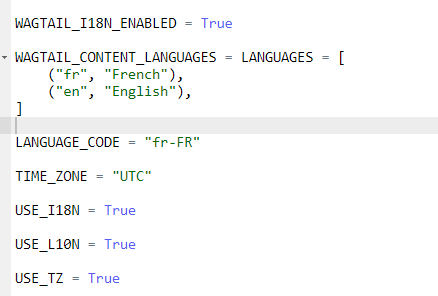
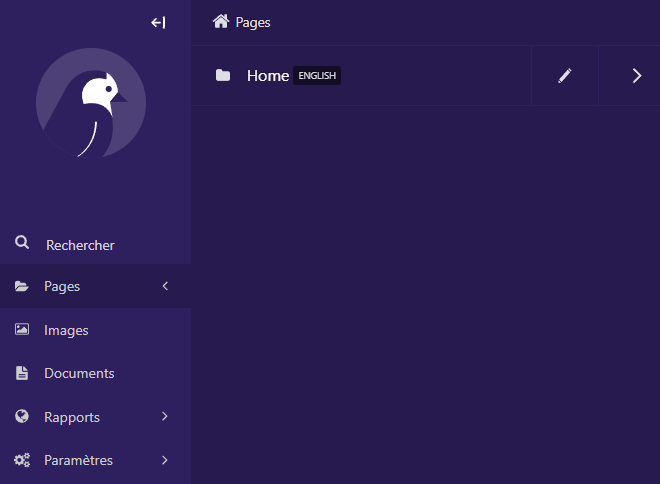
I've tried to reinstall the app and recreate my home page, but the issue persist.

the LANGUAGE_CODE needs to be one of the language codes defined in LANGUAGES/WAGTAIL_CONTENT_LANGUAGES.
Have you tried setting it to fr? Note that you will want start from scratch, or create a new home page since the one that's there already has the locale set to English as per https://docs.wagtail.org/en/stable/advanced_topics/i18n.html#changing-the-primary-language-of-your-wagtail-installation

Thanks for your input, yes I've also tried with "fr" alone and creating a new homepage.
Edit: Starting from scratch (new environment) it works.
the
LANGUAGE_CODEneeds to be one of the language codes defined inLANGUAGES/WAGTAIL_CONTENT_LANGUAGES.
I use 'en' in my content languages but language code set to en-GB because otherwise Django assumes en to mean en-US and formats all the short dates to US date format mm/dd/yy.
LANGUAGE_CODE = 'en-gb'
WAGTAIL_CONTENT_LANGUAGES = LANGUAGES = [
    ('en', "English"),
    ('es', "Español"),
    ('fr', "Français"),
]
