
spring-boot-multi-package-demo
 spring-boot-multi-package-demo copied to clipboard
 vpavic
How to run this project within IDE (like eclipse)
Thank you for the solution. I am to generate jar, bootJar and war in a single build. Initially my project was normal spring boot application with embedded tomcat. And I was able to run main class as java application directly from eclipse. But now after restructuring it's giving error while running Main class as java application. Below is the error: "Unable to start ServletWebServerApplicationContext due to missing ServletWebServerFactory bean."
Is there any way to run the application within the IDE using embedded server. I am trying to avoid external server here.

Hello @atultherajput!
Thank you for the interest in this sample project, I hope you've found it helpful.
Running from the IDE is indeed not as straightforward as with a simple application, but it shouldn't be too hard to set up. Basically, you need to run the demo.DemoApplication while providing the classpath of the demo-package-jar project.
I haven't used Eclipse in a while, but this is how the run configuration looks for me in IntelliJ:
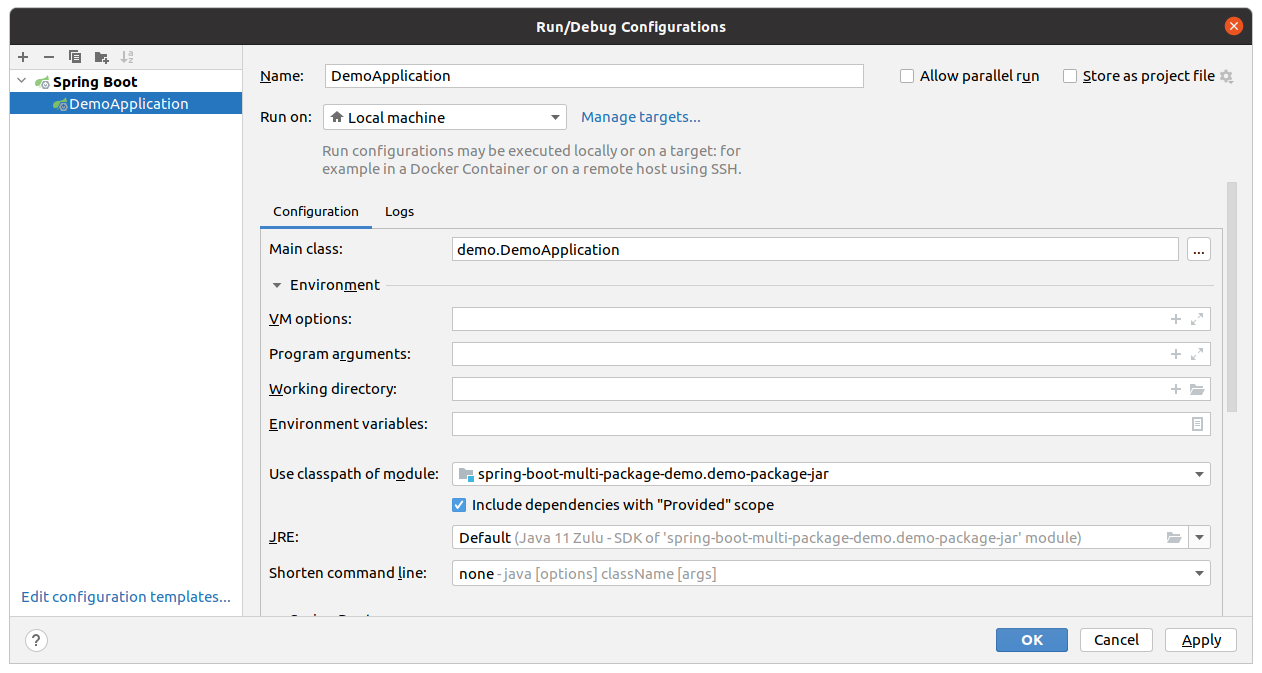
Please let me know if you managed to configure something similar to this in Eclipse. In order to help other users, I'll add these instructions to project's readme.

Great. Thanks for helping with this. I was able to run the application in eclipse. The only issue with eclipse was that the ui doesn't present the class to be chosen from its search dialog. Therefore I had to enter the fully qualified class name into "Main class" text field and then run the application. Please refer to this stackoverflow answer: https://stackoverflow.com/a/22486770
Hi guys, @vpavic thanks for your template! @atultherajput could you explain me better how did you manage to start spring boot server locally?
