volta
 volta copied to clipboard
 volta-cli
Will the package pin the NPM version?
First I want to thank the developers for their contributions, which have obvious advantages over other similar tools!
Refer to the following:
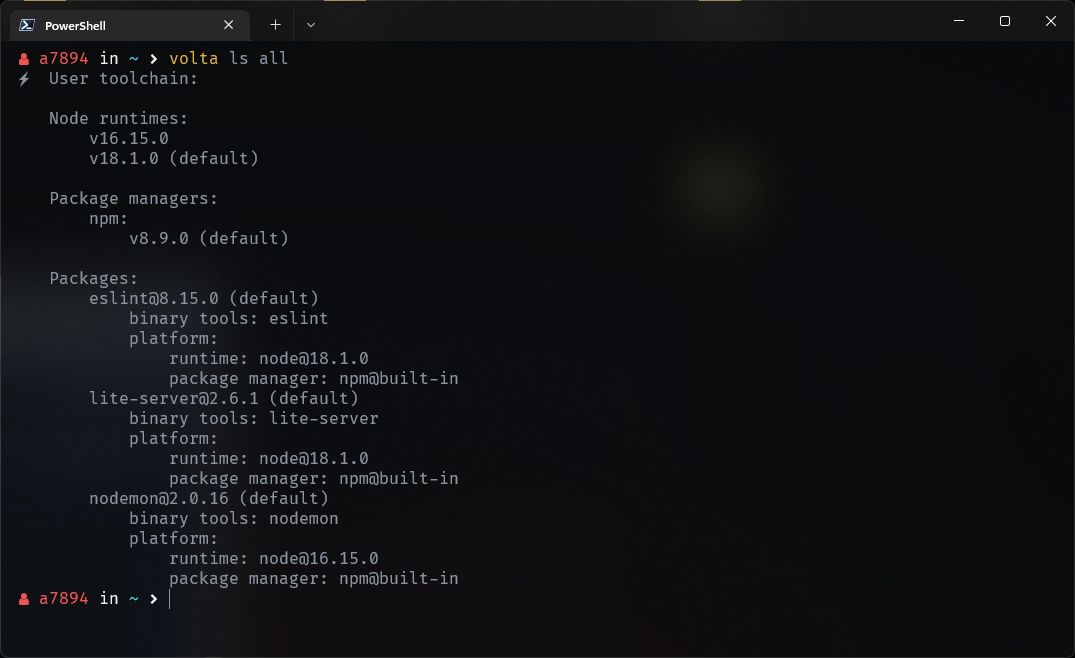
The package will be pinned to a specific node engine when installed, that is pinned to the current default node engine, which is why other versions of the node engine do not need to reinstall the package, because the package will always run the corresponding node engine , what about npm? I use a specific v8.9.0 version to install the package, shouldn't it show [email protected]? Why is it always showing npm@built-in, am I misunderstanding something? Thank you for your clarification.
Also would like to ask if there is a plan to display the built-in version number?

Hi @awdr74100 – we cover some of this in the guides section on Understanding Volta: Managing Your Project. The version it shows as npm@built-in indicates that you have not specifically pinned a distinct version, but are using the version that ships with the version of Node you pinned. I definitely see how it would be nice if that included an actual version number! I think we would accept a PR that adds it to the human-friendly formatter, something like package manager: npm@built-in (v8.9.0). It might be a bit trickier to include in the plain format, since that assumes built-in is a special case and it is designed for tools to be able to parse (and so is a stable format).