
postgresql_cluster
 postgresql_cluster copied to clipboard
 vitabaks
(UI) User Interface for installing and managing Postgres clusters
Currently, the process of installing and managing PostgreSQL clusters is conducted through the command line, which can be inconvenient for users who are less familiar with terminal operations. We propose to create a graphical user interface (GUI) that would make the installation and management processes of PostgreSQL clusters more intuitive and accessible.
Objectives:
- Simplify the PostgreSQL installation process by providing a graphical installer.
- Develop a comprehensive GUI for managing PostgreSQL clusters, including the creation, configuration, and maintenance of clusters.
- Integrate the ability to launch Ansible playbooks directly from the GUI to automate routine cluster management operations.
- Ensure support for various operating systems, including Windows, Linux, and macOS (perhaps it should be a web interface).
Anticipated Benefits:
- Improved accessibility and usability for users without deep technical knowledge.
- Increased efficiency in managing clusters by simplifying routine tasks.
- Expansion of the project's user base by attracting new users who prefer graphical interfaces.
- Providing a self-managed alternative to cloud managed databases, which may be particularly relevant for organizations seeking to increase control over their data.
Resource Request: The implementation of this feature will require resources in the form of fronted and backend developers, testers, as well as PostgreSQL and Ansible specialists to ensure integration and compatibility.
Conclusion: Introducing a graphical interface for the installation and management of PostgreSQL clusters will significantly improve user experience and make the product accessible to a wider audience. This step could represent a significant enhancement to our project and contribute to its dissemination and popularity.
Consider sponsoring the project via GitHub or Patreon

Draft (prototype):
PostgreSQL Cluster Console is a web interface designed initially for deployment and later for the management of PostgreSQL clusters. It is packaged in Docker, allowing it to run on various operating systems, whether on a corporate server or a personal laptop.
This solution includes a service designed to execute a Docker image, which encapsulates the postgresql_cluster project code. Deployment and management tasks for the clusters are conducted using Ansible. This setup means that the service can launch the required playbook (integrated within the postgresql_cluster container) using the ansible-playbook command. It can include necessary tags (--tags option) specific to the task at hand (such as creating only a database or user) and variables (--extra-vars option) that are determined based on user selections within the web interface.
For the design foundation (open to discussion and designer input), we can draw inspiration from the implementation of Google Cloud console. This approach aids in conceptualizing an intuitive and effective user interface.
As for the installation interface, we can look to Aiven for PostgreSQL as a model. In this setup, users can choose to deploy their cluster among five cloud providers: "Google Cloud", "AWS", "Azure", "DigitalOcean", and "Hetzner Cloud" (see related PR: https://github.com/vitabaks/postgresql_cluster/pull/464).
Example: https://www.youtube.com/watch?v=tJfQMubaspg
In this configuration, users define the deployment region, server type, database disk size, and other parameters. To offer a list of regions, server types, and potentially approximate costs, integration with the APIs of cloud providers is necessary to fetch this data. This information will be converted into appropriate variables (details to be outlined during implementation) and passed to the ansible-playbook command via the --extra-vars option.
An additional deployment method, named "Your Own Machines" is designed for deploying the cluster onto pre-existing servers (in another cloud service or your own data center). Users will input their server details, including IP addresses and login credentials (password or private SSH key) for authorization. This information will be used to prepare an inventory file, which is then passed to the ansible-playbook command to execute the playbooks on the specified servers.
Would it be possible to integrate pgAdmin? I'm not crazy about docker instances but could be persuaded otherwise if the Google version is better.

Would it be possible to integrate pgAdmin?
I'm not a fan of pgAdmin, but I think it will be possible to think about adding a simple SQL editor (e.q. pgweb) to the UI interface (in one of the future versions) when elements for managing database clusters are added.
In the first implementation, this will primarily be an interface for installing clusters.
I recently found Ivory which seems to match with many of the listed requirements. Given the maturity of the project it makes sense to consider it an option for including in the project.

@rcknr Thanks. I'll take a look at this. We will most likely write our solution from scratch. I have already started drafting the user interface.
So I just had a look and I have to say that Ivory seems to be exactly what was missing for me to have an overview of the cluster's operations. You have patronictl functionality and a summary of what's going on on the server right now.
To be clear regarding requirements Ivory is designed only for monitoring existing clusters.
We will have something more, we plan to make a (free) analog to cloud managed databases - multi-cloud PostgreSQL Service platform, which includes deployment, management, monitoring, etc.
Done.
Looking ahead, we are planning to enhance the PostgreSQL Cluster Console with features that will enable you to manage your PostgreSQL clusters directly through the UI. If you’re interested in supporting the continued development of this project, please consider becoming a sponsor.
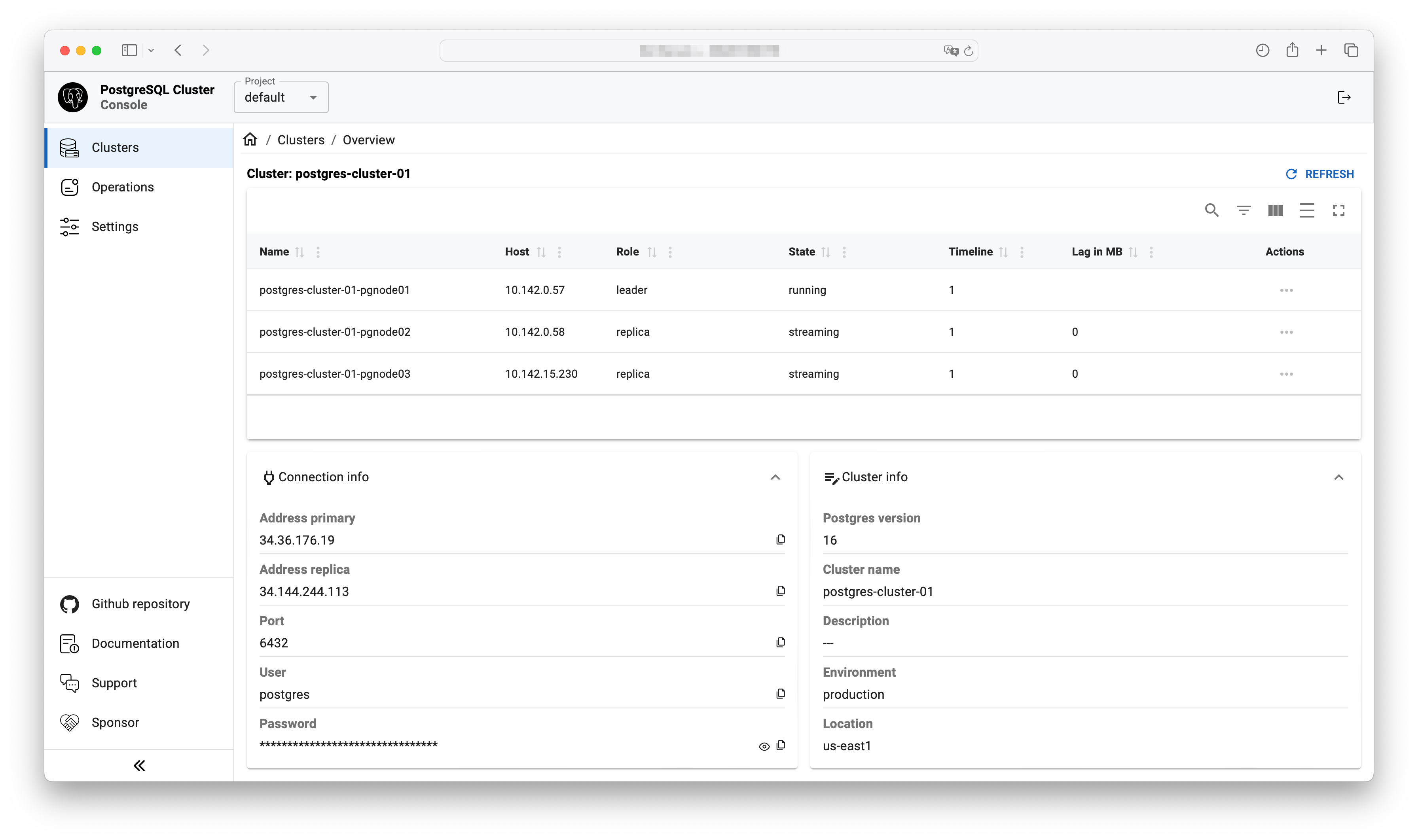
There is no such button in the UI yet, but I think you can add information about your cluster directly to the Console database (table: clusters, servers).
Okay, I was able to do that. However, I don't think everything is fully operational because I could not fill out many fields. It'd be great to have an ability to import existing cluster.
It'd be great to have an ability to import existing cluster.
This is planned for one of the future releases.
Next, add cluster management functionality https://github.com/vitabaks/postgresql_cluster/issues/754