
kvm-guest-drivers-windows
 kvm-guest-drivers-windows copied to clipboard
 virtio-win
[virtio-vga][windows 10] Only one monitor detected with head=2 (Gives BSOD when installing drivers, but works with ubuntu)
Describe the bug
When creating a Windows 10 VM, I can't get a second monitor in virt-viewer to connect on windows 10, but I can in ubuntu 20.04 desktop. More work is being developed on virtio-*, vs qxl, so I'm trying to switch a way from the qxl device. I've tried adding multiple displays, like you have to add multiple qxl's per monitor, with no luck either. Is multiple monitors supported for windows 10 yet?
To Reproduce
- Create a windows vm with multiple heads:
virt-install --connect qemu:///system --debug --noautoconsole --name=Mudkip-windows-spice --boot uefi --cpu mode=host-passthrough --vcpus vcpus=2,maxvcpus=4 --memory currentMemory=2048,memory=3072 --memballoon=virtio --disk vol=default/Mudkip-windows-spice.qcow2 --osinfo detect=on,require=on --cdrom=/var/lib/libvirt/iso/Win10_21H2_English_x64.iso --network network=default --graphics type=spice,listen=socket,image.compression=off,gl=no --video model=virtio,accel3d=no,model.heads=2 --rng=/dev/urandom - Use
virt-viewersince it can show multiple display's on the same VM. - Once through the install process, install spice and virtio-win drivers.
- Problem step: Go to device manager, and update the display. It automatically finds new drivers. When it tries to install them, a BSOD happens.
Expected behavior
Multiple monitors can be used with virtio-* video devices.
Screenshots If applicable, add screenshots to help explain your problem.
Host:
- Disto: Fedora release 36
- Kernel:
uname -r: 5.18.19-200.fc36.x86_64 - QEMU version: QEMU emulator version 6.2.0 (qemu-6.2.0-14.fc36)
- QEMU command line: virt-install is above. Is there a way to get the qemu-equivilant from that?
- libvirt version: 8.1.0
- libvirt XML file:
Windows 10 VM
    <domain type="kvm">
    <name>Mudkip-windows-spice</name>
    <uuid>3d2c64e5-baf6-4b74-ba7c-7ed11958f404</uuid>
    <metadata>
      <libosinfo:libosinfo xmlns:libosinfo="http://libosinfo.org/xmlns/libvirt/domain/1.0">
        <libosinfo:os id="http://microsoft.com/win/10"/>
      </libosinfo:libosinfo>
    </metadata>
    <memory unit="KiB">3145728</memory>
    <currentMemory unit="KiB">2097152</currentMemory>
    <vcpu placement="static" current="2">4</vcpu>
    <os firmware="efi">
      <type arch="x86_64" machine="pc-q35-6.2">hvm</type>
      <boot dev="hd"/>
    </os>
    <features>
      <acpi/>
      <apic/>
      <hyperv mode="custom">
        <relaxed state="on"/>
        <vapic state="on"/>
        <spinlocks state="on" retries="8191"/>
      </hyperv>
      <vmport state="off"/>
    </features>
    <cpu mode="host-passthrough" check="none" migratable="on"/>
    <clock offset="localtime">
      <timer name="rtc" tickpolicy="catchup"/>
      <timer name="pit" tickpolicy="delay"/>
      <timer name="hpet" present="no"/>
      <timer name="hypervclock" present="yes"/>
    </clock>
    <on_poweroff>destroy</on_poweroff>
    <on_reboot>restart</on_reboot>
    <on_crash>destroy</on_crash>
    <pm>
      <suspend-to-mem enabled="no"/>
      <suspend-to-disk enabled="no"/>
    </pm>
    <devices>
      <emulator>/usr/bin/qemu-system-x86_64</emulator>
      <disk type="file" device="disk">
        <driver name="qemu" type="qcow2"/>
        <source file="/var/lib/libvirt/images/Mudkip-windows-spice.qcow2"/>
        <target dev="sda" bus="sata"/>
        <address type="drive" controller="0" bus="0" target="0" unit="0"/>
      </disk>
      <disk type="file" device="cdrom">
        <driver name="qemu" type="raw"/>
        <source file="/var/lib/libvirt/iso/Win10_21H2_English_x64.iso"/>
        <target dev="sdb" bus="sata"/>
        <readonly/>
        <address type="drive" controller="0" bus="0" target="0" unit="1"/>
      </disk>
      <controller type="usb" index="0" model="qemu-xhci" ports="15">
        <address type="pci" domain="0x0000" bus="0x02" slot="0x00" function="0x0"/>
      </controller>
      <controller type="pci" index="0" model="pcie-root"/>
      <controller type="pci" index="1" model="pcie-root-port">
        <model name="pcie-root-port"/>
        <target chassis="1" port="0x10"/>
        <address type="pci" domain="0x0000" bus="0x00" slot="0x02" function="0x0" multifunction="on"/>
      </controller>
      <controller type="pci" index="2" model="pcie-root-port">
        <model name="pcie-root-port"/>
        <target chassis="2" port="0x11"/>
        <address type="pci" domain="0x0000" bus="0x00" slot="0x02" function="0x1"/>
      </controller>
      <controller type="pci" index="3" model="pcie-root-port">
        <model name="pcie-root-port"/>
        <target chassis="3" port="0x12"/>
        <address type="pci" domain="0x0000" bus="0x00" slot="0x02" function="0x2"/>
      </controller>
      <controller type="pci" index="4" model="pcie-root-port">
        <model name="pcie-root-port"/>
        <target chassis="4" port="0x13"/>
        <address type="pci" domain="0x0000" bus="0x00" slot="0x02" function="0x3"/>
      </controller>
      <controller type="pci" index="5" model="pcie-root-port">
        <model name="pcie-root-port"/>
        <target chassis="5" port="0x14"/>
        <address type="pci" domain="0x0000" bus="0x00" slot="0x02" function="0x4"/>
      </controller>
      <controller type="pci" index="6" model="pcie-root-port">
        <model name="pcie-root-port"/>
        <target chassis="6" port="0x15"/>
        <address type="pci" domain="0x0000" bus="0x00" slot="0x02" function="0x5"/>
      </controller>
      <controller type="pci" index="7" model="pcie-root-port">
        <model name="pcie-root-port"/>
        <target chassis="7" port="0x16"/>
        <address type="pci" domain="0x0000" bus="0x00" slot="0x02" function="0x6"/>
      </controller>
      <controller type="pci" index="8" model="pcie-root-port">
        <model name="pcie-root-port"/>
        <target chassis="8" port="0x17"/>
        <address type="pci" domain="0x0000" bus="0x00" slot="0x02" function="0x7"/>
      </controller>
      <controller type="pci" index="9" model="pcie-root-port">
        <model name="pcie-root-port"/>
        <target chassis="9" port="0x18"/>
        <address type="pci" domain="0x0000" bus="0x00" slot="0x03" function="0x0" multifunction="on"/>
      </controller>
      <controller type="pci" index="10" model="pcie-root-port">
        <model name="pcie-root-port"/>
        <target chassis="10" port="0x19"/>
        <address type="pci" domain="0x0000" bus="0x00" slot="0x03" function="0x1"/>
      </controller>
      <controller type="pci" index="11" model="pcie-root-port">
        <model name="pcie-root-port"/>
        <target chassis="11" port="0x1a"/>
        <address type="pci" domain="0x0000" bus="0x00" slot="0x03" function="0x2"/>
      </controller>
      <controller type="pci" index="12" model="pcie-root-port">
        <model name="pcie-root-port"/>
        <target chassis="12" port="0x1b"/>
        <address type="pci" domain="0x0000" bus="0x00" slot="0x03" function="0x3"/>
      </controller>
      <controller type="pci" index="13" model="pcie-root-port">
        <model name="pcie-root-port"/>
        <target chassis="13" port="0x1c"/>
        <address type="pci" domain="0x0000" bus="0x00" slot="0x03" function="0x4"/>
      </controller>
      <controller type="pci" index="14" model="pcie-root-port">
        <model name="pcie-root-port"/>
        <target chassis="14" port="0x1d"/>
        <address type="pci" domain="0x0000" bus="0x00" slot="0x03" function="0x5"/>
      </controller>
      <controller type="sata" index="0">
        <address type="pci" domain="0x0000" bus="0x00" slot="0x1f" function="0x2"/>
      </controller>
      <controller type="virtio-serial" index="0">
        <address type="pci" domain="0x0000" bus="0x03" slot="0x00" function="0x0"/>
      </controller>
      <interface type="network">
        <mac address="52:54:00:9b:c3:d7"/>
        <source network="default"/>
        <model type="e1000e"/>
        <address type="pci" domain="0x0000" bus="0x01" slot="0x00" function="0x0"/>
      </interface>
      <serial type="pty">
        <target type="isa-serial" port="0">
          <model name="isa-serial"/>
        </target>
      </serial>
      <console type="pty">
        <target type="serial" port="0"/>
      </console>
      <channel type="spicevmc">
        <target type="virtio" name="com.redhat.spice.0"/>
        <address type="virtio-serial" controller="0" bus="0" port="1"/>
      </channel>
      <input type="tablet" bus="usb">
        <address type="usb" bus="0" port="1"/>
      </input>
      <input type="mouse" bus="ps2"/>
      <input type="keyboard" bus="ps2"/>
      <tpm model="tpm-crb">
        <backend type="emulator" version="2.0"/>
      </tpm>
      <graphics type="spice">
        <listen type="socket"/>
        <image compression="off"/>
        <gl enable="no"/>
      </graphics>
      <sound model="ich9">
        <address type="pci" domain="0x0000" bus="0x00" slot="0x1b" function="0x0"/>
      </sound>
      <audio id="1" type="spice"/>
      <video>
        <model type="virtio" heads="2" primary="yes">
          <acceleration accel3d="no"/>
        </model>
        <address type="pci" domain="0x0000" bus="0x00" slot="0x01" function="0x0"/>
      </video>
      <redirdev bus="usb" type="spicevmc">
        <address type="usb" bus="0" port="2"/>
      </redirdev>
      <redirdev bus="usb" type="spicevmc">
        <address type="usb" bus="0" port="3"/>
      </redirdev>
      <memballoon model="virtio">
        <address type="pci" domain="0x0000" bus="0x04" slot="0x00" function="0x0"/>
      </memballoon>
      <rng model="virtio">
        <backend model="random">/dev/urandom</backend>
        <address type="pci" domain="0x0000" bus="0x05" slot="0x00" function="0x0"/>
      </rng>
    </devices>
  </domain>
VM:
- Windows 10
- Which driver has a problem:
virtio-vgaandvirtio-gpu. (possibly just the-vgaversion, I'm not sure how to check qemu directly, but virt-install forums point to that.) - Driver version or commit hash that was used to build the driver:
/usr/share/virtio-winonly showsvirtio-win-0.1.221.iso(with virtio-win.iso pointing to it). Also tried with latest virtio-win-guest-tools just now.
Additional context
- Tried without 3d support. I think windows just ignores it anyways. This was also the try I installed the guest driver tools from your github readme instead of the host fedora iso. It didn't bluescreen, but the screen went black for both
virt-manager viewerandvirt-viewerduring the install. Had to reset, and the device was never installed. - Tried with one
video virtiodevice, and two. (figuredqxlrequires it on windows, so worth a shot). Only one example shown in xml file, but I can add others if needed. - Got this same setup working on Ubuntu, and multiple screens showed.

@Cameronsplaze Honestly. I don't know how virt-install treats "heads=2", but virtio gpu is capable to handle multihead configuration as long as one device is defined as virtio-vga and another on as virtio-gpu-pci
/home/vrozenfe/work/upstream/qemu/build/x86_64-softmmu/qemu-system-x86_64 -cpu qemu64,hv_relaxed,hv_vapic,hv_spinlocks=0x1fff -m 2G -smp 4,maxcpus=4,cores=4,threads=1,sockets=1 -usb -device usb-tablet,id=tablet0 -drive file=/home/vrozenfe/work/images/ws2019.qcow2,if=none,id=drive-ide0-0-0,cache=off,werror=stop,rerror=stop -device ide-hd,bus=ide.0,unit=0,drive=drive-ide0-0-0,id=ide0-0-0,bootindex=1 -netdev user,id=hostnet0 -device virtio-net-pci,netdev=hostnet0,mac=52:83:66:77:88:68,id=net0 -boot c -uuid 5b959a71-e33f-4419-97b4-da6fe8fb7062 -rtc driftfix=slew -global kvm-pit.lost_tick_policy=discard -monitor stdio -name VIOVGA -enable-kvm -device virtio-vga,edid=on,xres=800,yres=600,xres=1280,yres=800 -device virtio-gpu-pci,edid=on,xres=800,yres=600,xres=1280,yres=800 -serial tcp:127.0.0.1:4445
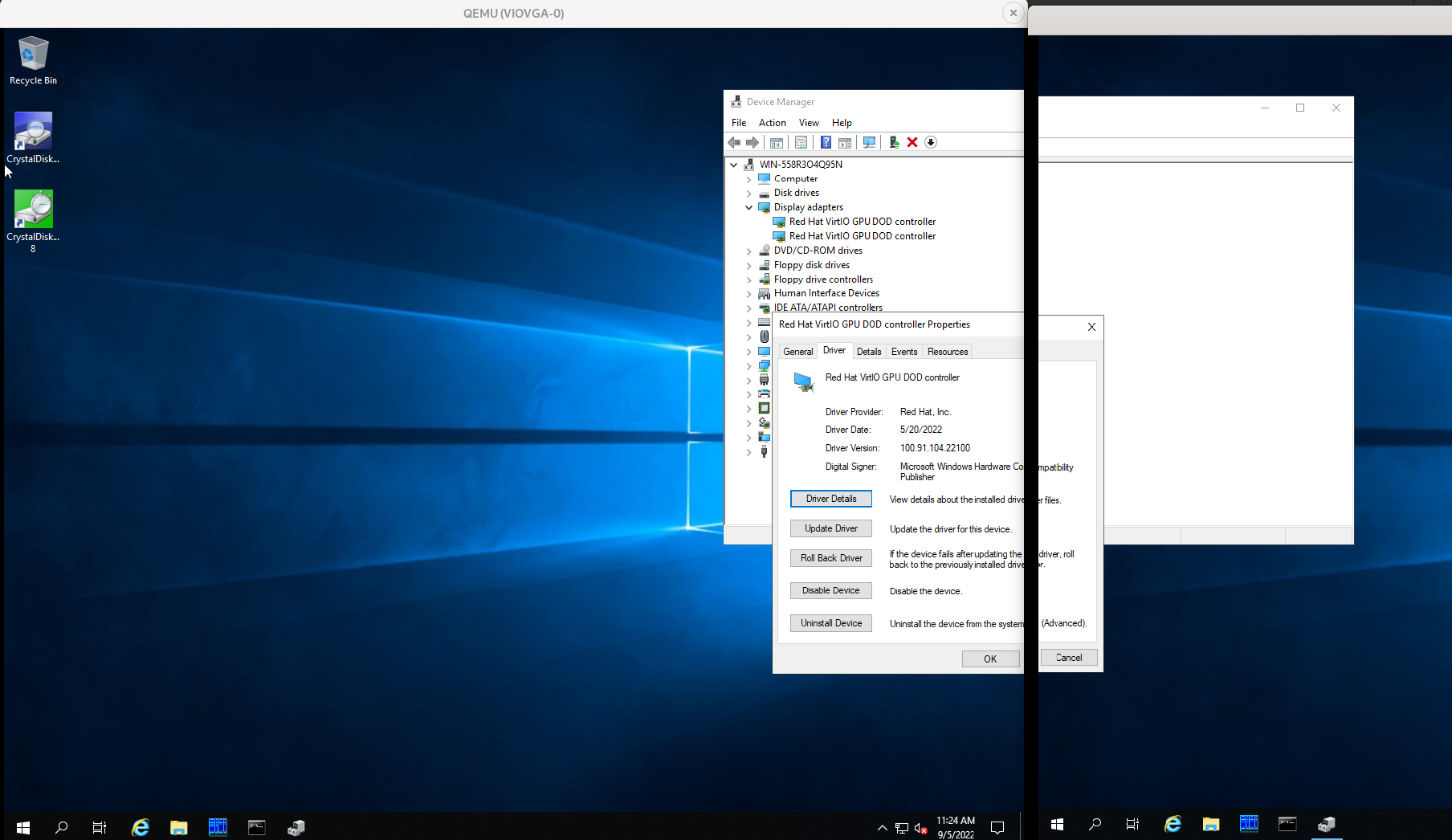
Vadim.

I tried using qemu for the first time, and I got a windows vm running based on your command:
qemu-system-x86_64 -cpu qemu64,hv_relaxed,hv_vapic,hv_spinlocks=0x1fff -m 2G \
-smp 4,maxcpus=4,cores=4,threads=1,sockets=1 -usb -device usb-tablet,id=tablet0 \
 drive file=/var/lib/libvirt/images/qemu-test.qcow2,if=none,id=drive-ide0-0-0,cache=off,werror=stop,rerror=stop \
-device ide-hd,bus=ide.0,unit=0,drive=drive-ide0-0-0,id=ide0-0-0,bootindex=1 -netdev user,id=hostnet0 \
-device virtio-net-pci,netdev=hostnet0,mac=52:83:66:77:88:68,id=net0 \
-boot c -uuid 5b959a71-e33f-4419-97b4-da6fe8fb7062 \
-rtc driftfix=slew -global kvm-pit.lost_tick_policy=discard -monitor stdio -name VIOVGA -enable-kvm \
-device virtio-vga,edid=on,xres=800,yres=600,xres=1280,yres=800 \
-device virtio-gpu-pci,edid=on,xres=800,yres=600,xres=1280,yres=800 \
-serial telnet:localhost:4321,server,nowait \
-cdrom /var/lib/libvirt/iso/Win10_21H2_English_x64.iso \
-drive file=/usr/share/virtio-win/virtio-win-0.1.221.iso,index=1,media=cdrom
I had to modify it towards the end. I couldn't figure out how you got the second qemu window open, but I had a menu bar in my default qemu window that let me switch to the second monitor and verify it's there. The cursor didn't want to leave the first monitor, but that's probably just a side-effect of only having one window for two monitors. (I bet it would work with mouse capturing).
I think this rules out virtio-win? Thanks for the qemu command, it helped a lot!