

 virtio-win
Is it possible to share more than one fs with virtio-fs (Windows 10)
I'm trying to share more than one fs with virtio-fs (proxmox host - windows 10 guest)
config-file
args: -cpu host,-hypervisor,-mpx -object memory-backend-memfd,id=mem,size=7000M,share=on -numa node,memdev=mem -chardev socket,id=char0,path=/var/run/virtiofsd-data.sock -device vhost-user-fs-pci,chardev=char0,tag=myfs -chardev socket,id=char1,path=/var/run/virtiofsd-data-home.sock -device vhost-user-fs-pci,chardev=char1,tag=home
daemons
/usr/lib/kvm/virtiofsd --socket-path=/var/run/virtiofsd-data.sock -o source=/nobody -o cache=always
/usr/lib/kvm/virtiofsd --socket-path=/var/run/virtiofsd-data-home.sock -o source=/home -o cache=always
But in Windows I see only one fs showing up
/usr/lib/kvm/virtiofsd --version
using FUSE kernel interface version 7.32

qemu-system-x86_64 --version
QEMU emulator version 5.2.0 (pve-qemu-kvm_5.2.0)
Copyright (c) 2003-2020 Fabrice Bellard and the QEMU Project developers
I'm using virtiofs.exe from @YanVugenfirer shared at https://github.com/virtio-win/kvm-guest-drivers-windows/issues/550

@oosoG, @hammerg mentioned on another bug (which I think I closed) that only one filesystem per guest is currently supported. I worked around the problem by creating symllinks on the host from the one filesystem to the others. It worked out nicely, I ending up with a central 'share' folder that contained simlinks to actual filesystem storage locations, including cifs shares to other machines on the network. It achieved what I wanted, a pseudo air-gaped sandbox environment for the guest to run in while simplifying administration immensely. The one caveat I'm aware of is it may be potentially dangerous to enable simlink creation in the guest-accessible filesystem; the possibility exists that a sufficiently skilled hostile guest could create symlinks to anywhere. I haven't taken the time to circle back on this whole scheme, probably running the virtiofs host daemon as the actual guest user would be a good idea.

I worked around the problem by creating symllinks on the host from the one filesystem to the others.
Does that mean you have the fixes for #499 already? It wasn't clear to me from the linked bugzilla bug that those had made it into the public builds.


Hello All,
Please help us understanding you use cases for using virtio-fs, and thus make us virtio-fs support better. Please participate in the discussion and add your use cases: https://github.com/virtio-win/kvm-guest-drivers-windows/discussions/726
Thanks a lot, Yan.
Is there any plan to implement this?
Meaning, share more than one filesystem with a Windows guest?
@hammerg ?

I wish we could vote on these to indicate general interest in features, because I would vote several times. It's not my experience that symlinks work properly.

I noticed that PR https://github.com/virtio-win/kvm-guest-drivers-windows/pull/804 adds -t option to virtiofs.exe to support mounting a VirtIO-FS device of a specific tag. The PR resolves this issue in some way. It seems this feature is not released yet. But still I think this feature is very useful and can't wait to try it.
Without -t option, the virtiofs.exe seems only mouting the first VirtIO FS device. Currently I have an use case which I wish the VirtioFsSvc service or virtiofs.exe tool could support mounting all the VirtIO FS devices at a time without specifying the tags of the devices.
As for my use case, I run Windows guest VM in K8S by KubeVirt. I wish to provide extra volumes to the VM for Windows user to read and write data (Limited to my case, I choose not to use block disk device). And some volumes contains shared data between VMs and must be readonly exposed. So multiple VirtIO-FS volumes are needed.
Thanks.

@bougou The change still didn't made it to the build we are distributing due to some permission issues we found in recent virtio-fs changes (already fixed in the repository). It will take 2-3 weeks to release next version. In a mean while you can build and test sign drivers using following instructions: https://github.com/virtio-win/kvm-guest-drivers-windows/wiki/Building-the-drivers-using-Windows-11--EWDK
Best regards, Yan.
Mounting multiple instances of VirtIO-FS is available since PR #804. There is a manual how to use this feature: https://github.com/virtio-win/kvm-guest-drivers-windows/wiki/VirtIO-FS:-Shared-file-system#multiple-virtio-fs-instances

@viktor-prutyanov I followed those steps, mounting one share works like a charm, but getting multiple mount points don't work at all. Any ideas to investigate what is going wrong ?

Hi @MathieuCGit ! Which virtio-win version do you use? I can check if it already contains upstream changes or not.
Hello @viktor-prutyanov
I'm using on the guest :
- windows 10 pro 21H2 (19044.1288)
- winfsp 1.11.2 2176 downloaded from here : https://github.com/winfsp/winfsp/releases/tag/v1.11 -virtio-win : 0.1.221.0 from here : https://fedorapeople.org/groups/virt/virtio-win/direct-downloads/latest-virtio/virtio-win-guest-tools.exe
Host is a debian bulleyes up-to-date.
- libvirt : 7.0.0
- kernel 5.10.0-18-amd64
- QEMU emulator version 5.2.0
-virtio-win : 0.1.221.0 from here : https://fedorapeople.org/groups/virt/virtio-win/direct-downloads/latest-virtio/virtio-win-guest-tools.exe
Multiple-instance feature was not included into 221
oh, nice to know, any links to download a supported version ? I've looked arround for 4 days but can't find a newer version. Any ideas please !
Mounting multiple instances of VirtIO-FS is available since PR #804. There is a manual how to use this feature: https://github.com/virtio-win/kvm-guest-drivers-windows/wiki/VirtIO-FS:-Shared-file-system#multiple-virtio-fs-instances
I try to use the currently stable virtio-win-0.1.225.iso driver, I want to mount multiple instances of VirtIO-FS, but not succeeded. I doubt if the -t option is added to this version, there's no -t option in the help of virtiofs.exe.
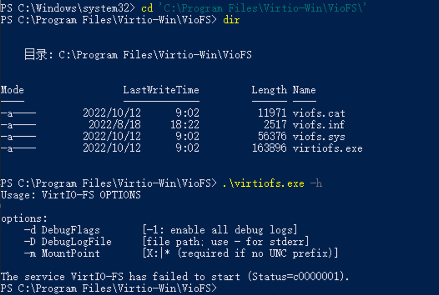
Wait... the "it's fully supported" answer is NOT to run it as a service but run it in the FOREGROUND? Just want to be sure I'm grokking that.
On 11/18/2022 4:10 AM PST Bougou Nisou ***@***.***> wrote:
Mounting multiple instances of VirtIO-FS is available since PR #804. There is a manual how to use this feature: https://github.com/virtio-win/kvm-guest-drivers-windows/wiki/VirtIO-FS:-Shared-file-system#multiple-virtio-fs-instances
I try to use the currently stable virtio-win-0.1.225.iso driver, I want to mount multiple instances of VirtIO-FS, but not succeeded. I doubt if the -t option is added to this version, there's no -t option in the help of virtiofs.exe.
—Reply to this email directly, view it on GitHub, or unsubscribe.You are receiving this because you are subscribed to this thread.Message ID: @.***>
I cant get it working too using 0.1.225. It is breaking with: KO launcher: error 5

I've encountered KO launcher: error 5 when trying to mount without elevated privileges.
However, I'm not able to use the -t option for tags at all. Is it in the virtio-win-0.1.225 build?

Hi @Nik343 @apss-pohl @bougou @MathieuCGit
229 version has -t support, but 225 don't
Hi @btaroli
Wait... the "it's fully supported" answer is NOT to run it as a service but run it in the FOREGROUND? Just want to be sure I'm grokking that.
Multiple mounts can't be served by VirtIO-FS service because it's a single process, but WinFsp.Launcher service can run multiple VirtIO-FS processes: https://github.com/virtio-win/kvm-guest-drivers-windows/wiki/VirtIO-FS:-Shared-file-system#multiple-virtio-fs-instances
@viktor-prutyanov Thanks for the reference. I had to walk through that a few times, but I guess the key is:
- Do not run Virtio-FS service
- Run the fsreg.bat exactly as indicated (with %1 and %2 parameters
And then the launcher start commands work. OK. But do these persist restarts? The only unusual part of this is that the configured virtio-fs from the instance XML aren't just picked up and used. But it's definitely better than before.
@btaroli You can, for example, add the launcher command to the "Run" key in the registry. https://devblogs.microsoft.com/powershell/how-to-access-or-modify-startup-items-in-the-window-registry/
Sharing of multiple virtiofs folders is possible since 229 with -t flag: https://github.com/virtio-win/kvm-guest-drivers-windows/wiki/Virtiofs:-Shared-file-system