
http-streaming
 http-streaming copied to clipboard
 videojs
Unable to rewind to the beginning of live HLS after quality change
Description
For live HLS, after changing the video quality, part of the video becomes unavailable for seek. I found that this issue is connected to the seekable property. When the new quality is selected, seekable start time changes from 0 to the time we change quality. After changing the video quality to the previous value, everything work as expected (the seekable start time becomes 0). All segments from 0 to live edge are available in all playlists.
Steps to reproduce
The problem is not always reproduced, tried a couple of times.
- Load player with live HLS which is broadcasting more than 10 minutes.
- Change quality
- Rewind to the first minute
Results
https://user-images.githubusercontent.com/52244384/180766872-bf44aa8a-a7a0-4d2b-91b4-02fb67d1f827.mp4
Player can't rewind to the first minute after quality change
Expected
Player should rewind to the first minute after quality change
Error output
There are no errors in the console.
Additional Information
videojs-http-streaming version
2.14.2
videojs version
7.19.2
Browsers
- Chrome
- Safari
- Firefox
Platforms
- Windows 10
- macOS 12 Monterey
Other Plugins
- videojs-contrib-quality-levels 2.1.0

Hey! We've detected some video files in a comment on this issue. If you'd like to permanently archive these videos and tie them to this project, a maintainer of the project can reply to this issue with the following commands:
- for https://user-images.githubusercontent.com/52244384/180766872-bf44aa8a-a7a0-4d2b-91b4-02fb67d1f827.mp4: say
@video-archivist-bot save 9EZakA

👋 Thanks for opening your first issue here! 👋
If you're reporting a 🐞 bug, please make sure you include steps to reproduce it. We get a lot of issues on this repo, so please be patient and we will get back to you as soon as we can. To help make it easier for us to investigate your issue, please follow the contributing guidelines.
![welcome[bot] avatar](https://avatars.githubusercontent.com/in/4141?v=4 "Published by a pub.dev verified publisher")
Here is example on JSBin https://jsbin.com/taluneqaka/1/edit?html,output Unfortunately I cant provide stream link, but here is the video of issue. Steps to reproduce are the same
https://user-images.githubusercontent.com/52244384/181474547-93e67874-8534-4724-8e5c-916fe12bc608.mp4
Hey! We've detected some video files in a comment on this issue. If you'd like to permanently archive these videos and tie them to this project, a maintainer of the project can reply to this issue with the following commands:
- for https://user-images.githubusercontent.com/52244384/181474547-93e67874-8534-4724-8e5c-916fe12bc608.mp4: say
@video-archivist-bot save gAgZJw
Does the steam include all 10 minutes of content, or are there only a couple of segments in the manifest? If it's the latter, it isn't possible. If it's the former, it should work.

@gkatsev Stream include all segments for all playlists. I have logged selected playlist while issue reproduced and it contains all segments from 0 to the live edge
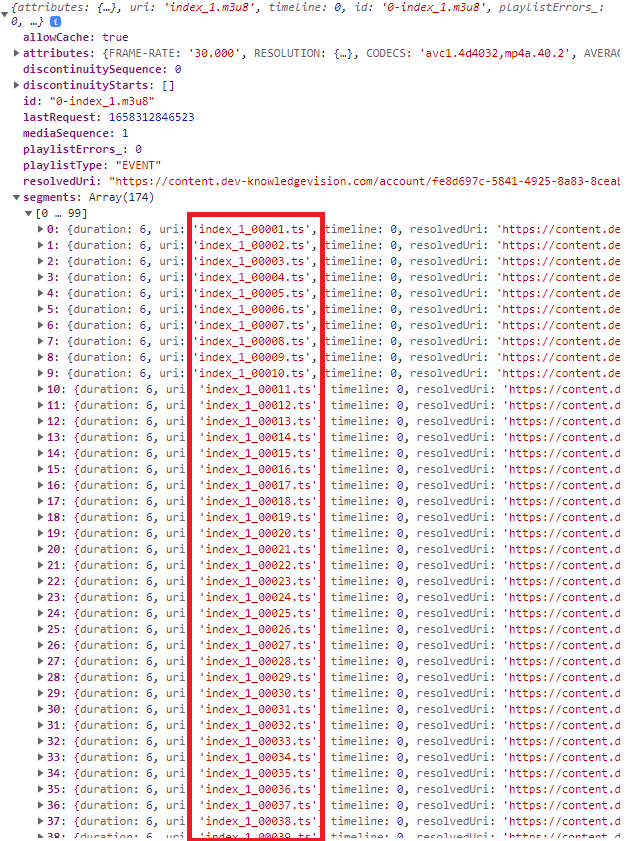
Here is attached hls files, they also contain all segments
index.txt index_1.txt index_2.txt index_3.txt index_4.txt
Nothing stands about the manifests. Are you able to share your stream? It's not really possible to debug without a sample stream, unfortunately.
Here is example with the live stream, where the issue is reproduce https://jsbin.com/gaqisegabi/edit?html,output
Hi, have you had a chance to take a look at this issue? Unfortunately given stream was stopped, I can't keep it running for a long time. Could you please leave comment here, when you will have time to take a look at it, so I can start the stream? Also want to mention some additional information, the stream is running on AWS MediaLive, stored on s3 and fetched from there
The issue was resolved by adding the #EXT-X-PROGRAM-DATE-TIME tag to the manifest
Hi, we are having the same issue. As soon as our player switches playlist (automatically, most of the times at the beginning), the liveWindow gets very small.
At the beginning, the seekable looks like this: [0, 31590]
After some second, the next playlist gets loaded and it looks like this: [31598.3, 32754]
We can assure that the playlist always contains all the chunks in the response. We have no influence over the playlist (cannot add the EXT-X-PROGRAM-DATE-TIME).
I think the expiry is calculated incorrectly and all the old chunks get considered expired for some reason.
Probably there is some issue with the syncPoint calculation:
Let me know if you need any other logs or details. Also, please reopen the issue.
Video.JS Version: 8.3.0 Browsers: Firefox, Chrome and Safari was tested

We have removed the "Segment" method in the SyncController, so its just using the Playlist method now, and it's working fine. We are not sure what's the issue with the Segment-Method though.