

 v3rm0n
Unhandled exception
class io.intercom.com.bumptech.glide.load.engine.GlideException: Failed to load resource
above exception occurs sometimes.

We experience the same error. Could this be the cause of our crash?
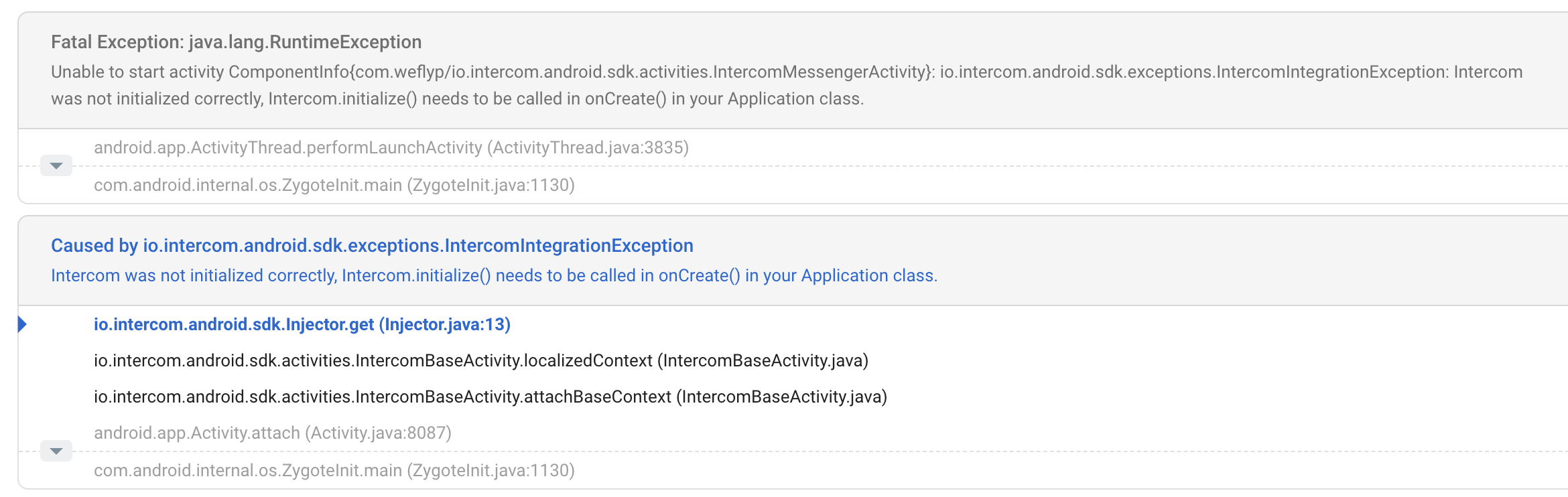
Caused by io.intercom.android.sdk.exceptions.IntercomIntegrationException
Intercom was not initialized correctly, Intercom.initialize() needs to be called in onCreate() in your Application class.
io.intercom.android.sdk.Injector.get
We do initialize Intercom, and the error doesn't always occur.

On some android phones there is crash when opening intercom
Fatal Exception: java.lang.NoSuchMethodError No static method asAttributeSet(Ll/a/a/a;)Landroid/util/AttributeSet; in class Landroid/util/Xml; or its super classes (declaration of 'android.util.Xml' appears in /system/framework/framework.jar:classes2.dex)
androidx.appcompat.widget.ResourceManagerInternal.loadDrawableFromDelegates (ResourceManagerInternal.java) androidx.appcompat.widget.ResourceManagerInternal.addDelegate (ResourceManagerInternal.java) androidx.appcompat.widget.ResourceManagerInternal.addDelegate (ResourceManagerInternal.java) androidx.appcompat.widget.ResourceManagerInternal.checkVectorDrawableSetup (ResourceManagerInternal.java) androidx.appcompat.widget.ResourceManagerInternal.addDelegate (ResourceManagerInternal.java) androidx.appcompat.widget.AppCompatDrawableManager.access$000 (AppCompatDrawableManager.java) androidx.appcompat.widget.TintTypedArray.getDimensionPixelSize (TintTypedArray.java) androidx.appcompat.app.AppCompatDelegateImpl.addContentView (AppCompatDelegateImpl.java) androidx.appcompat.app.AppCompatDelegateImpl.ensureWindow (AppCompatDelegateImpl.java) androidx.appcompat.app.AppCompatDelegateImpl.addContentView (AppCompatDelegateImpl.java) androidx.appcompat.app.AppCompatActivity.onCreate (AppCompatActivity.java) io.intercom.android.sdk.activities.IntercomHelpCenterActivity.onCreate (IntercomHelpCenterActivity.java) <- Here is crash android.app.Activity.performCreate (Activity.java:6355) android.app.Instrumentation.callActivityOnCreate (Instrumentation.java:1108) android.app.ActivityThread.performLaunchActivity (ActivityThread.java:2438) android.app.ActivityThread.handleLaunchActivity (ActivityThread.java:2545) android.app.ActivityThread.access$1100 (ActivityThread.java:151) android.app.ActivityThread$H.handleMessage (ActivityThread.java:1396) android.os.Handler.dispatchMessage (Handler.java:102) android.os.Looper.loop (Looper.java:157) android.app.ActivityThread.main (ActivityThread.java:5601) java.lang.reflect.Method.invoke (Method.java) com.android.internal.os.ZygoteInit$MethodAndArgsCaller.run (ZygoteInit.java:774) com.android.internal.os.ZygoteInit.main (ZygoteInit.java:652)

@joknjokn , I have this problem. I was try to initial in different places, but it have the same problem, the plugin is crash at some times.
Caused by io.intercom.android.sdk.exceptions.IntercomIntegrationException
Intercom was not initialized correctly, Intercom.initialize() needs to be called in onCreate() in your Application class.
Are anybody known solution?


@Zazo032 I initialized in main() and after initialized and rendering all widgets, but it's not help. I can't reproduce the crash always
I also have crash events in crashlytics on devices Galaxy A02s and Galaxy A10e.
I initialize the intercom very early in the main function:
Future<void> main({
  FlypApiEnvironment environment = FlypApiEnvironment.production,
}) async {
  WidgetsFlutterBinding.ensureInitialized();
  AppConfiguration.init(environment: environment);
  await Firebase.initializeApp();

  registerWidgetGroups();
  FlutterError.onError = FirebaseCrashlytics.instance.recordFlutterError;
  SystemChrome.setSystemUIOverlayStyle(SystemUiOverlayStyle.light);
  await configureIntercom(environment);

  ....

    runZonedGuarded(
    () {
      runApp(
        ...
        ),
      );
    },
    FirebaseCrashlytics.instance.recordError,
  );
}

Future<void> configureIntercom(FlypApiEnvironment environment) async {
  await Intercom.initialize(
    environment.intercomAppId,
    iosApiKey: environment.intercomIosKey,
    androidApiKey: environment.intercomAndroidKey,
  );
}
I have 12 crash events in 5 days, can't reproduce them either.

Per the docs, the initialize method in Android should be called in the onCreate method, but we're currently doing it on demand. Not sure when this was changed, neither if this is also an issue in the other platforms, but this might require some changes to how Android is initialized (maybe adding the android api key to the app's manifest and directly initialize in the onCreate method).
For reference, this is how it's done in React Native: https://developers.intercom.com/installing-intercom/docs/react-native-installation#initialize-intercom

@TimYusR which intercom_flutter version you are using?
I use intercom_flutter 5.3.0
How did you declare this package in pubspec.yml?
intercom_flutter: 5.3.0 or intercom_flutter: ^5.3.0?
How did you declare this package in pubspec.yml?
intercom_flutter: 5.3.0orintercom_flutter: ^5.3.0?
intercom_flutter: ^5.3.0
I have a doubt that in intercom_flutter: 6.0.0, we added the receiver io.maido.intercom.PushInterceptReceiver which will automatically handle all the intercom messages (push, post, etc.). So maybe before Flutter's main method, this receiver gets called and results in the crash of "intercom was not initialized correctly".
@Zazo032 what do you think?
if this happens on earlier versions also then it must be something else. We need a reproducible sample.
Could be, since seem to be difficult to reproduce, we'll need more specific details on the conditions when the crash occurs
I checked there is no issue in receiver io.maido.intercom.PushInterceptReceiver. This receiver uses only IntercomPushClient().
If we use Intercom.client() before initializing the Intercom then this error appears. Mostly all of the APIs such as Intercom.displayMessenger, Intercom.displayCarousel(id), etc are using the Intercom.client()
Intercom.initialize is being called in the main method so I'm not sure what is the cause of this error. Maybe we can try to initialize the Intercom in onAttachedToEngine by saving the AppId and corresponding keys in SharedPrefs, for e.g.
But first, need a reproduction of the issue so that it can be tested with the above solution.
@TimYusR Please check that your code is not calling any other Intercom API before the initialize. Maybe there are places such as background handlers where you might be calling the Intercom APIs.
I am having the same issue.
I am calling Intercom.instance.initialize(appId, androidApiKey, iosApiKey) inside the main() function in main.dart. I am sure I don't have any other places when I am calling Intercom API, as I only call it on one button press.
Did you find out how to work around the issue? Can I somehow manually call initialisation inside the Android?

@TimYusR Please check that your code is not calling any other Intercom API before the initialize. Maybe there are places such as background handlers where you might be calling the Intercom APIs.
I don't use any other Intercom API before initialization as @dCubelic
I don't know if there is a way to inject the code into the Android Application class. Do you know any similar package which also requires the SDK to be initialized in the onCreate of the Android application? This would help. By the way, I asked this in the Flutter https://github.com/flutter/flutter/issues/103709
I'm having the same issue and all the crashes I have on my app are coming from this error.
From what I saw on stackoverflow, these are some packages which are started on the background:

Any update on this? We are using the latest version of this library and still facing this issue.

A way has been added in the latest version intercom_flutter: 7.6.8
Follow the documentation here https://pub.dev/packages/intercom_flutter#android starting with the section According to the documentation, Intercom must be initialized in the Application onCreate. So follow the below steps to achieve the same:
Let me know if there is any doubt.
By the way, don't hesitate to buy me a coffee https://www.buymeacoffee.com/deepakdroid :)
We are initializing Intercom in Application onCreate but yet see this crash happening from Crashlytics. Any ideas if it could be related to flow where user opens Intercom push notification and app instance is not alive or something like that?
