
unicorn
 unicorn copied to clipboard
 unicorn-gallery
A simple, fast Dropbox photo gallery for your website.
unicorn
A Dropbox gallery for your website.
- Host your own your pictures on your own site.
- Rocket fast, local caching.
- Support for custom templates.
- Automatic, realtime updates using Dropbox's Delta API.
Getting started
The easiest way to get started is by using the pre-built Docker image:
docker run mre0/unicorn
Manual installation
-
Due to Dropbox restrictions I'm not allowed to share my application key with you. Create a new Dropbox app with the settings from the screenshot and put the credentials into
config_sample.php. Afterwards, renameconfig_sample.phptoconfig.phpto activate it.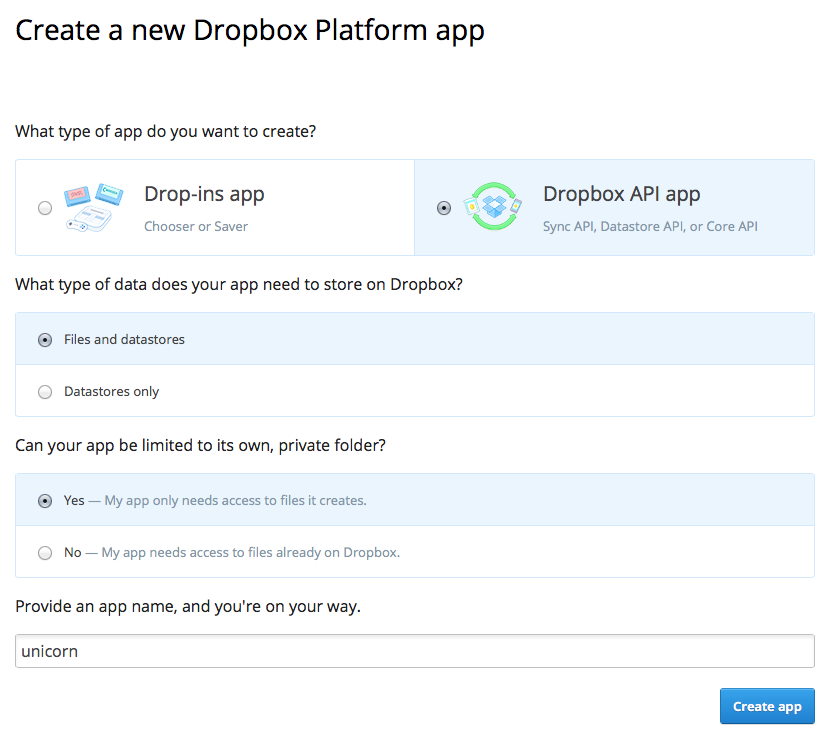
-
If you don't have it already, install composer. After that run
composer installinside the unicorn folder to install all dependencies. -
Upload the unicorn folder to your webserver.
-
Each directory is a gallery. So create a directory at
Dropbox/Apps/<your_app_name>/and add a few images.
Now go ahead and enjoy your gallery.
Pro tip: You can also enable pretty URLs.
See the [Slim documentation] on how to enable them for your server.
With docker
- Open docker-compose.yml in your favorite editor
- Set
UNICORN_KEY,UNICORN_SECRETandUNICORN_ACCESS_TOKENto the values shown in your dropbox app's settings page. - (Optional) Expose a different port than 8080
- Run
docker-compose upto start run the application
Customization / Themes
The gallery uses Twig and is fully customizable via HTML and CSS.
Look into the templates directory for inspiration.
Troubleshooting
What if my pictures don't show up?
By default, the gallery is updated every five minutes. This is a tradeoff
between Dropbox API restrictions and keeping the gallery up-to-date. You can set
the gallery to update more frequently in the config file, but this is
discouraged. To refresh the gallery right now, open /admin in your
web-browser in order to clear the cache.
After uploading unicorn to the server, make sure that all directories are writable by unicorn. Otherwise the pictures can not be cached and won't show up.
If your pictures don't show up in the gallery, the update process might have been terminated by the server, because some hosters don't allow long-running processes (longer than 30 seconds or so). As a workaround, try adding only a few albums at a time to work around this issue.
Copyright
Copyright (C) Matthias Endler http://www.matthias-endler.de
License
GNU General Public License version 3. See LICENSE.txt for details.
Credits
- @drobee for porting the project to the Dropbox v2 API
Unicorn makes use of the following projects.
- Slim-Framework - A PHP micro framework
- Slim-MVC - A skeleton MVC schema for slim.
- Dropbox - An alternative PHP 5.3 SDK for the Dropbox REST API
- Twig - The flexible, fast, and secure template engine for PHP
- Responsive Layout - A fine tutorial on responsive design
- Composer - The PHP package manager
Metadata
Owner
 unicorn-gallery
Metadata
A simple, fast Dropbox photo gallery for your website.