
react-native-background-geolocation
 react-native-background-geolocation copied to clipboard
 transistorsoft
Random location objects are fetched from GPS library
Your Environment
- Plugin version: 4.7.1
- Platform: iOS or Android
- OS version: 16
- Device manufacturer / model: iPhone
- React Native version (
react-native -v): 0.66.3 - Plugin config
BackgroundGeolocation.ready({
        // Geolocation Config
        desiredAccuracy: BackgroundGeolocation.DESIRED_ACCURACY_HIGH,
        distanceFilter:
          radStatusId == 1
            ? normalGPSConfig != undefined &&
              normalGPSConfig.hasOwnProperty('minmeters')
              ? normalGPSConfig.minmeters
              : 50
            : liveGPSConfig != undefined &&
              liveGPSConfig.hasOwnProperty('minmeters')
            ? liveGPSConfig.minmeters
            : 20,
        // Activity Recognition
        stopTimeout: 5,
        // Permissions
        locationAuthorizationRequest: 'Always',
        backgroundPermissionRationale: {
          title:
            "Allow {applicationName} to access this device's location even when closed or not in use.",
          message:
            'This app collects location data to enable recording your trips to work and calculate distance-travelled.',
          positiveAction: 'Change to "{backgroundPermissionOptionLabel}"',
          negativeAction: 'Cancel',
        },
        disableMotionActivityUpdates: false,
        disableElasticity: true,
        // Application config
        debug: false, // <-- enable this hear sounds for background-geolocation life-cycle.
        logLevel: BackgroundGeolocation.LOG_LEVEL_VERBOSE,
        stopOnTerminate: false, // <-- Allow the background-service to continue tracking when user closes the app.
        startOnBoot: true,
        enableHeadless: true, // <-- Auto start tracking when device is powered-up.
        url: COORD2,
        autoSync: true,
        batchSync: true,
        maxBatchSize: 5,
        headers: {
          Accept: 'application/json',
        },
        params: {
          apikey: API_KEY,
          appvers: user.version,
          client: clientID,
          bookingID: bookingApiData[0].bookingData.bookingID,
          mo: radStatusId == undefined ? 1 : radStatusId,
          tz: new Date().getTimezoneOffset(),
        },
        extras: {
          mo: radStatusId == undefined ? 1 : radStatusId,
        },
        locationsOrderDirection: 'DESC',
        maxDaysToPersist: 14,
      })
        .then(state => {
          setEnabled(true);

          console.log(
            '- BackgroundGeolocation is configured and ready: ',
            state,
          );
        })
        .catch(error => {
          console.warn('- BackgroundGeolocation error: ', error);
        });
Expected Behavior
No random location object to be logged apart from the route taken
Actual Behavior
It has been observed that sometime a random location object fetched from gps and that same object has been stored on server. Details are as follows:
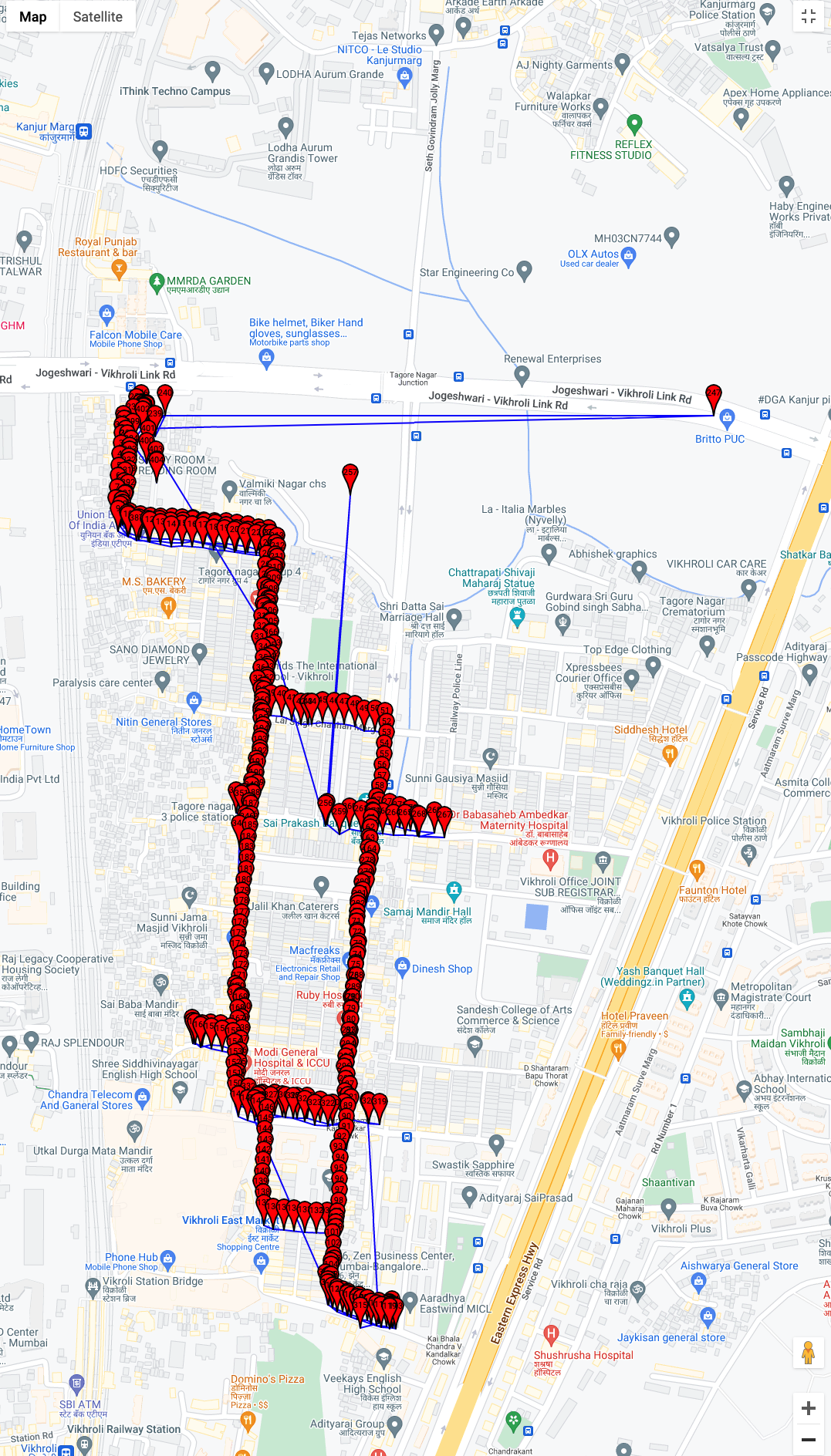
The long distance filed testing has been performed and library does fetched the location at desired interval but there was few random location which are totally away from the route taken. The file has been attached for your reference. It cleary shows that Pin 247, 257, 319 are quite far from actual location. Similarly, there are few duplicate location object for PIN number 246 & 247 with a long difference and then again it starts fetching the proper values.
Could please share your thoughts and guide us about the different reasons this could have happened. Similarly, what can be done to fix this kind of issues.
Steps to Reproduce
- Travel for long route with some in between halts.
Context
We are trying to get all the route logs on map while traveling from one location to another with some halts.
Debug logs
Please find attached screenshot of the map with all the route logs.
PASTE_YOUR_LOGS_HERE

You are expected to filter you data as desired.
see location.coords.accuracy

Could you let us know what is the accuracy level range to get accurate location. like is eg below ["coords"]: { "speed_accuracy": -1, "speed": -1, "longitude": 72.91782172503153, "floor": null, "heading_accuracy": -1, "latitude": 19.110456594879363, "accuracy": 44, "altitude_accuracy": 15.3, "altitude": 38.1, "heading": -1 }, here we got accuracy as 44 so what should be the value/range to identify accurate location for mapping.
A geolocation is not a simple point in space.
it is a circle of radius accuracy (Meters). The device is somewhere within that circle.
when location comes from gps, the accuracy is typically 5-10 meters. GPS works only outdoors with an unobstructed view of the sky.
from wifi (Eg: while indoors), typically 40-100 meters.
from cellular, 1000+ meters.
but, isn't it an oblate spheroid, when you also consider altitude and altitude accuracy? (I'm mostly joking - but it is important I think to point out that altitude (if you have it, it is not always present because it relies on gps only) has separate and usually lower accuracy than lat/long - mostly just adding this in order to really emphasize that it's always an uncertain point you are getting, in all dimensions and you have to think hard about what that means for your use case)

but, isn't it an oblate spheroid, when you also consider altitude and altitude accuracy?
Yes, it's actually 3 dimensional. In most cases, people aren't concerned with altitude.
@kulbir22
this issue is titled “Random location objects are fetched from GPS library”.
your questions do not appear to be related to this issue at all.
You are expected to filter you data as desired.
see location.coords.accuracy
@christocracy
Even I'm also getting random location objects.
I just wanted to know by filtering location.coords.accuracy, do you mean to filter via accuracy at my server end after completing the http request or to filter before the location object being pushed to the server via http request ???

do you mean to filter via accuracy at my server
yes
Is there a way we could filter via accuracy first and then decide if we want to POST specific coords to the server ?
There is an undocumented way to do this in the Native code in the iOS AppDelegate and Android MainApplication file:
MainApplication.java
import com.transistorsoft.locationmanager.adapter.BackgroundGeolocation;


public class MainApplication extends Application implements ReactApplication {
    @Override
    public void onCreate() {
        .
        .
        .
        // Adding a custom beforeInsertBlock.  If your callback returns null, the insert into the plugin's SQLite db
        // will be cancelled.  If there is no record inserted into SQLite, there will be no HTTP request.

        BackgroundGeolocation.getInstance(this).setBeforeInsertBlock(new TSBeforeInsertBlock() {
            @Override
            public JSONObject onBeforeInsert(TSLocation tsLocation) {
                boolean doInsert = true;
                //
                // Your logic here
                //
                // For example, you could do something like this:
                //
                // Location location = tsLocation.getLocation();
                // if (location.getAccuracy() >= 10) {
                //     doInsert = false;
                // }
                //
                return (doInsert) ? tsLocation.toJson() : null;
            }
        });
    }
}
AppDelegate.m
#import <TSLocationManager/TSLocationManager.h>

@implementation AppDelegate

- (BOOL)application:(UIApplication *)application
    didFinishLaunchingWithOptions:(NSDictionary *)launchOptions {
    .
    .
    .
    /**
     * Undocumented feature:  This is a native hook for each location recorded by background-geolocation.
     * Return null to cancel the SQLite insert (and corresponding HTTP request)
     */
    TSLocationManager *bgGeo = [TSLocationManager sharedInstance];

    bgGeo.beforeInsertBlock = ^NSDictionary* (TSLocation *location) {
        NSLog(@"[BackgroundGeolocation] beforeInsertBlock: %@", location);
        BOOL doInsert = YES;
        //
        // Your logic here
        //
        return (doInsert) ? [location toDictionary] : nil;
    };
    .
    .
    .
    return YES;
}
return (doInsert) ? tsLocation.toJson() : null;
This would serve my purpose, but now this sends entire json block to the SQLite database. I've managed to pulled out the required details:
Location location = tsLocation.getLocation();
           JSONObject json = new JSONObject();
           try {
               json.put("latitude", location.getLatitude());
               json.put("longitude", location.getLongitude());
               json.put("accuracy", location.getAccuracy());
               json.put("timestamp", tsLocation.getTimestamp());
               json.put("uuid", tsLocation.getUUID());
               //json.put("distance", tsLocation.);
           } catch (JSONException e) {
               e.printStackTrace();
           }
But, I am not sure how to get distance ?
tsLocation.getOdometer()
@christocracy
I've tried but it says Cannot resolve method 'getOdometer' in 'TSLocation'
I've imported location from
import android.location.Location;
.
.
.
Location location = tsLocation.getLocation();
Hmm...seems I forgot to implement a public getOdometer() for that one.
You can get it from TSConfig
TSConfig config = TSConfig.getInstance(context);
float odometer = config.getOdometer();
public class MainApplication extends Application implements ReactApplication {
    @Override
    public void onCreate() {
        .
        .
        .
        // 1.  Get TSConfig instance here.
        final TSConfig config = TSConfig.getInstance(this);

        // Adding a custom beforeInsertBlock.  If your callback returns null, the insert into the plugin's SQLite db
        // will be cancelled.  If there is no record inserted into SQLite, there will be no HTTP request.

        BackgroundGeolocation.getInstance(this).setBeforeInsertBlock(new TSBeforeInsertBlock() {
            @Override
            public JSONObject onBeforeInsert(TSLocation tsLocation) {
                boolean doInsert = true;

                // 2.  Fetch odometer here.
                float odometer = config.getOdometer();

                return (doInsert) ? tsLocation.toJson() : null;
            }
        });
    }
}
public class MainApplication extends Application implements ReactApplication {
    @Override
    public void onCreate() {
        .
        .
        .
        // 1.  Get TSConfig instance here.
        final TSConfig config = TSConfig.getInstance(this);

        // Adding a custom beforeInsertBlock.  If your callback returns null, the insert into the plugin's SQLite db
        // will be cancelled.  If there is no record inserted into SQLite, there will be no HTTP request.

        BackgroundGeolocation.getInstance(this).setBeforeInsertBlock(new TSBeforeInsertBlock() {
            @Override
            public JSONObject onBeforeInsert(TSLocation tsLocation) {
                boolean doInsert = true;

                // 2.  Fetch odometer here.
                float odometer = config.getOdometer();

                return (doInsert) ? tsLocation.toJson() : null;
            }
        });
    }
}
Thanks a million. It worked like a charm. You are a life saviour.
This issue is stale because it has been open for 30 days with no activity.
![github-actions[bot] avatar](https://avatars.githubusercontent.com/in/15368?v=4 "Published by a pub.dev verified publisher")
This issue was closed because it has been inactive for 14 days since being marked as stale.