Magisk
 Magisk copied to clipboard
 topjohnwu
Intermittent Issue with command backgrounding using /sbin/su
What is the issue?
When a target command is invoked via Magisk su bin with -c option, and with backgrounding using the & symbol, the command does not execute (most of the times).
When works, when doesn't?
- Works when the target command is not backgrounded, with SH or BASH shells:
termux@batmobile ~ $ /sbin/su -s /data/bin/bash -c 'id'
uid=0(root) gid=0(root) groups=0(root)

termux@batmobile ~ $ /sbin/su -s /system/bin/sh -c 'id'
uid=0(root) gid=0(root) groups=0(root)

root@batmobile root # /sbin/su -s /data/bin/bash -c 'id'
uid=0(root) gid=0(root) context=u:r:magisk:s0
- Works when directly executed in shell with background mode:
root@batmobile root # id &
[1] 21008
root@batmobile root # uid=0(root) gid=0(root) context=u:r:magisk:s0

[1]+  Done                    id
- Does NOT works when invoked as background mode
termux@batmobile ~ $ /sbin/su -s /system/bin/sh -c 'id &'

termux@batmobile ~ $ /sbin/su -s /data/bin/bash -c 'id &'

root@batmobile root # /sbin/su -s /data/bin/bash -c 'id &'
What are tried, but doesn't help
- Tested in termux fail-safe mode
- Tired reflashing the full ROM
- Tried reflashing the Magisk ZIp
Why this bug concerns
I have daemon BASH scripts running as root, which is controlled via termux-notification buttons. Here, we need to use privilege escalations to properly communicate with the process that owned by root. This a the suggested method by @xeffyr See https://github.com/termux/termux-api/issues/347
When the bash script has any commands with background mode, i.e, with the & symbol, the parts of the script does not executes when called as a termux-notification button action.
Environment
- Terminal: Termux v0.101
- Magisk 20.4
- Magisk Manager 7.5.1
- Device: POCO F1 Global
- ROM: MIUI 11.0.5 Stable
- Android 9

I have implemented a work-around by using start-stop-daemon to run the command in background instead of & method.

My screenshots with Magisk Canary 21001, from Termux (black terminal) and NetHunter (blue terminal)
Cases for su -c 'id &' marked by green (ok) and red rectangles (nok)
su sessions marked by yellow ellipses on top
IMO, three cases ok, one nok (all reproducible), IDK if it's (all) up to Magisk
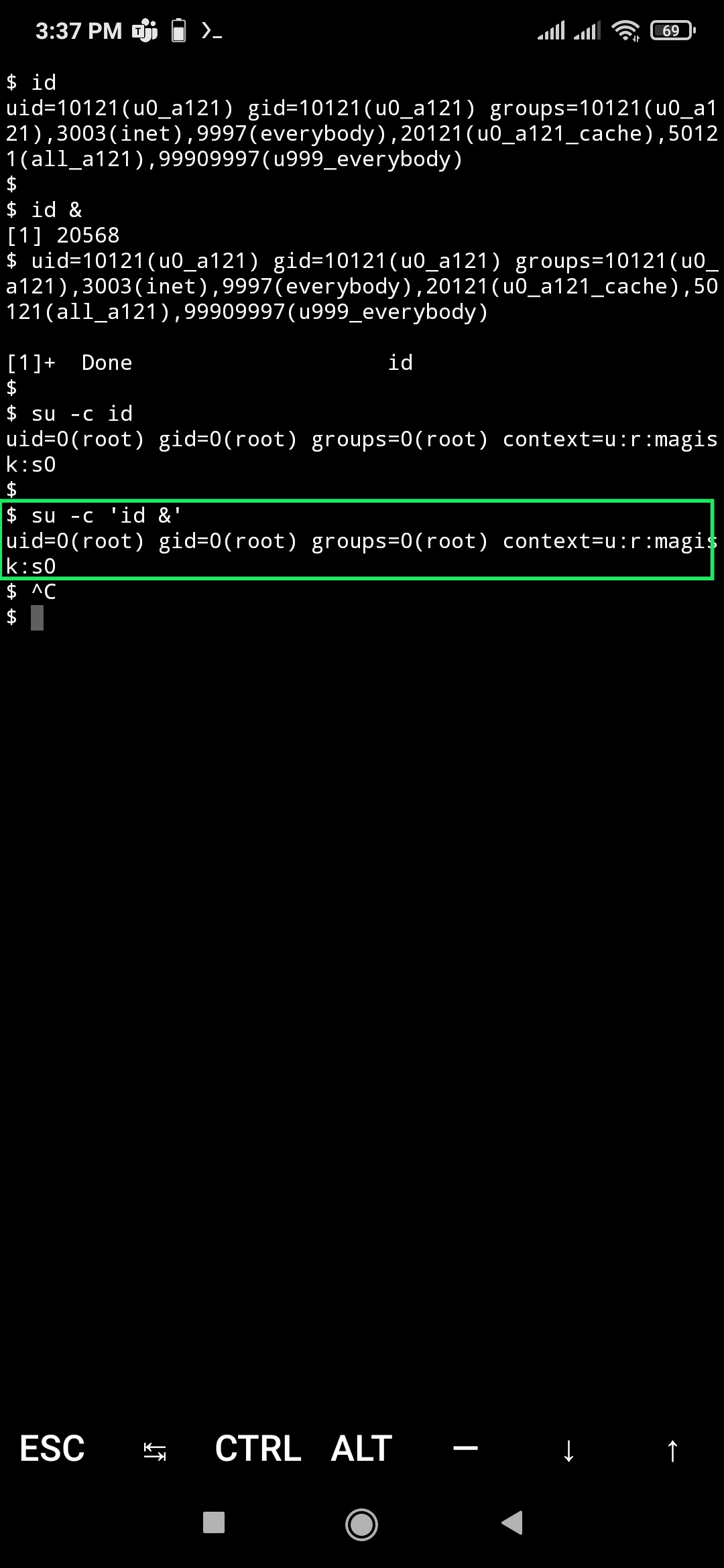
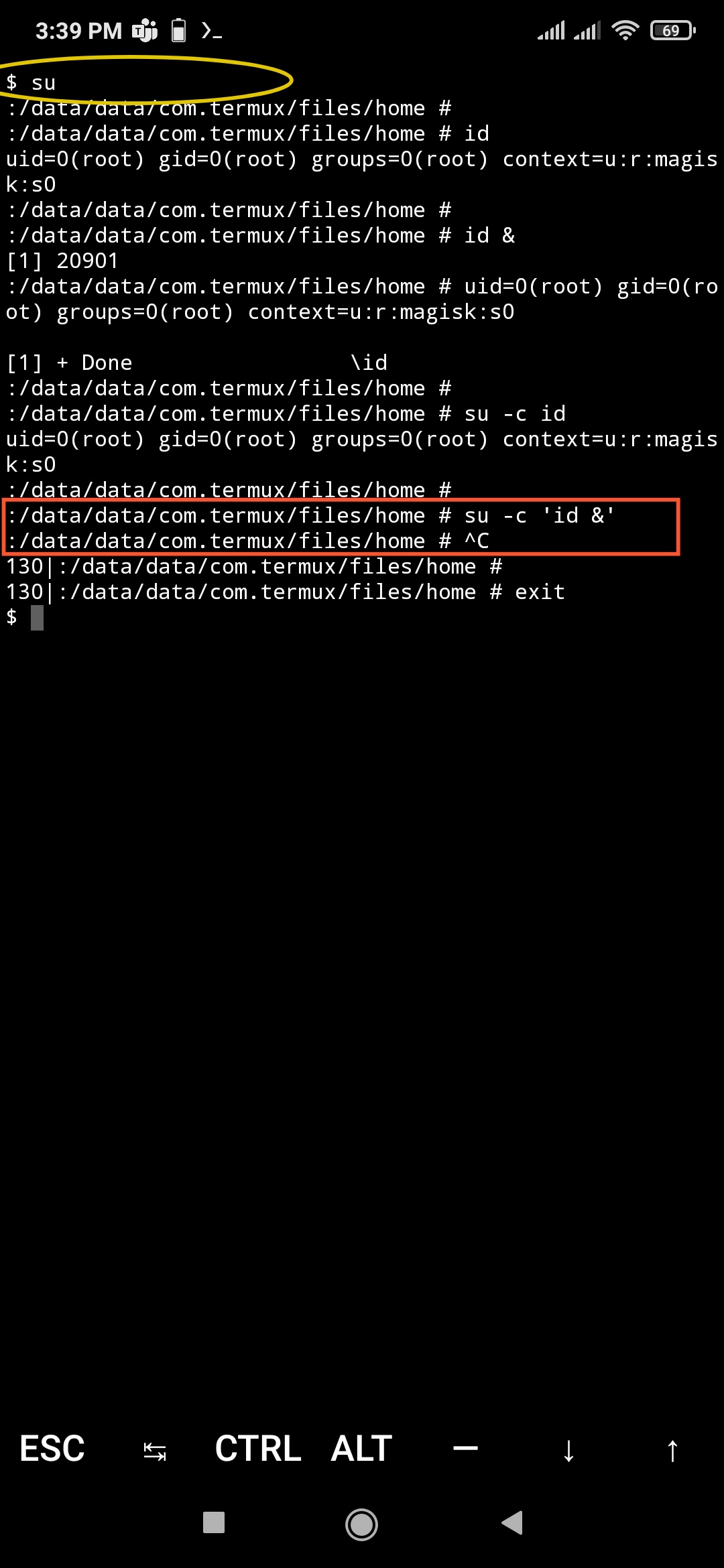
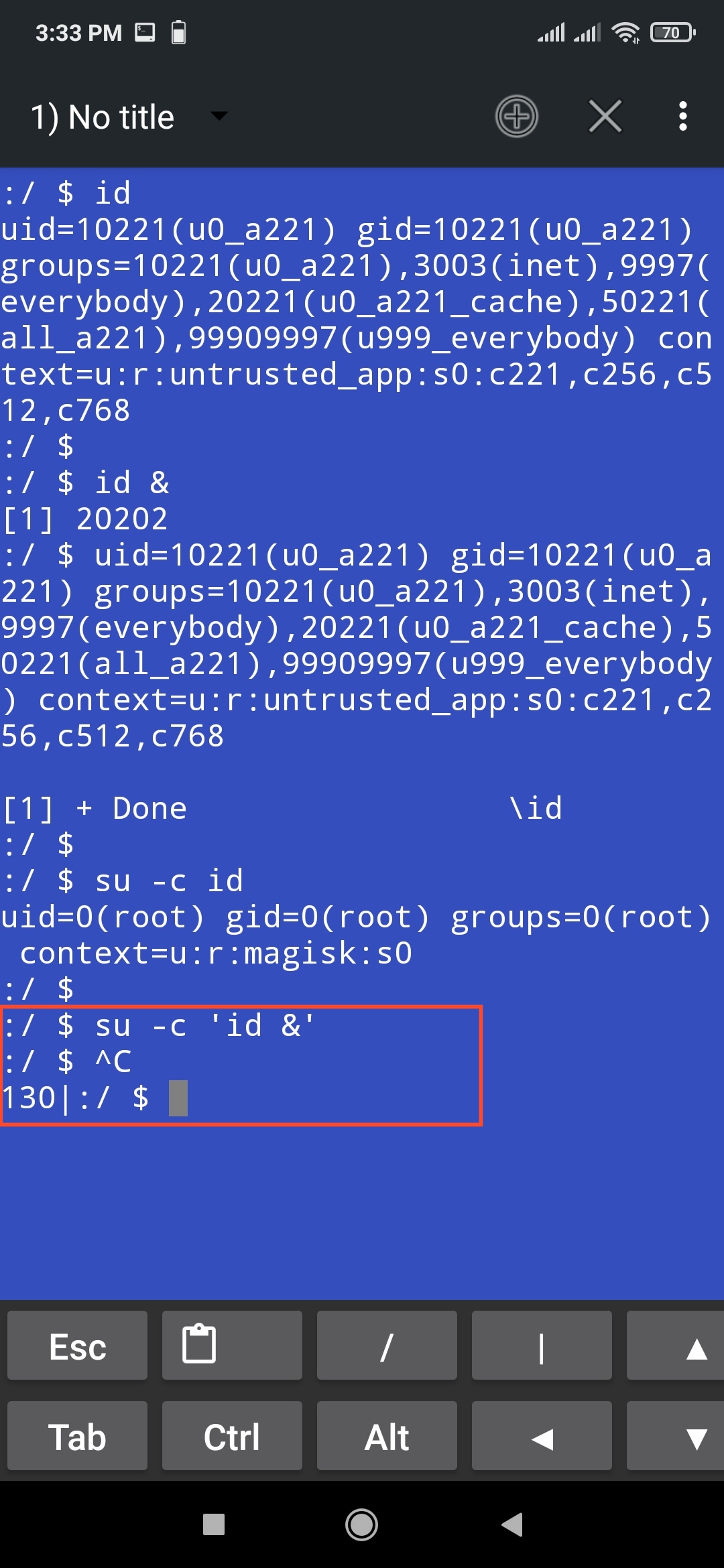


Thanks @zgfg for further investigating this bug. Since it is reproducible on different terminals, the issue must be with the Magisk SU.
What are tried, but doesn't help (Update 1#)
- Tried all three mount-namespace options in Magisk Manager
- Tried resetting the
/data/adb/Magisk.db
After further investigation, this is caused by the fact that the root shell is actually a remote shell. So not a regression, but I'll see what I can do to make this work like it should

Any update on this issue? After rooting with Magisk not able to su in adb shell. I get bramble:/ $ su Permission denied 13|bramble:/ $ su Permission denied 13|bramble:/ $ sudo su /system/bin/sh: sudo: inaccessible or not found 127|bramble:/ $ su Permission denied 13|bramble:/ $
Using version 11 bramble-rq1a.210205.004

@evelbodevil that's completely different from this issue, you just need to allow root access to Shell in the Magisk app
What is the issue?
When a target command is invoked via Magisk
subin with-coption, and with backgrounding using the&symbol, the command does not execute (most of the times).When works, when doesn't?
- Works when the target command is not backgrounded, with SH or BASH shells:
termux@batmobile ~ $ /sbin/su -s /data/bin/bash -c 'id'
uid=0(root) gid=0(root) groups=0(root)

termux@batmobile ~ $ /sbin/su -s /system/bin/sh -c 'id'
uid=0(root) gid=0(root) groups=0(root)

root@batmobile root # /sbin/su -s /data/bin/bash -c 'id'
uid=0(root) gid=0(root) context=u:r:magisk:s0
- Works when directly executed in shell with background mode:
root@batmobile root # id &
[1] 21008
root@batmobile root # uid=0(root) gid=0(root) context=u:r:magisk:s0

[1]+  Done                    id
- Does NOT works when invoked as background mode
termux@batmobile ~ $ /sbin/su -s /system/bin/sh -c 'id &'

termux@batmobile ~ $ /sbin/su -s /data/bin/bash -c 'id &'

root@batmobile root # /sbin/su -s /data/bin/bash -c 'id &'
What are tried, but doesn't help
- Tested in termux fail-safe mode
- Tired reflashing the full ROM
- Tried reflashing the Magisk ZIp
Why this bug concerns
I have daemon BASH scripts running as root, which is controlled via termux-notification buttons. Here, we need to use privilege escalations to properly communicate with the process that owned by root. This a the suggested method by @xeffyr See termux/termux-api#347
When the bash script has any commands with background mode, i.e, with the
&symbol, the parts of the script does not executes when called as a termux-notification button action.Environment
- Terminal: Termux v0.101
- Magisk 20.4
- Magisk Manager 7.5.1
- Device: POCO F1 Global
- ROM: MIUI 11.0.5 Stable
- Android 9

I believe this is expected:
sh -c 'id &'
does not produce output as well.
The issue is that when you launch a new shell process (like sh -c), the shell runs some commands that you provide. If the command is running in the background and the shell exits without waiting for that command, then a HUP signal will kill the command.
You can solve the problem in one of the following ways:
su -c 'id &
wait'
or
nphup su -c 'id' &
or
su -c 'id' </dev/null &
or
su -c 'nohup id &'