tectonic-typesetting
error: Cannot proceed without .vf or "physical" font for PDF output
Here is it:
$ tectonic task.tex
Running TeX ...
Rerunning TeX because "task.aux" changed ...
Running xdvipdfmx ...
warning: Tectonic unable to generate PK font "ark10" (dpi 720) on-the-fly
warning: Could not locate a virtual/physical font for TFM "ark10".
warning: >> There are no valid font mapping entry for this font.
warning: >> Font file name "ark10" was assumed but failed to locate that font.
error: Cannot proceed without .vf or "physical" font for PDF output...
because I am using dingbat package.
While LaTeX as usual works:
...
*geometry* detected driver: dvips
(/usr/share/texmf-dist/tex/latex/base/t1cmss.fd)
(/home/data1/protected/texmf/tex/latex/dingbat/uark.fd) [1] [2] (./task.aux) )
Output written on task.dvi (2 pages, 3492 bytes).
Transcript written on task.log.
My expectation was that tectonic would solve the problem automagically.

Hey @gnusupport thanks for the issue! 🚀
I can not reproduce it so far, here's what I'm trying:
\documentclass{article}
  \usepackage{dingbat}

\begin{document}
  dingbat: \squarewithdots
\end{document}
The above seems to work equally under tectonic, pdfTeX, XeTeX and LuaTeX.
Do you have a MWE that raises the error I could test?

I have the same. It works with LaTeX, but tectonic can't find it.
\documentclass[12pt]{article}
\usepackage[utf8]{inputenc}
\usepackage[T1]{fontenc}
\usepackage{hyperref}
\usepackage[a4paper, portrait, margin=2cm]{geometry}
\usepackage{hyperref}
\usepackage{dingbat}

\begin{document}
\sffamily

\title{\mytitle}

\rightpointleft hello

\end{document}
Interesting: it's the \rightpointleft macro —and others— that give this failure, while there are others from the same package work normally.
The following illustrates which dingbats are currently supported by tectonic, and commented out are the dingbats that error out:
\documentclass[12pt]{article}
  \usepackage{dingbat}

\def\cS#1{\texttt{\textbackslash#1}}

\begin{document}
  \section{Dingbats}
  \begin{enumerate}
    \ttfamily
    \item \cS{rightpointright}: \rightpointright
    \item \cS{leftpointright}: % \leftpointright
    \item \cS{leftthumbsdown}: % \leftthumbsdown
    \item \cS{leftthumbsup}: % \leftthumbsup
    \item \cS{rightpointleft}: % \rightpointleft
    \item \cS{rightthumbsdown}: % \rightthumbsdown
    \item \cS{rightthumbsup}: % \rightthumbsup
    \item \cS{squarewithdots}: \squarewithdots
    \item \cS{filledsquarewithdots}: \filledsquarewithdots
    \item \cS{Sborder}: \Sborder
    \item \cS{Zborder}: \Zborder
    \item \cS{largepencil}: % \largepencil
    \item \cS{anchor}: \anchor
    \item \cS{carriagereturn}: % \carriagereturn
    \item \cS{checkmark}: \checkmark
    \item \cS{eye}: % \eye
    \item \cS{satellitedish}: \satellitedish
    \item \cS{smallpencil}: % \smallpencil
  \end{enumerate}
\end{document}
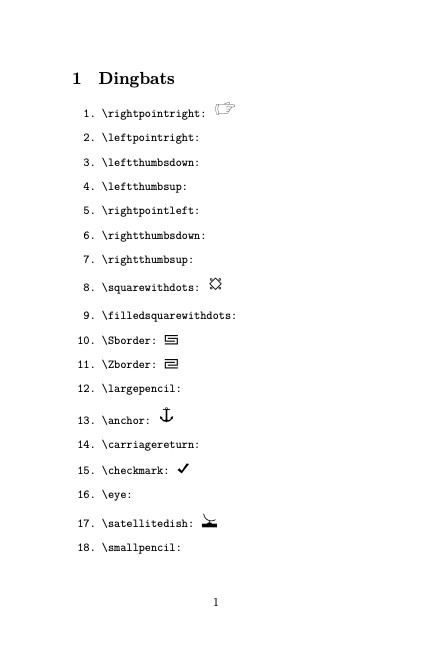
I can' know why. First I did not have system based dingbat font, I have tried installing in ~/texmf and it did not work, I have tried tectonic for that reason, and than installed system wide TeX package with fonts and then it works. But with tectonic it kept showing a problem.
This is known issue #992 with Tectonic, which can't create .pk fonts on the fly (this is done by pdflatex using metafont).
All dingbats symbols are not in a single font. So some are available as .pk and some are not on your system @mnrvwl.
You don't need a package with tectonic for the dingbats fonts. Dingbats are now part of Unicode, so you can use any .ttf or .otf font that has the dingbats you are looking for.
For example, if you put Noto Sans Japanese (which does not contain all the dingbats) in your local folder, you can compile the following code (utf8) with Tectonic :
\documentclass{article}
\usepackage{fontspec}

\begin{document}
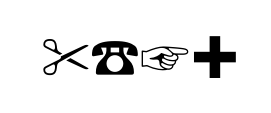
  {\setmainfont[Path=./]{NotoSansJP-Medium.otf}✂☎☞✚}
\end{document}