
tauri
 tauri copied to clipboard
 tauri-apps
[bug] Cannot build app on Apple M1
Describe the bug
I simply ran cargo tauri build.
The build process itself succeeded, but the bundling of the binary failed.
    Bundling splitfire.ai.app (/Users/myhome/splitfire-desktop/src-tauri/target/release/bundle/macos/splitfire.ai.app)
       Error failed to bundle project: Failed to copy binary from "/Users/myhome/splitfire-desktop/src-tauri/target/release/splitfire.ai": Failed to copy binary from "/Users/myhome/splitfire-desktop/src-tauri/target/release/splitfire.ai": `"/Users/myhome/splitfire-desktop/src-tauri/target/release/splitfire.ai" does not exist`
It seems like it wrongly refers the binary folder when trying to bundle the app.
I tried the --target universal-apple-darwin. The same error happened.
It's an existing React app that I integrated with Tauri with the official documentation tutorials. Any clue?
Reproduction
No response
Expected behavior
Build and bundle the project successfully.
Platform and versions
MacBook Pro
MacOS Ventura 13.2.1 (22D68)
Apple M1 Pro
Stack trace
No response
Additional context
No response

OK, this is silly. The package name in package.json and the productName in the tauri.conf.json cannot contain a dot.
@FabianLars what were your thoughts here? Validation of the name with a build-time error?

well, first i'd like to check/know if this is actually a bug and if not where the limitation comes from. Then, if it's unfixable, we can either go for a build time error or just for docs if we consider that good enough (probably not idk)

Just doing some quick searching, the error happens in copy_binaries_to_bundle, which is calling common::copy_file.
This copy_file function specifically says that it will fail if trying to copy a directory, which is what foo.app is. It's using <Path>.is_file() under the hood.
Here's a quick local test of an empty file and directory, and then a real Tauri binary (.app).
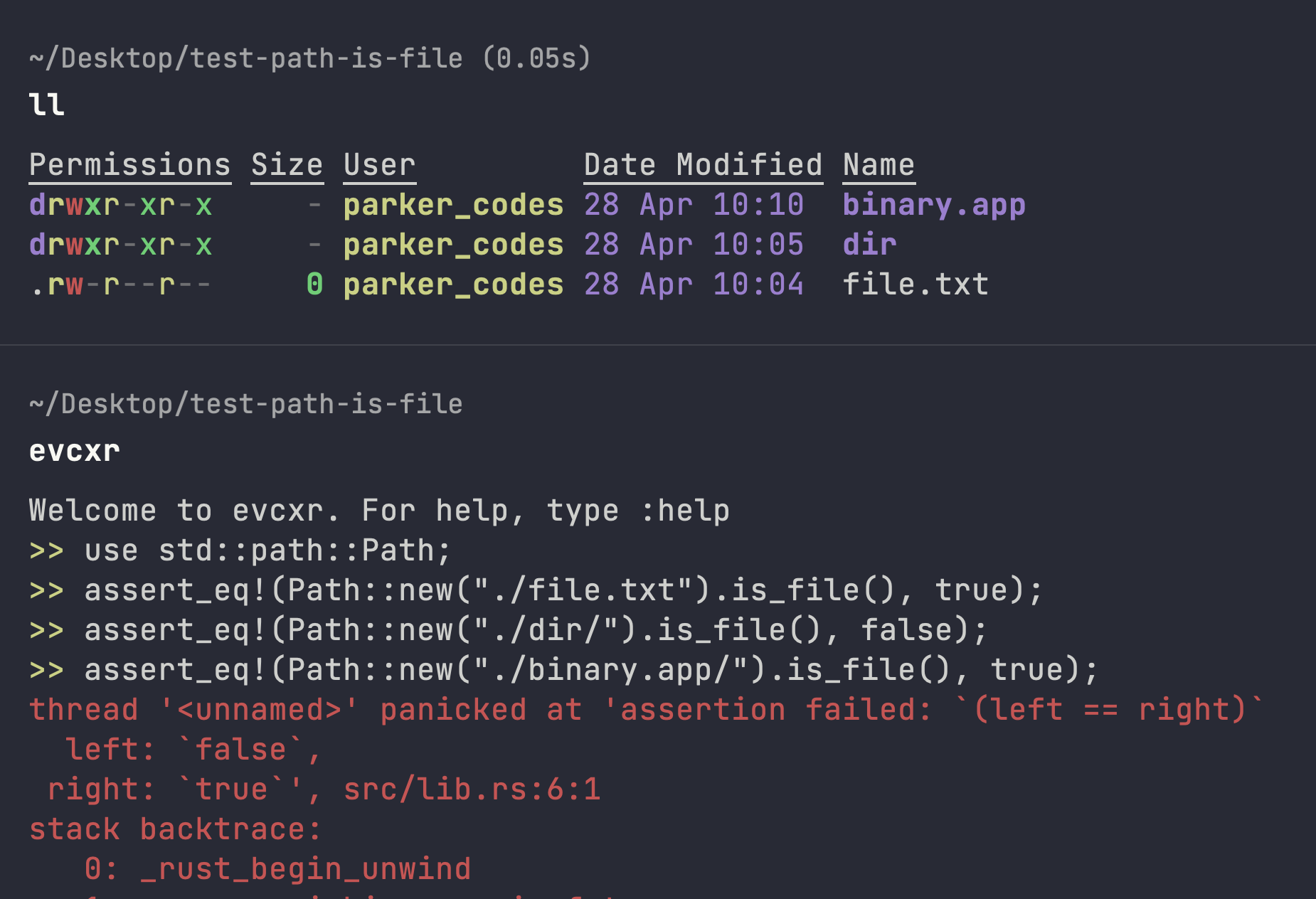
I'm confused at how this works for anyone. Perhaps the binary was not meant to make it into this copy-over setup?
I just confirmed that adding .ai to the end of the productName in the Tauri config file produces this error. I am running MacOS M1.
“.app” is damaged and can’t be opened. You should move it to the Bin.(without signing i uploaded to git releases and downloaded back and try to open ) I am on M1 mac os 14.4 and i get this error.

@parker-codes I'm seeing a different error as the root cause. The source file passed to copy_file is an executable file, but the path of the outputted file is missing the .ai suffix, so copy_file doesn't find the file and fails.
If I manually add the suffix to the binary, then the build runs successfully on the second try, and also generates a new binary without the suffix.
I'm also on Apple M1.
