

 tarampampam
Data Leakage Issue where an attacker can get true User Agent string
Is there an existing issue for this?
- [X] I have searched the existing issues
Describe the bug
Data Leakage Attack Allows a Remote Web Page to get true User Agent despite Browser Obfuscation
There are two attack profiles where a remote web site can get the true User Agent string despite the Random User Agent extension running and functioning properly.
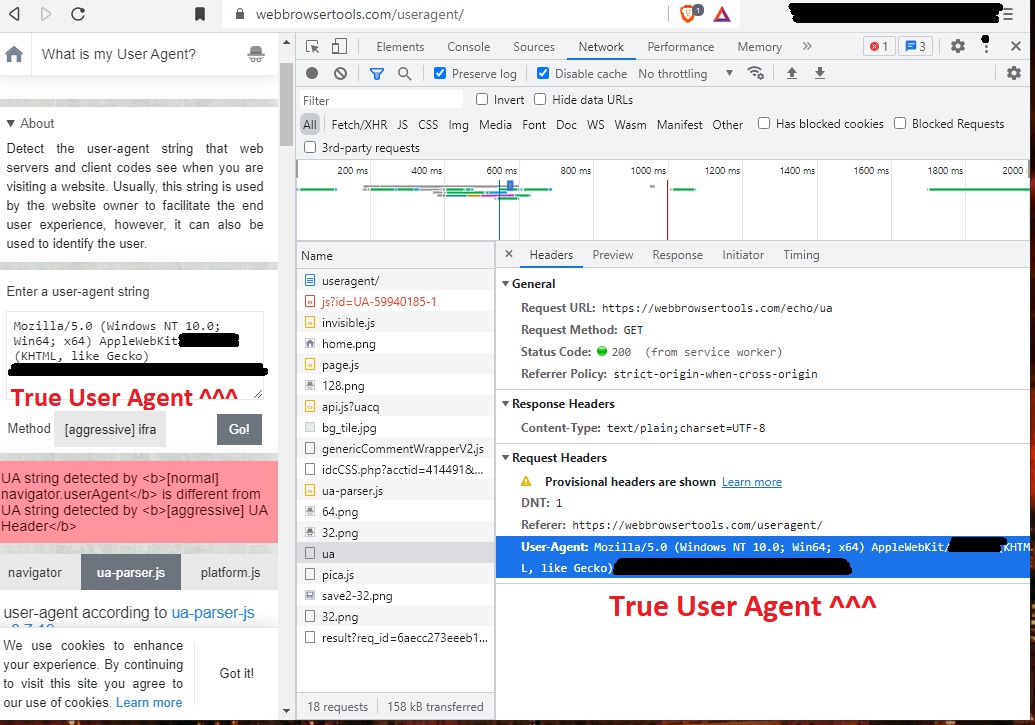
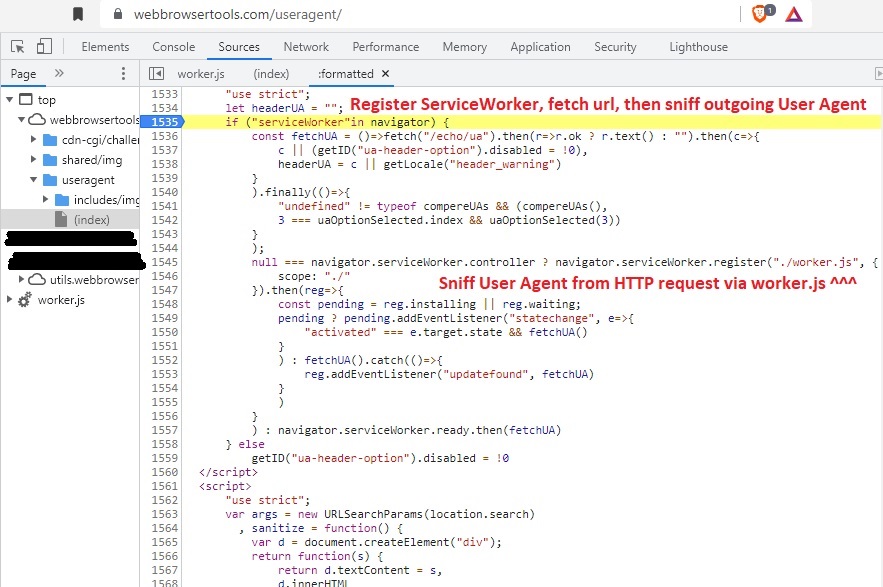
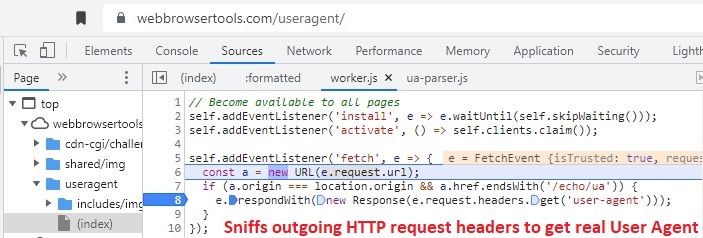
- The first attack profile involves having the malicious web page register a service worker, and then invoke the service worker to fetch a subsequent remote URL. This subsequent request will contain the real (non-spoofed) User Agent in the HTTP request headers, and the outgoing request headers (containing the true User Agent) are observed by the service worker. In a network analysis of the attack implementation (see screenshot below), the subsequent HTTP GET URL simply echoes back the contents of the real User Agent.
- The second attack profile involves immediately injecting a sandboxed iframe within the target web page to prevent any modifications of the iframe DOM. There are two sub-methods to this attack: (2.A) read the true User Agent from the navigator.userAgent object within the iframe DOM, and (2.B) read the true User Agent from the navigator.appVersion object within the iframe DOM.
Both of these attacks are conceived and demonstrated at the following URL:
https://webbrowsertools.com/useragent/
Attack profile (1) is called "iv. [aggressive] UA Header:" in the above URL. Attack profile (2.A) is called "v. [aggressive] iframe navigator.userAgent" in the above URL. Attack profile (2.B) is called "vi. [aggressive] iframe navigator.appVersion" in the above URL.
By selecting any of the three methods listed above in the drop-down box at the above URL, the true User Agent is revealed despite the random-user-agent plugin running and operating correctly.
Steps to reproduce
- Install random-user-agent extension, make sure it is enabled and functioning normally.
- Go to https://webbrowsertools.com/useragent/
- (Optionally run Chrome network inspector in Preserve Log / Disable Cache record mode.)
- Scroll down to "Method" drop-down box on the page.
- Select one of the following three methods in the drop-down: [aggressive] UA Header, [aggressive] iframe navigator.userAgent, or [aggressive] iframe navigator.appVersion.
- The true (non-spoofed) User Agent will be revealed in the text area above the drop-down.
- (Optionally) Check the network inspector for the HTTP 200 request to https://webbrowsertools.com/echo/ua invoked by the service worker. View Headers / Request Headers of this request, which contains the true (non-spoofed) user agent.
Browser
Chrome, Other
Extension version
3.3.1
Anything else?

Thanks for your issue! This is a known limitation, and I suppose that these aggressive detection methods are very rare. Anyway, I will try to fix them.
Related PR: #173

Agreed that these methods are not widely deployed in the wild, but perhaps there is a way to be able to prevent them?
In any case, great work on the extension!
Here are the details on attack profile (1) [use of a Service Worker to sniff outgoing HTTP GET headers]

Thanks for your issue! This is a known limitation, and I suppose that these aggressive detection methods are very rare. Anyway, I will try to fix them.
Related PR: #173
Hello, this problem has not been solved yet, has it? Is it because it can't be solved at the technical level, or is there no time to solve it for the time being?
