
webpack-encore
 webpack-encore copied to clipboard
 symfony
Invalid Transpilation vuejs
version(s) affected: "@symfony/webpack-encore": "^1.0.0"
When use encore dev-server or yarn run build with IE 11 ( i know my company is old school) transpilation code not work for vuejs.
With chrome
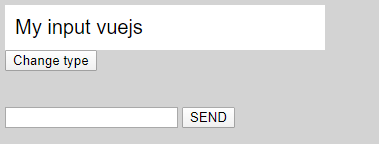
With IE 11


My package.json
{
    "devDependencies": {
        "@symfony/stimulus-bridge": "^2.0.0",
        "@symfony/webpack-encore": "^1.0.0",
        "autoprefixer": "^9.8",
        "core-js": "^3.0.0",
        "regenerator-runtime": "^0.13.2",
        "stimulus": "^2.0.0",
        "vue": "^2.5",
        "vue-loader": "^15",
        "vue-template-compiler": "^2.6.12",
        "webpack-notifier": "^1.6.0"
    },
    "license": "UNLICENSED",
    "private": true,
    "scripts": {
        "dev-server": "encore dev-server --port 8081",
        "build": "encore production --progress"
    },
    "dependencies": {
        "axios": "^0.21.1"
    },
"browserslist": [
        "> 0.5%",
        "last 2 versions",
        "IE 11"
    ]
}
If i rollback to @symfony/webpack-encore": "^0.33.0 it's work fine.
Maybe problem's with webpack-dev-server 4
Any Idea to resolve that ?

IIRC, the webpack 5 runtime is able to generate its runtime code either in es6 or in older syntax, depending on your browserlist config. if you don't have a browserlist config (or an explicit config for output.ecmaVersion to avoid using the default behavior), it defaults to es6 which is not compatible with IE11.

@stof i have browserslist, (i edit my post) i rollback temporaly to @symfony/webpack-encore": "^0.33.0
@thewalkingcoder so this only happens with 1.0 of Encore? 0.33.0 works fine?
Can you show - by clicking on one of the errors in the console - exactly which syntax is causing the error? I'd be curious to see what code isn't being transpiled correctly (e.g. an () => {} function or something else).
Cheers!

yes @weaverryan happens only with ^1.0.x. i exactly just rollback to Encore 0.33.0, Stimulus 1.x.x and works fine (with dev-server or build) with IE 11.
I show you on Monday after i come back to my company. regards ;-)
Hi,
@weaverryan
With "@symfony/webpack-encore": "^0.33.0" works fine. 0 error on console.

I change to "@symfony/webpack-encore": "^1.0.0" (1.0.5), uncomment on webpack.config.js (i use VM)
.configureDevServerOptions(config => {
        config.host =  '0.0.0.0';
        config.port = '8081';
        config.hot = true;
        config.public = 'http://mydomain.local:8081';
        config.firewall = false
    })
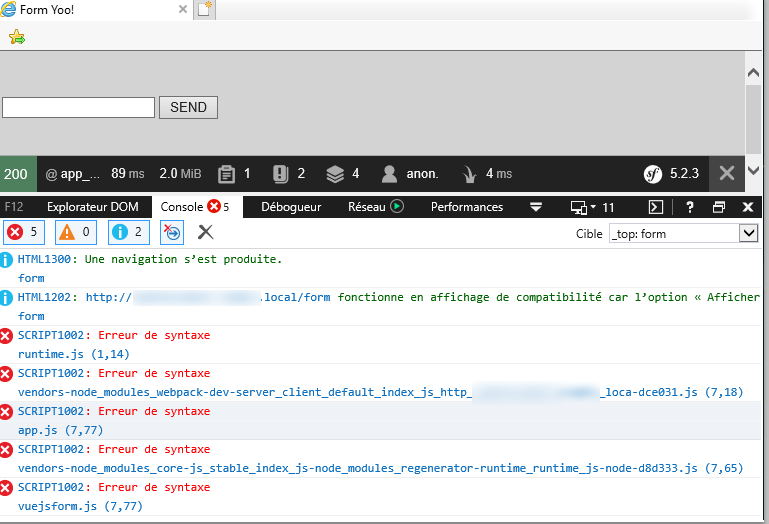
SCRIPT1002: Erreur de syntaxe runtime.js (1,14)
SCRIPT1002: Erreur de syntaxe
vendors-node_modules_webpack-dev-server_client_default_index_js_http_symfonylabs5_cnamts_loca-dce031.js (7,18)
SCRIPT1002: Erreur de syntaxe app.js (7,77)
 SCRIPT1002: Erreur de syntaxe
vendors-node_modules_core-js_stable_index_js-node_modules_regenerator-runtime_runtime_js-node-d8d333.js (7,65)
SCRIPT1002: Erreur de syntaxe vuejsform.js (7,77)
Problem with babel ?
regards
Hi @thewalkingcoder!
Thanks again for the super detailed report. All the files you attached to your previous message (e.g. app.js.txt and vendor-d8d333.js.txt), these are your final "built" files, correct? If you look inside them, they haven't been transpiled by Babel at all. For example, vendors-dce031.txt contains a module.exports and vendor-d8d333.js.txt contain require() statements. Even runtime.js (which is entirely built by Webpack) has an => function at the bottom. There are also, in dev mode, usually a lot of comments that Webpack itself adds... which are also missing.
This is definitely not expected, but it's also something that we test for in Encore. Do you have any custom babel config in your webpack.config.js file or via an external .babelrc type of file?
Cheers!
Hi @weaverryan,
I create a new app to isolate problem's. I don't know my mistake before, but now with simple config (and webpack-encore: ^1.0.0) babel transpile correctly with IE 11.
But i have some trouble compared with webpack-encore 0.33.0
I have one error but my js (vuejs component) is ok

and Hot reload with IE 11 not working.
If i callback to 0.33.0 all work's fine (no error and hot reloading)
very strange behaviour.
Cheers
What does your raw JavaScript look like? And do you have this config https://github.com/symfony/recipes/blob/d5faacab431e71baff3798f09dabfc89ea5f90cb/symfony/webpack-encore-bundle/1.0/webpack.config.js#L53-L56 ?
Symbol is a feature that's not supported on IE11... I'm not sure if Babel is supposed to polyfill that automatically or not. Anyways, I traced the error to your code - but I'm not sure what it looks like. The final, compiled code contains:
var a=Symbol("webpack logger raw log method"),c=Symbol("webpack logger times"),u=Symbol("webpack logger aggregated times")
Regardless, I'm not sure why you would have different behavior in 0.33.0 vs 1.0. This is all done by Babel.
Cheers!
Hi @weaverryan ,
I just load Vuejs on my javascript
import 'core-js/stable';
import "regenerator-runtime/runtime";
import Vue from 'vue';
import PasswordCheck from "./component/PasswordCheck";
import PasswordInput from "./component/PasswordInput";
new Vue({
    el: '#app',
    data(){
        return {
            nom: 'My input vuejs'
        }
    },
    components:{
        PasswordCheck,
        PasswordInput
    },
    created() {
    }
});
And yes i have default config for babel on webpack.config.js
// enables @babel/preset-env polyfills
        .configureBabelPresetEnv((config) => {
            config.useBuiltIns = 'usage';
            config.corejs = 3;
        })
I'm going to look for babel and maybe specific config for webpack 5
Ok, so I hunted this down a bit. The Symbol code that's in your final, built files is coming from Webpack's logger - https://github.com/webpack/webpack/blob/911ec1aa67011e25aa1449610f5b0b557edd5459/lib/logging/Logger.js#L34
I have no idea why Webpack's logger code would be in your final build - it's not in the built code of any of my projects - something you're doing (or Vue???) is trigger this, but I have no idea what. Here is what I would try:
A) First, I don't believe you need the import 'core-js/stable'; or import "regenerator-runtime/runtime"; - I believe those are redundant if you're using the useBuiltIns, though I'm not 100% sure on that - but it jumped out at me :0. Btw, if you set config.debug = true, you will see all the polyfills added for each entry, if it helps you to be sure that you're getting all the polyfills you need :).
B) I would simplify your app, piece-by-piece. Remove one thing, rebuild, then look for the string WebpackLogger in your final public/build/ directory (that is part of the code that is bringing in the Symbol). If it's still there, remove one more thing, then try again. We're trying to find WHAT in your app is causing that code to go there.
Cheers!
Hi @weaverryan
I follow your recommendations with new fresh install. After install symfony 5.2.3 and webpack-encore (1.0.0), i just had firewall false and browserslist.
//webpack.config.js

.configureBabelPresetEnv((config) => {
        config.useBuiltIns = 'usage';
        config.corejs = 3;
    })

    .configureDevServerOptions(options => {
        options.firewall = false;
    })
//package.json

"browserslist": [
        "> 0.5%",
        "last 2 versions",
        "IE 11"
    ]
//app.js

import './styles/app.css';

console.log('webpack encore Hello !');
same effect with IE 11.

I thinks is a lost cause....