

 symengine
Unresolved External Symbols: Windows CMake or WSL
The Issue
In attempting to compile Symengine for a C++ project (written in Microsoft Visual Studio 2022), I followed the installation instructions to compile the symengine libraries in an Ubuntu 20.04 WSL terminal via:
sudo cmake -DCMAKE_PREFIX_PATH="/mnt/c/Program Files/boost_1_79_0" -DINTEGER_CLASS=boostmp -DBUILD_SHARED_LIBS=OFF -DWITH_SYMENGINE_RCP=OFF .. && sudo make && sudo make install && sudo ctest.
I opted for boost, instead of the default GMP, because I already had this from a different project.
Visual Studio appears to have no issue including the appropriate header files nor any issue correctly linting: i.e. IntelliSense does not detect any issues in the source code.
However, the project will compile due to unresolved external symbols (see picture below).

Call for more C++ documentation
A couple issues have been opened (#1725 and #1905) asking for more C++ documentation. #1725 demonstrates that Symengine can be integrate to C++. Several other issues speak of interfacing with Windows: e.g. compiling for Windows appears to not be an issue for others.
Bottomline
Several other comments indicate that Symengine can be built in Windows, but all the installation instructions speak in terms of Linux commands and dependencies.
I attempted to install by cmake (via a GUI in Windows and not WSL) and compile the Symengine libraries from the resultant Visual Studio solution, but also to no avail with the same result in unresolved external symbols.
This was the same result as trying to compile the libraries in WSL.
Compiling in WSL or by cmake in Windows appears to have generated the appropriate symenginelib.a and symengine.lib libraries, respectively.
The issue also persists regardless of whether WITH_SYMENGINE_RCP is set to ON or OFF.
- Is this not supported in Windows?
- Is a full Linux environment required to compile?
- If Linux is so required to compile, then why am I running into this issue with WSL?
Configuration Summary from CMake in Windows
Selecting Windows SDK version 10.0.19041.0 to target Windows 10.0.19044. Linker does not support --exclude-libs
+-------------------------------+ | Configuration results SUMMARY | +-------------------------------+
CMAKE_C_COMPILER: C:/Program Files/Microsoft Visual Studio/2022/Community/VC/Tools/MSVC/14.32.31326/bin/Hostx64/x64/cl.exe CMAKE_CXX_COMPILER: C:/Program Files/Microsoft Visual Studio/2022/Community/VC/Tools/MSVC/14.32.31326/bin/Hostx64/x64/cl.exe CMAKE_BUILD_TYPE: Release CMAKE_CONFIGURATION_TYPES: Debug;Release;MinSizeRel;RelWithDebInfo CMAKE_C_FLAGS: /DWIN32 /D_WINDOWS /W3 CMAKE_CXX_FLAGS: /DWIN32 /D_WINDOWS /W3 /GR /EHsc CMAKE_CXX_FLAGS_DEBUG: /MTd /Zi /Ob0 /Od /RTC1 /W1 CMAKE_CXX_FLAGS_RELEASE: /MT /O2 /Ob2 /DNDEBUG /W1 CMAKE_INSTALL_PREFIX: C:/Program Files (x86)/symengine BUILD_SHARED_LIBS: INTEGER_CLASS : BOOSTMP HAVE_SYMENGINE_GMP: no WITH_SYMENGINE_ASSERT: OFF WITH_SYMENGINE_RCP: ON WITH_SYMENGINE_TEUCHOS: OFF WITH_COTIRE: OFF WITH_GENERATE_PARSER: OFF HAVE_GCC_ABI_DEMANGLE: no HAVE_C_FUNCTION_NOT_FUNC: yes HAVE_DEFAULT_CONSTRUCTORS: no HAVE_SYMENGINE_NOEXCEPT: ON HAVE_SYMENGINE_IS_CONSTRUCTIBLE: ON HAVE_SYMENGINE_RESERVE: ON HAVE_SYMENGINE_STD_TO_STRING: TRUE WITH_SYMENGINE_THREAD_SAFE: OFF BUILD_TESTS: ON BUILD_BENCHMARKS: ON BUILD_BENCHMARKS_GOOGLE: OFF WITH_GMP: no WITH_BFD: OFF WITH_ECM: OFF WITH_PRIMESIEVE: OFF WITH_FLINT: OFF WITH_ARB: OFF WITH_MPFR: OFF WITH_PIRANHA: OFF WITH_LLVM: OFF WITH_BOOST: yes BOOST_INCLUDE_DIRS: C:/Program Files/boost_1_79_0 BOOST_LIBRARIES: WITH_PTHREAD: OFF WITH_MPC: OFF WITH_TCMALLOC: OFF WITH_OPENMP: OFF WITH_VIRTUAL_TYPEID: OFF LIBS:
Configuring done Generating done
My Visual Studio info
Microsoft Visual Studio Community 2022 Version 17.2.5 VisualStudio.17.Release/17.2.5+32616.157 Microsoft .NET Framework Version 4.8.04084
Installed Version: Community
Visual C++ 2022 00482-90000-00000-AA747 Microsoft Visual C++ 2022
ASP.NET and Web Tools 2019 17.2.393.26812 ASP.NET and Web Tools 2019
Azure App Service Tools v3.0.0 17.2.393.26812 Azure App Service Tools v3.0.0
C# Tools 4.2.0-4.22281.5+8d3180e5f00d42f0f0295165f756f368f0cbfa44 C# components used in the IDE. Depending on your project type and settings, a different version of the compiler may be used.
Common Azure Tools 1.10 Provides common services for use by Azure Mobile Services and Microsoft Azure Tools.
Cookiecutter 17.0.22089.1 Provides tools for finding, instantiating and customizing templates in cookiecutter format.
Linux Core Dump Debugging 1.0.9.32408 Enables debugging of Linux core dumps.
Microsoft JVM Debugger 1.0 Provides support for connecting the Visual Studio debugger to JDWP compatible Java Virtual Machines
NuGet Package Manager 6.2.1 NuGet Package Manager in Visual Studio. For more information about NuGet, visit https://docs.nuget.org/
Python - Django support 17.0.22089.1 Provides templates and integration for the Django web framework.
Python - Profiling support 17.0.22089.1 Profiling support for Python projects.
Python - VC Project Support 17.0.21344.1 Provides support for launching C++ projects with Python debugging enabled.
Python with Pylance 17.0.22089.1 Provides IntelliSense, projects, templates, debugging, interactive windows, and other support for Python developers.
Test Adapter for Boost.Test 1.0 Enables Visual Studio's testing tools with unit tests written for Boost.Test. The use terms and Third Party Notices are available in the extension installation directory.
Test Adapter for Google Test 1.0 Enables Visual Studio's testing tools with unit tests written for Google Test. The use terms and Third Party Notices are available in the extension installation directory.
TypeScript Tools 17.0.10418.2001 TypeScript Tools for Microsoft Visual Studio
Visual Basic Tools 4.2.0-4.22281.5+8d3180e5f00d42f0f0295165f756f368f0cbfa44 Visual Basic components used in the IDE. Depending on your project type and settings, a different version of the compiler may be used.
Visual C++ for Linux Development 1.0.9.32408 Visual C++ for Linux Development
Visual Studio IntelliCode 2.2 AI-assisted development for Visual Studio.

It seems to me like you are not linking to symengine.lib. How are you compiling/linking your project?

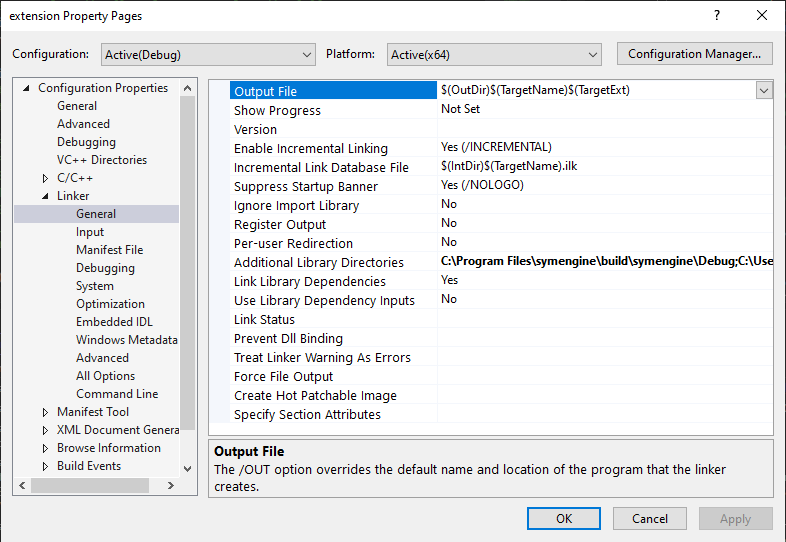
I am trying to develop a C++ project in Microsoft Visual Studio. Source codes, which require header files and libraries, can have certain file paths added to search in. This way, I can add paths to search for headers for the include preprocessor directive and paths to link to libraries. This properties page allows to one to adjust these paths on an individual basis for C++ projects or source code files: that way I do not have to mess with system variables and keep everything connected together. This particular window is where those file paths are defined.
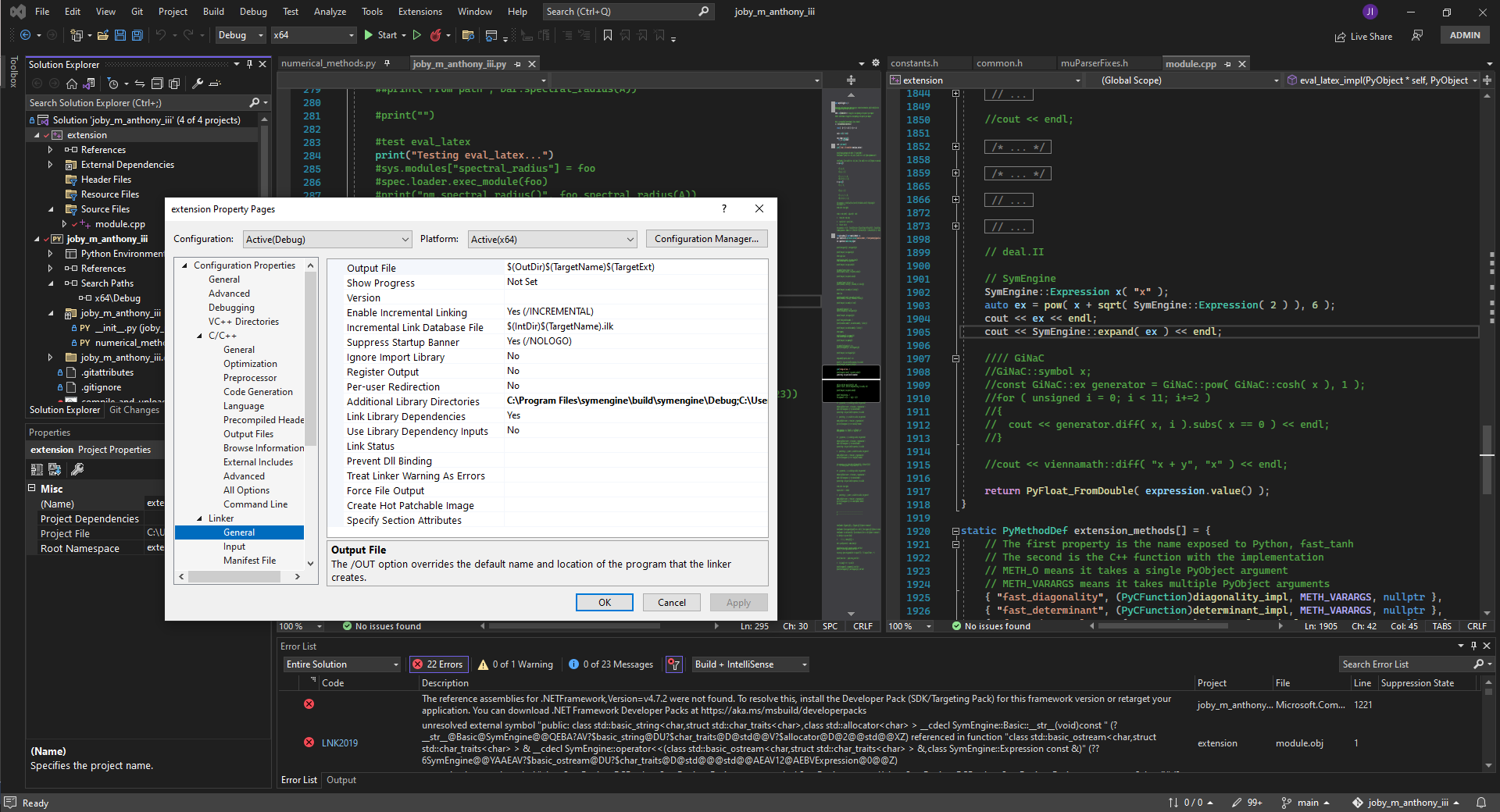
According to https://stackoverflow.com/questions/4445418/how-to-add-additional-libraries-to-visual-studio-project you need to add symengine.lib to Additional Dependencies which I don't see from your output.
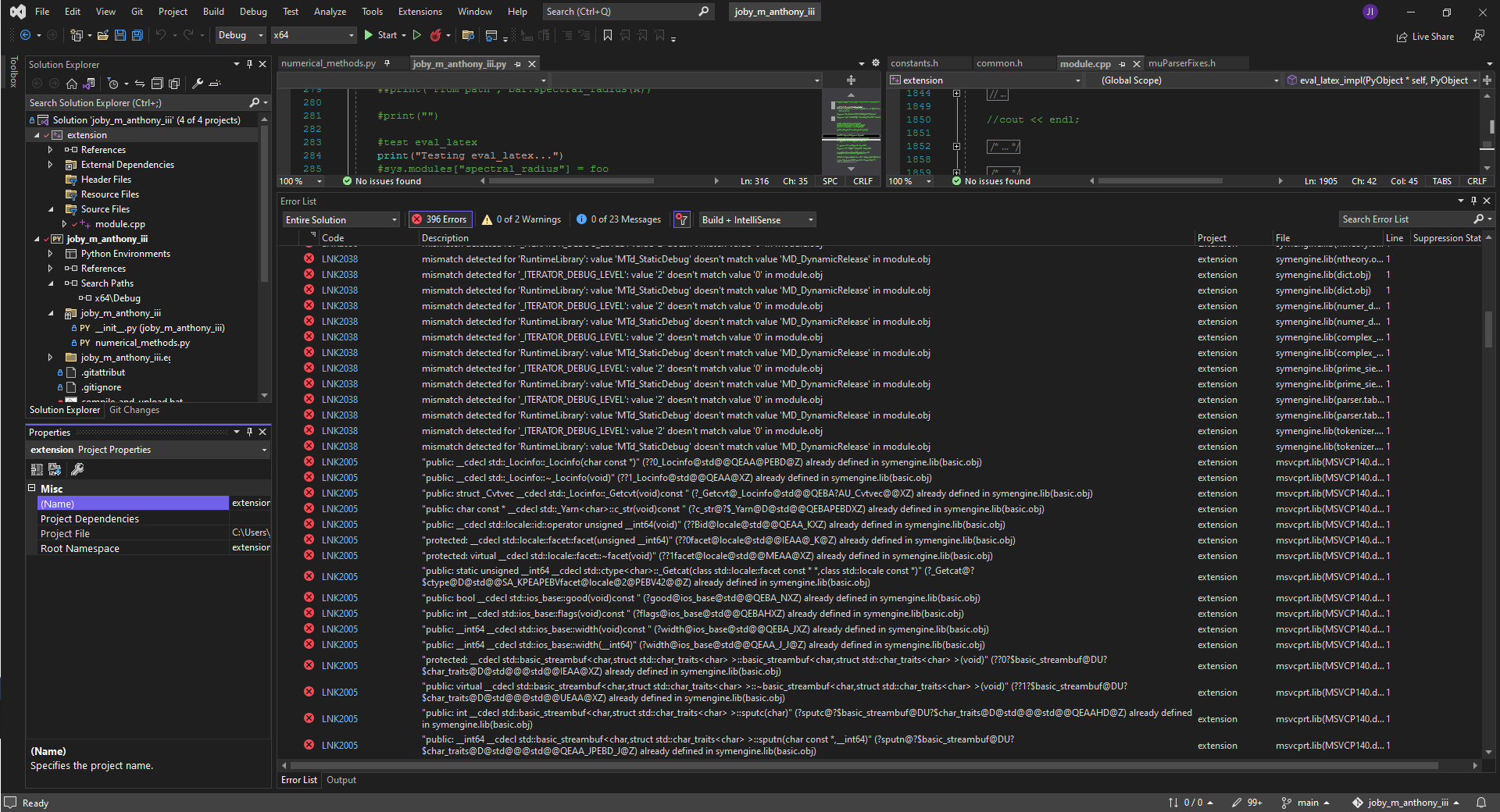
You seem to be compiling your project in Debug mode, but SymEngine was compiled in Release mode. You need to compile both in Release mode or both in Debug mode.
Compiling the library and then the project all in Debug generates the same issues as previously shared.
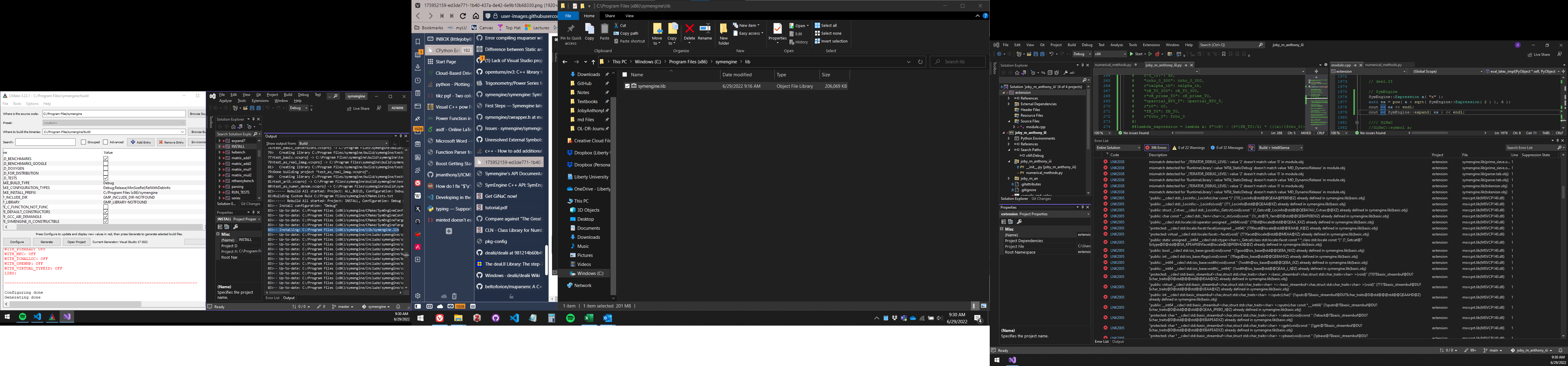
Compiling everything in Release mode generates different issues.
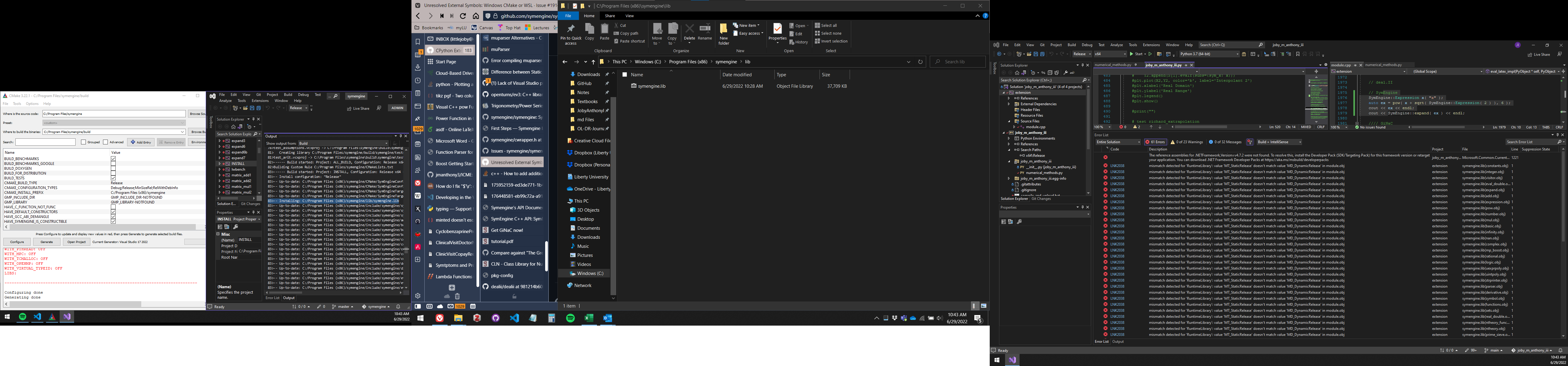
Could it the error be related to this: https://stackoverflow.com/questions/28887001/lnk2038-mismatch-detected-for-runtimelibrary-value-mt-staticrelease-doesn ?
