
SVG
 SVG copied to clipboard
 svg-net
The text position on the image is incorrect when resetting pointsperinch (for example 100 200 300)
Description
The text position on the image is incorrect when resetting pointsperinch (for example 100 200 300)
Example data
Used Versions

Can you give a few more details? What did you do exactly, what did the image look like?

Svg data are as follows:
<svg baseProfile="tiny" height="100%" version="1.2" width="100%" xmlns="http://www.w3.org/2000/svg" xmlns:ev="http://www.w3.org/2001/xml-events" xmlns:xlink="http://www.w3.org/1999/xlink"> <defs id="defs"> <marker xmlns="http://www.w3.org/2000/svg" id="arrowjyeoo" refX="16" refY="20" markerUnits="strokeWidth" markerWidth="100" markerHeight="100" orient="auto"> <path transform="translate(16 18)" fill="#000000" d="M 0 0 L 0 4 L 6 2 Z"></path> </marker> <marker xmlns="http://www.w3.org/2000/svg" id="arrowjyeoo1" refX="16" refY="16" markerUnits="strokeWidth" markerWidth="100" markerHeight="100" orient="auto"> <path transform="rotate(180) translate(-16 -18)" fill="#000000" d="M 0 0 L 0 4 L 6 2 Z"></path> </marker> </defs><g style="pointer-events:all;background: #ff6a00;"><line x1="45" y1="45" x2="62" y2="45" stroke="black" id="spot_3" stroke-width="1.5"></line><text x="50" y="40" data-layerX="704" data-layerY="272" opacity="1" font-family="JyeooHai-Main-Regular" font-size="14" fill="#000000" class="textinputshuru" id="spot_1" font-style="italic" font-weight="bold">y</text><text x="50" y="57" data-layerX="704" data-layerY="295" opacity="1" font-family="JyeooHai-Main-Regular" font-size="14" fill="#000000" class="textinputshuru" id="spot_2" font-style="italic" font-weight="bold">x</text><polyline points="115,33 95,33 85,55 80,45 77,50" stroke-width="1" fill="rgba(255, 255, 255, 0)" stroke="black" id="spot_7"></polyline><text font-family="JyeooHai-Main-Regular" fill="#000000" stroke-width="1.5" font-size="14" data-layerX="721" data-layerY="261" id="spot_6" x="99" y="51">x</text><polyline points="165,33 145,33 135,55 130,45 127,50" stroke-width="1" fill="rgba(255, 255, 255, 0)" stroke="black" id="spot_15"></polyline><text font-family="JyeooHai-Main-Regular" fill="#000000" stroke-width="1.5" font-size="14" data-layerX="721" data-layerY="261" id="spot_14" x="149" y="51" font-style="italic">x</text><text font-family="JyeooHai-Main-Regular" fill="#000000" stroke-width="1.5" font-size="14" data-layerX="721" data-layerY="261" id="spot_13" x="133" y="43" font-style="italic">y</text><text x="182" y="45" data-layerX="691" data-layerY="265" opacity="1" font-family="JyeooHai-Main-Regular" font-size="12" fill="#000000" class="textinputshuru" id="spot_21" font-style="italic">x</text><text x="175" y="50" data-layerX="682" data-layerY="274" opacity="1" font-family="JyeooHai-Main-Regular" font-size="14" fill="#000000" class="textinputshuru" id="spot_22" font-style="italic">e</text><text x="212" y="50" data-layerX="691" data-layerY="279" opacity="1" font-family="JyeooHai-Main-Regular" font-size="12" fill="#000000" class="textinputshuru" id="spot_23" font-style="italic">x</text><text x="205" y="45" data-layerX="682" data-layerY="274" opacity="1" font-family="JyeooHai-Main-Regular" font-size="14" fill="#000000" class="textinputshuru" id="spot_24" font-style="italic">e</text><text id="spot_25" fill="black" stroke-width="1" style="pointer-events: inherit; cursor: move; letter-spacing: 0px;" x="119" y="212" font-size="14" font-family="JyeooHai-Main-Regular" class="textinputshuru" opacity="1" data-layerX="NaN" data-layerY="NaN" text-decoration="" font-weight="" font-style="">安装字体之后</text></g></svg>
My code is like this:
  SvgDocument svgDoc = SvgDocument.Open(xmlDoc);
  var svgBitmap = svgDoc.Draw();
  svgBitmap.Save("test.png", ImageFormat.Png);
The output picture is like this:
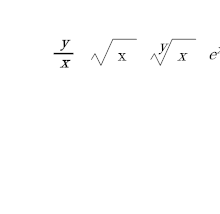 When I set SvgDocument.PointsPerInch = 300;
My code is as follows:
  SvgDocument.PointsPerInch = 300;
  SvgDocument svgDoc = SvgDocument.Open(xmlDoc);
  var svgBitmap = svgDoc.Draw();
  svgBitmap.Save("test.png", ImageFormat.Png);
The output picture is like this:
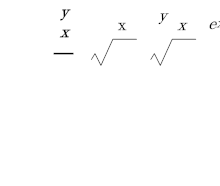 You can see that the text is offset from its original position