

 svg-net
SVG throws an error 'Stack empty.' if x="50%"
If the x attribute of a text element uses a %-value, the error 'Stack empty' is thrown. This works in the common browsers.
Example svg
<svg width="250" height="40" viewBox="0 0 250 40" xmlns="http://www.w3.org/2000/svg"> <rect x="0" y="0" width="100%" height="100%" style="fill: none; stroke: black; stroke-width: 0.25;" /> <text x="50%" y="25" font-size="10" font-family="Verdana, Helvetica, sans-serif" text-anchor="middle"> <tspan id="patient-age">x</tspan> <tspan> year old </tspan> <tspan id="patient-gender">(gender)</tspan> </text> </svg>
Stack trace
at System.ThrowHelper.ThrowInvalidOperationException(ExceptionResource resource) at System.Collections.Generic.Stack1.Peek()
at Svg.SvgUnit.ToDeviceValue(ISvgRenderer renderer, UnitRenderingType renderType, SvgElement owner) in C:\Dev\vvvv\SVG\Source\DataTypes\SvgUnit.cs:line 144
at Svg.SvgTextBase.TextDrawingState.<>c__DisplayClass51_0.<GetValues>b__0(SvgUnit p) in C:\Dev\vvvv\SVG\Source\Text\SvgTextBase.cs:line 931
at System.Linq.Enumerable.WhereSelectEnumerableIterator2.MoveNext() at System.Collections.Generic.List1.InsertRange(Int32 index, IEnumerable1 collection) at Svg.SvgTextBase.TextDrawingState.GetValues(Int32 maxCount, Func2 listGetter, UnitRenderingType renderingType) in C:\Dev\vvvv\SVG\Source\Text\SvgTextBase.cs:line 931
at Svg.SvgTextBase.TextDrawingState.DrawString(String value) in C:\Dev\vvvv\SVG\Source\Text\SvgTextBase.cs:line 599
at Svg.SvgTextBase.SetPath(TextDrawingState state, Boolean doMeasurements) in C:\Dev\vvvv\SVG\Source\Text\SvgTextBase.cs:line 343
at Svg.SvgTextBase.Path(ISvgRenderer renderer) in C:\Dev\vvvv\SVG\Source\Text\SvgTextBase.cs:line 305
at Svg.SvgTextBase.get_Bounds() in C:\Dev\vvvv\SVG\Source\Text\SvgTextBase.cs:line 214
at Svg.SvgFragment.get_Bounds() in C:\Dev\vvvv\SVG\Source\Document Structure\SvgFragment.cs:line 228
at Svg.SvgFragment.GetDimensions() in C:\Dev\vvvv\SVG\Source\Document Structure\SvgFragment.cs:line 270
at Svg.SvgFragment.Render(ISvgRenderer renderer) in C:\Dev\vvvv\SVG\Source\Document Structure\SvgFragment.cs:line 175
at Svg.SvgElement.RenderChildren(ISvgRenderer renderer) in C:\Dev\vvvv\SVG\Source\SvgElement.cs:line 800
at Svg.SvgElement.Render(ISvgRenderer renderer) in C:\Dev\vvvv\SVG\Source\SvgElement.cs:line 791
at Svg.SvgFragment.Render(ISvgRenderer renderer) in C:\Dev\vvvv\SVG\Source\Document Structure\SvgFragment.cs:line 188
at Svg.SvgDocument.Draw(Bitmap bitmap) in C:\Dev\vvvv\SVG\Source\SvgDocument.cs:line 526`

I cannot reproduce this using the SVGViewer example code. I get the following image:
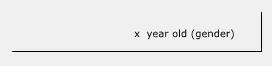

I am using the latest available via NuGet, 2.4.3.
I use this code to generate the image:
int imageWidth = 640;
int imageHeight = 480;
string svgInput = "<svg>...</svg>";

Svg.SvgDocument svgDoc = Svg.SvgDocument.FromSvg<Svg.SvgDocument>(svgInput);
svgDoc.Width = imageWidth;
svgDoc.Height = imageHeight;

using (Bitmap bm = new Bitmap(imageWidth, imageHeight))
{
    svgDoc.Draw(bm); // Exception here
    using (MemoryStream ms = new MemoryStream())
    {
        bm.Save(ms, imageFormat);
    }
}
Hm, I cannot reproduce it with that version, either - same result. I use basically the same code.
Oops, turns out I simplified the svg a bit too much.
One important thing I left out is that I use nested <svg>
That seems to be the issue.
Sorry for not giving the proper input data the first time.
<svg version=""1.1"" xmlns=""http://www.w3.org/2000/svg"" width=""148mm"" height=""210mm"" viewBox=""0 0 148 210"">
  <style>
        .caption { font-family: Arial; font-size: 7px; font-weight: normal; fill: black; }
    </style>
    <svg x=""0"" y=""55"">
        <text class=""caption"" x=""50%"" y=""20"" text-anchor=""middle"">
            <tspan id=""patient-age"">x</tspan>
            <tspan> year old </tspan>
            <tspan id=""patient-gender"">(gender)</tspan>
        </text>
    </svg>
</svg>
After some more testing I found that if both width and height are added to the nested <svg> there is no exception, but nothing is rendered, though.
Nested <svg>
<svg x=""0"" y=""55"" width=""148"" height=""150"">
also tested with a full declaration with the same result
<svg version=""1.1"" xmlns=""http://www.w3.org/2000/svg"" x=""0"" y=""55"" width=""148"" height=""150"">
I hope this info helps.
Not sure if it is allowed to leave out the width and the height in a nested <svg>, but I thought it would inherit from the parent element.
That is doesn't render the text is still a problem, though, but maybe I have done something else wrong?
Thanks - now I could reproduce the problem. I found where the crash comes from, and think I can fix it. I get no image for the second case (with size given in the nested SVG), though - this seems to be another problem.
Sorry again for not giving proper input data the first time. I know frustrating it is with "I have problem, you fix problem" and then you have no way to reproduce exactly. My only defence is that I was in a hurry.
Do you need me to submit another case for the non-rendering issue?
No problem :) I haven't looked at the other problem yet, but I guess one example should be enough. I cannot promise anything here (haven't looked much into the text rendering code yet), but with the current fix, you can at least use your original images. Are you are able to build master to test the fix?
Just for information: I had another look and did not find the actual problem, but got a bit closer: the problem is the calculation of percent values (here the caption) inside the nested SVG. For some reason, they are calculated wrong, seemingly with an extra scaling defined by the outer svg size (in the example, the text is drawn outside the bounds and not visible for this reason). This is true for any co-ordinates given in percents inside the nested SVG.
@mrbean-bremen
What's issue with this now ?(Text rendering ?) Which SVG is in issue ?

@H1Gdev - the SVG is __issue-460-01.svg (it's checked in), and the problem is that the text does not render. Admittedly, I don't remember at all what I found at the time - it's one and a half year ago, way over my memory capacity...