
language-tools
 language-tools copied to clipboard
 sveltejs
SCSS highlighting breaks if defined as default and not in the component
Describe the bug
If you set SCSS as the default style language and not set it inside the component itself on <style> tag, it would mess up the whole highlighting of everything below.
To Reproduce
Set the defaults in rollup.config.js:
import sveltePreprocess from 'svelte-preprocess';

const preprocess = sveltePreprocess({
  defaults: {
    style: 'scss',
  },
  scss: true,
});
Set the same in svelte.config.js:
const sveltePreprocess = require('svelte-preprocess');

module.exports = {
  preprocess: sveltePreprocess({
    defaults: {
      style: 'scss',
    },
    scss: true,
  }),
};
Use some basic component like this:
<script>
  let blabla = 'wer';
</script>

<style>
  @mixin a($var) {
    font-style: $var;
  }

  .selector {
    @include a('qwd');
  }
</style>

<!-- Messes up everything -->
<div class="selector">Yep {blabla}</div>
Expected behavior
Should work as if <style lang='scss'> is saved in the file.
Screenshots
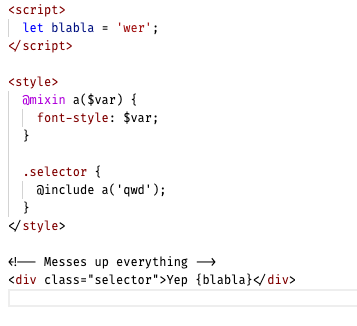
System (please complete the following information):
- OS: OS X
- IDE: VS Code
- Plugin/Package: Svelte for VS Code (103.0.0)

I don't think there's a way to solve this I'm afraid. The docs mention this and give an explanation why. If someone knows a way, let us know.

Offtop: this idea is so dope. <i18n> tag would be so cool in the context of https://github.com/sveltejs/sapper/issues/576.
Ran into this today and remembered reading those docs but did not recall it mentioning that it would only work for some instances.
@dummdidumm Do you happen to know which cases permit leaving off the lang/type from the style tag?
For me this doesn't appear to even get recognized by the language-server as I get css errors all over in my script tag unless I set the lang attribute to scss.


