
cli
 cli copied to clipboard
 supabase
Cannot type in Access Token in cmd or powershell
Describe the bug
As of this morning I cannot type in my access token in the cmd line prompt when prompted. Nor can I paste it
To Reproduce
Steps to reproduce the behavior, please provide code snippets or a repository:
- Run npx supabase login
- In the prompt that asks for access token. Try and type or right click paste access token
- Nothing happens
Expected behavior
I should be able to type or paste my access token in the command line
Screenshots
System information
- OS: Windows 10 Enterprise Version 22H2 OS build 19045.2846 Experience Windows Feature Experience Pack 120.2212.4190.0
- Supabase CLI Version: 1.52.3


The access token is hidden from display by default as it is sensitive data. May I check if you are able to login after hitting enter?



The one I am trying to use starts like below: sbp_e454aa....................
Can you try it with npx supabase login --debug? (Making sure to mask the actual token)
Same error message.The problem is in the cli input part. The token is fine and has worked perfectly until now. However due to the problems we had this morning due to the hotfix, it seems as though it affected the input.
I'm unable to reproduce your error on my win10 vm. Could you check the windows credentials store to see if the project access token exists?
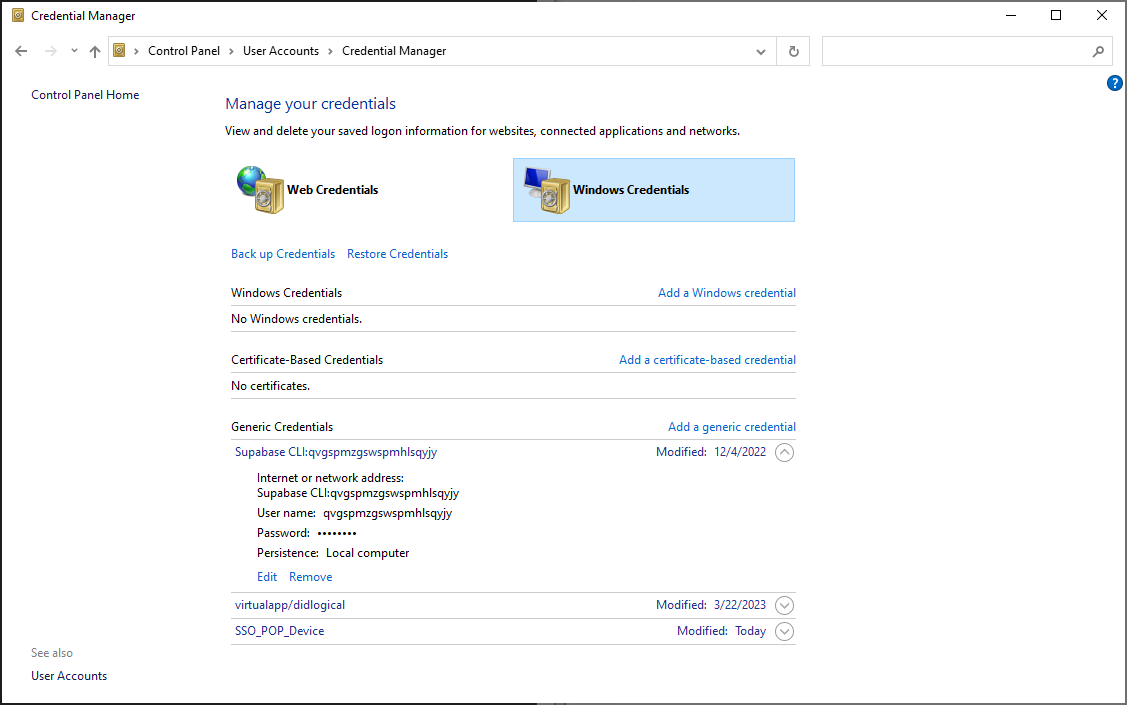
You may try removing the token and login again.
I removed the token and I still cannot type or paste anything in the cmd where it asks for 'Enter your access token'. Could you please tell me how I can do a full removal and clean of the npm cache so that I can totally remove the supabase cli. After that I will try and reinstall it.
Typically npm uninstall supabase should work. If not, you can also try deleting the ./node_modules directory from your project folder.
Thank you for trying to help me with this, but unfortunately nothing seems to work.
Another workaround is to skip login completely by setting SUPABASE_ACCESS_TOKEN env var.
Ok I could try that. I am guessing I need to do this using GitHub Actions or is there a simpler way using VSCode?
You can do this inside command prompt
setx SUPABASE_ACCESS_TOKEN sbp_******
Then after restarting command prompt, you should be able to run other commands like supabase projects list.
Awesome that did the trick. Thank you so much for your patience and help in resolving this case.
I had a similar issue using the PowerShell in VsCode on Win11. Using the default PowerShell worked as expected

I had a similar issue using the PowerShell in VsCode on Win11. Using the default PowerShell worked as expected
Interesting stuff. I will look into this as it never crossed my mind it could be that.
for what it's worth ... I have the same issue on Windows 11 in vs code and in Power Shell and Command Prompt directly. I resolved it by setting the environment variable as suggested above.

I had a similar issue using the PowerShell in VsCode on Win11. Using the default PowerShell worked as expected
This worked for me, thanks

I had a similar issue using the PowerShell in VsCode on Win11. Using the default PowerShell worked as expected
Same problem for me, it works with the default PowerShell too.

i had the same problem but it is on linux it seems that what is stopping me from entering the token is the password input the supabase cli is using.
i feel it's really useless because if the attacker wants to get it they have already captured the token from the token generating site and no one can remember this token so the password field here is meaningless

I typed the access token manually in the terminal, and that worked for me. However, as I was typing, there was no indication that I was actually typing anything.

i used the method to set env and sucessfully logined. but i can't input anything when i link to my database that i need to input my password.


Encountering the same problem with Visual Studio Code on Windows, but utilizing the Windows Terminal resolves the issue.
