
sublime_merge
 sublime_merge copied to clipboard
 sublimehq
Delete all branches in a folder
Problem description
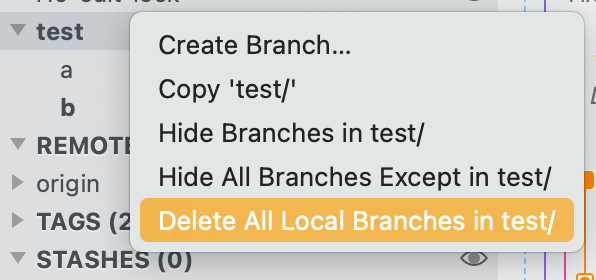
It would be great to be able to right-click a folder and delete all branches in the folder. A common example is Dependabot, which leaves all its branches under dependabot/*. Sometimes I like to clean up any Dependabot branches I've had to pull for manual intervention.
Preferred solution
The simplest solution for me is to add "Delete All" to the branch context menu
Alternatives
I've tried adding this myself to Branch Folder.sublime-menu, but I can't figure out the magical incantation to either let me use the pipe in a git command (git branch | grep '$branch' | xargs git branch -D), or backticks (git branch -d `git branch --list '$branch*'`)
Have tried this for example:
[
  {
    "caption": "Delete All Local Branches in $branch",
    "command": "git",
    "args": {"argv": ["branch", "-d", "`git branch --list '$branch*'`"]}
  }
]
But it just errors:
error: branch '`git branch --list 'test/*'`' not found.
Screenshots

Piping or nesting commands does not work within the command, keybinding, or menuing systems. Your best bet until a plugin API is supported it to use a git alias to workaround this limitation. Example: https://forum.sublimetext.com/t/ignore-file-directory-menu-items/57604
