
react-native
 react-native copied to clipboard
 storybookjs
Not able to view to react native stories on web
Hi ,
First of all storybook is amazing!.
I am trying to use it for building design system library for react-native.
I have installed react-native through react-native init and configured storybook through sb init
On running storybook server, i am able to view default stories on mobile device but web shows default stories but on selecting it changes in mobile and view is not there in web
 Since i want to share the design stories with others and viewable on site (final deploy)
What is the general process to view react native stories on mobile(this is working fine) as well as web view as i do not find any solution :disappointed:
I have gone through this below issues and tried configuring but does not help and i need some proper configuration even after future update of sb
Please advise on this situation.
one
two
three
Below version
"react": "16.9.0",
"react-native": "0.61.5",
"@storybook/addon-actions": "^5.2.8",
"@storybook/addon-links": "^5.2.8",
"@storybook/addons": "^5.2.8",
"@storybook/react-native": "^5.2.8",
"@storybook/react-native-server": "^5.2.8"
storybook version :- 5.2.8
Since i want to share the design stories with others and viewable on site (final deploy)
What is the general process to view react native stories on mobile(this is working fine) as well as web view as i do not find any solution :disappointed:
I have gone through this below issues and tried configuring but does not help and i need some proper configuration even after future update of sb
Please advise on this situation.
one
two
three
Below version
"react": "16.9.0",
"react-native": "0.61.5",
"@storybook/addon-actions": "^5.2.8",
"@storybook/addon-links": "^5.2.8",
"@storybook/addons": "^5.2.8",
"@storybook/react-native": "^5.2.8",
"@storybook/react-native-server": "^5.2.8"
storybook version :- 5.2.8

@rajatrao777 As far as I know you can't show them on the web unless you use react-native-web project.
Basically you can't render React-Native primitives on the web with storybook. One workaround would be to have a specific build, like with environment variables to delivery a storybook app to your testers. There is react-native-web, which would lead to an extra effort of maintaining another project just for storybook. I think it's counter intuitive and counterproductive.
My main idea today is to use diawi to build a "storybook app" to show storybook components. Fastlane can help with build automation so this can be a way to solve this. With Diawi you can upload your app build and they generate an installable link. With that you can share with anyone. By entering the link in the default phone browser they will be able to install the app and check storybook components.
But I would also be very happy to be wrong about this. So far this is the best way I had found.

@vinipachecov Thanks for your response. what you have suggested with diawi and share storybook app can be considered :+1: Just wanted to keep it open so people who are facing the same issue/ or solved the same can share their views
Agreed, It's a bit confusing how the docs are explained, by reading the docs it seemed that you are supporting story books for reaact native. When you read "demos of react native web and react dates...etc" you can assume that those are examples of react native applications with storybook static builds.
So yes adding a flag to build the app with the storybook registered app, will be the only solution for now.
thx

we DO support storybooks for react native -- on your device in the actual native environment, which AFAIK is what actually matters in the end. there are ways to emulate this in the browser but at the end of the day they are just emulations of varying fidelities.

yep, this is because I was understanding (and other guys in stackoverflow) that we can build a static website from the react-native storybook components, just like the title of this thread, because if you go to the docs the title "Exporting Storybook as a Static App" sounds like we can export our mobile application storybook stories to a static app(web-app) just like the linked examples, maybe adding something like `this works for react and react-native-web only, for react-native applications creating the static web application is not possible, but you can still configure your CD/CI or local environment to generate a build with the storybook application only, so the testers can work over it, etc"
`Exporting Storybook as a Static App
But Storybook is also a tool you can use to showcase your components to others. Demos of React Native Web and React Dates are a good example for that.
For that, Storybook comes with a tool to export your storybook into a static web app. Then you can deploy it to GitHub pages or any static hosting service.`
Hey, in the long run we have a plan to try to support react native web. As it is now, the main recommendation is to put storybook as an easter egg or something in your app. Or if you have multiple releases you could only keep it in dev release. Or if you don't have any native dependencies, an expo app could be created which downloads your storybook bundle from somewhere and renders it (we had a POC for it some time ago, but because it doesn't support any native things we dropped it).

Right, the documentation is not complete. Please check this video: https://www.youtube.com/watch?v=nWgKVEEI47Q This explain that you should up both projects

Hi , First of all storybook is amazing!. I am trying to use it for building design system library for react-native. I have installed react-native through react-native init and configured storybook through sb init On running storybook server, i am able to view default stories on mobile device but web shows default stories but on selecting it changes in mobile and view is not there in web
same issue...

Hi , First of all storybook is amazing!. I am trying to use it for building design system library for react-native. I have installed react-native through react-native init and configured storybook through sb init On running storybook server, i am able to view default stories on mobile device but web shows default stories but on selecting it changes in mobile and view is not there in web
same issue...
This is how it is currently implemented if I'm not mistaken. The stories will only be able to be viewed on a mobile device. The web navigator is just to help switch between stories.

I create a simple solution.
In development env, I created a selection process whether to run storybook or general application.
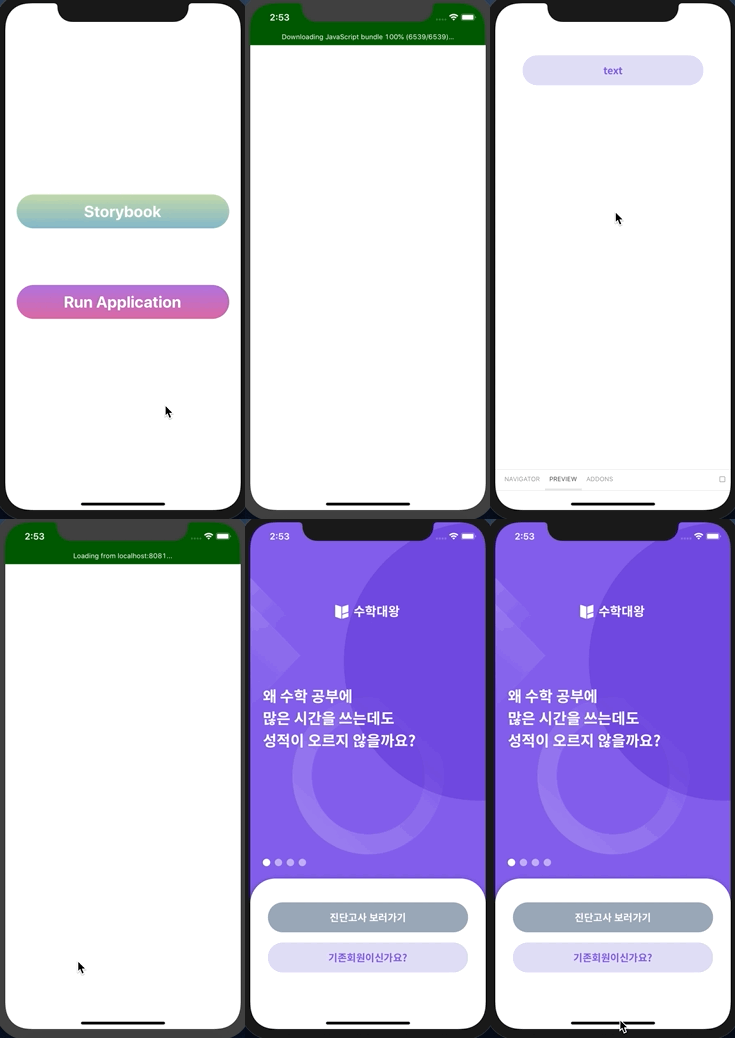
If __DEV__ is true, I wrapped App.tsx with simple HDC.
LinearGradient is absolutely useless. It is just for design.
const withStorybook = (Wrapped: ComponentType): ComponentType => {
  const WithStorybook = (props): ReactElement => {
    const [storybook, setStorybook] = useState<boolean>();

    SplashScreen.hide();

    if (storybook === undefined) {
      return (
        <View style={{ justifyContent: 'center', marginHorizontal: 20, flex: 1 }}>
          <TouchableOpacity
            onPress={(): void => {
              // eslint-disable-next-line no-console
              console.disableYellowBox = true;
              setStorybook(true);
            }}
          >
            <LinearGradient
              colors={['#c2d9a9', '#83b7c9']}
              style={{ justifyContent: 'center', alignItems: 'center', borderRadius: 30, height: 60 }}
            >
              <Text style={{ color: 'white', fontSize: 28, fontWeight: 'bold' }}>Storybook</Text>
            </LinearGradient>
          </TouchableOpacity>
          <TouchableOpacity
            style={{ marginTop: 100 }}
            onPress={(): void => {
              setStorybook(false);
            }}
          >
            <LinearGradient
              colors={['#b173de', '#db69a4']}
              style={{ justifyContent: 'center', alignItems: 'center', borderRadius: 30, height: 60 }}
            >
              <Text style={{ color: 'white', fontSize: 28, fontWeight: 'bold' }}>Run Application</Text>
            </LinearGradient>
          </TouchableOpacity>
        </View>
      );
    }

    if (storybook) {
      return <Storybook />;
    } else {
      return <Wrapped {...props} />;
    }
  };

  return WithStorybook;
};

function App(): React.ReactElement {
  return (
    <RootProvider>
      <RootNavigator />
    </RootProvider>
  );
}
// eslint-disable-next-line no-undef
export default __DEV__ ? withStorybook(App) : App;

Thanks, for solution
I will try this if any query I will ping.
On Tue, Mar 24, 2020 at 11:25 AM MJ Studio [email protected] wrote:
I create a simple solution.
In development env, I created a selection process whether to run storybook or general application.
[image: 1] https://user-images.githubusercontent.com/33388801/77392915-589c6300-6ddf-11ea-9714-8b9372dc13b4.gif
If DEV is true, I wrapped App.tsx with simple HDC.
LinearGradient is absolutely useless. It is just for design.
const withStorybook = (Wrapped: ComponentType): ComponentType => { const WithStorybook = (props): ReactElement => { const [storybook, setStorybook] = useState
(); SplashScreen.hide(); if (storybook === undefined) { return ( <View style={{ justifyContent: 'center', marginHorizontal: 20, flex: 1 }}> <TouchableOpacity onPress={(): void => { // eslint-disable-next-line no-console console.disableYellowBox = true; setStorybook(true); }} > <LinearGradient colors={['#c2d9a9', '#83b7c9']} style={{ justifyContent: 'center', alignItems: 'center', borderRadius: 30, height: 60 }} > <Text style={{ color: 'white', fontSize: 28, fontWeight: 'bold' }}>Storybook</Text> </LinearGradient> </TouchableOpacity> <TouchableOpacity style={{ marginTop: 100 }} onPress={(): void => { setStorybook(false); }} > <LinearGradient colors={['#b173de', '#db69a4']} style={{ justifyContent: 'center', alignItems: 'center', borderRadius: 30, height: 60 }} > <Text style={{ color: 'white', fontSize: 28, fontWeight: 'bold' }}>Run Application</Text> </LinearGradient> </TouchableOpacity> </View> ); } if (storybook) { return <Storybook />; } else { return <Wrapped {...props} />; }};
return WithStorybook; }; function App(): React.ReactElement { return ( <RootProvider> <RootNavigator /> </RootProvider> ); }// eslint-disable-next-line no-undefexport default DEV ? withStorybook(App) : App;
— You are receiving this because you commented. Reply to this email directly, view it on GitHub https://github.com/storybookjs/react-native/issues/21#issuecomment-603032574, or unsubscribe https://github.com/notifications/unsubscribe-auth/AEBLNJIHGGGSIKOBUA7WQSTRJBDNPANCNFSM4KOXXFOA .
-- By Ronak Dholariya IT Branch At B.H.Gardi college
9904817700
I also just tried to get this up and running, and my first thought when reading the documentation, was that the components and stories you define in your app, would be "viewable" on a static website aswell. But this is a lacking feature?

For rn sb on the web see http://github.com/storybookjs/addon-react-native-web
