
domoticz-zigbee2mqtt-plugin
 domoticz-zigbee2mqtt-plugin copied to clipboard
 stas-demydiuk
`color_temp_startup` feature support
Issue description I am getting this error on every start of z2m ( can not process numeric item "color_temp_startup" ) in domoticz on this devices:
IKEA | LED1903C5/LED1835C6 IKEA | LED1732G11 IKEA | LED1537R6/LED1739R5 Xiaomi | ZNLDP12LM
Additional information Zigbee2MQTT version 1.17.1-dev commit: 1bcc5f1 Coordinator type zStack3x0 Coordinator revision 20210120 Frontend version 0.3.42 Python: 3.7.3 Domoticz 2020.2 build 12913
Feature definition
{
   "access":7,
   "description":"Color temperature after cold power on of this light",
   "name":"color_temp_startup",
   "presets":[
      {
         "description":"Coolest temperature supported",
         "name":"coolest",
         "value":250
      },
      {
         "description":"Cool temperature (250 mireds / 4000 Kelvin)",
         "name":"cool",
         "value":250
      },
      {
         "description":"Neutral temperature (370 mireds / 2700 Kelvin)",
         "name":"neutral",
         "value":370
      },
      {
         "description":"Warm temperature (454 mireds / 2200 Kelvin)",
         "name":"warm",
         "value":454
      },
      {
         "description":"Warmest temperature supported",
         "name":"warmest",
         "value":454
      },
      {
         "description":"Restore previous color_temp on cold power on",
         "name":"previous",
         "value":65535
      }
   ],
   "property":"color_temp_startup",
   "type":"numeric",
   "unit":"mired",
   "value_max":454,
   "value_min":250
}

Could you please enable debug mode in the plugin and provide what you have in the log (there should be additional feature details under the error message).

2021-02-10 10:21:34.373 Python Plugin System: (Zigbee) {"access": 7, "description": "Color temperature after cold power on of this light", "name": "color_temp_startup", "presets": [{"description": "Coolest temperature supported", "name": "coolest", "value": 250}, {"description": "Cool temperature (250 mireds / 4000 Kelvin)", "name": "cool", "value": 250}, {"description": "Neutral temperature (370 mireds / 2700 Kelvin)", "name": "neutral", "value": 370}, {"description": "Warm temperature (454 mireds / 2200 Kelvin)", "name": "warm", "value": 454}, {"description": "Warmest temperature supported", "name": "warmest", "value": 454}, {"description": "Restore previous color_temp on cold power on", "name": "previous", "value": 65535}], "property": "color_temp_startup", "type": "numeric", "unit": "mired", "value_max": 454, "value_min": 250} 2021-02-10 10:21:34.374 Python Plugin System: (Zigbee) {"access": 3, "description": "Offset to be used in the local_temperature", "name": "local_temperature_calibration", "property": "local_temperature_calibration", "type": "numeric", "unit": "\u00b0C"}
The last logitem is also not processed, and gives the error: can not process numeric item "local_temperature_calibration" That is about https://www.zigbee2mqtt.io/devices/SEA801-Zigbee_SEA802-Zigbee.html#saswell-sea801-zigbee%252Fsea802-zigbee
Thanks, I'm not sure what device type should be used to handle that if any at all. Could you please suggest?
To me it seems to have only a few default setting, like coolest, cool, neutral, warm and warmest. That could be solved with a selector-switch with the above level names. This way there is an easy setting to set all bulbs to the same color temperature at startup. For the 'local_temperature_calibration' it should be part of the device temperature device. In a temperature device there is a setting "Adjustment", because the unit is \u00b0C, which is degrees Celsius.
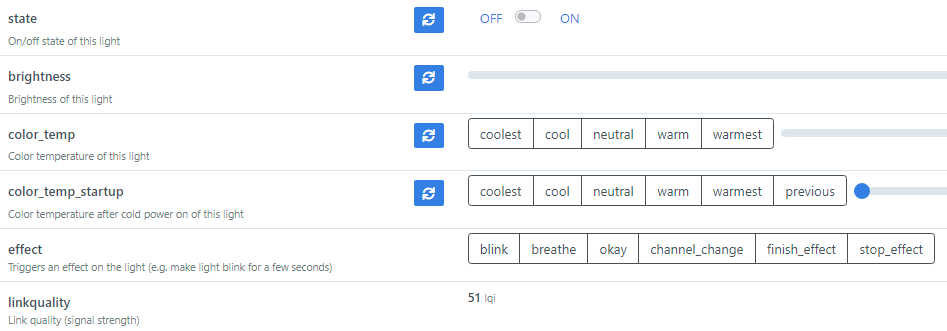
For now I have added below code to the adapters.py at line 301 to avoid the ' can not process numeric item "color_temp_startup" ' error...
        if (feature['name'] == 'color_temp_startup' and state_access):
            return


That's not a solution, but a workaround. I think it should be a selector device.
Por ahora, he agregado el siguiente código a adapters.py en la línea 301 para evitar el error ' no se puede procesar el elemento numérico "color_temp_startup" ' ...
        if (feature['name'] == 'color_temp_startup' and state_access):
            return
dear @stas-demydiuk , I have added this code to adapters.py but in my case with domoticz the problem is not solved:
2021-04-26 11:06:52.145 Error: zigbe2mqtt: (zigbe2mqtt) Philips hue1: can not process feature type "composite"
2021-04-26 11:06:52.146 Error: zigbe2mqtt: (zigbe2mqtt) Philips hue2: can not process feature type "composite"
2021-04-26 11:06:52.146 Error: zigbe2mqtt: (zigbe2mqtt) Philips hue4: can not process feature type "composite"
2021-04-26 11:06:52.146 Error: zigbe2mqtt: (zigbe2mqtt) Philips hue3: can not process feature type "composite"
2021-04-26 11:06:52.150 Error: zigbe2mqtt: (zigbe2mqtt) Hdd Plug: can not process numeric item "consumer_overload"
every time i reboot domoticz i get this annoying error.
I have the bulbs set to switch on in my favorite color and this works fine:
mosquitto_pub -h 127.0.0.1 -t zigbee2mqtt/0x0xxxxxxxxxxxxx/set -m '{"hue_power_on_brightness": 255, "hue_power_on_color": "FFFFFF" , "hue_power_on_behavior":"on" , "transition": 0}'
I don't understand why this error appears . How i can solve this error? thanks in advance. a cordial greeting

This issue has been automatically marked as stale because it has not had recent activity. It will be closed if no further activity occurs. Thank you for your contributions.
![stale[bot] avatar](https://avatars.githubusercontent.com/in/1724?v=4 "Published by a pub.dev verified publisher")