
sqlitebrowser
 sqlitebrowser copied to clipboard
 sqlitebrowser
JSON1 Extension still unavailable under Ubuntu / Linux Mint
I'm trying to execute a query using JSON1 in SQLite Browser under Linux Mint, however the extension seems to be missing in this binary.
Details for the issue
What did you do?
I just tried the nightly release on Linux Mint 20 with the following commands:
sudo add-apt-repository -y ppa:linuxgndu/sqlitebrowser-testingsudo apt-get updatesudo apt-get install sqlitebrowser
This gives me the following version in the "About" dialog: DB Browser for SQLite Version 3.12.99 (Oct 10 2020)
What did you expect to see?
For example, the basic query:
SELECT json_extract(json('{"greeting": "hello"}'), '$.greeting')
... should work.
What did you see instead?
The example query above produces the following error:
Execution finished with errors.
Result: no such function: json
At line 1:
SELECT json_extract(json('{"greeting": "hello"}'), '$.greeting')
Useful extra information
The info below often helps, please fill it out if you're able to. :)
What operating system are you using?
- [ ] Windows: ( version: ___ )
- [x] Linux: (Mint 20 )
- [ ] macOS: ( version: ___ )
- [ ] Other: ___

The extension isn't compiled statically into the application - you'd have to load it via 'Tools' and 'Load extension'. It would also need creating, as its not currently available in our packages. I've had a quick look around, but many sources just say, "compile it yourself" which isn't helpful...

I just compile JSON1 extension for you. You can load the below file from the 'Preferences' and use it. At least it works fine on my Ubuntu 20.04.1 PC and DB4S's latest nightly build.
DOWNLOAD LINK REMOVED
- MD5SUM: 6a5166245d1b2609d6b61996bdd9ae39
- SHA256: dab4a626be23514f75485ce77d5959f53e2dfa966011f156985d40941996a820

It's odd that the extension isn't enabled by default on linux. I know for a fact that in the windows version, the JSON1 extension is enabled by default because my co-workers use it.
@lucydodo I just tried it, sorry but my SQLite crashes immediately (without any error message, the window just closes) when I try to add that extension file...
The extension isn't compiled statically into the application - you'd have to load it via 'Tools' and 'Load extension'. It would also need creating, as its not currently available in our packages. I've had a quick look around, but many sources just say, "compile it yourself" which isn't helpful...
@chrisjlocke We include the JSON1 extension (built in) to our Windows and macOS builds:
https://github.com/sqlitebrowser/sqlitebrowser/blob/1c0cf443b55e3a06e0c948db7ba6ece50eec278e/installer/windows/nightly_build_scripts/win64build.bat#L70
We probably just need to add the same options to the Linux build process. @deepsidhu1313 would you be ok to try adding them? It's probably just a matter of using the same compile options for the build. Something like:
<compiler> sqlite3.c -DSQLITE_ENABLE_FTS5 -DSQLITE_ENABLE_FTS3 -DSQLITE_ENABLE_FTS3_PARENTHESIS -DSQLITE_ENABLE_STAT4 -DSQLITE_SOUNDEX -DSQLITE_ENABLE_JSON1 -DSQLITE_ENABLE_GEOPOLY -DSQLITE_ENABLE_RTREE -DSQLITE_MAX_ATTACHED=125
The "<compiler>" thing there being (eg) gcc or whatever is currently being used. Hopefully that works. :smile:

If there's a way to enable JSON1 by default on linux, please enable it. It would make my daily work that much easier.
No worries. @deepsidhu1313 is the creator of our Linux packages, so lets see if the extension can be added to them. :smile:
@justinclift Can you tell me what extensions are currently built-in to DB4S? It would be nice to add information about this to the wiki. :smile:
Quick question, to enable json1 support do we need set flag while building DB4S or sqlite ?

Theoretically, when building SQLite. Specifically, "Add the -DSQLITE_ENABLE_JSON1 compile-time option to enable the json1 extension that is built into the amalgamation. The json1 source code is included with the SQLite amalgamation, though it is disabled by default."
Oops. Yeah, that's why I was pointing to the compile line above. Forgot I should probably explain it a bit better.
Each of those options in the compile line above are explained here:
https://www.sqlite.org/compile.html
So:
-DSQLITE_ENABLE_FTS5enables the FTS5 extension-DSQLITE_ENABLE_FTS3enables the FTS3 extension- etc...
Thanks @chrisjlocke. :smile:
I have to check if default sqlite packages are built with these flags, otherwise we have to compile our own
Hey folks,
I've just acquired SQLite Browser 3.12.0 from https://launchpad.net/~linuxgndu/+archive/ubuntu/sqlitebrowser using Ubuntu 20.10 and it still doesn't include the JSON1 extension... This is unfortunately still an issue.
Ahhh well. I suppose the only foolproof method that's likely to be timely is compiling the code yourself.
Is that something you're ok with?
You'd likely need to compile SQLite itself (eg with the JSON extension), then compile SQLite Browser using that SQLite.
We have instructions for Ubuntu for compiling the SQLite Browser piece, if that's helpful?
https://github.com/sqlitebrowser/sqlitebrowser/blob/master/BUILDING.md#ubuntu--debian-linux
There's some further info about compiling with a custom SQLite, for Ubuntu, that's likely relevant:
https://github.com/sqlitebrowser/sqlitebrowser/wiki/Compiling-DB4S-on-Ubuntu-To-Use-A-Pre-Installed-Version-of-SQLite
I'm not really all that comfortable with compiling native binaries to be honest. Those things tend to go wrong in all sorts of ways (wrong library versions etc.). My short-term solution currently is to use another SQL UI tool (their SQLite binary apparently had the extension by default), but I'd still prefer the SQLite browser.
No worries at all. :smile:
@deepsidhu1313 Hopefully you have some time to look at this at some point. Another approach might be to ask the Ubuntu SQLite packaging people if they'd be ok to include most/all of the optional SQLite extensions that are in the SQLite tarball. They'd just need to add the -Dxxxxx options (like in our Windows build). :smile:
Sure, i can build some binaries on testing ppa over weekend. Can someone please provide me details how to test this issue, so that I don’t miss anything ? I was pretty much sure it was solved. But may be i missed something.
Thanks
How to test:
- open any sqlite db in the browser
- open the sql editor
- run the following query:
select json('{}')
If you don't get an error running the query, the extension works.
@MartinHaeusler apologies for taking some time to investigate the issue. I ran the query you mentioned and got the following results
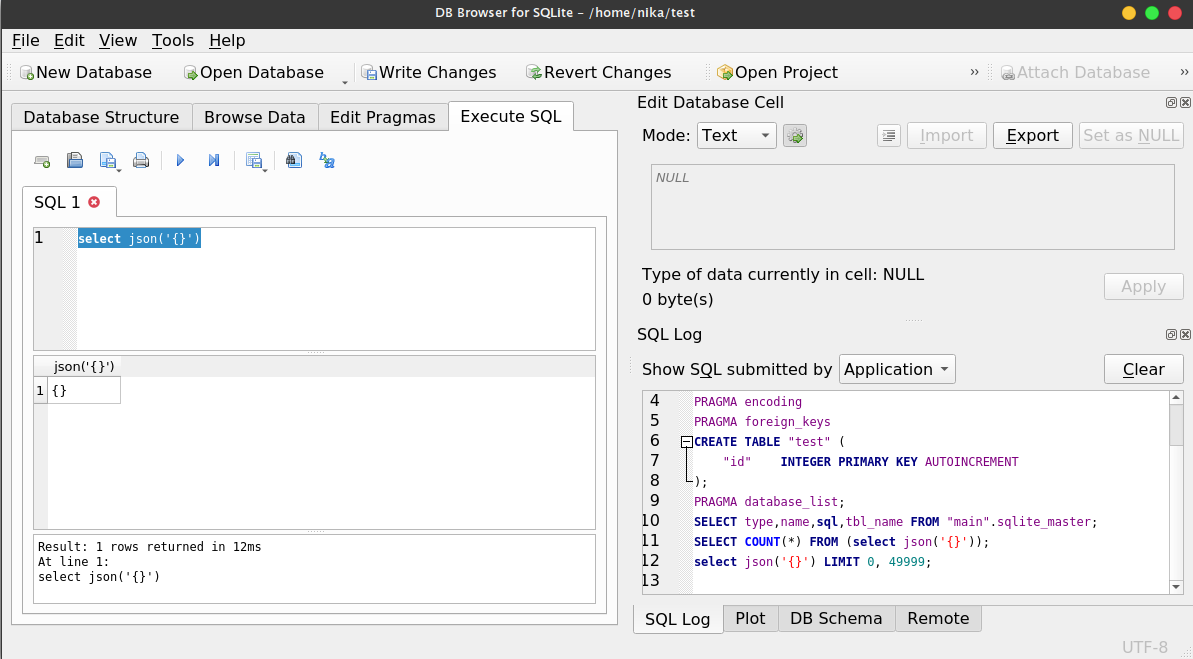
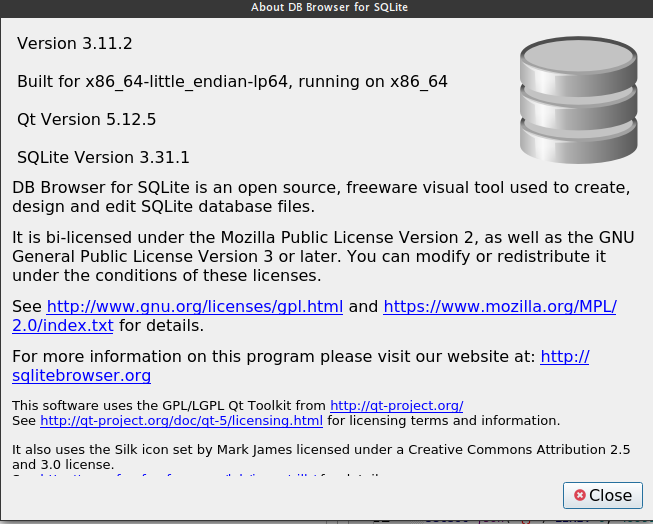
Something broke the package 3.12.0. Did we change anything special in 3.12 ?
@deepsidhu1313 That screenshot seems to be for the older 3.11.2 release, and it seems to be ok. eg it does include the JSON1 extension.
So, in theory (!) the same approach for building that should work for building the 3.12.1 release with the JSON1 extension.
I have this flag enabled for both sqlitebrowser and sqlcipher package.
https://github.com/deepsidhu1313/sqlitebrowser-deb-packaging/blob/master/debian/rules
https://github.com/deepsidhu1313/sqlcipher_deb_packaging/blob/master/debian/rules
Am I missing any flag or do I need to compile SQLite with this option?
Is there a way in our make step to know if sqlite or sqlcipher which is being used to build sqlitebrowser supports JSON?
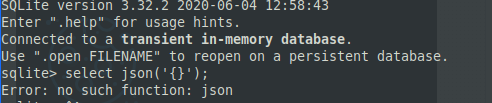
Ahhh, interesting. That's a flag used when compiling SQLite and SQLCipher, and doesn't do anything for the DB4S package build.
DB4S just needs to be built with SQLite or SQLCipher that had the extension enabled for its build.
It seems like whichever SQLite or SQLCipher library is being used when testing, it's not one with that flag enabled.
Maybe the DB4S install is just picking up the wrong library when it's being run?
should we look into standardizing sqlite and sqlcipher version and build flags to be used across all platforms? it seems like windows builds are using different flags than Linux one.
Yeah, the Linux one should probably use the same flags as the Windows one. :smile:
I have created new ppa for sqlite3 and added some extra cc flags to align with windows builds. May i request someone to peer review the cc flags?! I have kept cc flags that are being used by original debian packaging.
https://github.com/deepsidhu1313/sqlite_deb_packaging/commit/f3899094852002b2a579df2cabc80dec93c00702
New ppa link for sqlite_daily packages. once we build sqlite with json support, i will try to build sqlcipher with json support and then DB4S.
@deepsidhu1313 Looking over the list, it seems to include all the same pieces we have in the Windows and macOS builds. :smile:
There is one aspect I'm not sure of though. Some of the -D options have a =1 on the end. I'm guessing you're trying to give them a value, like in key/value lookups? eg:
-DSQLITE_ENABLE_JSON1=1-DSQLITE_ENABLE_RTREE=1-DSQLITE_SOUNDEX=1
There are some SQLite defines that can take values, but those three don't seem to:
- JSON1 → https://www.sqlite.com/compile.html#enable_json1
- R*Tree → https://www.sqlite.com/compile.html#enable_rtree
- Soundex → https://www.sqlite.com/compile.html#soundex
Not sure if it'll really hurt anything though. :smile:
so finally able to figure out why sqlite3 version i was using, was not recognizing json* functions :confused: . My machine was picking up sqlite3 from android packaging tool. This thing was driving me nuts from last few weeks :angry:. so finally was able to fix and test json support in sqlite and sqlcipher :smile: . Will spend some time testing sqlitebrowser nightly packages .
@deepsidhu1313 Good stuff. :smile:
Sounds like that was a royal pain in the arse to figure out too. :frowning_face:
Finally issue is resolved in latest build on nightly repo. Please verify with 3.12.1-3~3036* build. I would love someone to confirm the package is working for all before i push it to stable repo.