
spyder
 spyder copied to clipboard
 spyder-ide
Outline pane is automatically shown when editor is maximized
Issue Report Checklist
- [ ] Searched the issues page for similar reports
- [ ] Read the relevant sections of the Spyder Troubleshooting Guide and followed its advice
- [ ] Reproduced the issue after updating with
conda update spyder(orpip, if not using Anaconda) - [ ] Could not reproduce inside
jupyter qtconsole(if console-related) - [ ] Tried basic troubleshooting (if a bug/error)
- [ ] Restarted Spyder
- [ ] Reset preferences with
spyder --reset - [ ] Reinstalled the latest version of Anaconda
- [ ] Tried the other applicable steps from the Troubleshooting Guide
- [ ] Completed the Problem Description, Steps to Reproduce and Version sections below
Problem Description
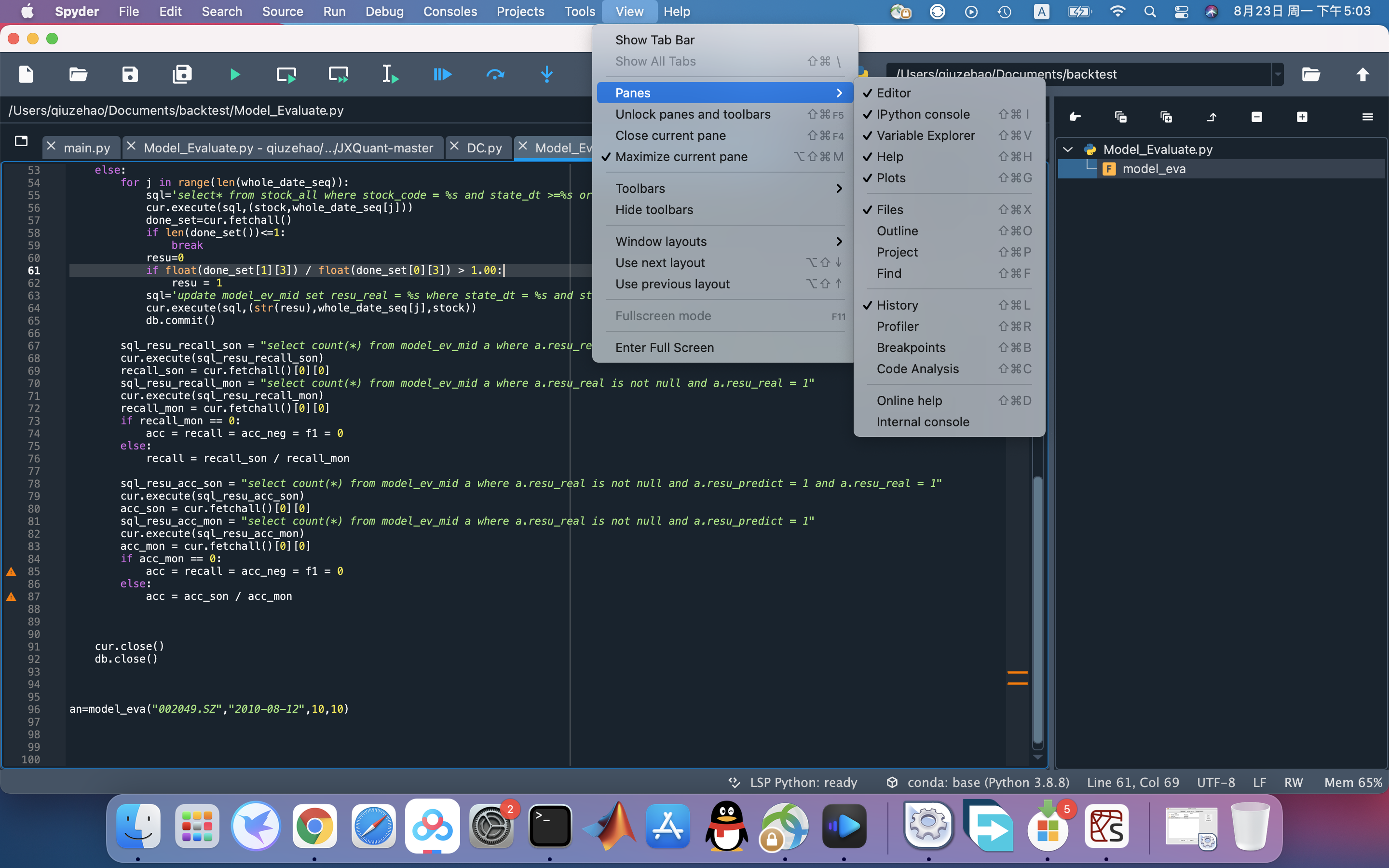
When I click the maximize current pane on the top tool bar to maximize editor, the outline pane automatically shown on the right side. But in the view option, the outline is actually not checked. I have to first check the outline option(nothing happens), then check it again to close the outline pane.
What steps reproduce the problem?
- click the maximize current pane to maximize editor
- the outline pane is shown on the right side
What is the expected output? What do you see instead?
Outline pane not shown. Or at least the outline option should be checked when shown.
Paste Traceback/Error Below (if applicable)
PASTE TRACEBACK HERE
Versions
- Spyder version: 5.1.1 (also happen in 5.0.5)
- Python version: 3.8.8
- Qt version:
- PyQt version:
- Operating System name/version: Mac BigSur
Dependencies
PASTE DEPENDENCIES HERE

Hi @newyorker123,
When you hit maximize the editor, it will open by default the outline on the right side. What is weird is that the pane is not checked on the menu, we will look into to add the fix in our future releases.
Thanks for reporting!

To fix this, I propose to hide the Unlock position and Undock actions of the Outline plugin and show only Close. But that action would need an extra implementation to know that we don't need to show the Outline when the Editor is maximized again.
In addition, if users would like to recover this functionality, they'd need to go to View > Panes > Outline to show it again. But for that, we need to update the Outline state in that menu when the editor is maximized (see https://github.com/spyder-ide/spyder/pull/19448#pullrequestreview-1109685546 for more context).

Removing the "file path" above the tabs would be good to save screen space. The full path is already shown when the mouse is over the tab, so, this static "file path" info is unnecessary.
