
mactype
 mactype copied to clipboard
 snowie2000
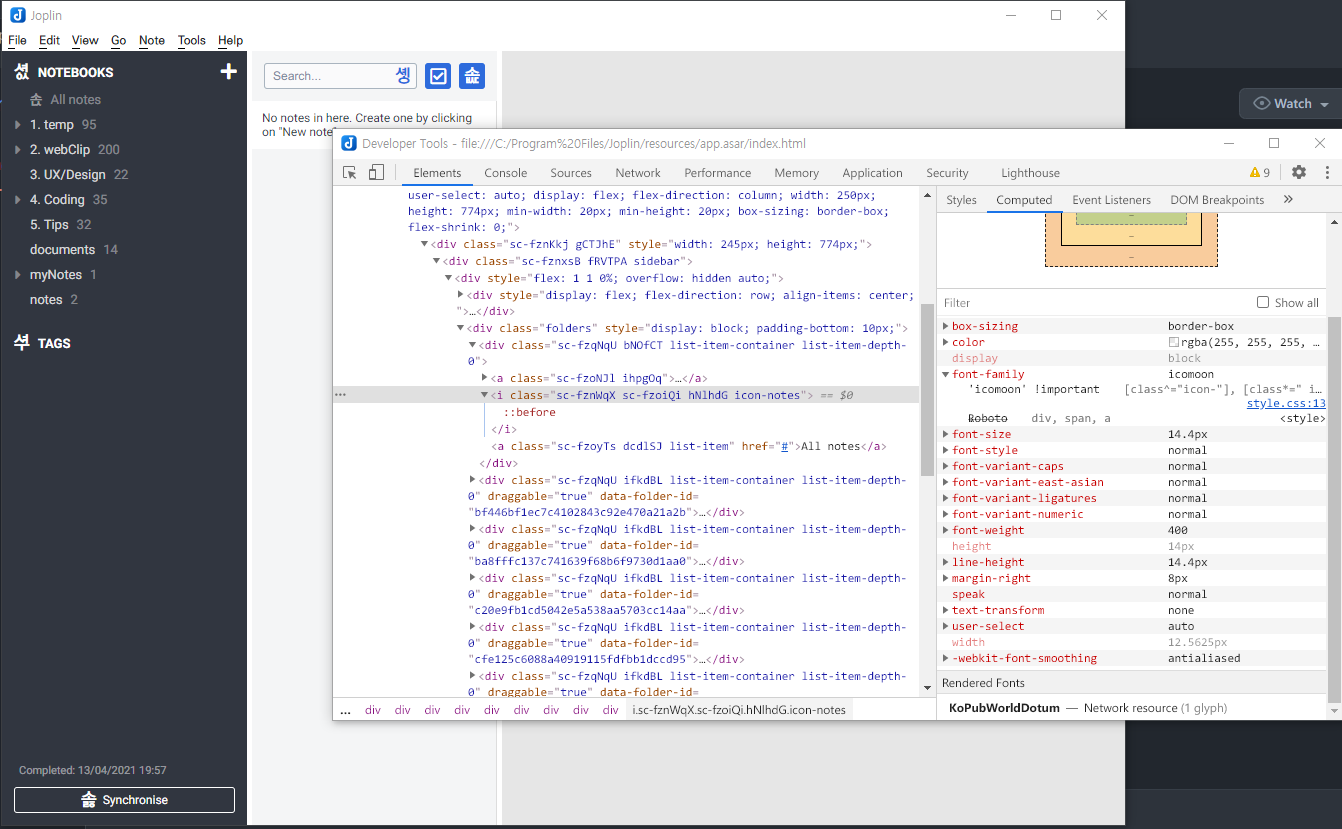
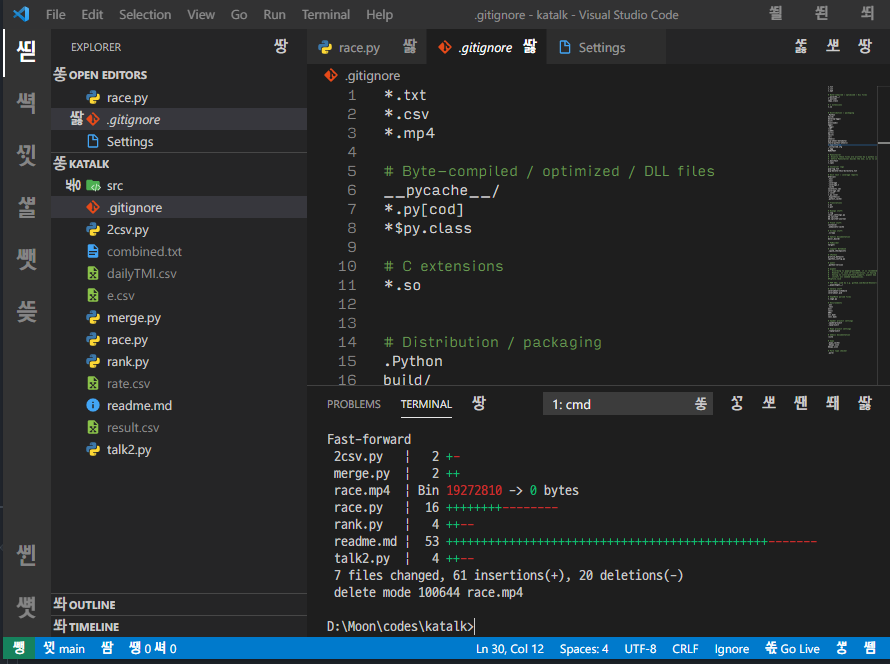
some Icons not showing properly in electron apps, with font replacing
I love to use mactype with my favorite Korean font 'KopubWorldDotum'
and all Korean system default font 'Malgun Gothic' is replaced with KopubWorldDotum via the mactype tuner
but this make all electron apps that are using icons based on typeface (I don't know what's this, I'm not a web developer) look weird
How can I just make an exception for that?
This happens on VSCode, and Joplin (alternative to Evernote for me)

I believe you may have misused the option ForceChangeFont to replace a font which is never a good practice.
The correct way to replace a font is to write a font equation under FontSubstitutes section as
[FontSubstitutes]
Malgun Gothic=KopubWorldDotum
This will only replace the specific font without touching any other fonts.
ForceChangeFont should be used for experimental purposes only.

I believe you may have misused the option
ForceChangeFontto replace a font which is never a good practice. The correct way to replace a font is to write a font equation underFontSubstitutessection as[FontSubstitutes] Malgun Gothic=KopubWorldDotumThis will only replace the specific font without touching any other fonts.
ForceChangeFontshould be used for experimental purposes only.
I hope I have had, but no.
thanks for the comment by the way
[General]
HintingMode=1
AntiAliasMode=4
NormalWeight=16
BoldWeight=2
ItalicSlant=-1
EnableKerning=0
GammaMode=0
LcdFilter=2
BolderMode=2
TextTuning=0
TextTuningR=4
TextTuningG=4
TextTuningB=4
GammaValue=1.5
Contrast=1.7
RenderWeight=1.4
Fontlink=2
HookChildProcesses=1
FontLoader=0
FontSubstitutes=2
Shadow=0,0,0,0x0,0,0x0
MaxBitmap=0
DirectWrite=1
HintSmallFont=0
CacheMaxFaces=256
CacheMaxSizes=12554432
CacheMaxBytes=12108864
Name=default-kopub_noVScode
[UnloadDll]
fontview.exe
AxureRP.exe
FontCreator.exe
FontCreator.cn.exe
notecaselauncher.exe
notecase.exe
gnucash-bin.exe
bleachbit.exe
Fontforge_TC.exe
Fontforge_SC.exe
Fontforge_EN.exe
dwm.exe
Fetion.exe
xdict.exe
ollyice.exe
sc2.exe
avgnt.exe
PlantsVsZombies.exe
SynTPHelper.exe
SynTPEnh.exe
war3.exe
SearchFilterHost.exe
SearchProtocolHost.exe
mspdbsrv.exe
starcraft.exe
KakaoTalk.exe
[exclude]
[FontSubstitutes]
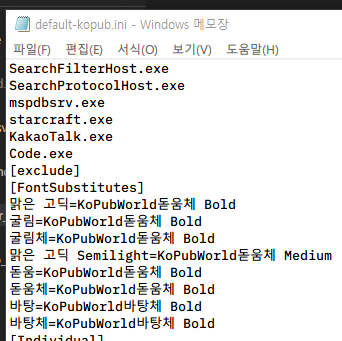
맑은 고딕=KoPubWorld돋움체 Bold
굴림=KoPubWorld돋움체 Bold
굴림체=KoPubWorld돋움체 Bold
맑은 고딕 Semilight=KoPubWorld돋움체 Medium
돋움=KoPubWorld돋움체 Bold
돋움체=KoPubWorld돋움체 Bold
바탕=KoPubWorld바탕체 Bold
바탕체=KoPubWorld바탕체 Bold
[Individual]
XSong=,,30,,,
XSong SimSun=,,30,,,
XSong Mono=,,30,,,
宋?=,,30,,,
新宋?=,,30,,,
?文宋?=,,30,,,
?文中宋=,,30,,,
Batang=,,30,,,
MingLiU=,,30,,,
PMingLiU=,,30,,,
PMingLiU_HKSCS=,,30,,,
MingLiU_ExtB=,,30,,,
PMingLiU_ExtB=,,30,,,
PMingLiU_HKSCS_ExtB=,,30,,,
MS Mincho=,,30,,,
MS PMincho=,,30,,,
[ExcludeSub]
javaw.exe
PPLive.exe
QQGame.exe
devenv.exe
javaw.exe
PPLive.exe
QQGame.exe
devenv.exe
javaw.exe
PPLive.exe
QQGame.exe
devenv.exe
javaw.exe
PPLive.exe
QQGame.exe
devenv.exe
[DirectWrite]
RenderingMode=6
GammaValue=1.5
Contrast=1.0
ClearTypeLevel=1
RenderingMode=6
GammaValue=1.5
Contrast=1.0
ClearTypeLevel=1
RenderingMode=6
GammaValue=1.5
Contrast=1.0
ClearTypeLevel=1
RenderingMode=6
GammaValue=1.5
Contrast=1.0
ClearTypeLevel=1
here's it, thank you
all of the fonts that are in [FontSubstitutes] are windows built-in fonts in Korean Locale
I tried with your profile, but maybe it's that I'm not using a Korean system, the profile does nothing to me.
Here are 2 things you could try:
- set
fontsubstitutesto 1 instead of 2. 2 is more powerful but also causing more troubles - Save your profile with UTF16-LE encoding (or Windows Unicode, they are the same thing.). Asia font names work better with unicode.
Is there anything wrong with your regular win32 apps besides those "electron" based apps?
I have a similar problem. Here is my profile:
; A softer minimal ini that works well with most Latin language fonts (not tested with Japanese or Chinese fonts)
; By Samantha Glocker
; Version 1.2
;
; Contact: @sammilucia at https://linkedin.com/in/samanthaglocker

[Preview]
Font=Helvetica
Color=$000000
Text=A softer minimal ini by Samantha Glocker 01234567890!@#$%^&*
Size=10

[General]
Name=Clean Soft NoVisio
HookChildProcesses=1
HintingMode=1
AntiAliasMode=2
NormalWeight=0
BoldWeight=0
ItalicSlant=-2
UseMapping=0
GammaMode=0
GammaValue=1.0
Contrast=0.9
RenderWeight=1.2
TextTuning=0
TextTuningR=0
TextTuningG=0
TextTuningB=0
BolderMode=0
FontLoader=0
FontLink=1
FontSubstitutes=1
MaxHeight=0
LcdFilter=1
LoadOnDemand=1
CacheMaxFaces=256
CacheMaxSizes=33554432
CacheMaxBytes=67108864
EnableKerning=1
MaxBitmap=0
HintSmallFont=1
DirectWrite=1
Shadow=0,0,0,0x0,0,0x0

[Experimental]
ColorFont=1

[[email protected]]
; Make color fonts appear correctly in Chrome
InvertColor=1

[[email protected]]
; Workaround for IDEA/JAVA font rendering unverified as of 2018/10/19
clipboxfix=1

[[email protected]]
; Workaround for Mathematica font rendering verified as of 2018/11/09
clipboxfix=0

[[email protected]]
; Workaround for Mathematica font rendering verified as of 2018/11/09
clipboxfix=0

[ExcludeModule]
VISIO.exe

[Exclude]
[FontSubstitutes]
SimSun=Microsoft YaHei
New SimSun=Microsoft YaHei
NewSimSun=Microsoft YaHei
SimSun-ExtB=Microsoft YaHei
Courier New=Consolas

[Individual]

[ExcludeSub]
[DirectWrite]
GammaValue=1.2
Contrast=0
ClearTypeLevel=1.0
RenderingMode=6

[UnloadDll]
; WINWORD.exe
I'm using Windows 10 build 19042, Simplified Chinese version. MacType is loaded through registry. All the icons in the left bar of VSCode 1.60 has become tofu with this configuration.
And fontsubstitutes is already 1 in this profile. Other regular Win32 apps are not affected.
It seems like this issue only happens with Electron apps with built in fonts. After installing all the font files in VSCode folder the issue is gone.

After installing all the font files in VSCode folder the issue is gone.
@updateing Can you please elaborate on how you resolved issue? What do you mean by "installing all the font files in VSCode folder"? Where are they? Thanks in advance!

After installing all the font files in VSCode folder the issue is gone.
@updateing Can you please elaborate on how you resolved issue? What do you mean by "installing all the font files in VSCode folder"? Where are they? Thanks in advance!
The font is located at resources\app\out\vs\base\browser\ui\codicons\codicon.
There is another one at resources\app\extensions\simple-browser\media but I think the one above will suffice.