
quill
 quill copied to clipboard
 slab
slab
Paste stops working on iOS 13 through WKWebView.
We use quilljs 1.3.6 in our iPhone app. We load the script inside a WKWebView and use it to provide some rich text editing features. Everything has been working fine until the iOS 13 release last weekend. With iOS 13, it seems that the Cut and Copy functions are still working as expected, but the Paste function is not working any more. When I copy some text and select to paste, the quill editor will insert no text at all. If I select a block of existing text and then paste, the text block will get replaced with empty string. It seems like paste is not getting the data correctly. We register a quill.clipboard.addMatcher() callback to handle pasting of links, and the callback is not called either. We use the quilljs code as is with very little customization, so it is unclear to us right now whether it's an issue with WKWebView not passing the correct data to quilljs, or if it's something inside the quill code. Since iOS 13 is new, we're wondering if anyone else has experienced similar issue, and may have some idea on how to fix, or further debug, this issue. Thanks!



version: 1.3.7
After investigation, I find the issue is caused by an element whose class is ql-clipboard.
It is leveraged to store the content copied by user.
https://github.com/quilljs/quill/blob/0148738cb22d52808f35873adb620ca56b1ae061/modules/clipboard.js#L108-L124
I make a break point at line 116.
When I run my demo on chrome, the element is fulfilled:
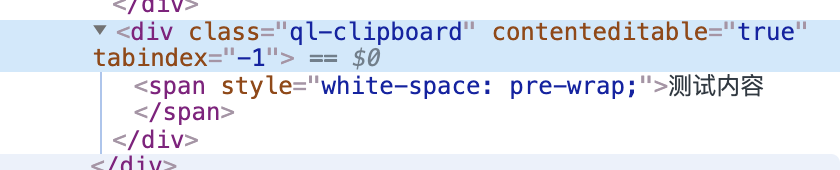
When I run my demo on ios 13.0 safari, this issue occur, and the element is empty at the same breakpoint:

I am trying to find the code which writes the copied content into ql-clipboard, but no luck. Anyone knows where the related code is?
I can not find the code manipulates ql-clipboard, I just workaround this issue by the following way:
// issue only occurs on ios 13.0.  13.1, 13.1.1, 13.1.2 are all OK.
export const isIOS13_0 = navigator.userAgent.match(/13_0.*Mac OS X/)

class CustomClipboard extends Clipboard {
  onPaste(e) {
    if (isIOS13_0) {
      this.container.innerHTML = e.clipboardData.getData('text')
    }
    super.onPaste(e)
  }
}
Quill.register('modules/clipboard', CustomClipboard, true)
Installed iOS 13.2 beta 3 - problem resolved. I guess will have to wait until Apple releases 13.2.
@cbahai It's weird. I have tested on ios 13.0, 13.1, 13.1.1 and 13.1.2. All is OK except 13.0

经过我的尝试,给.ql-clipboard 不要设置为行高或者字号为0就行了。 比如这么
            .ql-clipboard {
                visibility: hidden;
                line-height: 1;
                font-size: .3rem;
            }


I am trying to find the code which writes the copied content into
ql-clipboard, but no luck. Anyone knows where the related code is?
@njleonzhang
The pasting progress utilizes the browser's default action, which usually, just pastes the copied text into ql-clipboard. That's why lines 116-121 are wrapped in a setTimeout callback, as these code are expected to run after browser's default paste action.
Sadly @likyh's solution doesn't solve this problem completely. Pasting still breaks if there was content selected. And even if the selection was a carrot, after pasting, the cursor is put before the pasted content. (on Safari 13.1.2. Why the cursor is put before is still unknown, need investigating.)
It seems that the default paste action is not reliable to use cross-platform. Now we know it breaks on Safari 13 and iOS Safari 13. I wonder if we should drop it (and turn to our own processing completely, like what @njleonzhang does) on other browsers.


Hi all, I am trying to implement the QuilJS in the iPhone using Swift. I need the steps to do so.


I can not find the code manipulates
ql-clipboard, I just workaround this issue by the following way:// issue only occurs on ios 13.0. 13.1, 13.1.1, 13.1.2 are all OK. export const isIOS13_0 = navigator.userAgent.match(/13_0.*Mac OS X/) class CustomClipboard extends Clipboard { onPaste(e) { if (isIOS13_0) { this.container.innerHTML = e.clipboardData.getData('text') } super.onPaste(e) } } Quill.register('modules/clipboard', CustomClipboard, true)
using e.clipboardData.getData('text/html') supports more like image。
and still ios 14.0 sucks!
