
xmlschema
 xmlschema copied to clipboard
 sissaschool
unable to load XMLSchema.xsd (w3c) as schema
I am attempting to validate xml schemas using the w3c XMLSchema.xsd and get the following error when attempting to load it as my schema:
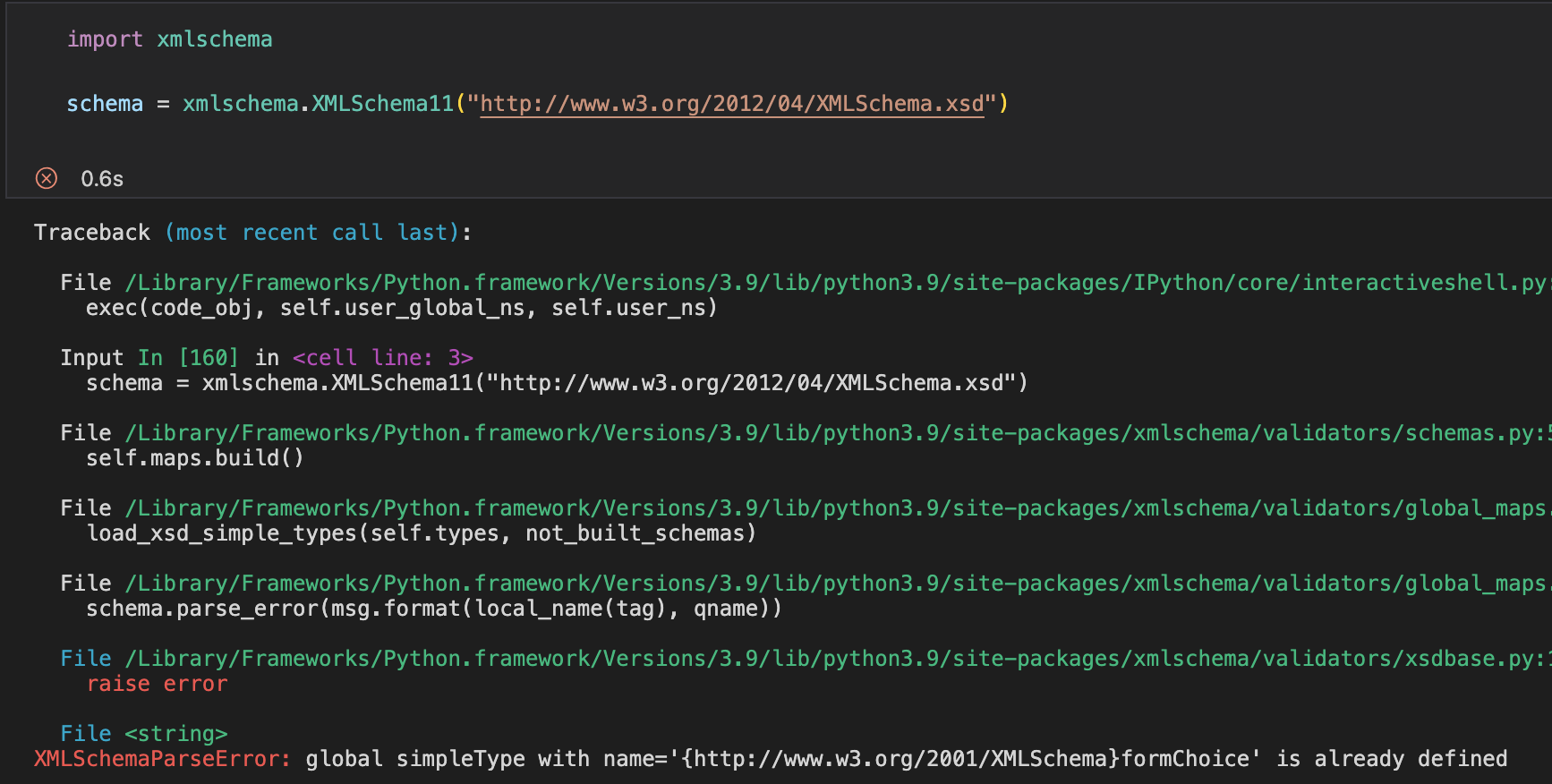
please advise
found links to schemas here: https://stackoverflow.com/questions/17735345/is-there-an-xsd-schema-for-xsd-schemas

Hi,
the XMLSchema.xsd document is already loaded in XMLSchema class (into meta_schema instance) and it's used to validate every XSD that is passed to initialize XMLSchema() instance (using the XMLSchema.check_schema() class method).
Anyway the meta-schema can be bypassed loading a new copy of XMLSchema.xsd, but something seems to going wrong with that operation in XMLSchema11 class. I will check and fix this.
The problem with a reloading of XSD 1.1 schema maybe related to a patch that it requires for working (it lacks definitions for builtin list types and it maybe have an error in openContent wildcards).
Thank you

I appreciate. Will be validating xml schemas generated via automation so kinda need it.
Thanks!
On Mon, Sep 12, 2022 at 8:34 AM, Davide Brunato @.***> wrote:
Hi,
the XMLSchema.xsd document is already loaded in XMLSchema class (into meta_schema instance) and it's used to validate every XSD that is passed to initialize XMLSchema() instance (using the XMLSchema.check_schema() class method).
Anyway the meta-schema can be bypassed loading a new copy of XMLSchema.xsd, but something seems to going wrong with that operation in XMLSchema11 class. I will check and fix this.
The problem with a reloading of XSD 1.1 schema maybe related to a patch that it requires for working (it lacks definitions for builtin list types and it maybe have an error in openContent wildcards).
Thank you
— Reply to this email directly, view it on GitHub https://github.com/sissaschool/xmlschema/issues/325#issuecomment-1243676152, or unsubscribe https://github.com/notifications/unsubscribe-auth/AO3YXTEAHY22NUJF7H6UYELV54PO5ANCNFSM6AAAAAAQJ4WFSU . You are receiving this because you authored the thread.Message ID: @.***>
Actually, I like the JsonML format of the xml from your converter. Can you verify the following assumptions are correct?
- If I generate my schema in JsonML format, I assume I can load it with XMLSchema.xsd as schema and use JsonMLConverter, correct?
- Then I can serialize to xml with lxml
I appreciate. Will be validating xml schemas generated via automation so kinda need it.
But in this case you don't need to replace the XSD 1.0/1.1 meta-schema, you can simply create a new schema from your generated XSD (e.g.: xmlschema.XMLSchema11("generated.xsd")).
Checking against XMLSchema.xsd is only a part of the validation performed during schema init, it's not exhaustive and some constraints have to be checked by code.
In any case i found the problem and fixed it in my develop, but with XSD 1.1 needs the same patch cited above to be fully compliant.
Actually, I like the JsonML format of the xml from your converter. Can you verify the following assumptions are correct?
* If I generate my schema in JsonML format, I assume I can load it with XMLSchema.xsd as schema and use JsonMLConverter, correct?
If your need is to serialize the generated.xsd schemas to python objects you can use the already available xmlschema.XMLSchema11.meta_schema.decode() method, providing converter=JsonMLConverter.
If you need to serialize XML build your schema from generated.xsd and the serialize with decode() and JsonMLConverter.
* Then I can serialize to xml with lxml
From decoded objects you can encode back to XML using the encode() method and proper parameters (see docs).
I do not have a need to serialize to python objects.
I'll be:
- generating/producing schema in JsonML from results of Networkx graph algorithm (generated_xsd_jsonml.json).
- loading it up in xmlschema (your wonderful library) via JsonMLConverter
- validate using XMLSchema.xsd and
- serialize to xml (on-demand) when needed
I assume steps 2-4 are possible with xmlschema library
I do not have a need to serialize to python objects.
For python object i intend both low level data (basic data types into nested dictionaries/lists) or high level class instances (derived from xmlschema.DataElement class). Low level data can be serialized to json.
I'll be:
1. generating/producing schema in JsonML from results of Networkx graph algorithm (generated_xsd_jsonml.json).

2. loading it up in xmlschema (your wonderful library) via JsonMLConverter

3. validate using XMLSchema.xsd and

4. serialize to xml (on-demand) when needed
I assume steps 2-4 are possible with xmlschema library
I think so, but steps 2-4 are managed by a single API (because the validation requires an encoding to XML of data chunks).
The module function xmlschema.from_json() can be used to perform that in one step or XMLSchema.encode() API can be used on data decoded with json.load/loads.
The problem in your case is that schemas are the target, so currently (maybe until the next version) you need to use the meta schema. This is an example using collection.xsd:
>>> import xmlschema
>>>
>>> with open('collection.json', 'w') as fp:
...     xmlschema.to_json('collection.xsd', fp, schema=xmlschema.XMLSchema11.meta_schema, converter=xmlschema.JsonMLConverter)
...
>>> with open('collection.json') as fp:
...     root = xmlschema.from_json(fp, path='xs:schema', schema=xmlschema.XMLSchema11.meta_schema, converter=xmlschema.JsonMLConverter)
...
root should be equivalent to the original collection.xsd.
In the next minor version I'll try to make these steps more simple (e.g. detecting that the target is in XSD namespace so the meta-schema can be used if no specific schema argument is provided).
Awesome! Can’t wait to try it out!! Thank you!
On Tue, Sep 13, 2022 at 3:15 AM Davide Brunato @.***> wrote:
I do not have a need to serialize to python objects.
For python object i intend both low level data (basic data types into nested dictionaries/lists) or high level class instances (derived from xmlschema.DataElement class). Low level data can be serialized to json.
I'll be:
generating/producing schema in JsonML from results of Networkx graph algorithm (generated_xsd_jsonml.json).
loading it up in xmlschema (your wonderful library) via JsonMLConverter
validate using XMLSchema.xsd and
serialize to xml (on-demand) when needed
I assume steps 2-4 are possible with xmlschema library
I think so, but steps 2-4 are managed by a single API (because the validation requires an encoding to XML of data chunks).
The module function xmlschema.from_json() can be used to perform that in one step or XMLSchema.encode() API can be used on data decoded with json.load/loads.
The problem in your case is that schemas are the target, so currently (maybe until the next version) you need to use the meta schema. This is an example using collection.xsd:
import xmlschema
with open('collection.json', 'w') as fp: ... xmlschema.to_json('collection.xsd', fp, schema=xmlschema.XMLSchema11.meta_schema, converter=xmlschema.JsonMLConverter) ... with open('collection.json') as fp: ... root = xmlschema.from_json(fp, path='xs:schema', schema=xmlschema.XMLSchema11.meta_schema, converter=xmlschema.JsonMLConverter) ...
root should be equivalent to the original collection.xsd.
In the next minor version I'll try to make these steps more simple (e.g. detecting that the target is in XSD namespace so the meta-schema can be used if no specific schema argument is provided).
— Reply to this email directly, view it on GitHub https://github.com/sissaschool/xmlschema/issues/325#issuecomment-1244997974, or unsubscribe https://github.com/notifications/unsubscribe-auth/AO3YXTDSOQA4NZVREKZOOATV6AS2PANCNFSM6AAAAAAQJ4WFSU . You are receiving this because you authored the thread.Message ID: @.***>
Hi @MartyStache,
you can try new minor release v2.1.0, that has an automatic usage of pre-build meta-schema. In you case also this should works:
>>> import xmlschema
>>>
>>> with open('collection.json', 'w') as fp:
...     xmlschema.to_json('collection.xsd', fp, cls=xmlschema.XMLSchema11, converter=xmlschema.JsonMLConverter)
...
>>> with open('collection.json') as fp:
...     root = xmlschema.from_json(fp, path='xs:schema', cls=xmlschema.XMLSchema11, converter=xmlschema.JsonMLConverter)
...
It's not possible a further simplification because you have to use XSD 1.1 validation.
Added a section on meta-schemas and XSD file validation in docs.
So in your case you can alternatively provide the XSD 1.1 meta-schema as schema argument:
>>> import xmlschema as xs
>>> with open('collection.json', 'w') as fp:
...     xs.to_json('collection.xsd', fp, schema=xs.XMLSchema11.meta_schema, converter=xs.JsonMLConverter)
...
>>> with open('collection.json') as fp:
...     root = xs.from_json(fp, path='xs:schema', schema=xs.XMLSchema11.meta_schema, converter=xs.JsonMLConverter)
...
>>> root
<Element '{http://www.w3.org/2001/XMLSchema}schema' at 0x7f87d897ae30>
Best regards