
esp32_arduino_sqlite3_lib
 esp32_arduino_sqlite3_lib copied to clipboard
 siara-cc
LittleFS support ?
hey Arun and thanks for your awesome library :+1:
I'm not sure I'm doing things properly, but I'm experiencing problems creating db files when using LittleFS as a substitute to SPIFFS
    #define SPIFFS LITTLEFS
    #include <LITTLEFS.h>
I've tried different posix names such as /spiffs/ or /littlefs/ to no luck, any hint is welcome.
[edit] LittleFS is now bundled with espressif core for esp32, so the substitution scenario should look like this:
    #define SPIFFS LittleFS
    // #include "LITTLEFS.h" // <<< WRONG (external lib, uppercase, quoted)
    #include <LittleFS.h> // <<< GOOD (core lib, camelcase, bracketed)

I've had success running this on LittleFS.
There is one main behavior that is different than in SPIFFS that I've found: In SPIFFS, if you try to open a database file that doesn't exist, sqlite will create it for you. I find this is not the case with LittleFS. The db and journal files need to be created before trying to open it.
I modified the example code below to run on LittleFS
#include <stdio.h>
#include <stdlib.h>
#include <sqlite3.h>
#include <SPI.h>
#include <FS.h>
#include <LITTLEFS.h>

#define FORMAT_LITTLEFS_IF_FAILED true

const char* data = "Callback function called";
static int callback(void *data, int argc, char **argv, char **azColName) {
   int i;
   Serial.printf("%s: ", (const char*)data);
   for (i = 0; i<argc; i++){
       Serial.printf("%s = %s\n", azColName[i], argv[i] ? argv[i] : "NULL");
   }
   Serial.printf("\n");
   return 0;
}

int db_open(const char *filename, sqlite3 **db) {
   int rc = sqlite3_open(filename, db);
   if (rc) {
       Serial.printf("Can't open database: %s\n", sqlite3_errmsg(*db));
       return rc;
   } else {
       Serial.printf("Opened database successfully\n");
   }
   return rc;
}

char *zErrMsg = 0;
int db_exec(sqlite3 *db, const char *sql) {
   Serial.println(sql);
   long start = micros();
   int rc = sqlite3_exec(db, sql, callback, (void*)data, &zErrMsg);
   if (rc != SQLITE_OK) {
       Serial.printf("SQL error: %s\n", zErrMsg);
       sqlite3_free(zErrMsg);
   } else {
       Serial.printf("Operation done successfully\n");
   }
   Serial.print(F("Time taken:"));
   Serial.println(micros()-start);
   return rc;
}

void setup() {

   Serial.begin(115200);
   sqlite3 *db1;
   int rc;

   if (!LITTLEFS.begin(FORMAT_LITTLEFS_IF_FAILED)) {
       Serial.println("Failed to mount file system");
       return;
   }

   // list LITTLEFS contents
   File root = LITTLEFS.open("/");
   if (!root) {
       Serial.println("- failed to open directory");
       return;
   }
   if (!root.isDirectory()) {
       Serial.println(" - not a directory");
       return;
   }
   File file = root.openNextFile();
   while (file) {
       if (file.isDirectory()) {
           Serial.print("  DIR : ");
           Serial.println(file.name());
       } else {
           Serial.print("  FILE: ");
           Serial.print(file.name());
           Serial.print("\tSIZE: ");
           Serial.println(file.size());
       }
       file = root.openNextFile();
   }

   // remove existing file so we start clean for this test.
   LITTLEFS.remove("/test1.db");
   LITTLEFS.remove("/test1.db-journal");

   // Create the db file before trying to open it.
   if (!LITTLEFS.exists("/test1.db")){
      File file = LITTLEFS.open("/test1.db", FILE_WRITE);   //  /littlefs is automatically added to the front
      file.close();
   }

   // We also need to create the journal file.
   if (!LITTLEFS.exists("/test1.db-journal")){
      File file = LITTLEFS.open("/test1.db-journal", FILE_WRITE);   //  /littlefs is automatically added to the front
      file.close();
   }

   sqlite3_initialize();

   if (db_open("/littlefs/test1.db", &db1))
       return;

   rc = db_exec(db1, "CREATE TABLE test1 (id INTEGER, content);");
   if (rc != SQLITE_OK) {
       sqlite3_close(db1);
       return;
   }

   rc = db_exec(db1, "INSERT INTO test1 VALUES (1, 'Hello, World from test1');");
   if (rc != SQLITE_OK) {
       sqlite3_close(db1);
       return;
   }

   rc = db_exec(db1, "SELECT * FROM test1");
   if (rc != SQLITE_OK) {
       sqlite3_close(db1);
       return;
   }

   sqlite3_close(db1);

}

void loop() {
}

Thanks a lot for sharing your experience @mr-wiggle !! Does it work for you @tobozo ? If not I will try and get back to you.

@mr-wiggle @siara-cc thanks for your quick replies!
I can't seem to get it working even after creating an empty file.
17:07:53.412 -> [W][DB.h:879] createDB(): Creating file /blemacs.db prior to db creation
17:07:53.445 -> [E][DB.h:703] error(): SQL error: unable to open database file
17:07:54.505 -> [E][DB.h:703] error(): SQL error: no such table: blemacs
but I have other SPI issues when using LittleFS, which puzzles me as I don't have those problems with SPIFFS, so maybe it's a consequence of that situation rather than a library problem, I'll keep researching and post some updates
update: I fixed the other SPI issue so it's either a LITTLEFS problem or a sqlite3 problem, here's what I've tried so far:
- PSRam disabled (132kb heap free at worst)
- 3.6MB or 7MB partitions (using a TTGO-TWatch so I don't have any other choice)
- Different SQL create statements and database names
- Uploading an empty file using LittleFS sketch data uploader
I got the dreadful SQL Error: unable to open database file error after executing the CREATE TABLE statement in all situations and now I'm out of ideas to pinpoint the origin of the problem.
Can you post your code?
one thing you can check too is to have the "/littlefs" prefix included in all the sqlite calls, but don't include it when you're working with littleFS directly (eg. LITTLEFS.remove("/test1.db"); ) It's implied in the LITTLEFS calls, but not the sqlite calls.
The POSIX path translation is already taken care of in my code, BLEMacsDbFSPath is the path for fs::FS and BLEMacsDbSQLitePath is the same path prefixed by /littlefs.
    void createDB()
    {

      if( strcmp( BLE_FS_TYPE, "littlefs" ) == 0 ) {
        // LittleFS Exception: create file first or sqlite3 won't see it
        if( ! BLE_FS.exists( BLEMacsDbFSPath ) ) {
          log_w("Creating empty file %s (FS path)", BLEMacsDbFSPath );
          fs::File tmp = BLE_FS.open( BLEMacsDbFSPath, FILE_WRITE );
          tmp.close();
        }
      }

      if( open(BLE_COLLECTOR_DB, false) ) {
        log_e("Could not open database");
        return;
      }

      if( DBExec( BLECollectorDB, createTableQuery ) == SQLITE_OK ) {
        log_i("created %s : %s", BLEMacsDbSQLitePath, createTableQuery);
      } else {
        log_e("CRITICAL: Failed to create db, halting system");
      }

      close(BLE_COLLECTOR_DB);
    }
Looks like the issue is that you're not creating the journal file. That will allow you to open the database, but not do anything to it, which appears to be happening here.
Found a workaround but it's not portable across filesystems:
LITTLEFS.begin( false, "/spiffs" ); // default for second argument is "/littlefs"
Looks like the partition_label and base_path properties of the VFS configuration (type esp_vfs_littlefs_conf_t) are being confused somewhere in the code.
I have not been able to create the LITTLEFS since last week to figure out the above issue. I get the following when trying to create LittleFS using ESP32 Sketch data upload tool.
There was already SPIFFS partition in it and I have done a full chip erase. Any idea why I am unable to create the LittleFS?
Chip : esp32
Using partition scheme from Arduino IDE.
Start: 0x150000
Size : 0xb0000
mklittlefs : /Users/arun/Library/Arduino15/packages/esp8266/tools/mklittlefs/2.5.0-4-69bd9e6/mklittlefs

esptool : /Users/arun/Library/Arduino15/packages/esp32/hardware/esp32/1.0.4/tools/esptool.py

[LittleFS] data   : /Users/arun/Library/Arduino15/packages/esp32/hardware/esp32/1.0.4/libraries/esp32_arduino_sqlite3_lib/examples/sqlite3_spiffs/data
[LittleFS] offset : 0
[LittleFS] start  : 1376256
[LittleFS] size   : 704
[LittleFS] page   : 256
[LittleFS] block  : 4096
->/babyname.db
->lfs warn:472: No more free space 263
_>lfs_write error(-28): File system is full.
_>
_>error adding file!

LittleFS Create Failed!
looks like you're currently using the LittleFS Uploader from esp8266 on an esp32
https://github.com/lorol/arduino-esp32fs-plugin/releases << this should be used
@tobozo I noticed that. But I am using the release you have pointed to. Not sure how it is using mklittlefs from esp8266 folder.
hmm could it be related to the Partition Scheme choice in your tools menu? what's your ESP32 model?
[edit] downloaded the latest mklittlefs binary and copied here: ~/.arduino15/packages/esp32/hardware/esp32/1.0.4/tools/
This fixed the sdk mismatch for me

@tobozo I am using a ESP-WROOM-32. Your suggestion did change it from esp8266 to esp32 folder, but the rest are still the same:
Chip : esp32
Using partition scheme from Arduino IDE.
Start: 0x150000
Size : 0xb0000
mklittlefs : /Users/arun/Library/Arduino15/packages/esp32/hardware/esp32/1.0.4/tools/mklittlefs

esptool : /Users/arun/Library/Arduino15/packages/esp32/hardware/esp32/1.0.4/tools/esptool.py

[LittleFS] data   : /Users/arun/Library/Arduino15/packages/esp32/hardware/esp32/1.0.4/libraries/esp32_arduino_sqlite3_lib/examples/sqlite3_spiffs/data
[LittleFS] offset : 0
[LittleFS] start  : 1376256
[LittleFS] size   : 704
[LittleFS] page   : 256
[LittleFS] block  : 4096
->/babyname.db
->lfs warn:475: No more free space 291
_>lfs_write error(-28): File system is full.
_>
_>error adding file!

LittleFS Create Failed!
Probably the existing SPIFFS partition is leaving very little space for LITTLEFS. I will have to check later. I don't actively work on these during weekdays.
Looks like you are still using the older mklittlefs 2.5.0-4 and all its bugs, maybe don't recycle mklittlefs from and older esp8266 sdk folder but use the latest from the release pages instead ?
https://github.com/earlephilhower/mklittlefs/releases
@tobozo I am sure I copied the latest one to the esp32 folder. Further I moved the esp8266 one out of its tools folder, restarted my machine, still getting the same issue. I have been facing issues with these partitions since someone mentioned LITTLEFS support long time ago. I will figure it out soon.
If it can be of some help, I don't have these three lines when running the filesystem uploader:
Using partition scheme from Arduino IDE.
Start: 0x150000
Size : 0xb0000
I'm not sure where these lines are coming from in your situation, the other thing I can think of is that there is a difference between the MacOS implementation and the Linux implementation.
What happens when the data folder is empty, do you get a dialog like this one and the same error ?
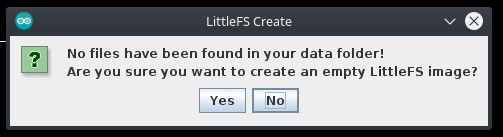
Also what's the size of the /babyname.db file ?
[edit] trying to fit a 1.52Mb file on a 704Kb partition sure won't work, use a smaller file or choose a larger partition :-)
@tobozo I deleted the babyname.db and I got the same error. Not sure what the issue is, but I was sure it is something to do with the existing SPIFFS partition.
So then I used this https://github.com/joltwallet/esp_littlefs component for esp-idf and this demo repo https://github.com/wreyford/demo_esp_littlefs to create the partition.
Now I could run the program provided by @mr-wiggle successfully. I will see if I can get the console program working.
Thank you for the inputs.
I could get the console program working too when I set #define SPIFFS LITTLEFS at the beginning.
 I will see if it can be integrated into the Library.
Hi guys, if you're still trying to figure out how to use the SQlite3 along with LITLLEFS I have found out the following: 1- Set the basePath of the LITTLEFS as suggested by @tobozo.
LITTLEFS.begin( false, "/spiffs" ); // default for second argument is "/littlefs"
2 - The files are not automatically created when openning the database because the stat call in the function ESP32Open located at the source file esp32.cpp returns -2, instead of the expected -1. Don't know why, maybe a LITLLEFS peculiarity? So it is assumed that the file already exists and it is openned with the flag "r+" which does not create the file if not exists. This is a possible fix:
/*
** Open a file handle.
*/
static int ESP32Open(
 sqlite3_vfs *pVfs,              /* VFS */
 const char *zName,              /* File to open, or 0 for a temp file */
 sqlite3_file *pFile,            /* Pointer to ESP32File struct to populate */
 int flags,                      /* Input SQLITE_OPEN_XXX flags */
 int *pOutFlags                  /* Output SQLITE_OPEN_XXX flags (or NULL) */
){
 static const sqlite3_io_methods ESP32io = {
   1,                            /* iVersion */
   ESP32Close,                    /* xClose */
   ESP32Read,                     /* xRead */
   ESP32Write,                    /* xWrite */
   ESP32Truncate,                 /* xTruncate */
   ESP32Sync,                     /* xSync */
   ESP32FileSize,                 /* xFileSize */
   ESP32Lock,                     /* xLock */
   ESP32Unlock,                   /* xUnlock */
   ESP32CheckReservedLock,        /* xCheckReservedLock */
   ESP32FileControl,              /* xFileControl */
   ESP32SectorSize,               /* xSectorSize */
   ESP32DeviceCharacteristics     /* xDeviceCharacteristics */
 };

 ESP32File *p = (ESP32File*)pFile; /* Populate this structure */
 int oflags = 0;                 /* flags to pass to open() call */
 char *aBuf = 0;
	char mode[5];
     //Serial.println("fn: Open");

	strcpy(mode, "r");
 if( zName==0 ){
   return SQLITE_IOERR;
 }

 if( flags&SQLITE_OPEN_MAIN_JOURNAL ){
   aBuf = (char *)sqlite3_malloc(SQLITE_ESP32VFS_BUFFERSZ);
   if( !aBuf ){
     return SQLITE_NOMEM;
   }
 }

	if( flags&SQLITE_OPEN_CREATE || flags&SQLITE_OPEN_READWRITE
         || flags&SQLITE_OPEN_MAIN_JOURNAL ) {
   struct stat st;
   memset(&st, 0, sizeof(struct stat));
   int rc = stat( zName, &st );

   //Serial.print(zName);
   //Serial.print(":");
   //Serial.println(rc);

/* FIX FOR THE ISSUE: Check if less than 0, if so file does not exist  */
		if (rc < 0) {
     strcpy(mode, "w+");
     //int fd = open(zName, (O_CREAT | O_RDWR | O_EXCL), S_IRUSR | S_IWUSR);
     //close(fd);
     //oflags |= (O_CREAT | O_RDWR);
     //Serial.println("Create mode");
   } else
     strcpy(mode, "r+");
	}

 memset(p, 0, sizeof(ESP32File));
 //p->fd = open(zName, oflags, 0600);
 //p->fd = open(zName, oflags, S_IRUSR | S_IWUSR);
 p->fp = fopen(zName, mode);
 if( p->fp<=0){
   if (aBuf)
     sqlite3_free(aBuf);
   //Serial.println("Can't open");
   return SQLITE_CANTOPEN;
 }
 p->aBuffer = aBuf;

 if( pOutFlags ){
   *pOutFlags = flags;
 }
 p->base.pMethods = &ESP32io;
 //Serial.println("fn:Open:Success");
 return SQLITE_OK;
}
I could create a pull request, but since it's a very minor issue, it should take no time for @siara-cc to fix it.


I fixed this long pending one. Thanks @wesee-dev @muratdemirtas If possible could you please include a description of the link you provided? It seems not the fix discussed here.
I fixed this long pending one. Thanks @wesee-dev @muratdemirtas If possible could you please include a description of the link you provided? It seems not the fix discussed here.
i'll do when implementation is done. that was an example who want to use with littlefs.
I'm testing latest pull request.
https://github.com/raldone01/esp_littlefs/blob/pullReq/CMakeLists.txt
I have wrote example code for testing littlefs over sdspi mmc interface of ESP32. But this was an example.
I have forked and implemented esp32 littlefs component with latest pull request provided by @raldone01
https://github.com/raldone01/esp_littlefs/
when you install esp littlefs component for esp-idf from link (https://github.com/joltwallet/esp_littlefs) then you have to merge your component with @raldoneo1 pull request(https://github.com/raldone01/esp_littlefs/)
after that users have to create littlefs mount point in sdmmc example...
// Use settings defined above to initialize and mount LittleFS filesystem. // Note: esp_littlefs_flash_create creates the little fs and mounts it. esp_err_t ret = esp_littlefs_sd_create(&handle, &conf); // init lfs with a backend here esp_littlefs_vfs_mount_conf_t conf= ESP_LITTLEFS_VFS_MOUNT_CONFIG_DEFAULT(); conf.lfs = handle; // set config here ESP_ERROR_CHECK(esp_littlefs_vfs_mount(&conf));
https://gist.github.com/muratdemirtas/fe10ca3dbde1558ff0f42f337f3b9fc7
after that virtual file system operations is esp32.c works perfect which means sqlite3 can be used over sd cards.
I have tested and working good.
do not forget to add "/littlefs/" path for your database for example "/littlefs/Database.db"
@siara-cc
@siara-cc one insert operation takes 1667 ms. omg.
[01:12:54:306] <0x1b>[0;32mI (22:12:54.328) SQLite3DataProvider: Time taken: 1667<0x1b>[0m␍␊
edit: fixed now takes 235 ms absolutely very fast.
Mhh if you are using my code make sure too initialize the sdmmc correctly to use the maximum available speed. I use it in my projects to stream audio and store files with no issues. (Also take a look at the buffersizes and menuconfig options.)
Ps: I plan to rebase to upstream in a month or so and improve docs.

@raldone01 yes i'm using your code. i really appreciate your work. I fixed my code. Currently;
one insert operation takes 223 ms.
[01:12:54:306] <0x1b>[0;32mI (22:12:54.328) SQLite3DataProvider: Time taken: 223<0x1b>[0m␍␊
thanks.
@raldone01 i have a question, if i use 1gb sd card(512 byte sector) then everything is ok but when i plug 16gb sd card(512 byte sector size) then this error throws. is this 24 bit/32 bit addressing issue?
[02:21:53:372] <0x1b>[0;31mE (23:21:53.316) sdmmc_cmd: sdmmc_read_sectors_dma: sdmmc_send_cmd returned 0x107<0x1b>[0m␍␊ [02:21:53:372] <0x1b>[0;31mE (23:21:53.316) LFS_FLASH: failed to read block 29520438, size 512, err 263<0x1b>[0m␍␊ [02:21:53:372] <0x1b>[0;32mI (23:21:53.329) TAG: sqlite3 used size: 0<0x1b>[0m␍␊ [02:21:53:372] <0x1b>[0;31mE (23:21:53.341) SQLite3DataProvider: SQL ERROR LENGHT:32<0x1b>[0m␍␊
when i limit block count to 50000, again i got this.
[02:33:37:466] <0x1b>[0;31mE (23:33:37.455) sdmmc_cmd: sdmmc_read_sectors_dma: sdmmc_send_cmd returned 0x107<0x1b>[0m␍␊ [02:33:37:466] <0x1b>[0;31mE (23:33:37.455) LFS_FLASH: failed to read block 7986, size 512, err 263<0x1b>[0m␍␊ [02:33:37:466] <0x1b>[0;32mI (23:33:37.461) TAG: sqlite3 used size: 0<0x1b>[0m␍␊ [02:33:37:466] <0x1b>[0;31mE (23:33:37.464) SQLite3DataProvider: SQL ERROR LENGHT:32<0x1b>[0m␍␊ [02:33:37:466] <0x1b>[0;31mE (23:33:37.470) SQLite3DataProvider: SQL error: database disk image is malformed<0x1b>[0m␍␊
my sd card information:
[02:36:49:165] SD MCC init ok␍␊ [02:36:49:165] Name: SD␍␊ [02:36:49:165] Type: SDHC/SDXC␍␊ [02:36:49:165] Speed: 40 MHz␍␊ [02:36:49:165] Size: 14922MB␍␊
stable card information
[03:03:31:799] Name: SD01G␍␊ [03:03:31:799] Type: SDSC␍␊ [03:03:31:799] Speed: 40 MHz␍␊ [03:03:31:799] Size: 922MB␍␊
@siara-cc
https://github.com/espressif/esp-idf/issues/9289 @siara-cc @raldone01 i created an issue.
i resolved this issue by adding retry algorithm for sd mmc read timeouts
the problem was
[02:33:37:466] <0x1b>[0;31mE (23:33:37.455) sdmmc_cmd: sdmmc_read_sectors_dma: sdmmc_send_cmd returned 0x107<0x1b>[0m␍␊
thanks to retrying algorithm the esp32 will retry the communication 5 times. this resolves the issue.
Sqlite3 now works with SDHC/SDXC 16GB cards
static int littlefs_api_read(const struct lfs_config *c, lfs_block_t block, lfs_off_t off, void *buffer, lfs_size_t size) { struct esp_littlefs_sd_ctx *ctx = c->context; int retry_count = 0; int32_t start_time = 0; esp_err_t err = ESP_FAIL; for(retry_count = 0; retry_count < 5; retry_count++){ start_time= esp_timer_get_time(); err = sdmmc_read_sectors(&ctx->sd, ctx->non_dma_buf, block , 1); if (err != ESP_OK) { printf("[READ]Failed at block %d, err_code, retry_count %d \n", block, retry_count ); continue; } memcpy(buffer , ctx->non_dma_buf, 512); printf("[READ]Read ok block %d, size %d\n", block, size); break; } if(retry_count == 4){ printf("[READ]Cannot read block %d\n", block); return LFS_ERR_IO; } int32_t stop_time = esp_timer_get_time() - start_time; lfs_perf_counter.read_size += size; lfs_perf_counter.read_step++; lfs_perf_counter.read_time += stop_time; sdmmc_benchmark_printf(); return 0; }
[22:22:10:125] <0x1b>[0;33mW (19:22:10.043) -: DB before open:909375 <0x1b>[0m␍␊ [22:22:10:205] <0x1b>[0;31mE (19:22:10.150) sdmmc_cmd: sdmmc_read_sectors_dma: sdmmc_send_cmd returned 0x107<0x1b>[0m␍␊ [22:22:10:244] [READ]Failed at block 1, err_code, retry_count 0 ␍␊ [22:22:10:244] <0x1b>[0;33mW (19:22:10.164) -: DB after open:904843 <0x1b>[0m␍␊ [22:22:10:244] <0x1b>[0;33mW (19:22:10.165) SQLite3DataProvider: Database init successfull<0x1b>[0m␍␊ [22:22:10:675] <0x1b>[0;32mI (19:22:10.617) SQLite3DataProvider: SQL success<0x1b>[0m␍␊ [22:22:10:719] <0x1b>[0;32mI (19:22:10.617) SQLite3DataProvider: Change count:1<0x1b>[0m␍␊ [22:22:10:719] <0x1b>[0;33mW (19:22:10.618) -: DB before close:898447 <0x1b>[0m␍␊ [22:22:10:719] <0x1b>[0;33mW (19:22:10.626) -: DB after close:909375 <0x1b>[0m␍␊
Hi guys, if you're still trying to figure out how to use the SQlite3 along with LITLLEFS I have found out the following: 1- Set the basePath of the LITTLEFS as suggested by @tobozo.
LITTLEFS.begin( false, "/spiffs" ); // default for second argument is "/littlefs"2 - The files are not automatically created when openning the database because the stat call in the function ESP32Open located at the source file esp32.cpp returns -2, instead of the expected -1. Don't know why, maybe a LITLLEFS peculiarity? So it is assumed that the file already exists and it is openned with the flag "r+" which does not create the file if not exists. This is a possible fix:
/*
** Open a file handle.
*/
static int ESP32Open(
 sqlite3_vfs *pVfs,              /* VFS */
 const char *zName,              /* File to open, or 0 for a temp file */
 sqlite3_file *pFile,            /* Pointer to ESP32File struct to populate */
 int flags,                      /* Input SQLITE_OPEN_XXX flags */
 int *pOutFlags                  /* Output SQLITE_OPEN_XXX flags (or NULL) */
){
 static const sqlite3_io_methods ESP32io = {
   1,                            /* iVersion */
   ESP32Close,                    /* xClose */
   ESP32Read,                     /* xRead */
   ESP32Write,                    /* xWrite */
   ESP32Truncate,                 /* xTruncate */
   ESP32Sync,                     /* xSync */
   ESP32FileSize,                 /* xFileSize */
   ESP32Lock,                     /* xLock */
   ESP32Unlock,                   /* xUnlock */
   ESP32CheckReservedLock,        /* xCheckReservedLock */
   ESP32FileControl,              /* xFileControl */
   ESP32SectorSize,               /* xSectorSize */
   ESP32DeviceCharacteristics     /* xDeviceCharacteristics */
 };

 ESP32File *p = (ESP32File*)pFile; /* Populate this structure */
 int oflags = 0;                 /* flags to pass to open() call */
 char *aBuf = 0;
   char mode[5];
     //Serial.println("fn: Open");

   strcpy(mode, "r");
 if( zName==0 ){
   return SQLITE_IOERR;
 }

 if( flags&SQLITE_OPEN_MAIN_JOURNAL ){
   aBuf = (char *)sqlite3_malloc(SQLITE_ESP32VFS_BUFFERSZ);
   if( !aBuf ){
     return SQLITE_NOMEM;
   }
 }

   if( flags&SQLITE_OPEN_CREATE || flags&SQLITE_OPEN_READWRITE
         || flags&SQLITE_OPEN_MAIN_JOURNAL ) {
   struct stat st;
   memset(&st, 0, sizeof(struct stat));
   int rc = stat( zName, &st );

   //Serial.print(zName);
   //Serial.print(":");
   //Serial.println(rc);

/* FIX FOR THE ISSUE: Check if less than 0, if so file does not exist  */
   	if (rc < 0) {
     strcpy(mode, "w+");
     //int fd = open(zName, (O_CREAT | O_RDWR | O_EXCL), S_IRUSR | S_IWUSR);
     //close(fd);
     //oflags |= (O_CREAT | O_RDWR);
     //Serial.println("Create mode");
   } else
     strcpy(mode, "r+");
   }

 memset(p, 0, sizeof(ESP32File));
 //p->fd = open(zName, oflags, 0600);
 //p->fd = open(zName, oflags, S_IRUSR | S_IWUSR);
 p->fp = fopen(zName, mode);
 if( p->fp<=0){
   if (aBuf)
     sqlite3_free(aBuf);
   //Serial.println("Can't open");
   return SQLITE_CANTOPEN;
 }
 p->aBuffer = aBuf;

 if( pOutFlags ){
   *pOutFlags = flags;
 }
 p->base.pMethods = &ESP32io;
 //Serial.println("fn:Open:Success");
 return SQLITE_OK;
}
I could create a pull request, but since it's a very minor issue, it should take no time for @siara-cc to fix it.
Sorry for which part of the code or library I had to change or overwrite, the modification you share, I have the same problem of "unable to open database file" when I try to use INSERT or CREATE TABLE, but not to obtain data with SELECT, thanks
