
OpenKinect-for-Processing
 OpenKinect-for-Processing copied to clipboard
 shiffman
Kinect v2 Incompatible OS
Greetings,
OS: Arch Linux - Kernel:5.9.4 Kinect v2 (Xbox One) Processing 3
Description:
- Have installed OpenKinect for processing through libraries
- libfreenect2 also installed (Protonect works and detects kinect)
When launching any 'contributed examples' with kinect v2 it shows the following error
TL;DR Incompatible OS or 32-bit application
Full error
not compatible with the current OS or is a 32 bit system
UnsatisfiedLinkError: org.openkinect.freenect2.Device.jniInit()J
UnsatisfiedLinkError: org.openkinect.freenect2.Device.jniInit()J
A library relies on native code that's not available.
Or only works properly when the sketch is run as a 32-bit application.
UnsatisfiedLinkError: org.openkinect.freenect2.Device.jniInit()J
UnsatisfiedLinkError: org.openkinect.freenect2.Device.jniInit()J
UnsatisfiedLinkError: org.openkinect.freenect2.Device.jniInit()J
Nov 06, 2020 7:32:45 PM java.util.prefs.FileSystemPreferences checkLockFile0ErrorCode
WARNING: Could not lock User prefs.  Unix error code 2.

Any updates on this issue? I suffer from the same. Would appreciate some help

I also have the same problem in Ubuntu 20.0.4 I don't know if it's related to the fact that it's developed on OS X because on Mac Big Sur it worked without problems.
Can someone help ?
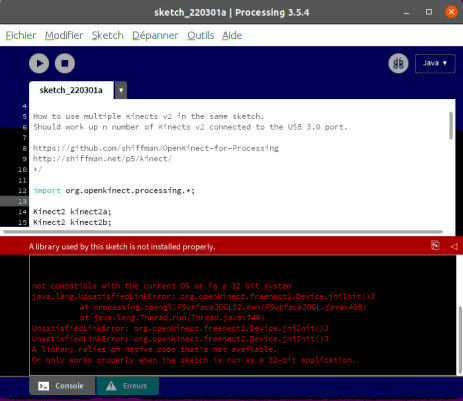

Hello @austinbostonberlin @ranjithshegde @madaracelio have you solved this error, if yes Please tell me how? or tell me any other option also. Thank you.
