
shepherd
 shepherd copied to clipboard
 shepherd-pro
modelOverlay do not fully highlight the specified div
Hi, i have an issue with an element that is not fully highlighted as i specified.
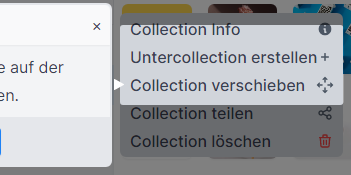
As you can see my dropdown menu is not highlighted correctly. All other steps I highlighted are working fine. There is a property called modalOverlayOpeningPadding for Steps for controlling the modal overlay overall padding but can the padding be controlled individually by left, right, top and bottom?

G2K: the dropdown has a position absolute property - when removing that it is working properly. But I don't want to do without it because otherwise the positioning isn't working how it should.

Perhaps try wrapping in a position relative div or putting one inside? I'm not sure what causes this, but my guess is there are workarounds.

@Obermair @didaquis can you provide a repro? Applying absolute positioning to the demo, apart from the weird positioning of elements, doesn't have any issues with the sizing of the overlay.

I have applied overflow:auto to target element and it worked, but have no idea why :D

Hi, I am facing same issue. It only highlights the area which is in viewport at the time of first load
