
ui
 ui copied to clipboard
 shadcn-ui
Put full colors in CSS variables
I'm not sure if there is a reasoning behind the current way, but why do we have:
module.exports = {
  theme: {
    extend: {
      colors: {
        border: "hsl(var(--primary))",
      }
    }
  }
}
And then:
@layer base {
  :root {
    --primary: 222.2 47.4% 11.2%;
  }
}
This way VSCode doesn't give you a color preview in the CSS file (probably other editors as well).
Wouldn't it be better to do:
module.exports = {
  theme: {
    extend: {
      colors: {
        border: "var(--primary)",
      }
    }
  }
}
And then:
@layer base {
  :root {
    --primary: hsl(222.2 47.4% 11.2%);
  }
}
That way we get a preview of the color and a color picker in VSCode like this beside --primary:


@multiwebinc This is how Tailwind does CSS variables. See https://tailwindcss.com/docs/customizing-colors#using-css-variables
See also my comment here: https://github.com/shadcn/ui/issues/199#issuecomment-1513596747

Ok, I read the docs more in detail and I understand why they do it like that. It's because of the <alpha-value> that allows tailwindcss opacity modifiers to work. So maybe this library should add / <alpha-value> to the end of all colors in tailwind.config.js in case anyone wants to use opacity modifiers.
Let me know if you would be interested in a PR.
I understand the design decision given the options, but currently this makes shadcn unusable for me. I need to see the colors in VsCode more than the time saved with darkmode handling. Is there a good workaround?


Agree with @multiwebinc on adding the / <alpha-value> to all colors in tailwind.config.js. Does anything speak against this, @shadcn? Could also PR it in.

Just stumbled onto this pain point and wanted to +1 the notion of working towards a more robust solution

I also agree with building a more robust solution which provides better developer experience. Not being able to visualize colors while applying them is a very big pain point. Maybe build a vs code plugin to rectify this.


Hi everyone, I faced the same problem today and I created a vscode extension for it. The extension adds color decorators to css variables. You can preview and edit the color with color decorators. It only works for hsl and hsla.
This is the first time I write a vscode extension, so there may be some bugs.
https://marketplace.visualstudio.com/items?itemName=meouwu.css-var-color-decorator
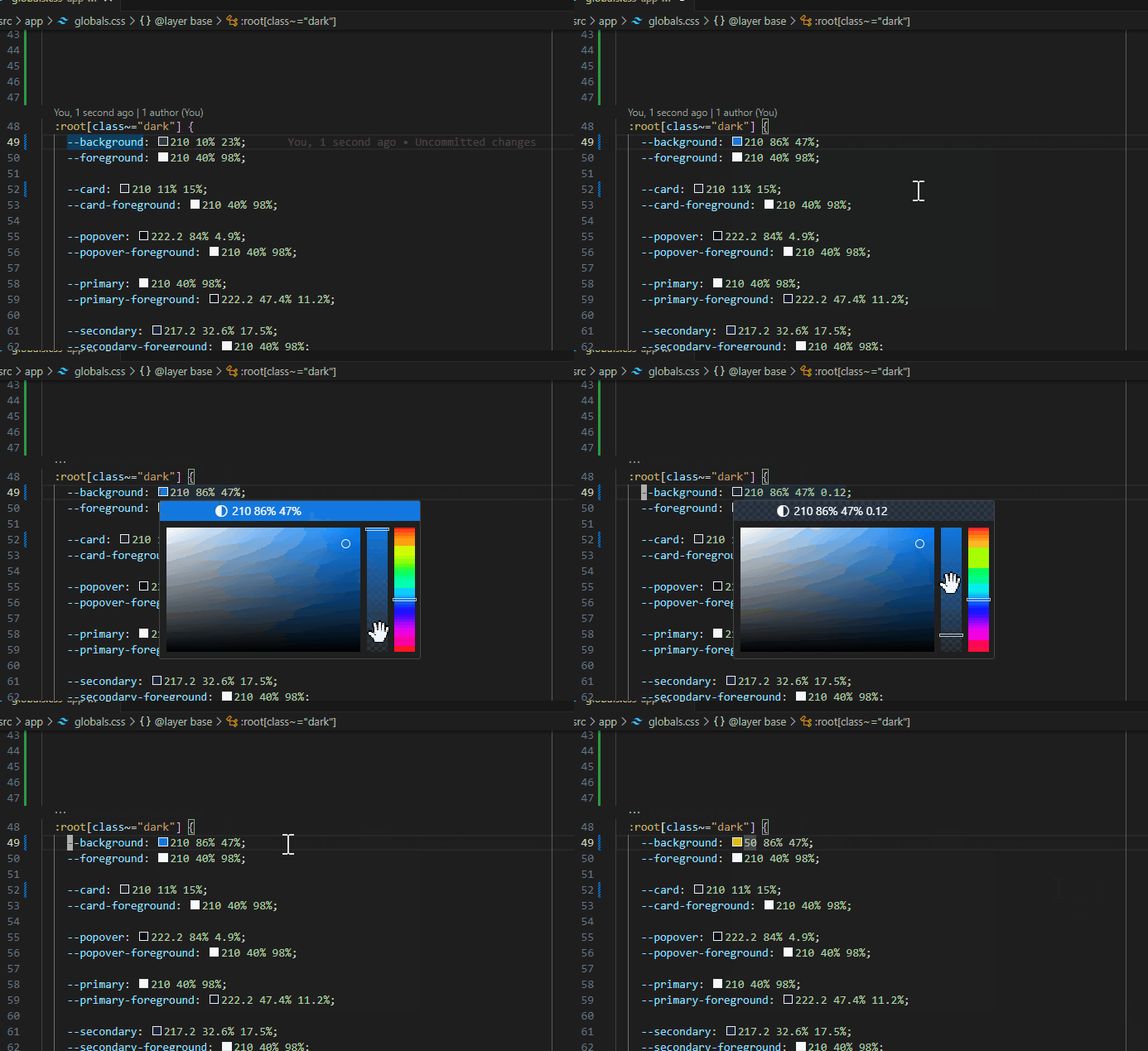

This is the first time I write a vscode extension, so there may be some bugs.
https://marketplace.visualstudio.com/items?itemName=meouwu.css-var-color-decorator
@meouwu-dev This plugin looks like exactly what I need! But when I install it, I see no difference in my CSS file. The plugin is enabled in VSCode. Is there some activation or configuration that I need to make? How can I check if I'm hitting a bug?
My index.css file looks like this:
@tailwind base;
@tailwind components;
@tailwind utilities;

@layer base {
  :root {
    --background: 0 0% 100%;
    --foreground: 20 14.3% 4.1%;

    --card: 0 0% 100%;
    --card-foreground: 20 14.3% 4.1%;

    --popover: 0 0% 100%;
    --popover-foreground: 20 14.3% 4.1%;


Same here, nothing happens in my CSS file
@benyamynbrkyc i add this in my .vscode/settings.json "cssVarColorDecorator.supportedLanguages": ["css", "scss", "tailwindcss", "html"], and it works

Hi everyone, I faced the same problem today and I created a vscode extension for it. The extension adds color decorators to css variables. You can preview and edit the color with color decorators. It only works for hsl and hsla.
This is the first time I write a vscode extension, so there may be some bugs.
https://marketplace.visualstudio.com/items?itemName=meouwu.css-var-color-decorator
I love you bro

Same here, nothing happens in my CSS file
@benyamynbrkyc i add this in my .vscode/settings.json "cssVarColorDecorator.supportedLanguages": ["css", "scss", "tailwindcss", "html"], and it works
Tried it, still nothing :(

@benyamynbrkyc @tauren I found what was causing it not to work for me... The PostCSS Language Support extension (csstools.postcss) was blocking it, if you have that installed try disabling it.

This issue has been automatically closed because it received no activity for a while. If you think it was closed by accident, please leave a comment. Thank you.