
sanity
 sanity copied to clipboard
 sanity-io
Frequent occurrences of published documents being wiped, with no historical versions retained.
Difficult to describe exactly what is happening here because we don't specifically know what steps are always taken to re-create this. But we have experienced multiple occurrences whereby a published document has completely disappeared and in it's place is a completely empty one, with no history in the version list. Our clients have reported this multiples on multiple different projects, with different versions of sanity studio installed. Some v3, and some v2. One (the V2 project) has custom publish actions, but I can confirm that the other v3 projects do not have any custom publish actions or, in fact, any custom logic at all. I have just experienced this myself to and I can vouch to say no mistakes were made in publishing. All I did myself was: (working on a article that was posted a few days ago with a lot of version history and content.
- fix a spelling error in the title
- hit publish
- then the document was completely blank with all fields completely empty and no data in the history. I have tried searching for the document to see if it exists anywhere and can confirm it does not.
Situations similar to this have been reported multiple times over the past few months and are concerning, as some of these entries are 5000+ characters length articles and losing them are costing the client a lot of time and energy to create.
Has anyone else experienced something like this and is there a suspected cause?

Hi Todd!
This sounds very odd, especially the fact that there is no history. We'd like to investigate this, but will need some details from you to help us get started, and there may be a bit of back and forth as we investigate. Could you reach out to me at [email protected] with the following details:
- Project ID
- Dataset
- Ideally: Document ID of the document that you were doing the spelling error fixes on, the title, or something else identifiable
- Ideally: Some timestamp of when the change was done (a rough timestamp if you don't know exactly)
Thanks for reporting!

Hi @rexxars my client just reported this happening three more times in a row – I've quoted their message to me here:
I have been adding to the new feature page section – everything was working great until about 15mins ago. The last three I've added have reset to a blank page (deleting all the other info) as soon as I press Publish. Could you take a look?
this occurred on 24th April, 15:15 London time (GMT+1).
I asked her to tell me which entries were lost and she responded with the following:
I tried to find them but I can't because all the information is gone. I remember one was from the Irish Times and when I search for the Irish Times (see below), the blank page is still showing up as a result for that (even though it looks blank)
There are two blank pages like that in there now, both called 'Untitled'
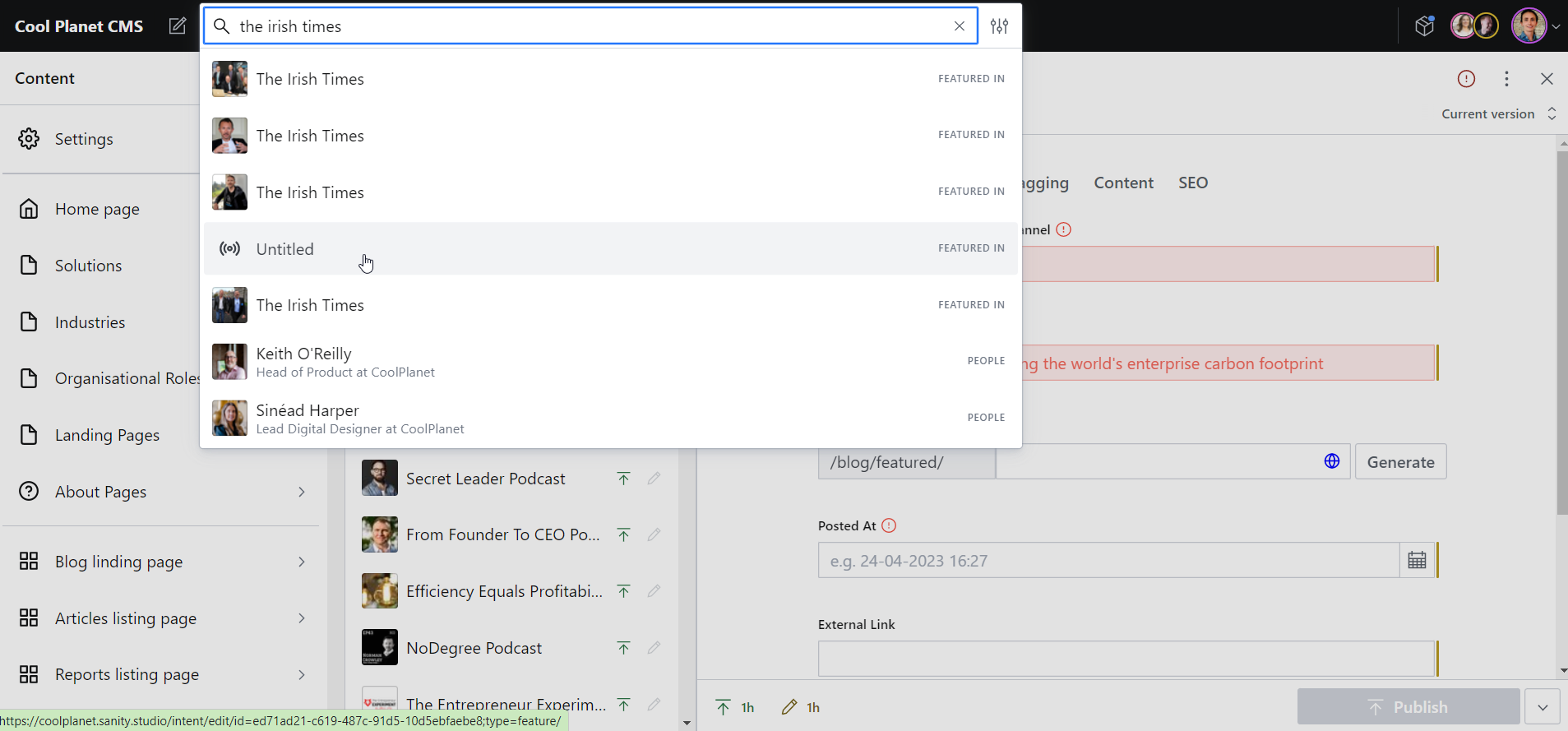
So that's interesting that they are still coming up in search despite being empty.
Hey @rexxars! We're having a similar issue as reported by @toddpadwick ...
When I open a specific type of document, one of the fields (type markdown) gets wiped out automatically. So, for example, I open a Post and I see the markdown content, however, it appears that the document "is being saved" and it also shows a "last updated X seconds ago", even though I haven't done anything. If move to another Post and then get back, the markdown field will be empty.
I can get the content back by selecting Discard Changes, but every time I change documents in the studio, the content will be lost again, so it's just a cycle.
We updated some dependencies a couple of weeks ago, but we're not sure if it's related.

This sounds a lot like the one thing that can never happen in a CMS.😬 Any news on the cause or solution? Didn't see it mentioned in the 3.9.1 RN. https://github.com/sanity-io/sanity/releases/tag/v3.9.1

Hey @kerns we were able to fix the issue by fully migrating to v3. Previously we were only at v2.
Hey guys, I have personally experienced it on v2 projects, but my clients have reported had similar issues on v3 projects as well – but obviously, i was not there to see exactly what they were doing to trigger them. One of the more pressing projects is a v2 project, with a few custom components and we don't have the budget to get these refactored for v3 at this time :(
Hey @toddpadwick, is this issue still apparent? I haven't encountered it yet, but your description sounds worrying.

Hey @railaru . No but I have been away for a few weeks so I haven't been using the CMS much. Because the studio is often a little buggy when it comes to rendering list previews, and refreshing the view after anything is saved or updated, I wonder if something like that is happening, in combination with publish resulting in the following:
- publish button is pressed (which often is quite slow and occasionally needs to be pressed twice)
- Race condition bug in front end renders fields data as empty despite it being in the database just before this
- Publish action currently in progress, then causes the newly empty fields to wipe the data in the database.
Although that wouldn't explain the lack of historical data?
Hi all, have also experienced this issue with another site which is a v3 project. So this re-affirms my suspicions that there are issues with the publishing action and race conditions. Do you think they are related?

Hi @rexxars did you have any luck with the logs? Sounds like multiple people are experiencing this, and one of my clients in particular, is concerned about going to production until they know more.
Hi @rexxars did you have any luck with the logs? Sounds like multiple people are experiencing this, and one of my clients in particular, is concerned about going to production until they know more.
I had a look but I'm struggling to reproduce the issue, which makes me think there could potentially be some custom logic that might be causing issues. Are you using any custom document actions? The slug input in the screenshot is definitely custom, or a plugin - could we have some information on it?
Hi @rexxars the slug input field does use document actions, but it isn't present on my other projects which encounter similar problems.
The purpose of it is to append the slug to a path as a separate hidden field. Here is the code:
### article doc type
		import GeneratePathInput from '../src/components/generatePathInput';
		import client from 'part:@sanity/base/client';


		export default {
			name:'article',
			fields: [
				{
					type:'title',
					name:'title',
					group:'title'
				},
				{
					type:'postedAt',
					name:'postedAt',
					group:'title'
				},
				{
					type:'reference',
					name:'organisation',
					group:'title',
					to:[
						{type:'organisation'}
					]
				},
				{
					type:'reference',
					name:'industry',
					group:'title',
					to:[
						{type:'industry'}
					],
					options:{
						disableNew:true
					}
				},
				{
					name:'slug',
					group:'title',
					type:'slug',
					placeholder:'vodafone',
					validation:Rule => Rule.required(),
					inputComponent: GeneratePathInput,
					options: {
						source: async doc => {
				          if (!doc.organisation) {
				            return doc.title;
				          }
				          const organisation = await client.getDocument(doc.organisation._ref);
				          return organisation.name;
				        },
						prefix:'/case-studies'
					},
				},
			]
		}
### GeneratePathInput.js
        import { useId } from '@reach/auto-id';
    import { ChangeIndicatorCompareValueProvider, FormField } from '@sanity/base/components';
    import { useDocumentOperation } from "@sanity/react-hooks";
    import PatchEvent, { set, unset } from '@sanity/form-builder/PatchEvent';
    import { Box, Button, Flex, TextInput } from '@sanity/ui';
    import { withDocument } from 'part:@sanity/form-builder';
    import PropTypes from 'prop-types';
    import React, { useEffect } from 'react';
    import slugify from 'slugify';
    import styled from 'styled-components';
    import { FiGlobe } from "react-icons/fi";

    const SlugBox = styled(Flex)`
      align-items: center;
      width: 100%;
      position: relative;
      flex:1 1 auto;
      & > span:nth-of-type(1) {
        flex:0 0 33.33%;
      }
      & > span:nth-of-type(2) {
        flex: 1;
      }
    `;

    const SlugPrefix = styled(TextInput)`
      border-right: 0;
      border-bottom-right-radius: 0;
      border-top-right-radius: 0;
      overflow: hidden;
      text-overflow: ellipsis;
      padding-right: 0;
    `;

    const SlugInput = styled(TextInput)`
      border-left: 0;
      border-bottom-left-radius: 0;
      border-top-left-radius: 0;
    `;

    const SlugLink = styled(Button)`
      position: absolute;
      right: 0;
      top: 50%;
      transform: translateY(-50%);
      background: transparent;
      color: blue;
      padding: 0;
      border: 0;
      z-index: 1;
      box-shadow: none;
      outline: none;

      span {
        display: flex !important;
        padding: 10px;
      }
    `;

    const Patch = ({document, type, value, compareValue, prefix}) => {
      if(!document?._id) return null;
      const pathFieldName = type?.options?.pathFieldName || 'path'
      const { patch } = useDocumentOperation(document?._id?.replace('drafts.',''), document?._type)
      const { current: slug } = value || {}

      useEffect(() => {
        if(!patch.disabled && value !== compareValue) patch.execute([{set: {[pathFieldName]: `${prefix}${slug}`}}])
      }, [slug]);


      return null
    }

    const GeneratePathInput = React.forwardRef((props, ref) => {
      const {
        document, // The document being edited
        level, // The nesting level of the field
        compareValue, // The value of the field in the current document
        type, // Schema information
        value, // Current field value
        readOnly, // Boolean if field is not editable
        markers, // Markers including validation rules
        presence, // Presence information for collaborative avatars
        onFocus, // Method to handle focus state
        onBlur, // Method to handle blur state,
        onChange, // Method to handle patch events
      } = props;


      const siteURL = process.env.SITE_URL || 'http://localhost:3000'
      const inputId = useId();
      //let prefix = `${document?._type}/`;
      let prefix = `/`;
      if(type?.options?.prefix) prefix = typeof type?.options?.prefix === 'function' ? `${type?.options?.prefix(document)}/` : `${type?.options?.prefix}/`

      const handleChange = React.useCallback(
        (event) => {
          console.log('handleChange',event.currentTarget.value)
          const slug = slugify(event.currentTarget.value, {
            lower: true,
            strict: true,
          });

          onChange(
            PatchEvent.from(slug ? set({ _type: 'slug', current: slug }) : unset()),
          );
        },
        [onChange, prefix],
      );

      const handleGenerate = React.useCallback(async () => {
        const inputSource = type?.options?.source;
        const source = inputSource ? typeof inputSource === 'function' ? await inputSource(document) : document?.[inputSource] : document?.title;
        if(!source) return null
        const slug = slugify(source, {
          lower: true,
          strict: true,
        });

        onChange(PatchEvent.from(set({ _type: 'slug', current: slug })));
      }, [document, onChange, type, prefix]);

      const goToLink = () => {
        window.open(`${siteURL}${prefix}${value.current}`, '_blank');
      }

      return (
        <FormField
          title={type.title}
          description={type.description}
          level={level}
          compareValue={compareValue}
          __unstable_markers={markers}
          __unstable_presence={presence}
          __unstable_changeIndicator={false}
          inputId={inputId}
        >
          <Patch prefix={prefix} {...props} />
          <ChangeIndicatorCompareValueProvider value={value} compareValue={compareValue}>
            <Flex align='center'>
              <SlugBox>
                <SlugPrefix value={prefix} readOnly />
                <SlugInput
                  id={inputId}
                  value={value?.current?.replace(prefix, '') || ''}
                  onChange={handleChange}
                  readOnly={readOnly}
                  onFocus={onFocus}
                  onBlur={onBlur}
                  ref={ref}
                />
                <SlugLink
                  onClick={goToLink}>
                  <FiGlobe />
                </SlugLink>
              </SlugBox>
              <Box marginLeft={1}>
                <Button
                  mode='ghost'
                  type='button'
                  disabled={readOnly}
                  text='Generate'
                  onClick={handleGenerate}
                />
              </Box>
            </Flex>
          </ChangeIndicatorCompareValueProvider>
        </FormField>
      );
    });

    GeneratePathInput.propTypes = {
      document: PropTypes.shape({
        _type: PropTypes.string,
        title: PropTypes.string,
      }),
      level: PropTypes.number,
      compareValue: PropTypes.shape({
        current: PropTypes.string,
      }),
      type: PropTypes.shape({
        title: PropTypes.string,
        description: PropTypes.string,
        options: PropTypes.shape({
          prefix: PropTypes.string,
          source: PropTypes.string,
        }),
      }),
      value: PropTypes.shape({
        current: PropTypes.string,
      }),
      readOnly: PropTypes.bool,
      markers: PropTypes.arrayOf(
        PropTypes.shape({
          type: PropTypes.string,
        }),
      ),
      presence: PropTypes.arrayOf(
        PropTypes.shape({
          path: PropTypes.arrayOf(PropTypes.string),
        }),
      ),
      onFocus: PropTypes.func,
      onBlur: PropTypes.func,
      onChange: PropTypes.func,
    };

    export default withDocument(GeneratePathInput);
Hi @rexxars, most probably we just had the same issue.
One of the published docs just became blank (or some new blank doc was published somehow with validation errors, we are not sure), the history of changes doesn't show anything helpful. And creator assigned to the doc ensures no any activities were performed in the CMS. Also, we have 2 projects, the first one with sanity v2 (and we were migrating it to v3 recently) and the second one using sanity v3. And we often run sanity locally with both production and dev datasets available. On that particular project where the issue happened, we have no custom actions, on the other one we just added the i18n action (from the @sanity/document-internationalization v2) recently.
Also, we use the following plugins:
import { documentI18n } from '@sanity/document-internationalization'; // (v1)
import { languageFilter } from '@sanity/language-filter';
import { visionTool } from '@sanity/vision';
import { unsplashImageAsset } from 'sanity-plugin-asset-source-unsplash';
import { media } from 'sanity-plugin-media';
import { tags } from 'sanity-plugin-tags';
import { deskTool } from 'sanity/desk';
I guess it's not really helpful, but anyway, maybe it will help somehow

Hi @rexxars - this just happened again to one of my clients - gramafilm – project id v4i92q6x – on an article that they spent a long time writing.
- they changed the position of a block inside a block content field, above a large portion of rich text.
- they had an alert saying 're-ordering failed'.
- all richText in the entire block content field below this block, including the block itself, disappeared.
- Versioning was listed, every few minutes for the entire session, however, non of them contained the missing content.
This is on a v3 project - 3.8.2, with no custom plugins, or custom publish actions. Understandably, they are frustrated and I'm worried their trust in the CMS will begin to dwindle. Anything you can do?
Judging by the fact this is on multiple projects, of different versions and is being flagged by other members, It is my view that this should be flagged as critical.
...and just been alerted to another occurrence from the first client - this one is a v2 project – say5yn59. they hit publish, and it wiped all their content, nothing in versioning history at all.
They then tried to re-create the entry... but it wont let them because it says slug already exists:
Whats happening? as I haven't heard much from anyone on this.
Just had a new client express their frustration with these issues, on a new Sanity studio install – a basic v3 project, with no custom components. This brings the total of projects I am experiencing this on, up to 4. This particular client, just like the others, are frequently getting the above issues where they make changes to block content and then it all disappears when they hit publish. This is the email I got from them:
Anyone from Sanity who can help with this issue? Not getting much support :(
Hello everyone,
So sorry for the late reply...
we usually provide help in our slack community for these kinds of issues...
Do you, by any chance, have any custom input components that are patching? Often we see people not using the recommended renderDefault method and the client, which leads them to override the entire document...
Could you please check your code for anything in those particular document types, while we investigate this further on our side...

Hi @bobinska-dev I dont really know what Patching is, I've never built a custom component myself.
For this v3 project mentioned here, we don't have custom components. And here's a list of the plugins we're using on that project:
- Color input (official sanity) https://www.sanity.io/plugins/color-input
- NoteField https://www.sanity.io/plugins/note-field
For the v2 project, mentioned here, we only have one custom component, which does use document actions ( I didn't built it though so not sure how it works). I outlined the code for this custom component here.
But as above, I do stress this issue is happening on multiple projects, where only one has a custom component. all the rest are pretty much out of the box sanity studio. So even if the custom component is a potential culprit there is something else at play here.
Hope that helps.
I just saw that your editors say they cannot recreate it because the slug already exists. this means the data is still in the content lake but not in the UI or structure... To find out more this issue needs to be reproduced though and the network and console panels checked.
In both studios, please also make sure you're upgraded to the latest version of v2 (maintenance updates) and V3.
Hi @bobinska-dev - thanks for getting back to me. Somehow this notification slipped the net while I was away. Yes, that seems to be correct – the data does seem to be somewhere in some cases but appears empty in the CMS. i just had this issue occur again In the studio, it looks like this - empty, even in historical versions. despite having been published and was live this morning. Client called me to say its disappeared. the url for it was https://www.coolplanet.io/blog/reports/modernising-real-estate-embracing-sustainability
as of July, these projects were updated to latest of each version. When I get a chance next week, I will upgrade them again.
Hi @bobinska-dev been reported this happening again with project v4i92q6x. This project has absolutely no custom components or publish actions and is a very recent install of v3. (last couple months).
Client made a load of changes to an already published article. Then when they clicked publish, all the change disappeared and it reverted to the previous version. No historical version seems to have stored any of his changes. Here is the video he sent me (although doesnt show much as the incident already happened):
https://github.com/sanity-io/sanity/assets/36191462/80bf1ee6-9767-4d1f-acd5-d2ffa6097bab
This incident occured at 5:28 pm UK time. Are you able to see any kind of logs on the content lake to determine what might be happening?
The entry was of type article and has the slug gramanews-issue-20
Hi @bobinska-dev @rexxars we've noticed there is live content, accessible via API but not in the studio.In project say5yn59 this person entry is being queried by the API to generate this page, https://www.coolplanet.io/people/katie-oconnor but it doesn't exist anywhere in the CMS. When you search for it, it reveals an empty doc, but the version history doesn't contain anything. Please can you check the logs for this?
This might actually be some sort of issue with the schema not being set correctly or changes without migrating the content... BUT I cannot help you more here, so I need to ask you to post this issue in the Slack community channel #help, since more people can help you there...
I hadn't made any schema changes to this section since we went live in Jan. And I hadn't run any updates between when this entry was created and when the entry was lost. And Surely that wouldn't explain why it's happening on multiple projects? I've just posted this on the slack channel.
Hi! Just came here to say we've seen a few instances of this issue over the last couple weeks. Each instance was in a different document type so I can't imagine it's a schema issue. I don't really know where to begin with debugging this and it's been impossible to repro reliably. I made a thread in the Slack channel here if anyone wants to follow along.

Having this same issue on a client's website, any insight? Publishing the document just clears it and reverts it to unpublished

@devinhalladay @majorwaves I'm still experiencing this issue, but gave up trying to get to the bottom of it. I'm convinced it's a race condition bug to do with how Sanity's versioning works. Not sure where to go from here :( @rexxars please can you advise? It seems enough people are experiencing this to indicate it's unlikely to be a config or custom logic problem.