
nerd-fonts
 nerd-fonts copied to clipboard
 ryanoasis
letters of different length
🎯 Subject of the issue
 in windows term config:
"fontFace": "JetBrainsMono Nerd Font Mono",
🔧 Your Setup
- Which font are you using (e.g.
Anonymice Powerline Nerd Font Complete.ttf)? JetBrainsMono Nerd Font Mono - Which terminal emulator are you using (e.g.
iterm2,urxvt,gnome,konsole)? Windows terminal - Are you using OS X, Linux or Windows? And which specific version or distribution? windows


I don't know how to make a problem statement, the letters are of different lengths, I have no idea what it is connected with
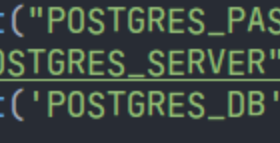
You mean, that in the bottom right at _DB the B is obviously smaller? And R and T look a bit too high up?
I remember that on Windows / with Windows Terminal individual glyphs are cached. So this could happen if you use one JetBrains and then switch to another font file. That would be fixed by a reboot, though.
Another Idea is that you probably installed the original JetBrains together with the patched one and/or installed multiple patched ones. The font identification stuff (regarding font families) is broken with a lot fonts (PR that fixes it is there). Could be that Terminal confuses different font files.
I guess you rebooted since 2021 ;-) so if the problem is still there we can rule that out. So could you show which JetBrains* fonts do you have installed (original and NerdFont)? Also good would be to specify where you got the NerdFont font files from (the link / method)
The font (family) naming has been fixed in 3.0.0, so this is probably ok now. If you still experience the problem, please reopen with new screenshot.
To be sure when updating the font (just had that issue with some other font)
- remove old version
- reboot
- install new version
This issue has been automatically locked since there has not been any recent activity (i.e. last half year) after it was closed. It helps our maintainers focus on the active issues. If you have found a problem that seems similar, please open a new issue, complete the issue template with all the details necessary to reproduce, and mention this issue as reference.
![github-actions[bot] avatar](https://avatars.githubusercontent.com/in/15368?v=4 "Published by a pub.dev verified publisher")