
redux-persist
 redux-persist copied to clipboard
 rt2zz
rt2zz
Seeing outofmemory errors on ios in asyncstorage code
Hi, using react-native-persist 5.10.0 and react-native 0.59.9, I am seeing several crashes lately in our production app like:
Error · Out of memory
[native code]stringify
node_modules/redux-persist/lib/createPersistoid.js:90:57writeStagedState
node_modules/redux-persist/lib/createPersistoid.js:78:6processNextKey
node_modules/react-native/Libraries/Core/Timers/JSTimers.js:152:6_callTimer
node_modules/react-native/Libraries/Core/Timers/JSTimers.js:414:17callTimers
node_modules/react-native/Libraries/BatchedBridge/MessageQueue.js:366:47value
node_modules/react-native/Libraries/BatchedBridge/MessageQueue.js:106:26
node_modules/react-native/Libraries/BatchedBridge/MessageQueue.js:314:8value
node_modules/react-native/Libraries/BatchedBridge/MessageQueue.js:105:17value
Could this be due to trying to store too much data in AsyncStorage? I am thinking of trying out https://github.com/bhanuc/react-native-fs-store at the RN level to drop-in this replacement for AsyncStorage ... do you know if redux-persist would work with it?


Facing same issue, but I am also using redux-persist-expo-filesystem as storage engine, I thought it did not had any size limitations. anyone having an idea whats it about or how to deal with it?

@summerkiflain I am dealing with the same issue as you in my production app, using redux-persist-expo-filesystem. Any luck?

I'm still chasing this .. I updated everything to RN 0.61 (because aysnc storage was updated) and the symptoms changed (redux persist is no longer in the stack trace) but it does seem still related because I am updating state with every keystroke to a persisted reducer. My working theory is while doing this memory is consumed and not released fast enough (XCode profiling bears this out, although there does not appear to be a leak, just a surge in memory usage).
Just tried updating to redux-persist 6.0.0 and adding a throttle of 3000 to that reducer and explicitly flushing it when the state is cleared (to avoid it coming back due to throttle delay later). Testing now ... it takes a while because this is not reliably reproducible.
Hope this helps; I will let you know what happens.
@dchersey thanks for the update. I'm extremely curious how this works out for you so, yes, please keep us posted. Thank you!
@brianchenault @dchersey Yeah still not resolved, sentry reported it happening to two users yesterday, for me sentry reports with stracktrace saying error in node_modules/redux-persist/lib/createPersistoid.js in writeStagedState at line 98:48: which is this one:
writePromise = storage.setItem(storageKey, serialize(stagedState)).catch(onWriteFail);
@dchersey @summerkiflain just to follow up here - out of curiosity, I have tried swapping out redux-persist-expo-filesystem with SqlLite storage (redux-persist-sqlite-storage), and I am still seeing this error, so I know it's not specific to the storage mechanism now. I'm on Expo SDK37 and redux-persist 5.10.0.
Same issue here. It seems like this problem happens when a device is really stressed by some large payload.
I think JSON.stringify used inside defaultSerialize function here
https://github.com/rt2zz/redux-persist/blob/master/src/createPersistoid.js#L140
function defaultSerialize(data) {
  return JSON.stringify(data)
}
is the cause. When the data to serialize is too big, it fails.
My current workaround is to use kind of "best effort" strategy to serialize. It will not store new data or remove the existing data, just to avoid the app from crashing.
// try to serialize but quit if it was too much.
const serialize = (data) => {
  try{
    return JSON.stringify(data)
  }catch(err){
    captureHandledException(err) // for sentry
    return JSON.stringify({})
  }
}

const persistConfig = {
  key: 'root',
  version: 1,
  storage: AsyncStorage,
  serialize,
}
I use redux-persist 6.0.0, Expo SDK36, AsyncStorage from react-native.
I also check the stored data when initializing screen and remove excessive data, because this error was happening when there was too much data in the store.
Since this error is quite hard to replicate, so I haven't tested this solution in the production yet. But I will update when I found out it fixed it or not.
I hope someone will come up with better solution though. Any suggestion is helpful.

Thanks for the update @foloinfo - keep us posted. Similar scenario here - I'm dealing in large datasets.
Look like it also happened with serialize process, anyway to stream JSON data ?

Experiencing the same/similar issue.
redux-persist 6.0.0 AsyncStorage 1.11.0
I have a socket connection delivering messages once per second. Each delivery results in a write to storage. While profiling using Safari connected to a live device I noticed that my redux store is being retained on every write. This results in approx 600k being added on each message :-/ In the memory snapshot list of functions the store string is being referenced by setItem(), pointing at the Promise().
`setItem: function setItem(key, value, callback) { return new Promise(function (resolve, reject) { checkValidInput(key, value);
    _RCTAsyncStorage.default.multiSet([[key, value]], function (errors) {
      var errs = convertErrors(errors);
      callback && callback(errs && errs[0]);

      if (errs) {
        reject(errs[0]);
      } else {
        resolve(null);
      }
    });
  });
},`
My store string is exceptionally escaped as well ..
"{\"networkStatus\":\"{\\\"isFetching\\\":false,\\\"error\\\":\\\"\\\",\\\"data\\\":{\\\"connected\\\":true, ...
What other info can I provide? Any workarounds or fixes for this?
EDIT: tried throttling the socket data to once every 3s. No change.

I resolve this problem by using rn-fetch-blob to writeStream data to file. If you still want to use redux-perist, custom your storage and serialize function, in setItems function, split data and stringify at that time.
I resolve this problem by using
rn-fetch-blobtowriteStreamdata to file. If you still want to useredux-perist, custom your storage and serialize function, insetItemsfunction, split data and stringify at that time.
Can you elaborate on "split data" - do you mean just arbitrarily split by json string (say in half) and persist each half (then re-combine on read)?
@ajp8164 it's depend on data you have, for me it's just a large array (8 thousand records), so I can easily split it to [[array1], [arrays2]...] and each array have 200 items which able to stringify.
// data is a list of array
writeStreamData: (data, callback) => {
   return RNFetchBlob.fs.writeStream(pathFile, 'utf8').then((stream) => {
    // put a unique key so you can split it again when retrieving data
     return Promise.all([data.map(d => stream.write(JSON.stringify(d)+'unique_key'))])
   }).then(([stream]) => stream.close())
   .catch(error => {
     if (!callback) {
       throw error;
     }
   });
 },
Update: An example code ;)
I think this is a complex problem that cant be fixed in one place. But I can identify at least one place that effectively double memory consumption at persist times.
Here:
- let stagedState = {} This is an object that contains already serialized slices of state for each top-level key. They are not cleared, only set.
- stagedState[key] = serialize(endState)
So after first write, application already have 2 copies of data - real data and serialized in
stagedState, than it create 3rd copy by callserializeagain and oops, OutOfMemory.
We in our application have state which persistent part contained in 4-5Mb json file. And sometimes we seen these crashes.

Thanks for the clues, @vovkasm. Here's a workaround that removes the extra layer of serialization in stagedState by doing all the serialization in the storage layer instead:
import AsyncStorage from '@react-native-community/async-storage';

const storage = {
  ...AsyncStorage,
  getItem: async (key: string) => {
    const value = await AsyncStorage.getItem(key);
    if (value === null) {
      return null;
    }
    return JSON.parse(value);
  },
  setItem: async (key: string, value: mixed) =>
    AsyncStorage.setItem(key, JSON.stringify(value)),
};

const persistConfig = {
  key: 'root',
  version: 1,
  storage,
  serialize: false,
  deserialize: false,
};
I'm hoping this will reduce the out-of-memory errors I see in production.

@brsaylor2 did that fix the issue for you?
Also I don't understand how moving the serialization over to your async storage wrapper would fix the issue? The problem seems to be that we're trying to serialize too much data at once. Am I missing something?
Thanks in advance for sharing your thoughts.

Thanks to all the comments above.
It seems like the number of issues are related. Especially as @vovkasm mentioned, multiple serializations cause large memory usage.
A solution from @brsaylor2 gave me an idea of how I can split data to store/rehydrate.
import rootReducer from 'reducer' // whereever you define, I use `combineReducers()`
const topLevelKeys = Object.keys(rootReducer({}, {}))

const storage = {
  ...AsyncStorage,
  getItem: async (baseKey) => {
    const data = {}
    await Promise.all(topLevelKeys.map(async key => {
      const value = await AsyncStorage.getItem(`${baseKey}:${key}`)
      if(value){
        data[key] = JSON.parse(value)
      }
    }))
    return data
  },
  setItem: async (baseKey, value) => {
    topLevelKeys.map(async key => {
      if(value[key]){
        AsyncStorage.setItem(
          `${baseKey}:${key}`,
          JSON.stringify(value[key])
        )
      }
    })
  }
}
Keep in mind this solution could slow your app especially if you have many top-level keys. Also, you might need to further split by keys if you have large dataset inside of the objects.
@brsaylor2 did that fix the issue for you?
Also I don't understand how moving the serialization over to your async storage wrapper would fix the issue? The problem seems to be that we're trying to serialize too much data at once. Am I missing something?
It seems to have fixed the issue. Moving the serialization to the AsyncStorage wrapper is just a way to prevent redux-persist from doing two serialization passes, where the second pass is processing a bunch of large already-serialized strings.

@brsaylor2 did your solution still fixed the issue?
Yes, I haven't had any reports of this crash since implementing that workaround.
import AsyncStorage from '@react-native-community/async-storage';

const storage = {
  ...AsyncStorage,
  getItem: async (key: string) => {
    const value = await AsyncStorage.getItem(key);
    if (value === null) {
      return null;
    }
    return JSON.parse(value);
  },
  setItem: async (key: string, value: mixed) =>
    AsyncStorage.setItem(key, JSON.stringify(value)),
};

const persistConfig = {
  key: 'root',
  version: 1,
  storage,
  serialize: false,
  deserialize: false,
};
I'm hoping this will reduce the out-of-memory errors I see in production.
I implemented this but after checking my previously persisted state was gone, had to persist everything from the start... any idea why is that happening? i changed my code like this:
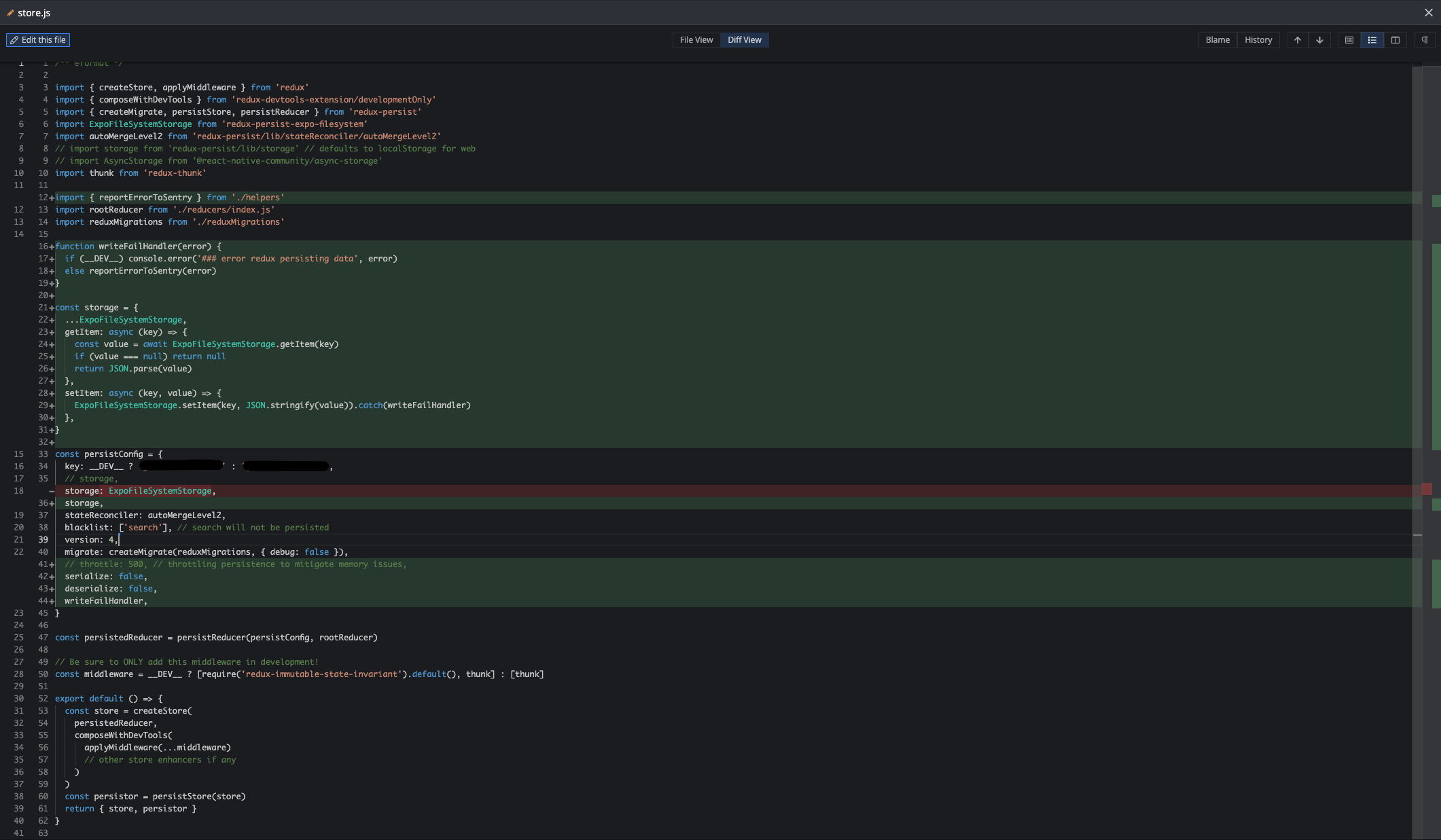
@summerkiflain when you set serialize & deserialize to false then you have to handle case in which existing data which is already deserialize
export const storage = {
    setItem: async (key, value) => {
      return set(key, value);
    },
    getItem: async key => {
      let value = await get(key);

      //for backward compatibility
      if (typeof value === 'string') {
        value = JSON.parse(value);
      }

      return value;
    },
    removeItem: async key => {
      await remove(key);
    },
};

It causes my app to crash too. Here's the error I got:
react": "18.1.0
react-native": "0.70.5
react-native-mmkv": "^2.5.1
reduxjs-toolkit-persist": "^7.2.1
react-redux": "^8.0.5
Device: Pixel 4 API 30 Android 11.0 Google Play | x86
const persistConfig = {
  key: 'root',
  storage: storage,
  blacklist: ['user'],
  stateReconciler: autoMergeLevel1,
};

const reducers = combineReducers({
  splash: splashReducer,
  search: searchReducer,
  user: userReducer,
  team: teamReducer,
  point: pointReducer,
  fetching: fetchingReducer,
  route: routeReducer,
  screenOrientation: screenOrientationReducer,
  tabBar: tabBarReducer,
  navigation: navigationReducer,
  prize: prizeReducer,
  quiz: quizReducer,
  question: questionReducer,
  news: newsReducer,
  event: eventReducer,
  ranking: rankingReducer,
  push_notification: pushNotificationReducer,
  fcm: fcmReducer,
  [apiSlice.reducerPath]: apiSlice.reducer,
});

const _persistedReducer = persistReducer(persistConfig, reducers);

export const store = configureStore({
  reducer: _persistedReducer,
  middleware: (getDefaultMiddleware) =>
    getDefaultMiddleware({
      immutableCheck: false,
      serializableCheck: false,
    }).concat([apiSlice.middleware]),
});

setupListeners(store.dispatch);
And I'm also using this function wait(timeout); a lot in my react native app is this what it triggers it or it's the storage? To get rid of memory leak I use clearTimeout is this true?
const wait = (timeout) => {
  return new Promise((resolve) => {
    const timer = setTimeout(() => {resolve(timer)}, timeout);
  });
};

const timer = await wait(1000);
clearTimeout(timer);
