
DT
 DT copied to clipboard
 rstudio
FR: Edit factor columns with (level) dropdowns in editable mode
It would be nice, if factor columns could be edited as dropdown menus offering with factor levels as options when editable = TRUE.

Hello,
Here is a way. It uses the jQuery plugin contextMenu.
library(shiny)
library(DT)

callback <- c(
  "var id = $(table.table().node()).closest('.datatables').attr('id');",
  "$.contextMenu({",
  "  selector: '#' + id + ' td.factor input[type=text]',",
  "  trigger: 'hover',",
  "  build: function($trigger, e){",
  "    var colindex = table.cell($trigger.parent()[0]).index().column;",
  "    var coldata = table.column(colindex).data().unique();",
  "    var options = coldata.reduce(function(result, item, index, array){",
  "      result[index] = item;",
  "      return result;",
  "    }, {});",
  "    return {",
  "      autoHide: true,",
  "      items: {",
  "        dropdown: {",
  "          name: 'Edit',",
  "          type: 'select',",
  "          options: options,",
  "          selected: 0",
  "        }",
  "      },",
  "      events: {",
  "        show: function(opts){",
  "          opts.$trigger.off('blur');",
  "        },",
  "        hide: function(opts){",
  "          var $this = this;",
  "          var data = $.contextMenu.getInputValues(opts, $this.data());",
  "          var $input = opts.$trigger;",
  "          $input.val(options[data.dropdown]);",
  "          $input.trigger('change');",
  "        }",
  "      }",
  "    };",
  "  }",
  "});"
)
ui <- fluidPage(
  tags$head(
    tags$link(
      rel = "stylesheet",
      href = "https://cdnjs.cloudflare.com/ajax/libs/jquery-contextmenu/2.8.0/jquery.contextMenu.min.css"
    ),
    tags$script(
      src = "https://cdnjs.cloudflare.com/ajax/libs/jquery-contextmenu/2.8.0/jquery.contextMenu.min.js"
    )
  ),
  DTOutput("dtable")
)

server <- function(input, output){
  output[["dtable"]] <- renderDT({
    datatable(
      iris, editable = "cell", callback = JS(callback),
      options = list(
        columnDefs = list(
          list(
            targets = 5, className = "factor"
          )
        )
      )
    )
  }, server = FALSE)
}

shinyApp(ui, server)
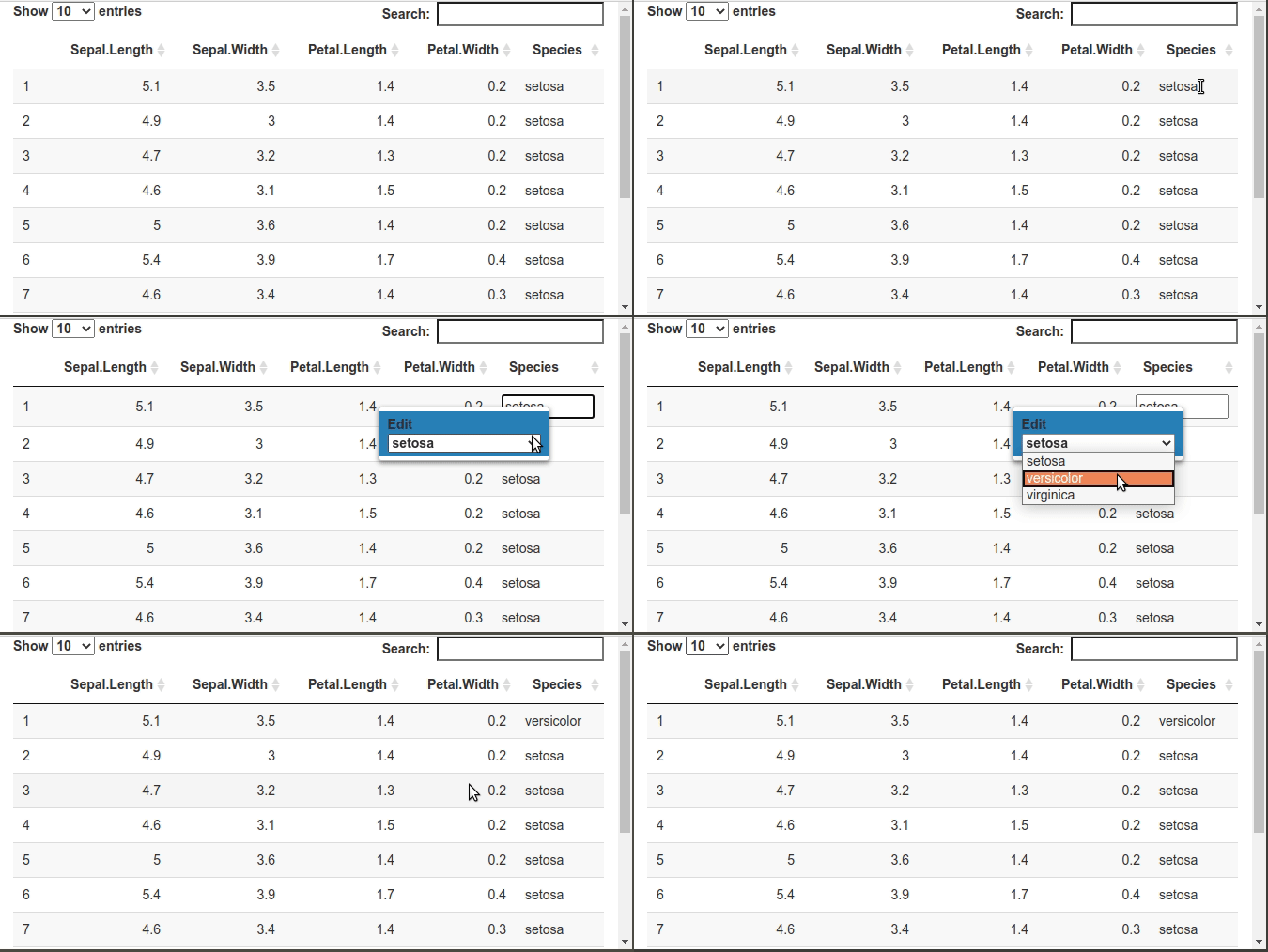

When i try this, the editing mode don't exit, after i choose the value from the drop down, it doesn't write it to the cell, and then revert back, this happens on DT version 0.20,0.19, but works well on 0.18, Can i know a workaround for this?

@AhmedKhaled945 I'm having the same issue :/ did you find a solution for this ?

Ah yes, I know why. Try this:
library(shiny)
library(DT)
library(jsonlite)

Sepal.Length <- c(10,11,12,13,14)
Sepal.Width  <- c(1,2,3,4,5)
Petal.Length <- c(10,11,12,13,14)
Petal.Width  <- c(1,2,3,4,5)
Species      <- c("SpeciesA", "SpeciesB", "SpeciesC", "SpeciesD", "SpeciesE")

iris2 <- data.frame(
  Sepal.Length,
  Sepal.Width,
  Petal.Length,
  Petal.Width,
  Species
)

callback <- c(
  "var id = $(table.table().node()).closest('.datatables').attr('id');",
  "$.contextMenu({",
  "  selector: '#' + id + ' td input[type=text]',",
  "  trigger: 'hover',",
  "  build: function($trigger, e){",
  "    var levels = $trigger.parent().data('levels');",
  "    if(levels === undefined){",
  "      var colindex = table.cell($trigger.parent()[0]).index().column;",
  "      levels = table.column(colindex).data().unique();",
  "    }",
  "    var options = levels.reduce(function(result, item, index, array){",
  "      result[index] = item;",
  "      return result;",
  "    }, {});",
  "    return {",
  "      autoHide: true,",
  "      items: {",
  "        dropdown: {",
  "          name: 'Edit',",
  "          type: 'select',",
  "          options: options,",
  "          selected: 0",
  "        }",
  "      },",
  "      events: {",
  "        show: function(opts){",
  "          opts.$trigger.off('blur');",
  "        },",
  "        hide: function(opts){",
  "          var $this = this;",
  "          var data = $.contextMenu.getInputValues(opts, $this.data());",
  "          var $input = opts.$trigger;",
  "          var td = $input.parent();",
  "          $input.remove();",
  "          table.cell(td).data(options[data.dropdown]).draw();",
  "        }",
  "      }",
  "    };",
  "  }",
  "});"
)

createdCell <- function(dat2){
  dat2_json <- toJSON(dat2, dataframe = "values")
  c(
    "function(td, cellData, rowData, rowIndex, colIndex){",
    sprintf("  var matrix = %s;", dat2_json),
    "  var tmatrix = matrix[0].map((col, i) => matrix.map(row => row[i]));", # we transpose
    "  $(td).attr('data-levels', JSON.stringify(tmatrix[colIndex]));",
    "}"
  )
}

ui <- fluidPage(
  tags$head(
    tags$link(
      rel = "stylesheet",
      href = "https://cdnjs.cloudflare.com/ajax/libs/jquery-contextmenu/2.8.0/jquery.contextMenu.min.css"
    ),
    tags$script(
      src = "https://cdnjs.cloudflare.com/ajax/libs/jquery-contextmenu/2.8.0/jquery.contextMenu.min.js"
    )
  ),
  DTOutput("dtable")
)

server <- function(input, output){
  output[["dtable"]] <- renderDT({
    datatable(
      iris, editable = list(target = "cell", numeric = "none"),
      callback = JS(callback), rownames = FALSE,
      options = list(
        columnDefs = list(
          list(
            targets = "_all",
            createdCell = JS(createdCell(iris2))
          )
        )
      )
    )
  }, server = FALSE)
}

shinyApp(ui, server)
Ah sorry, this code is more general. It allows to have in the dropdown lists the values of another dataframe. Take iris2 = iris and that should work.
Thanks @stla is createdCell needed in my case or changing the callback code should be enough?
These are the modifications that are causing the issue https://github.com/rstudio/DT/pull/860/files#diff-7c0c45b02b95552b2b58278c3ce9de811ec27e03a89ceb561ca1175c3f8a1b03
I've tried to use the $input.trigger('blur'); but still doesn't work
changeInput('cell_edit', [cellInfo(cell)], 'DT.cellInfo', null, {priority: 'event'}); this is now ignored when I use the $input.trigger('blur') or 'change'
That's me who did these modifications. Why don't you simply copy-paste my code? Yes, keep the createdCell.
@stla thanks again for your help. I tried your code many times, otherwise I wouldn't be here commenting on the issue ^^, the problem is like the modification of the cell does not trigger the input$dt_cell_edit, see example below:
`library(shiny)
library(DT)
library(jsonlite)

Sepal.Length <- c(10,11,12,13,14)
Sepal.Width  <- c(1,2,3,4,5)
Petal.Length <- c(10,11,12,13,14)
Petal.Width  <- c(1,2,3,4,5)
Species      <- c("SpeciesA", "SpeciesB", "SpeciesC", "SpeciesD", "SpeciesE")

iris2 <- data.frame(
  Sepal.Length,
  Sepal.Width,
  Petal.Length,
  Petal.Width,
  Species
)

callback <- c(
  "var id = $(table.table().node()).closest('.datatables').attr('id');",
  "$.contextMenu({",
  "  selector: '#' + id + ' td input[type=text]',",
  "  trigger: 'hover',",
  "  build: function($trigger, e){",
  "    var levels = $trigger.parent().data('levels');",
  "    if(levels === undefined){",
  "      var colindex = table.cell($trigger.parent()[0]).index().column;",
  "      levels = table.column(colindex).data().unique();",
  "    }",
  "    var options = levels.reduce(function(result, item, index, array){",
  "      result[index] = item;",
  "      return result;",
  "    }, {});",
  "    return {",
  "      autoHide: true,",
  "      items: {",
  "        dropdown: {",
  "          name: 'Edit',",
  "          type: 'select',",
  "          options: options,",
  "          selected: 0",
  "        }",
  "      },",
  "      events: {",
  "        show: function(opts){",
  "          opts.$trigger.off('blur');",
  "        },",
  "        hide: function(opts){",
  "          var $this = this;",
  "          var data = $.contextMenu.getInputValues(opts, $this.data());",
  "          var $input = opts.$trigger;",
  "          var td = $input.parent();",
  "          $input.remove();",
  "          table.cell(td).data(options[data.dropdown]).draw();",
  "        }",
  "      }",
  "    };",
  "  }",
  "});"
)

createdCell <- function(dat2){
  dat2_json <- toJSON(dat2, dataframe = "values")
  c(
    "function(td, cellData, rowData, rowIndex, colIndex){",
    sprintf("  var matrix = %s;", dat2_json),
    "  var tmatrix = matrix[0].map((col, i) => matrix.map(row => row[i]));", # we transpose
    "  $(td).attr('data-levels', JSON.stringify(tmatrix[colIndex]));",
    "}"
  )
}

ui <- fluidPage(
  tags$head(
    tags$link(
      rel = "stylesheet",
      href = "https://cdnjs.cloudflare.com/ajax/libs/jquery-contextmenu/2.8.0/jquery.contextMenu.min.css"
    ),
    tags$script(
      src = "https://cdnjs.cloudflare.com/ajax/libs/jquery-contextmenu/2.8.0/jquery.contextMenu.min.js"
    )
  ),
  DTOutput("dtable")
)

server <- function(input, output){
  output[["dtable"]] <- renderDT({
    datatable(
      iris, editable = list(target = "cell", numeric = "none"),
      callback = JS(callback), rownames = FALSE,
      options = list(
        columnDefs = list(
          list(
            targets = "_all",
            createdCell = JS(createdCell(iris2))
          )
        )
      )
    )
  }, server = FALSE)

  shiny::observe({
    input[["dtable_cell_edit"]]

    message("it is working you can stop editing the table")

  })
}

shinyApp(ui, server)
@stla it's working using the following JS code. The event has been changed from "change" to "blur" in DT version 0.19, so we need to proceed as follow:
"      events: {",
  "        show: function(opts){",
  "          opts.status = 'show'",
  "          opts.$trigger.on('blur', function(event) {",
  "               if(opts.status == 'show'){",
  "                   event.preventDefault();",
  "                   event.stopPropagation();",
  "                   event.stopImmediatePropagation();",
  "                   return false;",
  "               }",
  "           })",
  "          let eventList = $._data(opts.$trigger[0], 'events');",
  "          eventList.blur.unshift(eventList.blur.pop());",
  "        },",
  "        hide: function(opts){",
  "          opts.status = 'hide'",
  "          var $this = this;",
  "          var data = $.contextMenu.getInputValues(opts, $this.data());",
  "          var $input = opts.$trigger;",
  "          var userSelectedValue = options[data.dropdown];",
  "          $input.val(userSelectedValue);",
  "          $input.trigger('blur');",
  "        }",
  "      }",
Ah ok you want the input$dt_cell_edit. I would do:
  "        hide: function(opts){",
  "          var $this = this;",
  "          var data = $.contextMenu.getInputValues(opts, $this.data());",
  "          var $input = opts.$trigger;",
  "          var td = $input.parent();",
  "          $input.remove();",
  "          var value = options[data.dropdown];
  "          var cell = table.cell(td);",
  "          var indices = cell.index();",
  "          var info = {row: indices.row, column: indices.column, value: value};",
  "          Shiny.setInputValue(id + '_' + 'cell_edit:DT.cellInfo', [info], {priority: 'event'});",
  "          cell.data(value).draw();",
  "        }",
These are the modifications that are causing the issue https://github.com/rstudio/DT/pull/860/files#diff-7c0c45b02b95552b2b58278c3ce9de811ec27e03a89ceb561ca1175c3f8a1b03
I've tried to use the $input.trigger('blur'); but still doesn't work
May these modifications also prevent the cancelling of inputs by hitting the Esc button in recent DT versions (but just confirms the input)?
Per default it's also not possible to use Enter to confirm the input in cell-edit mode, while in row-edit mode CTRL + ENTER still works fine.

This is not possible. See #408. rhandsontable does it well.
@stla That solution above feels a bit janky unfortunately.

There's a better solution with another JavaScript library (yadcf or something like that). I didn't know the word "janky" :)
That looks great! I wish I knew JS well enough to customize it a bit more. E.g.
- No Confirm/Cancel. Just click to confirm. Easier to use as a spreadsheet (but I suppose you can hit Tab+Enter to Confirm quickly).
- Allow typing in the numeric box to highlight the choices.