
librime
 librime copied to clipboard
Published
20 hours ago •
 rime
rime
rime
refactor UI style config and move frontend logic to librime
Rough ideas:
themesthat is an alias to the backward compatible namepreset_color_schemes- unified themes that work for multiple frontends; frontends selectively implement features defined in unified theme;
- ability to specialize for a particular frontend;
- librime to provide cross-platform support for UI style config
- merge
(frontend=weasel,squirrel):/styletodefault:/styleusing a config compiler plugin; - implement
app_optionsin librime, maybe using an in-memory config builder to dynamically merge app-specific config, in order to simplify frontend code.
- merge

要出現主題功能了啊 OuO
有可能把官網的圖像復現出來嗎 (#
例如這樣 (?
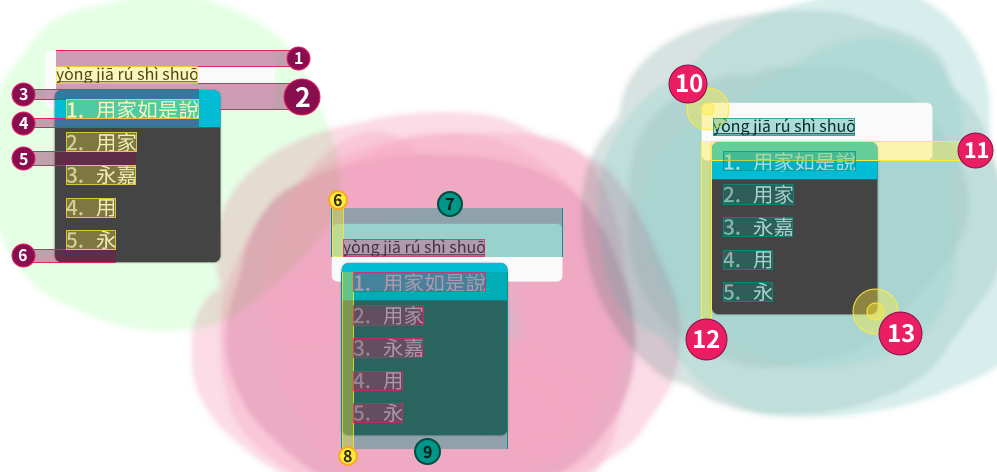
#輸入區域
input:
    #最短寬度⑦
    min_width: 330
    #圓角半徑⑩
    round_corner: 4
    #內距(參照CSS順序採上①、右、下②、左⑥)
    padding: [15,10,25,10]
    #陰影(位移、角度、半徑、顏色)
    shadow: []
#候選字選單
candidate:
    #最短寬度⑨
    min_width: 165
    #候選字間距⑤
    spacing: 12
    #圓角半徑⑬
    round_corner: 5
    #與輸入區域的外距(採上⑪、左⑫)
    margin: [-20,10]
    #選單內距(參照CSS順序採上③、右、下⑥、左⑧)
    padding: [10,12,12,12]
    #激活選項內距(參照CSS順序採上③、右、下④、左⑧)
    hilited_padding: [10,12,10,12]
    #陰影(位移、角度、半徑、顏色)
    shadow: [0,180,2,0xff000000]

我认为可以将标签、候选项和 comment 的字体参数分开,比如 font_point 可以分成 label_font_point、candidate_font_point 和 comment_font_point。

我认为把样式定义放到 librime 并不益于简化前端和统一配置,因为不同终端本身差异就大,并且无论如何都需要在每个前端分别实现一遍样式的代码。
