
react-email
 react-email copied to clipboard
 resendlabs
Column used together with Section add extra td element, using local version works fine
Hi! The Column component adds an extra td element.
        <Container style={container}>
          <Section>
            <Column>
              <Section>
                <Img
                  src={`https://birdview.se/logo_b_np.png`}
                  width="120"
                  height="auto"
                  alt="Bird View UF"
                />
              </Section>
              <Section>
                <Text>Bird View</Text>
              </Section>
            </Column>
          </Section>
Using this code gives me:
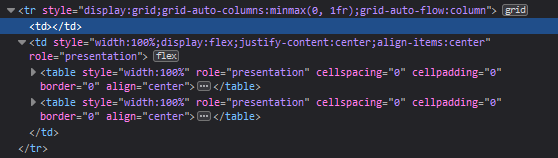
It seams like for every <Column> I add, I get an extra td
          <Section>
            <Column>A</Column>
            <Column>B</Column>
            <Column>C</Column>
          </Section>
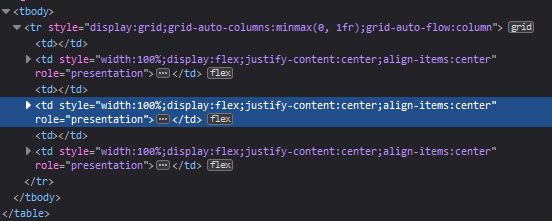

Rendering out an empty column gives:
 which is correct, it seams to become bad when I wrap the column in Section tags it seams to break?
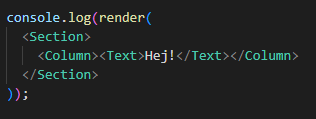
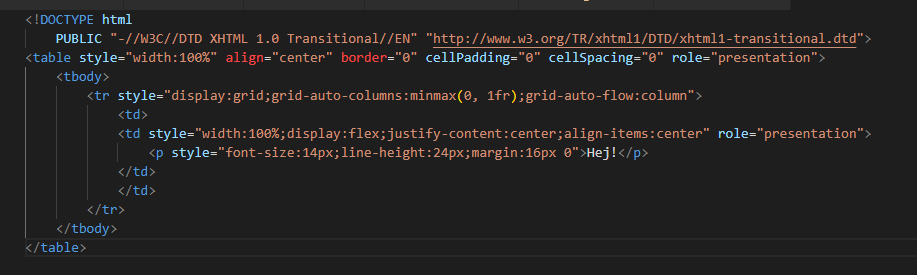 It makes like a dubbletd? The code:
Using a local copy of the section element it works just fine (taken from the github repo)
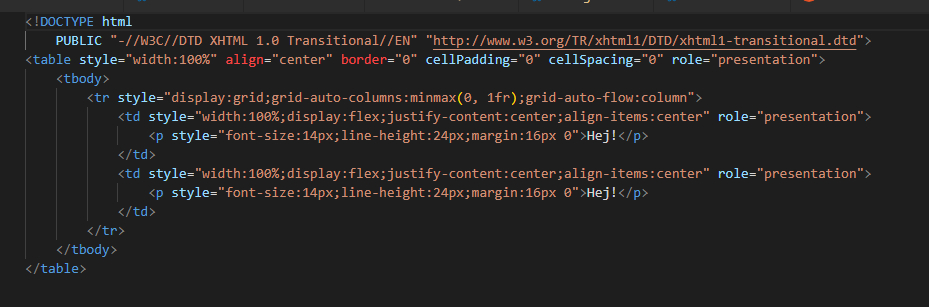
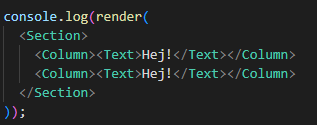 But using the copy from the package gives:
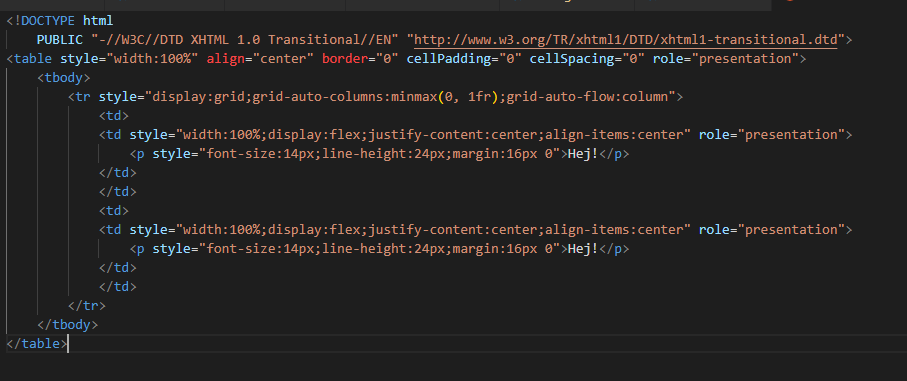
Any idea what could cause this?
Hey @Philip2809, try to update to the latest version of Section component :). https://react.email/docs/changelog#january-24-2023

Hi! I can't, it says 0.0.4 is the latest.
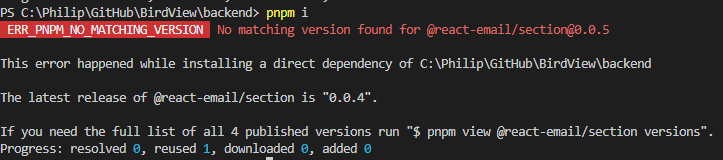 It also says so on this website:
https://socket.dev/npm/package/@react-email/section
It also says so on this website:
https://socket.dev/npm/package/@react-email/section
But at least the bug is fixed and I can use a local version until I can download the latest later, not that urgent.
Hi. I'm running into the same issue. It looks like this was thought to be fixed in v0.0.4 of Section but then was undone in v0.0.7 in #456. In v0.0.6, EACH Column is being wrapped in an extra td and in v0.0.8 it's back to wrapping all tds in a single extra td.
// React code
<Section>
    <Column>
        <Img src={...} height={40} width={150} />
    </Column>
    <Column>
        <Img
            src={...} height={40} width={150} />
    </Column>
</Section>
<!-- Generated HTML with Section v0.0.6 -->
<table style="width:100%" align="center" border="0" cellPadding="0" cellSpacing="0" role="presentation">
    <tbody>
        <tr style="display:grid;grid-auto-columns:minmax(0, 1fr);grid-auto-flow:column">
            <td>
                <td>
                    <img src="..." width="150" height="40" style="display:block;outline:none;border:none;text-decoration:none" />
                </td>
            </td>
            <td>
                <td>
                    <img src="..." width="150" height="40" style="display:block;outline:none;border:none;text-decoration:none" />
                </td>
            </td>
        </tr>
    </tbody>
</table>
<!-- Generated HTML with Section v0.0.8 -->
<table align="center" border="0" cellPadding="0" cellSpacing="0" role="presentation" width="100%">
    <tbody>
        <tr>
            <td>
                <td>
                    <img src="..." width="150" height="40" style="display:block;outline:none;border:none;text-decoration:none" />
                </td>
                <td>
                    <img src="..." width="150" height="40" style="display:block;outline:none;border:none;text-decoration:none" />
                </td>
            </td>
        </tr>
    </tbody>
</table>

Hi. I'm running into the same issue. It looks like this was thought to be fixed in v0.0.4 of
Sectionbut then was undone in v0.0.7 in #456. In v0.0.6, EACHColumnis being wrapped in an extratdand in v0.0.8 it's back to wrapping alltds in a single extratd.// React code <Section> <Column> <Img src={...} height={40} width={150} /> </Column> <Column> <Img src={...} height={40} width={150} /> </Column> </Section><!-- Generated HTML with Section v0.0.6 --> <table style="width:100%" align="center" border="0" cellPadding="0" cellSpacing="0" role="presentation"> <tbody> <tr style="display:grid;grid-auto-columns:minmax(0, 1fr);grid-auto-flow:column"> <td> <td> <img src="..." width="150" height="40" style="display:block;outline:none;border:none;text-decoration:none" /> </td> </td> <td> <td> <img src="..." width="150" height="40" style="display:block;outline:none;border:none;text-decoration:none" /> </td> </td> </tr> </tbody> </table><!-- Generated HTML with Section v0.0.8 --> <table align="center" border="0" cellPadding="0" cellSpacing="0" role="presentation" width="100%"> <tbody> <tr> <td> <td> <img src="..." width="150" height="40" style="display:block;outline:none;border:none;text-decoration:none" /> </td> <td> <img src="..." width="150" height="40" style="display:block;outline:none;border:none;text-decoration:none" /> </td> </td> </tr> </tbody> </table>
Thanks for reporting this detailed between version. Latest version is more stable now, can you double check that? Also Column should always be used inside of a Row.
eg
<Section>
  <Row>
    <Column>
      <Img src={...} height={40} width={150} />
    </Column>
    <Column>
      <Img src={...} height={40} width={150} />
    </Column>
  </Row>
</Section>
Going to close this issue since latest version fixes this and let me know if any issue pops up and we can reopen
