
datetimepicker
 datetimepicker copied to clipboard
 react-native-datetimepicker
Accesibility options not allowed
Question
Accessibility Options not allowed
We are using expo 3.20.1 and we want to make some changes but we are not finding how. Some of the things we need are:
- Modify styles such as the background color of the letters when they are not in focus in both date and time,
- When selecting a disabled date that only mentions the voice over that date
is it possible to customize these things?
Thanks, greetings.

Hi
I have the same issue.
The contrast ratio between text and its background is not at least 4.5:1. As a low vision/Colorblind user, I should be able to see the text with sufficient contrast with its background so I would be able to read the content.
Current ratio: For the text “Thu, Apr 23” and "7 AM " (approximate hex:#FFFFFF) on the blue background color(approximate hex:#5383C3) has an approximate insufficient contrast ratio of 3.9:1.
Expected ratio: Regular text (under 18 points regular font or 14 points bold font) must have a contrast ratio of at least 4.5:1 with the background.


Also having problems to navigate using talkback.
As a Talkback user, the location of the elements must be consistent so that he would be able to navigate or use the widget easily. Current behaviour:
- focus the '>' (next month) button in the month of april and may.
- Observe that the 'next >' month button receives the focus after the calendar dates in the month of april and receives the focus before the calendar dates in the month of may, june and other future months.
Expected behaviour:
2. The element must receive the focus consistently either before or after the calendar dates for all the months.

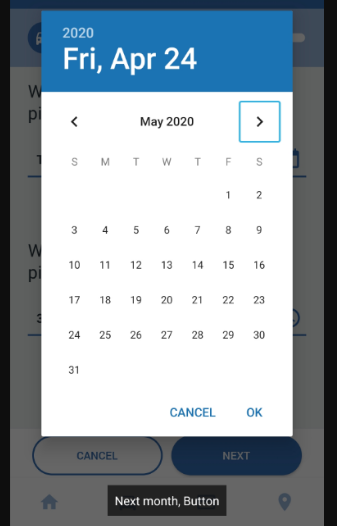
Hello! I am encountering challenges with accessibility on Android. Specifically, I am unable to adjust the size of the cells in the calendar to meet the minimum requirement of 48dp for accessibility compliance. Currently, the cells are sized at 35dp x 40dp, which is below the necessary threshold. This issue is being flagged by the accessibility scanner.
I am inquiring if there are any plans to address this limitation, as enhancing customization options for Android styling could facilitate meeting these accessibility standards.
Thank you for your attention to this matter.
