
remi
 remi copied to clipboard
 rawpython
[Question] How do I get the "Choose a file" dialog boxes
I'm trying to implement this feature:

I want to choose:
- A single file (Save As)
- A single file (Open)
- Multiple files
- A folder
I don't have a problem creating the button.
My problem is, how do I show the dialog box that's show when you press the button and how do you get back the results?
I would like to get 3 flavors of this dialog box:


Oh, I just noticed this code that I did not see last night!
This seems to be in the right direction!
    def open_fileselection_dialog(self, widget):
        self.fileselectionDialog = gui.FileSelectionDialog('File Selection Dialog', 'Select files and folders', False,
                                                           '.')
        self.fileselectionDialog.confirm_value.connect(
            self.on_fileselection_dialog_confirm)

        # here is returned the Input Dialog widget, and it will be shown
        self.fileselectionDialog.show(self)
Ooooo ooo oooo... I'm getting closer.
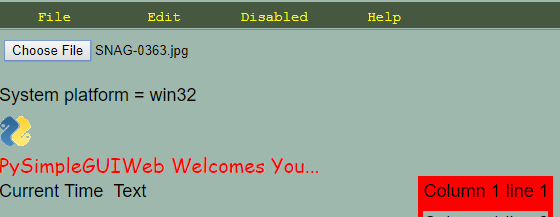
I was able to get a popup dialog by including this widget in my layout:
remi.gui.FileUploader('./', width=200, height=30, margin='10px')
Clearly a lot to learn, like how to use my own buttons with it so that it doesn't look like this in my layout:
Hello @MikeTheWatchGuy ,
This reddit thread will help you on how to show your custom button. https://www.reddit.com/r/RemiGUI/comments/bl1nr5/how_should_i_parse_files_via_the/
Let me know if you find problems. ;-)

All I want this button to do is show one of the 4 Windows File/Folder dialog boxes that I showed at the start of the Issue. I don't want to upload anything, I just want to choose a file or folder from the local filesystem.
Does that Reddit thread still apply to this?
@MikeTheWatchGuy ok so you need a FileSelectionDialog widget. An example about its usage in the example/widgets_overview_app.py
This allows to select single and multiple file and folders.