
unity-graphql-client
 unity-graphql-client copied to clipboard
 rafaelnsantos
Demo and Documentation
Thanks so much for this--I am new to GraphQL and it's Unity implementation.
You wouldn't happen to have a demo Unity file as to how you implemented this and/or more documentation on how you used these scripts within Unity would you?
It would be very helpful.
Thank you!

Hi, thank you for your message. I have a Demo project using this client:
Project
https://github.com/rafaelnsantos/Base (this repository uses LFS)
Setup
Memory Cloud
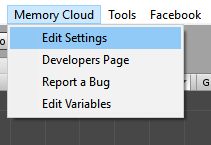
Memory Cloud > Edit Settings
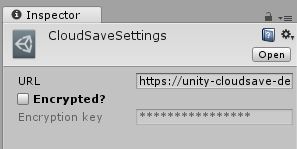 The encryptation method is RC4
Memory Cloud > Edit Variables(queries are built from this setting)
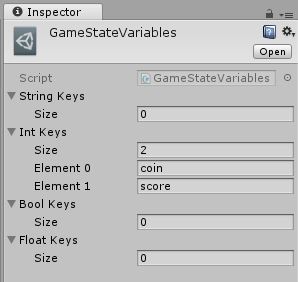
Facebook SDK
Set up Facebook SDK https://developers.facebook.com/docs/unity/
API
GameState.SetInt("key", value);
GameState.SetFloat"key", value);
GameState.SetString"key", value);
GameState.SetBool"key", value);

GameState.GetInt("key");
GameState.GetFloat("key");
GameState.GetString("key");
GameState.GetBool("key");

GameState.Save();
GameState.Load();
Usage
Load
Load only need to be called once(https://github.com/rafaelnsantos/Base/blob/3a8f7c8c9e53f626f4e878c0e6be2b2db224710f/Assets/2Dverse/Facebook/FacebookManager.cs).
When Load is finished fires the Action onLoad(https://github.com/rafaelnsantos/Base/blob/1938a254226c79dc3ab7a951b56017fccbef2473/Assets/2Dverse/CloudSave/GameState.cs#L133)
Subscribe to this Action wherever needed(https://github.com/rafaelnsantos/Base/blob/1938a254226c79dc3ab7a951b56017fccbef2473/Assets/HighScore.cs#L16).
set
Set the variables using GameState set methods(https://github.com/rafaelnsantos/Base/blob/1938a254226c79dc3ab7a951b56017fccbef2473/Assets/_Projeto/Sandbox/Score.cs#L34).
Save
Only need to be called once(https://github.com/rafaelnsantos/Base/blob/3a8f7c8c9e53f626f4e878c0e6be2b2db224710f/Assets/2Dverse/AudioManager/Scripts/AudioManager.cs#L128)
Server
https://github.com/rafaelnsantos/unity-cloudsave
GraphQL Schema
https://github.com/rafaelnsantos/unity-cloudsave/blob/master/src/graphql/cloudsave/schema.graphql https://github.com/rafaelnsantos/unity-cloudsave/blob/master/src/graphql/leaderboard/schema.graphql
PublicLeaderboard is used here https://memory-cloud.github.io/leaderboard-react/
Setup
configured via enviroment variables, mine is hosted at heroku.
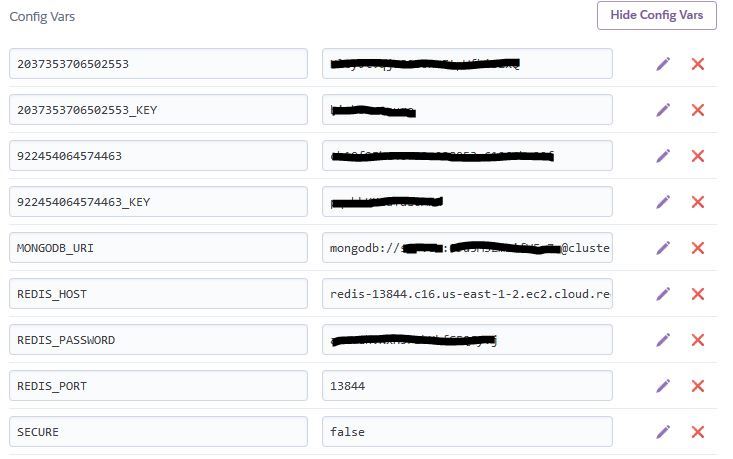
Database
Mongo Schema
https://github.com/rafaelnsantos/unity-cloudsave/blob/master/src/models/user.js
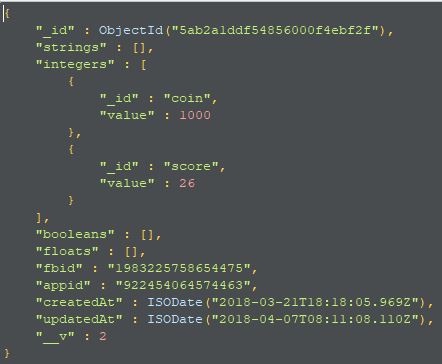
Authentication
The game sends the Facebook token and appid in the header (https://github.com/rafaelnsantos/Base/blob/master/Assets/2Dverse/CloudSave/GraphQLClient.cs#L37) of the request, the server retrieves the userid from facebook (https://github.com/rafaelnsantos/unity-cloudsave/blob/a07c2592bf14d1959571ca24d73c8169760831bf/src/middlewares/authentication.js#L26) using https://developers.facebook.com/docs/graph-api/reference/v2.12/debug_token
Cryptography(optional) (RC4)
- https://github.com/rafaelnsantos/Base/blob/master/Assets/2Dverse/CloudSave/RC4.cs
- https://github.com/rafaelnsantos/unity-cloudsave/blob/master/src/utils/rc4.js
Extending
To extend the server, create a folder in /src/graphql and create a schema.graphql and a resolver.js inside the folder.
egs:
- https://github.com/rafaelnsantos/unity-cloudsave/tree/master/src/graphql/leaderboard
- https://github.com/rafaelnsantos/unity-cloudsave/tree/master/src/graphql/cloudsave
Anything else?
I'd love to hear about how you want to use it.

Thank you very much for the quick update on this! This looks like exactly what I need—very nicely put.
I am having a rough time on authentication--I have a GQL server my developers setup and I am trying to connect to it--however, i must be logged in to myapp.com/login first to then to be able to access myapp.com/graphql. I see the authorization bearer/token is in client script which they mentioned to me and they also said to do a post to myapp.com/graphql and in the request body use {email: string, password: string}...i have tried this numerous ways and I still cant get it configered properly. Any tips on authentication you may have would be extremely helpful. Thank you!