
userscripts
 userscripts copied to clipboard
 quoid
quoid
Missed Installation Steps
Is this app only for macOS users? I can't figure out what should I do after following steps:
- Go to Settings > Extensions > Userscripts
- Turn Userscripts on
- For optimal experience it's recommended that you allow Userscripts for All Websites
- Once the above is complete open the containing app
- Click the "Set Userscripts Directory" button and select the directory, within the Files.app ...
Here's where I stuck. I guess some steps are missing, where do I get Files.app file?

@rusproject Files.app is an Apple app that is bundled with iOS. If you've deleted it, you will have to reinstall it.
When you click Set Userscripts Directory, it should automatically open the Files.app if installed.
I don't know if I would say that there is a "missed installation step" but perhaps I could include the information I wrote above in the readme. Do you think that would make it more clear?

Ok, get it, I just have other iOS language, so the Files app named differently, and I thought Files.app is some file with ".app" extension (from repo or smth)...
Well, still having difficulties, though. Probably missing something, but after installation (as written in the Steps above), what should I do next to run my .js files on a specific website in iOS Safari? For example, I've created test.js file and placed it in a directory Files.app - iCloud Drive - /userscripts. In the Saffari I can see following:
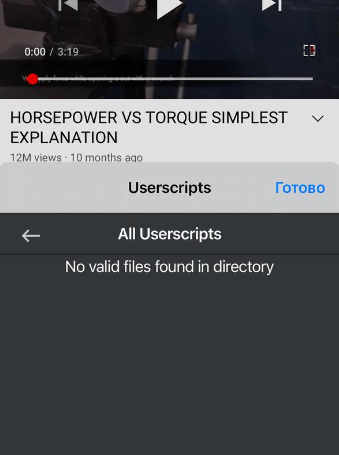
Some additional screenshots:
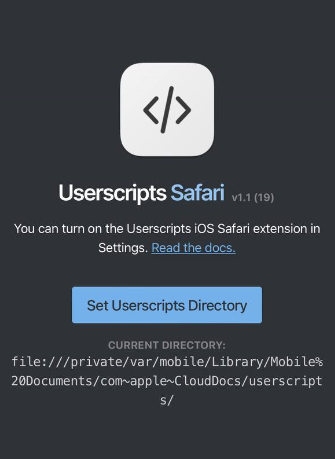
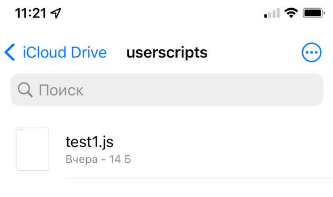
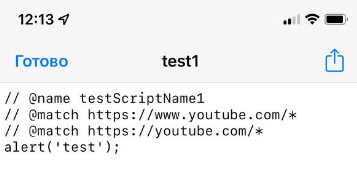
I just have other iOS language
You are probably correct. I used to the .app suffix because I am used to seeing it on macOS, but most people are probably not.
what should I do next to run my .js files on a specific website in iOS Safari
Whether a script runs on a specific website is dependent on how the userscript is written. I am glad to help you out with this if you are new to userscripts, but send me an email for that (on github profile).
For example, I've created test.js file and placed it in a directory Files.app - iCloud Drive - /userscripts. In the Saffari I can see following
That userscript you created would not work because your @match values won't match the youtube url on mobile. The youtubeurls on mobile is https://m.youtube.com and the @match values are https://youtube/* and https://www.youtube.com/*.
You would want to use a match pattern like this *://*.youtube.com/*. You can read more about match patterns here.
Thank you a lot for this link, the thing was I did't add // ==UserScript== to beginning of the .js file. Now it totally works as expected.
I don't know if I would say that there is a "missed installation step" but perhaps I could include the information I wrote above in the readme. Do you think that would make it more clear?
I think info about default iOS apps reinstallation process in the readme will be a little out of place, but may be you will consider adding a short example of a simple script? Like this one
// ==UserScript==
// @name        Simple script example
// @match       *://*/*
// @version     1.0
// ==/UserScript==
alert('It works!');
Thanks!