
vscode-plantuml
 vscode-plantuml copied to clipboard
 qjebbs
Context menu shows on Pan operation
On Visual Studio Code current version (1.57.1). When use right click for pan the PlantUML Preview, the context menu appears for cut/copy/paste operation. That makes unable to use the pan operation with a mouse.
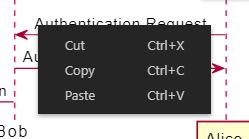


I have the same issue in the 2.15.1 version. On Macbook it is fine to scroll vertical/horizontal using two fingers. With external mouse I cannot find a way of scrolling (except using arrows on keyboard).


This is a very important feature for large diagrams, where we need to zoom in. Request to developer for prioritizing this. It sounds like easily fixable.

it really is a shame the pan is not working properly because of the context menu
The best experience I had was with this preview extension for Graphviz - click and drag left button to pan around, mouse wheel to zoom in and out

My best workaround for now is to right click twice. First right click opens the menu, then right-click again on the same and then hold it. It will close the menu and you can move. It looks like it is necessary to do this on the extension: https://github.com/microsoft/vscode/issues/139824
