
gluetun
 gluetun copied to clipboard
 qdm12
qdm12
VPN provider support: VPNSecure.me

vpnsecure.zip This zip has all the servers in one file vs the one emailed that has each server in a separate file.

Wonderful. Notes to my future self:
- TCP port:
110 - UDP port:
1282 - TCP hostnames are the UDP hostnames with
tcp-prefix. There is a TCP server for each UDP server. - Domain is
isponeder.com - List of UDP hosts (subdomains):
subdomains := []string{"at2", "au2", "au3", "be1", "be2", "ca1", "ca2", "ch1", "de1", "de2", "de3", "de4", "de5", "de6", "dk3", "es1", "es2", "fr1", "fr2", "fr3", "fr4", "hk1", "id1", "ie1", "in1", "mx1", "nl1", "nl2", "nz1", "se1", "se3", "uk1", "uk2", "uk3", "uk4", "uk5", "uk6", "uk7", "us1", "us10", "us11", "us12", "us13", "us14", "us15", "us16", "us2", "us4", "us5", "us6", "us7", "us8", "us9", "ustream1", "za2"}
- Remarks on their config
- they use
comp-lzo - they use
float?? - they use
mute 20?? <key>has prefix-----BEGIN ENCRYPTED PRIVATE KEY-----and suffix-----END ENCRYPTED PRIVATE KEY-----. This might be a user specific encrypted key.
- they use
Ca certificate:
MIIEJjCCAw6gAwIBAgIJAMkzh6p4m6XfMA0GCSqGSIb3DQEBCwUAMGkxCzAJBgNVBAYTAlVTMQswCQYDVQQIEwJOWTERMA8GA1UEBxMITmV3IFlvcmsxFTATBgNVBAoTDHZwbnNlY3VyZS5tZTEjMCEGCSqGSIb3DQEJARYUc3VwcG9ydEB2cG5zZWN1cmUubWUwIBcNMTcwNTA2MTMzMTQyWhgPMjkzODA4MjYxMzMxNDJaMGkxCzAJBgNVBAYTAlVTMQswCQYDVQQIEwJOWTERMA8GA1UEBxMITmV3IFlvcmsxFTATBgNVBAoTDHZwbnNlY3VyZS5tZTEjMCEGCSqGSIb3DQEJARYUc3VwcG9ydEB2cG5zZWN1cmUubWUwggEiMA0GCSqGSIb3DQEBAQUAA4IBDwAwggEKAoIBAQDiClT1wcZ6oovYjSxUJIQplrBSQRKB44uymC8evohzK7q67x0NE2sLz5Zn9ZiC7RnXQCtEqJfHqjuqjaH5MghjhUDnRbZS/8ElxdGKn9FPvs9b+aTVGSfrQm5KKoVigwAye3ilNiWAyy6MDlBeoKluQ4xW7SGiVZRxLcJbLAmjmfCjBS7eUGbtA8riTkIegFo4WFiy9G76zQWw1V26kDhyzcJNT4xO7USMPUeZthy13g+zi9+rcILhEAnl776sIil6w8UVK8xevFKBlOPk+YyXlo4eZiuppq300ogaS+fX/0mfD7DDE+Gk5/nCeACDNiBlfQ3ol/De8Cm60HWEUtZVAgMBAAGjgc4wgcswHQYDVR0OBBYEFBJyf4mpGT3dIu65/1zAFqCgGxZoMIGbBgNVHSMEgZMwgZCAFBJyf4mpGT3dIu65/1zAFqCgGxZooW2kazBpMQswCQYDVQQGEwJVUzELMAkGA1UECBMCTlkxETAPBgNVBAcTCE5ldyBZb3JrMRUwEwYDVQQKEwx2cG5zZWN1cmUubWUxIzAhBgkqhkiG9w0BCQEWFHN1cHBvcnRAdnBuc2VjdXJlLm1lggkAyTOHqnibpd8wDAYDVR0TBAUwAwEB/zANBgkqhkiG9w0BAQsFAAOCAQEArbTAibGQilY4Lu2RAVPjNx14SfojueBroeN7NIpAFUfbifPQRWvLamzRfxFTO0PXRc2pw/It7oa8yM7BsZj0vOiZY2p1JBHZwKom6tiSUVENDGW6JaYtiaE8XPyjfA5Yhfx4FefmaJ1veDYid18S+VVpt+Y+UIUxNmg1JB3CCUwbjl+dWlcvDBy4+jI+sZ7A1LF3uX64ZucDQ/XrpuopHhvDjw7g1PpKXsRqBYL+cpxUI7GrINBa/rGvXqv/NvFH8bguggknWKxKhd+jyMqkW3Ws258e0OwHz7gQ+tTJ909tR0TxJhZGkHatNSbpwW1Y52A972+9gYJMadSfm4bUHA==
Encrypted private key:
MIIC0TBLBgkqhkiG9w0BBQ0wPjApBgkqhkiG9w0BBQwwHAQINKwv0CSB0KMCAggAMAwGCCqGSIb3DQIJBQAwEQYFKw4DAgcECDCTTHzrt9taBIICgOGx8MfAVf+BlWlblLoItYkflBRH7acUEC2TFbPe/HSwfklwZewvshkOr7+gg5w7berWdrMz6ZcNnMRPqs2Ba/MyCgRqzupsnJxMUFyfcXPya8PqIMoIeprozQ8dBwLnD0GSUIfzKXe9i5PtfNMsCdYTPP6GY1GM0QCBIyXYwNexd/aB4QZbrZbelwZiW2EHF3vJ7zumf/N5JOnUeTMC67zkN0Pcr/gJS6hMZFhJWA7ZDEaEpPb+JemqFisnQRngkk/EGUDNGboWSqFCaN6gNe4EVeQuotsybPEllQRKHerp6seYYzBluuTINNyE06V0QZt49DAxOWKbc+w6YLvr0t5mJrW4qCIl+cK8icGP9kVtllIITmeaLq9CnbYYFLdW/ZYYWWcHSl2VuQ7Bzkv5Mhb35ff7iZPMx8vHcyslOBj1WDwshQqgExpOkRdsssaYwnmzSe8Sa3R8CAkwfAQ6TmCV3yYcXinU/vBzJqLgnt0qPOOkI7VmRVyn3FZEhJm/M7+asLEHOBLBJ/QJbdN+5xTlNQyC6Uzmk2aJbfTdZqk/PRVLzKLwzV6LJq0HdDRej5RkpNNlLgTLQO/rofnfDv2rjfgaCkn1cAjSFNtNa51oi5zQw7k1Jqu9UDVRJGktjuAHb0RfHZ8BMhEcBJP2H5HG+/Xy8GN3Yi/QxZdmF99s+HOghy+gZlz226iKVXL7J2pGYG1pxqX8Tw/6UrXPBxz1PA4bAIalDdEFWo+4qjsw3PmoZmg/BavByTwwWc14Wk5FaNOKxPf9bSI0gYu2u/GPt1EVFMOYrvCOWmhVMa2GhMBXCT3M4hOvMIf/7MwYa9PwT2LNUEF1niF9x+PYIMw=
Cert certificate:
MIIC9jCCAd6gAwIBAgICaUgwDQYJKoZIhvcNAQELBQAwaTELMAkGA1UEBhMCVVMxCzAJBgNVBAgTAk5ZMREwDwYDVQQHEwhOZXcgWW9yazEVMBMGA1UEChMMdnBuc2VjdXJlLm1lMSMwIQYJKoZIhvcNAQkBFhRzdXBwb3J0QHZwbnNlY3VyZS5tZTAiGA8yMDIxMTAxNzEwMzEyNVoYDzIwMzEwMTAzMTAzMTI1WjBXMQswCQYDVQQGEwJVUzEPMA0GA1UECwwGT2ZmaWNlMRMwEQYDVQQDDApzdW5pbHdvb2RzMRUwEwYDVQQKDAx2cG5zZWN1cmUubWUxCzAJBgNVBAgMAk5ZMIGfMA0GCSqGSIb3DQEBAQUAA4GNADCBiQKBgQCkyNu1EDFWAoThW6hOPA7XNVAFhmeba+bzd1BFWvQgQo+c3U+tWxDorOv0CRM13hjDXK0DL0PIaEzXLp5B911AJoj1WAkBsc6KKYz0bBFc3waRAzXpn1zcSX0e3wh/A1KIJiXPFCzBRiaSHyFNjpE24ofyO1cTw3T5HnNNWExMoQIDAQABozowODAMBgNVHRMBAf8EAjAAMCgGCWCGSAGG+EIBDQQbFhlDcmVhdGVkIHdpdGggdnBuc2kgMC40LjE2MA0GCSqGSIb3DQEBCwUAA4IBAQDKJwjjYR9/l4ynxw98E9BC58Odj+383fMsoODxoJmADg4WtQ/GrteahlgYXTZK/YPBeO9WVHi1zSN3FZh55IRtatDHxHYI6PLxOrmulRCDxMrUoHY8Vyp6fP5sXhYt3iE9mEAVpSjdMCnR4w6lzhp7dBOoOXw5WvyWOUnoKffesW5/3UtCimTBhTQ/d63liaPND1qn4f/Q54oaSs7A7MTxYYWvw6K41QnDNmao+SsHbRTYntyBeF+L4WqmPVXbDIsDdBed2hVqBlLTvMmvsdxnKOIbX+oPdiV+Cb7CGWw/MS5rLpDm0Ncf2JoPzgb+ZiHdfcTJ41Lq8394ooL0Stbo
Hey, Glad to read this. I support this feature request and will be able to test it when implemented ! Thanks

Hello, any follow on this ? do you think you'll be able to implement it soon ? Thanks a lot, of course, enjoy end of year :).
Thanks! It's definitely coming soon, but it's blocked by #756 which is a long lasting rework I've been doing for several weeks (to be able to plug in configurations from more sources).
@qdm12 Just found this container. Very impressive. +1 from me, as I'm keen to get VPNSecure working soon too.
I tried to add it myself, using your custom config page, but it keep getting stuck at
2021/12/28 15:50:14 INFO openvpn: neither stdin nor stderr are a tty device and you have neither a controlling tty nor systemd - can't ask for 'Enter Private Key Password:'. If you used --daemon, you need to use --askpass to make passphrase-protected keys work, and you can not use --auth-nocache.,
as shown here
2021/12/28 15:50:14 INFO openvpn: 2021-12-28 15:50:14 WARNING: Compression for receiving enabled. Compression has been used in the past to break encryption. Sent packets are not compressed unless "allow-compression yes" is also set., 2021/12/28 15:50:14 INFO openvpn: DEPRECATED OPTION: --cipher set to 'AES-256-CBC' but missing in --data-ciphers (AES-256-GCM:AES-128-GCM). Future OpenVPN version will ignore --cipher for cipher negotiations. Add 'AES-256-CBC' to --data-ciphers or change --cipher 'AES-256-CBC' to --data-ciphers-fallback 'AES-256-CBC' to silence this warning., 2021/12/28 15:50:14 INFO openvpn: OpenVPN 2.5.4 x86_64-alpine-linux-musl [SSL (OpenSSL)] [LZO] [LZ4] [EPOLL] [MH/PKTINFO] [AEAD] built on Nov 15 2021, 2021/12/28 15:50:14 INFO openvpn: library versions: OpenSSL 1.1.1l 24 Aug 2021, LZO 2.10, 2021/12/28 15:50:14 INFO openvpn: Exiting due to fatal error, 2021/12/28 15:50:14 INFO openvpn: neither stdin nor stderr are a tty device and you have neither a controlling tty nor systemd - can't ask for 'Enter Private Key Password:'. If you used --daemon, you need to use --askpass to make passphrase-protected keys work, and you can not use --auth-nocache., 2021/12/28 15:50:14 ERROR vpn: exit status 1, 2021/12/28 15:50:14 INFO firewall: setting VPN connection through firewall...
Happy to provide more info if you need/want. And, If I'm close to getting it being working, I'd appreciate any ideas to get it going before the unlock from #756. Thanks.

Hello, Since merge of https://github.com/qdm12/gluetun/pull/756 in master, should we expect news on this feature request ? Thanks for the work done.
Sorry for the long delay, I am finally working on it. A few additional quick questions:
-
Do you use a username + password when using OpenVPN? Or do you use only a passphrase to decrypt the 'encrypted private key'? Or both?
-
Can one of you reach their support and ask the following:
Do you offer a publicly accessible API endpoint to obtain your server location information? I have tried
curl -X POST -H "Accept:application/json" https://vpnsecure.me/actions/core/api/locations/but I get the errorThe CSRF token could not be verified.This would be so your server data can automatically be updated in the Gluetun project.
@Cyphon00 Probably pull latest, that might had been a bug introduced in #756. Although vpnsecure.me looks like it needs a passphrase for the encrypted private key which you can specify with a askpass /pathtofile where /pathtofile contains the passphrase only.
No problem.
- As far as I remind (3+ months that I don't use it waiting this improvment), I used both username + passphrase.
- Question sent to support. I will update with answer.
@magicgg91 In your Openvpn configuration file, do you also have an 'encrypted private key'? Example of one:
-----BEGIN ENCRYPTED PRIVATE KEY-----
MIIC0TBLBgkqhkiG9w0BBQ0wPjApBgkqhkiG9w0BBQwwHAQINKwv0CSB0KMCAggA
MAwGCCqGSIb3DQIJBQAwEQYFKw4DAgcECDCTTHzrt9taBIICgOGx8MfAVf+BlWlb
...
UrXPBxz1PA4bAIalDdEFWo+4qjsw3PmoZmg/BavByTwwWc14Wk5FaNOKxPf9bSI0
gYu2u/GPt1EVFMOYrvCOWmhVMa2GhMBXCT3M4hOvMIf/7MwYa9PwT2LNUEF1niF9
x+PYIMw=
-----END ENCRYPTED PRIVATE KEY-----
Answer from VPNSecure support : the API call for retrieving available servers requires a username/password with an active VPN Secure account.
Ugh well this is the API being called to show the public page https://www.vpnsecure.me/vpn-locations/. Anyway, I'll code something to scrap https://www.vpnsecure.me/vpn-locations/ directly then without going through their API :confused:
Also do you have an encrypted private key in your Openvpn configuration file?
I pushed an image qmcgaw/gluetun:vpnsecure which should have everything for VPNSecure. For now it's using @Sea-Wolfe 's private encrypted key in there, so it might only work for @Sea-Wolfe but I'm not too sure yet. I'll implement reading a custom encrypted private key from file probably tomorrow.
Anyway feel free to try it:
docker run -it --rm --cap-add=NET_ADMIN -e VPN_SERVICE_PROVIDER=vpnsecure -e OPENVPN_USER=bla -e OPENVPN_PASSWORD=bla qmcgaw/gluetun:vpnsecure
It should work for you @Sea-Wolfe (or not then let me know!)
I quickly tried the SeaWolf release, but it didn't work for me. Kept receiving the 'server unhealthy...restarting' type messages. I'll wait till your updated release to try again. Thanks. :)
Please try again with docker pull qmcgaw/gluetun:vpnsecure, move your encrypted private key from one of your Openvpn config file (it should be the same for all servers) to /yourhostpath/gluetun/encrypted-private-key. For example it would be:
-----BEGIN ENCRYPTED PRIVATE KEY-----
xxxx
-----END ENCRYPTED PRIVATE KEY-----
and then run
docker run -it --rm --cap-add=NET_ADMIN -v /yourhostpath/gluetun:/gluetun \
 -e VPN_SERVICE_PROVIDER=vpnsecure -e OPENVPN_USER=xxx -e OPENVPN_PASSWORD=xxx \
qmcgaw/gluetun:vpnsecure
@qdm12 Cheers. I'm getting an error and it's possibly due to my setup. I have also likely misunderstood you direction, but is that 'encrypted-private-key' a file (with no extension) or a directory? I have currently created a file (with no extension) and placed my key in there as text only. I get the following error when running the 'docker run..' (after pulling the latest image as per your earlier docker pull code).
2022/02/20 08:41:58 INFO routing: default route found: interface eth0, gateway 10.0.3.1
2022/02/20 08:41:58 INFO routing: local ethernet link found: eth0
2022/02/20 08:41:58 INFO routing: local ipnet found: 10.0.3.0/24
2022/02/20 08:41:58 INFO firewall: enabling...
2022/02/20 08:41:58 INFO firewall: enabled successfully
2022/02/20 08:41:58 INFO storage: merging by most recent 11173 hardcoded servers and 11173 servers read from /gluetun/servers.json
panic: runtime error: invalid memory address or nil pointer dereference
[signal SIGSEGV: segmentation violation code=0x1 addr=0x0 pc=0x711a33]

goroutine 19 [running]:
github.com/qdm12/gluetun/internal/configuration/settings.OpenVPN.validate({{0xc0000240a0, 0x3}, {0xc00002403d, 0x9}, {0xc000024029, 0x7}, 0xc0001ea400, {0x0, 0x0, 0x0}, ...}, ...)
        github.com/qdm12/gluetun/internal/configuration/settings/openvpn.go:112 +0x293
github.com/qdm12/gluetun/internal/configuration/settings.(*VPN).validate(_, {0x1, {0x4, 0x614c8660, {0xc00022a000, 0xb8, 0xb8}}, {0x1, 0x61f2977a, {0xc000b5c000, ...}}, ...})
        github.com/qdm12/gluetun/internal/configuration/settings/vpn.go:38 +0x1f8
github.com/qdm12/gluetun/internal/configuration/settings.(*Settings).Validate.func1()
        github.com/qdm12/gluetun/internal/configuration/settings/settings.go:45 +0x5f
github.com/qdm12/gluetun/internal/configuration/settings.(*Settings).Validate(_, {0x1, {0x4, 0x614c8660, {0xc00022a000, 0xb8, 0xb8}}, {0x1, 0x61f2977a, {0xc000b5c000, ...}}, ...})
        github.com/qdm12/gluetun/internal/configuration/settings/settings.go:50 +0x990
main._main({0xd2ad98, 0xc000084000}, {{0xd176e8, 0x7}, {0xd176e0, 0x7}, {0xd186d0, 0xf}}, {0xc00001e210, 0x1, ...}, ...)
        ./main.go:226 +0xca5
main.main.func1()
        ./main.go:87 +0x150
created by main.main
        ./main.go:86 +0x649
I'm not sure if it's there's a bug or if the issue is on my end. I've copied it here in case it's of use, but happy to delete if it's an error in my setup.
It looks like this issue: https://github.com/qdm12/gluetun/issues/855#issue-1144947458

#855 was due to a mixup in my build pipeline, I'm working on it. Thanks @frepke for linking the two that helped me figure it out 😄 👍
@Cyphon00 So yes /yourhostpath/gluetun/encrypted-private-key is just a file without extension, with the content as the example. Let me know if you would like a better filename. And yes there was a bug, sorry late Saturday coding at fault 😉 Please re-docker pull qmcgaw/gluetun:vpnsecure and try again thanks! 🙏
@Cyphon00 So yes
/yourhostpath/gluetun/encrypted-private-keyis just a file without extension, with the content as the example. Let me know if you would like a better filename. And yes there was a bug, sorry late Saturday coding at fault 😉 Please re-docker pull qmcgaw/gluetun:vpnsecureand try again thanks! 🙏
Thanks for confirming. There's nothing wrong with your file naming convention, I'm simply used to DOS/Windows, where files have extensions :) It might be worth calling it 'encrypted-private-key.key' (or similar) to reduce queries from other users like myself (who weren't used to such filenames), but it's far from essential.
After re-pulling, I no longer have that panic + crash :) Unfortunately the system still reports "unhealthy for x seconds, restarting VPN" which is probably an issue on my end to be honest. I am running a qnap TVS-872N, which is known to require turning off the QVNP app (their integrated VPN app) as it actively hunts and kills VPN processes (and dockers). WTF QNAP?!?
I'll have to try again/look into it tomorrow though.
I picked the wrong hostnames, I thought it was host.vpnsecure.me but it's actually host.isponeder.com. I'll fix it soon, right now I'm blocked by #855 as in I need to fix the build pipeline for the repo.
Can you try with image qmcgaw/gluetun:pr-848 please?
Unfortunately, the same results:
2022/02/26 23:19:29 INFO healthcheck: program has been unhealthy for 5s: restarting VPN
I did pull the latest 848 update first and turned off the QNAP QVPN app before trying too. Perhaps the issue is on my side. I'll keep trying any new releases though.
Unfortuantely, there's no other error msgs that I could find. I believe we're already using verbose/full logging too.
Hm I've been trying for some time but I couldn't even get an AUTH_FAILED message from their server :cry: It looks like the IP addresses I got are wrong somehow :thinking:
For example I have au2.isponeder.com do you have such hostname for Australia??
If yes, then can you please try with one of their configuration file and https://github.com/qdm12/gluetun/wiki/OpenVPN-configuration-file to check if it works with one of their server? Sorry I'm a bit clueless at this point.
Yes, I do.
I did an NSLOOKUP on au2.isponeder.com and the IP is different from when I checked a few months ago.
It now seems to be: 139.99.131.191
They may have changed their servers (again). Certainly some I used in the past are not there anymore.
 For clarity:
 proxy-au1.vpnsecure.me port:8080
Here are my two Open VPN files for the au2 server. I removed all the key info and replaced my username with 'USERNAME' in the filenames. VPNSecure au server.zip
Also, I believe there is a typo in the instructions at: https://github.com/qdm12/gluetun/wiki/OpenVPN-configuration-file
This should be a / not . ?

Finally, I just tried the method you requested, but I get the exact same error 'unhealthy, restarting...' Is there any flag I can turn on to increase the debugging level messages to share back with you?
I've also tried with bogus username/password combos, but there's no difference. This suggests we aren't even getting in touch with the VPN server.
It now seems to be: 139.99.131.191
Yes that's the same IP gluetun uses.
For clarity: proxy-au1.vpnsecure.me port:8080
What is this, is it for Openvpn?
Also, I believe there is a typo in the instructions
Totally, I'll fix that.
Is there any flag I can turn on to increase the debugging level messages
You can use OPENVPN_VERBOSITY=4 but I already tried that it's not really helpful since there is nothing on the other end as you suggested. I would rather have you try with openvpn directly as described below.
This suggests we aren't even getting in touch with the VPN server.
Yep, can you try with dumb native openvpn on your laptop/desktop machine with their Australia openvpn configuration file? Maybe these configuration files are just bad 🤔 If they are, complain to their support and let me know once they're fixed and what changed.
It now seems to be: 139.99.131.191
Yes that's the same IP gluetun uses.
For clarity: proxy-au1.vpnsecure.me port:8080
What is this, is it for Openvpn?
Yes, but perhaps just for when using a browser?
Also, I believe there is a typo in the instructions
Totally, I'll fix that. :)
Is there any flag I can turn on to increase the debugging level messages
You can use
OPENVPN_VERBOSITY=4but I already tried that it's not really helpful since there is nothing on the other end as you suggested. I would rather have you try with openvpn directly as described below.This suggests we aren't even getting in touch with the VPN server.
Yep, can you try with dumb native openvpn on your laptop/desktop machine with their Australia openvpn configuration file? Maybe these configuration files are just bad 🤔 If they are, complain to their support and let me know once they're fixed and what changed.
I can't try until the weekend, but in the meantime, here's the .ovpn settings I'm using with QVPN (QNAP's VPN server/client app) which has been working for 2 years. (Public IP: 51.81.147.10)
client
proto udp
dev tun
ca ca.crt
dh dh2048.pem
cert USERNAME.crt
key USERNAME.key
remote us5.isponeder.com 1282
cipher AES-256-CBC
verb 2
mute 20
keepalive 10 120
comp-lzo
persist-key
persist-tun
float
resolv-retry infinite
nobind
auth-nocache
remote-cert-tls server
Sorry, I hadn't checked in on this for a while.
Is there still a "vpnsecure" tag? Or it's now integrated into the master/latest build?
@Cyphon00 sorry for the delay, I'm missing dh dh2048.pem! Can you share the content of that file?
@Sea-Wolfe can you also share yours to make sure it's the same across users (it should be)? Thanks
And yes the docker image tag is :vpnsecure, I just pushed it (although it won't work due to that pem file missing).
@Cyphon00 sorry for the delay, I'm missing
dh dh2048.pem! Can you share the content of that file?
@qdm12 All good. Where can I find that file to begin with?
Probably in the openvpn zip file, it should be a file dh2048.pem? I cannot find it in the files I received by email though.
Probably in the openvpn zip file, it should be a file
dh2048.pem? I cannot find it in the files I received by email though.
Here you go (just removed the txt extension:) https://github.com/qdm12/gluetun/files/8701407/dh2048.pem.txt
@Cyphon00 it should be together with your openvpn configuration files. Please share it when you got the time, just to make sure it's the same as the one @Sea-Wolfe shared. Otherwise we'll have to bind mount it as well.
@Sea-Wolfe thanks for getting back to me, and sorry for having forgotten about vpnsecure for a while.
I updated the branch to get the latest changes, and added the DH to the openvpn config as well. All this is re-pushed with the :vpnsecure image (sha256:0143629c75ade4fa7a5efd7721fa28ff38ea638e2a4aec753c2d92827e754517).
Let me know if it works 😉
No worries!
The truth about it, after all this time, I moved on to another "workflow" that doesn't involve this kind of solution.
I will spin up the image and give it a test for you, however---since I am the one who initially started this request.
Did anyone have some time to try it out? I just re-updated the image now, but I'll probably leave it in the dust if it stays inactive.
It's also being cross built for all architectures as :pr-848.
Here's the command:
docker pull qmcgaw/gluetun:vpnsecure
docker run -it --rm --cap-add=NET_ADMIN -v /yourhostpath/gluetun:/gluetun \
 -e VPN_SERVICE_PROVIDER="vpn secure" -e OPENVPN_USER=xxx -e OPENVPN_PASSWORD=xxx \
qmcgaw/gluetun:vpnsecure
And have your key at /yourhostpath/gluetun/encrypted-private-key
I can try this but i am new to docker and unable to locate the /yourhostpath/gluetun to place my key.

Hey @rkbest13 /yourhostpath/gluetun is a directory you have to create somewhere on your host system (linux or osx or windows), and then place your key as the file encrypted-private-key in there (without extension). Then adapt the volume bind mount, for example -v /home/user/gluetun:/gluetun.
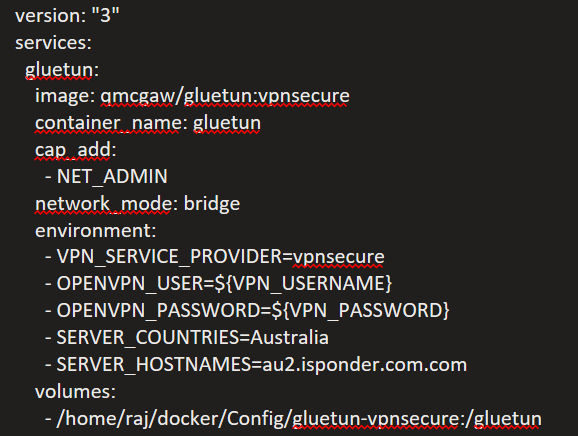
Thanks @qdm12 . I tried with your image gluetun:vpnsecure after moving the encrypted key file to hostpath but the logs throw error sating the VPN provider name is not valid: 'vpnsecure'. see below. I also am sharing my portainer yaml for reference:
========================================
========================================
=============== gluetun ================
========================================
=========== Made with ❤️ by ============
======= https://github.com/qdm12 =======
========================================
========================================

Running version unknown built on an unknown date (commit unknown)

🔧 Need help? https://github.com/qdm12/gluetun/discussions/new
🐛 Bug? https://github.com/qdm12/gluetun/issues/new
✨ New feature? https://github.com/qdm12/gluetun/issues/new
☕ Discussion? https://github.com/qdm12/gluetun/discussions/new
💻 Email? [email protected]
💰 Help me? https://www.paypal.me/qmcgaw https://github.com/sponsors/qdm12
2022-06-20T03:07:59Z INFO [routing] default route found: interface eth0, gateway 172.17.0.1 and assigned IP 172.17.0.5
2022-06-20T03:07:59Z INFO [routing] local ethernet link found: eth0
2022-06-20T03:07:59Z INFO [routing] local ipnet found: 172.17.0.0/16
2022-06-20T03:07:59Z INFO [firewall] enabling...
2022-06-20T03:07:59Z INFO [firewall] enabled successfully
2022-06-20T03:08:00Z INFO [storage] merging by most recent 11233 hardcoded servers and 11233 servers read from /gluetun/servers.json
2022-06-20T03:08:00Z ERROR updater settings: VPN provider name is not valid: "vpnsecure" can only be one of cyberghost, expressvpn, fastestvpn, hidemyass, ipvanish, ivpn, mullvad, nordvpn, perfect privacy, privado, private internet access, privatevpn, protonvpn, purevpn, surfshark, torguard, vpn unlimited, vyprvpn, wevpn or windscribe
2022-06-20T03:08:00Z INFO Shutdown successful
Thanks @rkbest13 for trying it out. My bad, you need to use VPN_SERVICE_PROVIDER="vpn secure" instead (with the space).
Also for other possible users, image is built by the CI for all architectures at qmcgaw/gluetun:pr-848.
Thanks @qdm12 , changed to 'vpn secure' and re-ran the container and got this in the logs. I used Australia /au2.isponder.com
========================================
========================================
=============== gluetun ================
========================================
=========== Made with ❤️ by ============
======= https://github.com/qdm12 =======
========================================
========================================
Running version unknown built on an unknown date (commit unknown)
🔧 Need help? https://github.com/qdm12/gluetun/discussions/new
🐛 Bug? https://github.com/qdm12/gluetun/issues/new
✨ New feature? https://github.com/qdm12/gluetun/issues/new
☕ Discussion? https://github.com/qdm12/gluetun/discussions/new
💻 Email? [email protected]
💰 Help me? https://www.paypal.me/qmcgaw https://github.com/sponsors/qdm12
2022-06-20T13:57:25Z INFO [routing] default route found: interface eth0, gateway 172.17.0.1 and assigned IP 172.17.0.6
2022-06-20T13:57:25Z INFO [routing] local ethernet link found: eth0
2022-06-20T13:57:25Z INFO [routing] local ipnet found: 172.17.0.0/16
2022-06-20T13:57:25Z INFO [firewall] enabling...
2022-06-20T13:57:25Z INFO [firewall] enabled successfully
2022-06-20T13:57:26Z INFO [storage] merging by most recent 11309 hardcoded servers and 11309 servers read from /gluetun/servers.json
2022-06-20T13:57:26Z ERROR VPN settings: provider settings: server selection: the country specified is not valid: one or more values is set but there is no possible value available
should i be using proxy server listed on vpnsecure website like these

I saw in another issue where you mentioned t use au2.isponder.com?
@rkbest13 just don't set any filter for now, it will pick a random server.
If you want to try filters (I'll document it in the wiki once the image works), SERVER_COUNTRIES is not valid for now, I did not implement parsing the country from https://www.vpnsecure.me/vpn-locations/ but I'll get to it now. For now only SERVER_REGIONS, SERVER_CITIES and SERVER_HOSTNAMES can be used. au2.isponder.com is one of their hostname, but it's not compulsory to set any filter.
should i be using proxy server listed on vpnsecure website like these
No, these are for another protocol I think. We are aiming at making it work with OpenVPN only (or Wireguard, but I don't think they support it).
What hostserver or city or region should i test with for now. SO that we are testing the same servers for this image?

This is most likely because you did not remove SERVER_COUNTRIES from your environment variable.
Anyway, I spent a good amount of time today to parse the country from their website as well, so it's now part of the servers data, so you can use SERVER_COUNTRIES if you want to. Try pulling and running it again?
Still unhealthy but wuth new logs information to debug.
|   |           └── Protocol: UDP
|   └── OpenVPN settings:
|       ├── OpenVPN version: 2.5
|       ├── User: [set]
|       ├── Password: [set]
|       ├── Encrypted private key: [not set]
|       ├── Tunnel IPv6: no
|       ├── Network interface: tun0
|       ├── Run OpenVPN as: root
|       └── Verbosity level: 1
├── DNS settings:
|   ├── DNS server address to use: 127.0.0.1
|   ├── Keep existing nameserver(s): no
|   └── DNS over TLS settings:
|       ├── Enabled: yes
|       ├── Update period: every 24h0m0s
|       ├── Unbound settings:
|       |   ├── Authoritative servers:
|       |   |   └── cloudflare
|       |   ├── Caching: yes
|       |   ├── IPv6: no
|       |   ├── Verbosity level: 1
|       |   ├── Verbosity details level: 0
|       |   ├── Validation log level: 0
|       |   ├── System user: root
|       |   └── Allowed networks:
|       |       ├── 0.0.0.0/0
|       |       └── ::/0
|       └── DNS filtering settings:
|           ├── Block malicious: yes
|           ├── Block ads: no
|           ├── Block surveillance: no
|           └── Blocked IP networks:
|               ├── 127.0.0.1/8
|               ├── 10.0.0.0/8
|               ├── 172.16.0.0/12
|               ├── 192.168.0.0/16
|               ├── 169.254.0.0/16
|               ├── ::1/128
|               ├── fc00::/7
|               ├── fe80::/10
|               ├── ::ffff:7f00:1/104
|               ├── ::ffff:a00:0/104
|               ├── ::ffff:a9fe:0/112
|               ├── ::ffff:ac10:0/108
|               └── ::ffff:c0a8:0/112
├── Firewall settings:
|   └── Enabled: yes
├── Log settings:
|   └── Log level: INFO
├── Health settings:
|   ├── Server listening address: 127.0.0.1:9999
|   ├── Target address: cloudflare.com:443
|   └── VPN wait durations:
|       ├── Initial duration: 6s
|       └── Additional duration: 5s
├── Shadowsocks server settings:
|   └── Enabled: no
├── HTTP proxy settings:
|   └── Enabled: no
├── Control server settings:
|   ├── Listening address: :8000
|   └── Logging: yes
├── OS Alpine settings:
|   ├── Process UID: 1000
|   └── Process GID: 1000
├── Public IP settings:
|   ├── Fetching: every 12h0m0s
|   └── IP file path: /tmp/gluetun/ip
└── Version settings:
    └── Enabled: yes
2022-06-22T04:34:31Z INFO [routing] default route found: interface eth0, gateway 172.17.0.1 and assigned IP 172.17.0.7
2022-06-22T04:34:31Z INFO [routing] adding route for 0.0.0.0/0
2022-06-22T04:34:31Z INFO [firewall] setting allowed subnets...
2022-06-22T04:34:31Z INFO [routing] default route found: interface eth0, gateway 172.17.0.1 and assigned IP 172.17.0.7
2022-06-22T04:34:31Z INFO TUN device is not available: open /dev/net/tun: no such file or directory; creating it...
2022-06-22T04:34:31Z INFO [pprof] http server listening on [::]:6060
2022-06-22T04:34:31Z INFO [dns over tls] using plaintext DNS at address 1.1.1.1
2022-06-22T04:34:31Z INFO [http server] http server listening on [::]:8000
2022-06-22T04:34:31Z INFO [healthcheck] listening on 127.0.0.1:9999
2022-06-22T04:34:31Z INFO [firewall] allowing VPN connection...
2022-06-22T04:34:31Z WARN [openvpn] Compression for receiving enabled. Compression has been used in the past to break encryption. Sent packets are not compressed unless "allow-compression yes" is also set.
2022-06-22T04:34:31Z WARN [openvpn] Ignoring option 'dh' in tls-client mode, please only include this in your server configuration
2022-06-22T04:34:31Z INFO [openvpn] OpenVPN 2.5.6 x86_64-alpine-linux-musl [SSL (OpenSSL)] [LZO] [LZ4] [EPOLL] [MH/PKTINFO] [AEAD] built on Apr 17 2022
2022-06-22T04:34:31Z INFO [openvpn] library versions: OpenSSL 1.1.1o  3 May 2022, LZO 2.10
2022-06-22T04:34:31Z INFO [openvpn] neither stdin nor stderr are a tty device and you have neither a controlling tty nor systemd - can't ask for 'Enter Private Key Password:'.  If you used --daemon, you need to use --askpass to make passphrase-protected keys work, and you can not use --auth-nocache.
2022-06-22T04:34:31Z INFO [openvpn] Exiting due to fatal error
2022-06-22T04:34:31Z ERROR [vpn] exit status 1
2022-06-22T04:34:31Z INFO [vpn] retrying in 15s
2022-06-22T04:34:37Z INFO [healthcheck] program has been unhealthy for 6s: restarting VPN
@rkbest13 awesome, the problem is because of that encrypted private key requiring a password to be decrypted.
- Can you get an unencrypted private key from vpnsecure directly?
- If not, what password do you use to decrypt it? Is it the same as the OPENVPN_PASSWORD or another one?
The private key was in plain text when I opened it before moving to hostpath. The only other password is the account password that is added to env variable.
The private key was in plain text when I opened it before moving to hostpath.
It is but its encoded content is encrypted. From reading their website, i don't think you can download as unencrypted. However, reading https://support.vpnsecure.me/articles/getting-started-dd-wrt-routers/pfsense it looks like you might have a .keyout file in your downloaded zip file, do you have such file? How does the content of it look like, is it a single line/readable characters? Thanks!
there were two folders that i got one has content for openvpn config files ( 2 file for each server) and other as below (including the key)

Can you please send me your zipped 2 folders to [email protected] without your credentials (just remove user and password of they are in a file, although it's usually asked interactively)?
It's a bit hard to know what file is what without seeing the content and file extension. Also, your private key is useless without your username+password credentials so don't worry about sharing it either (it's also unneeded security imo, a 9+ long characters password is more than enough).
Thanks!
Thanks @rkbest13 that definitely helped.
On image qmcgaw/gluetun:vpnsecure, you should now be able to inject your encrypted key passphrase with the environment variable OPENVPN_KEY_PASSPHRASE. It's likely just your 'normal' password (please let me know 😉).
docker pull qmcgaw/gluetun:vpnsecure
docker run -it --rm --cap-add=NET_ADMIN -v /yourhostpath/gluetun:/gluetun \
 -e VPN_SERVICE_PROVIDER="vpn secure" -e OPENVPN_USER=xxx -e OPENVPN_PASSWORD=xxx \
-e OPENVPN_KEY_PASSPHRASE=xxx qmcgaw/gluetun:vpnsecure
I haven't really tested it, so it may or may not work the first time...
Tried with au2.isponedor.com server no host_country and passphrase.
...
2022-06-25T04:03:22Z INFO [healthcheck] listening on 127.0.0.1:9999
panic: runtime error: invalid memory address or nil pointer dereference
[signal SIGSEGV: segmentation violation code=0x1 addr=0x8 pc=0x84b3cc]

goroutine 120 [running]:
github.com/qdm12/gluetun/internal/vpn.setupOpenVPN({_, _}, {_, _}, {_, _}, {_, _}, {{0xc00002a009, 0x7}, ...}, ...)
	github.com/qdm12/gluetun/internal/vpn/openvpn.go:37 +0x30c
github.com/qdm12/gluetun/internal/vpn.(*Loop).Run(0xc000174dc0, {0xd70cf8, 0xc000621cc0}, 0xc000237560)
	github.com/qdm12/gluetun/internal/vpn/run.go:34 +0x3c9
created by main._main
	./main.go:398 +0x2fc7
Please pull and try again, that bug is fixed. I tried myself and it looks like it works but I get the:
2022-06-25T13:43:43Z INFO [openvpn] OpenVPN 2.5.6 x86_64-alpine-linux-musl [SSL (OpenSSL)] [LZO] [LZ4] [EPOLL] [MH/PKTINFO] [AEAD] built on Apr 17 2022
2022-06-25T13:43:43Z INFO [openvpn] library versions: OpenSSL 1.1.1o  3 May 2022, LZO 2.10
2022-06-25T13:43:43Z INFO [openvpn] OpenSSL: error:0B080074:x509 certificate routines:X509_check_private_key:key values mismatch
2022-06-25T13:43:43Z INFO [openvpn] Cannot load private key file [[INLINE]]
Since I am using some locally generated key not valid with vpnsecure or their certificate.
2022-06-29T00:35:19Z INFO [openvpn] OpenVPN 2.5.6 x86_64-alpine-linux-musl [SSL (OpenSSL)] [LZO] [LZ4] [EPOLL] [MH/PKTINFO] [AEAD] built on Apr 17 2022
2022-06-29T00:35:19Z INFO [openvpn] library versions: OpenSSL 1.1.1o  3 May 2022, LZO 2.10
2022-06-29T00:35:19Z INFO [openvpn] OpenSSL: error:0B080074:x509 certificate routines:X509_check_private_key:key values mismatch
2022-06-29T00:35:19Z INFO [openvpn] Cannot load private key file [[INLINE]]
2022-06-29T00:35:19Z INFO [openvpn] SIGUSR1[soft,private-key-password-failure] received, process restarting
Same on my end. wonder if my private key password is different than my account password.
Maybe have a go with openvpn directly on one of your machines? That way you can try interactively to find which password is right for your encrypted key.
Related information I found: https://support.vpnsecure.me/articles/getting-started-dd-wrt-routers/pfsense
There is also a SSL mismatch error before the key error. What it could be?
I dont think there is a error in the passphrase key I used. although i could not verify via OPENVPN steps in that page. might give it a try on pfsense in future. The content of the files are same as what i shared with you. and there is only one password for this account.
Let's scrap all this; I pushed the image again this time using the Openvpn configuration files from your rkbestfiles instead of the rkbestvpn directory. So now there is no more encrypted private key, key passphrase, cert data and dh parameters (server side thing that was weird as well). Let me know if it works for you.
docker pull qmcgaw/gluetun:vpnsecure
docker run -it --rm --cap-add=NET_ADMIN  -e VPN_SERVICE_PROVIDER="vpn secure" \
  -e OPENVPN_USER=xxx -e OPENVPN_PASSWORD=xxx \
  qmcgaw/gluetun:vpnsecure
EDIT: @rkbest13 did you remove the <key> and <cert> fields data from each file?
I did not remove anything from key or cert fields. Just updated the CT as above, and i get this.
`2022-07-04T03:56:21Z INFO [vpn] stopping
2022-07-04T03:56:21Z INFO [vpn] starting
2022-07-04T03:56:21Z INFO [firewall] allowing VPN connection...
2022-07-04T03:56:21Z WARN [openvpn] Compression for receiving enabled. Compression has been used in the past to break encryption. Sent packets are not compressed unless "allow-compression yes" is also set.
2022-07-04T03:56:21Z INFO [openvpn] OpenVPN 2.5.6 x86_64-alpine-linux-musl [SSL (OpenSSL)] [LZO] [LZ4] [EPOLL] [MH/PKTINFO] [AEAD] built on Apr 17 2022
2022-07-04T03:56:21Z INFO [openvpn] library versions: OpenSSL 1.1.1o 3 May 2022, LZO 2.10
2022-07-04T03:56:21Z INFO [openvpn] TCP/UDP: Preserving recently used remote address: [AF_INET]45.114.118.84:1282
2022-07-04T03:56:21Z INFO [openvpn] UDP link local: (not bound)
`
I'll subscribe and test it myself in the coming days to put an end to this 😄 I'll keep you updated.
Maybe get from here. Often on sale for lifetime use https://stacksocial.com/
Alright I finally finished this!
Use image qmcgaw/gluetun:pr-848 and instructions are at https://github.com/qdm12/gluetun/wiki/VPN-Secure
It works for me, but let me know if you encounter any issue or if it works, and I'll get this merged 👍