
pyscript
 pyscript copied to clipboard
 pyscript
Browser normalizes html tags inside <py-script>
Checklist
- [X] I added a descriptive title
- [X] I searched for other issues and couldn't find a solution or duplication
- [X] I already searched in Google and didn't find any good information or help
What happened?
Reproduction:
<!DOCTYPE html>
<html lang="en">
<meta charset="utf-8" />
<link rel="stylesheet" href="https://pyscript.net/latest/pyscript.css" />
<script defer src="https://pyscript.net/latest/pyscript.js"></script>

<py-script>
json_data = r"""
{
    "foo": 1,
    "bar": "<component db_entry=\u0022\ud83e\udde9 Set Ability Name\u0022 x=\u00223\u0022 y=\u00221\u0022></component>",
    "baz": 3
}
"""
print(json_data)
</py-script>
The following is printed to the console log:
{
    "foo": 1,
    "bar": "<component db_entry="\u0022\ud83e\udde9" set="" ability="" name\u0022="" x="\u00223\u0022" y="\u00221\u0022"></component>",
    "baz": 3
}
What browsers are you seeing the problem on? (if applicable)
Firefox
Console info
No response
Additional Context
This also happens in chrome.
Likely, using <script type="text/python"> instead, like Brython, would solve this.

Hey @pbsds, thanks for opening the issue! We're aware of this kind of behavior and intend to work on it soon. I'm wondering if we should open an umbrella issue for that or turn #735 in an umbrella. Also my comment on #622 aggregates a bunch of output display that could be better clustered. @tedpatrick opinions on organization here?

+1 on umbrella ticket
The issue looks to be having legal html in an inner string and these entities were parsed by the browser as inner elements.
Note the behavior if I change these slightly.
<!DOCTYPE html>
<html lang="en">
<meta charset="utf-8" />
<link rel="stylesheet" href="https://pyscript.net/latest/pyscript.css" />
<script defer src="https://pyscript.net/latest/pyscript.js"></script>
<py-script>
json_data = r"""
{
"foo": 1,
"bar": "<component db_entry=\u0022\ud83e\udde9 Set Ability Name\u0022 x=\u00223\u0022 y=\u00221\u0022></component>",
"baz": 3
}
"""
print(json_data)
</py-script>

Within the py-script element, we do this
this.code = htmlDecode(this.innerHTML);
where htmlDecode looks like this
function htmlDecode(input: string): string {
    const doc = new DOMParser().parseFromString(ltrim(escape(input)), 'text/html');
    return doc.documentElement.textContent;
}
If we put html into a DOMParser this only results in elements and the textContent will not reflect the intent of the python.
I think we are basically doomed here. I fear that we cannot have a general & robust solution if we want to use the <py-script> tag. As @tedpatrick says, the core problem is this:
The issue looks to be having legal html in an inner string and these entities were parsed by the browser as inner elements.
i.e., that the browser tries to parse the text inside <py-script> as HTML: most of the times it doesn't succeed and we can reconstruct back the original source code; sometimes it does succeed and it's a problem.
I'm using the following HTML file as a playground to do various experiments:
<body>
<script>
// copy&pasted from utils.ts
// I removed the call to ltrim() to simplify: this means that the
// indentation is wrong, but we don't care for this example
function escape(str) {
return str.replace(/</g, '<').replace(/>/g, '>');
}
function htmlDecode(input) {
let escaped = escape(input);
const doc = new DOMParser().parseFromString(escaped, 'text/html')
return doc.documentElement.textContent;
}
window.addEventListener('load', (event) => {
let el = document.getElementById('xxx');
let decoded = htmlDecode(el.innerHTML);
console.log(`innerHTML: \n` + el.innerHTML);
console.log(`decoded: \n` + decoded);
});
</script>
<py-script id='xxx'>
[....]
</py-script>
</body>
Following are the results which I get with various inputs.
- this works fine:
<py-script id='xxx'>
p = 3
result = (1 < p > 3)
</py-script>
innerHTML:
p = 3
result = (1 < p > 3)

decoded:
p = 3
result = (1 < p > 3)
- this breaks horribly. Note that it's a perfectly valid python syntax. The problem is that the
<p>is interpreted as an open tag and the browser automatically add a closing</p>:
<py-script id='xxx'>
p = 3
result = (1<p>3)
</py-script>
innerHTML:
p = 3
result = (1<p>3)

</p>                                <===== NOTE THIS!
decoded:
p = 3
result = (1<p>3)

</p>
- this also breaks: it's the cause of #735.
Note the problem: after the HTML parser, we are unable to distinguish whether the user typed
<or<: this means that no matter what we do, we will always have corner case which break unexpectedly:
<py-script id='xxx'>
a = 1 < 2
b = 1 < 2
</py-script>
innerHTML:
a = 1 < 2
b = 1 < 2

decoded:
a = 1 < 2
b = 1 < 2
The core issue is that AFAIK the only way that we have to extract the content of a <py-script> tag is to use .innerHTML. There is no way to get the original text before parsing.
As @pbsds suggests, if we used <script type="text/python">, we would not have these kind of issues: this happens because the <script> tag is parsed as CDATA and thus all the bytes are preserved, without any special interpretation.
I don't really know what's the best way to proceed:
<py-script>has the problems which I described above and which I fear are unsolvable- pros&cons of using
<script>were already analyzed here: https://github.com/pyscript/pyscript/issues/329

Not doomed... someone pushed all code through a DOMParser here: https://github.com/pyscript/pyscript/blob/main/pyscriptjs/src/utils.ts#L18
The PyScript custom element could extend HTMLPreElement. This element preserves all whitespace and formatting of child text, which should void the implied HTML parsing.
On Wed, Nov 2, 2022 at 6:08 AM Ted Patrick @.***> wrote:
Not doomed... someone pushed all code through a DOMParser here: https://github.com/pyscript/pyscript/blob/main/pyscriptjs/src/utils.ts#L18
— Reply to this email directly, view it on GitHub, or unsubscribe. You are receiving this because you are subscribed to this thread.Message ID: @.***>
Ok I think I see the problem...
The browser parses everything and if it sees HTML elements that are not closed, it adds them before innerHTML is called. Case:
<!DOCTYPE html>
<html lang="en">
<body>
    <py-script>
    mycode = "<p>"
    </py-script>
</body>
</html>
Result:

Note the extra </p> element added there... ☠️
HTML Comments... Case:
<!DOCTYPE html>
<html lang="en">
<body>
    <py-script><!--
    mycode = "<p>"
    --></py-script>
</body>
</html>
Result:
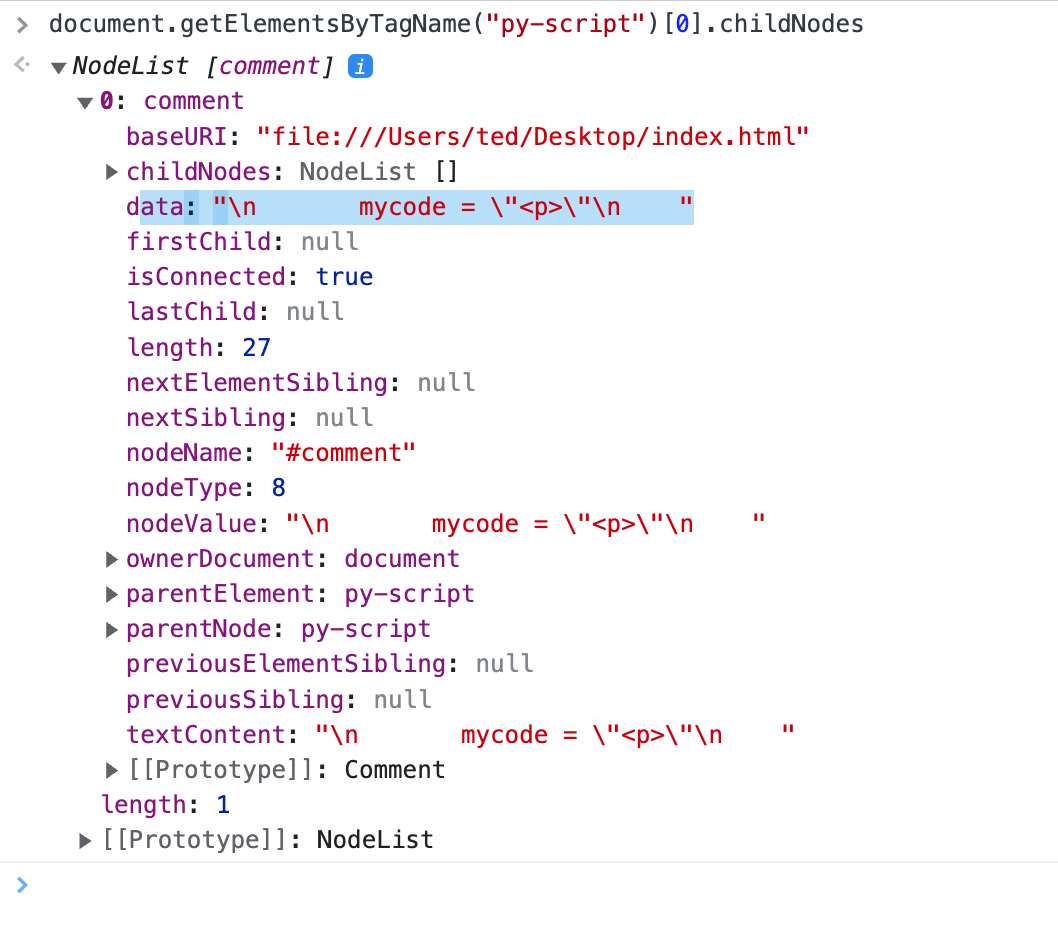
The browser places a comment Node within the
I propose that <py-script> looks for a comment node and falls back to innerHTML.
This has some nice benefits:
- No code is rendered within the
<py-script>element by default. - HTML Comment is cleanly parsed by browser so no need to escape.
- We can warn on use of inline code without html comment (heuristics)
- We can advocate for external .py files using
srcattribute
Personally I dislike the comment approach and am -1. I wonder though, it might be the best solution. I've been looking into how to use the script tag but really have no idea how to implement it. It does exactly what we need:
type
    This attribute specifies the scripting language of the element's contents and overrides the default
scripting language. The scripting language is specified as a content type (e.g., "text/javascript").
Authors must supply a value for this attribute. There is no default value for this attribute.
But the problem is how to integrate it to our API. These functionalities should belong to our py-script tag, so I'm thinking we should inherit the HTML object that'd allow us to do this. Does anyone have any idea if that's possible? I've been reading the W3C and from what I understood script is part of the DOM... So it should be possible to do something like that, correct? Unfortunately it doesn't seem like the Python STL offers this functionality. I wonder if Pyodide does it?
Dunno if I'm in the right path here. Happy to hear your thoughts!
I've been looking into how to use the
scripttag but really have no idea how to implement it. It does exactly what we need:
Yes, but keep in mind that we already analzyed pros&cons in #329. Which doesn't mean that the decision is set in stone forever of course, but it means that whatever decision we take it's a trade-off.
But the problem is how to integrate it to our API.
this is "easy". Instead of using a web component, we can just use document.getElementsByTagName('script') and execute them one by one.
so I'm thinking we should inherit the HTML object that'd allow us to do this.
Do you mean this?
    class PyScript extends HTMLScriptElement {
....
I would love if it worked, but I'm dubious. I'm not sure that:
- it's possible
- it would work anyway. Custom elements are connected after the HTML has been parsed, and it means that the browser has already mangled all the content inside.
Unfortunately it doesn't seem like the Python STL offers this functionality. I wonder if Pyodide does it?
python and pyodide has nothing to do with the problem described here, which is present even in pure JS.
Yes, but keep in mind that we already analzyed pros&cons in https://github.com/pyscript/pyscript/issues/329.
I didn't know about that. Thanks I'll check it out!
this is "easy". Instead of using a web component, we can just use document.getElementsByTagName('script') and execute them one by one.
I didn't think of that thanks! But, I guess this is still the problem:
it would work anyway. Custom elements are connected after the HTML has been parsed, and it means that the browser has already mangled all the content inside.
So pff I don't know.
python and pyodide has nothing to do with the problem described here, which is present even in pure JS.
True, but I meant using something like class PyScript extends HTMLScriptElement { here. Does HTMLScriptElement contains script? But anyways I think you might be right about 2? Not sure though.
True, but I meant using something like
class PyScript extends HTMLScriptElement {here. DoesHTMLScriptElementcontainsscript? But anyways I think you might be right about 2? Not sure though.
I tried to make a quick experiment but it didn't work for weird reasons. So if you want to experiment with it, it would be very welcome and useful. Basically, the important test is the following:
<py-script>
a < b
a < b
</py-script>
We need to be able to distinguish the two cases. If you want a way to do it, that would be awesome :)
I've been trying! 😅 It's an interesting issue but yeah it's a hard one. I'll keep trying later today. If you think on something new keep me in the loop!
uh, I might have found "something". I'm undecided whether it's a brilliant solution or a horrible hack.
So, the main point of #329 is that <script type="text/python"> is too verbose and error prone, which I agree with.
<py-script> is much easier to write, but what about <script py> or <script python>?
We cannot use them out of the box because if the browser doesn't see a type attribute, it assumes it's JS and tries to execute it. But we can use MutationObserver to automatically add type="text/x-python" as soon as we encounter a <script py>.
Proof of concept:
<!DOCTYPE html>
<html lang="en">
  <body>
    <script>
      // dark magic ahead: observe all mutations of the DOM: when we try to
      // add a <script py> tag, we add type="text/x-python" to prevent its
      // execution as a JS script.
      //
      // Problem: this works only if we run this inside <body>: if we run this
      // inside <head>, it fails because "document.body" is not present yet.
      function callback(mutations, observer) {
          for (const mut of mutations) {
              if (mut.type === "childList") {
                  for (const node of mut.addedNodes) {
                      if (node.tagName === "SCRIPT" && "py" in node.attributes) {
                          node.setAttribute("type", "text/x-python");
                      }
                  }
              }
          }
      }
      const observer = new MutationObserver(callback);
      observer.observe(document.body, { childList: true });
    </script>

    <script>
      console.log("this is a JS script, executed normally");
    </script>

    <script py>
      console.error("this should NOT be executed");
    </script>

  </body>
</html>
This seems to work. As I said, I'm undecided whether it's reasonable or not. /cc @tedpatrick and @fpliger .
What's the goal?
From the inception of the project and the <py-script> tag we were expecting that inline code would have its limitations and wasn't to be as flexible as using src. In fact we often talked about it being the entry point for users to play around with coding and starting their project but once they started doing more complex work, organizing their code in python files and modules and using src= is a more viable and powerful option. We also said that in time we should encourage that actually.
I think it's totally reasonable to say that in some scenarios users should be using src= instead of inline code and this is probably one of them. Don't get me wrong, I do think that if we have bandwidth and resources we should try to fix it and make inline code as close as possible to running from an external file but there are also a ton of other things that we have prioritized that I think would be strategically supporting and empowering a larger user base. Basically, unless I'm missing something, this has a quite simple workaround: to use an external file. Right?

The problem with using a Custom Element that subclasses HTMLScriptElement is that the browser parses the internal contents of the element before realizing it is a <script>.
Also with mutation observer, the risk is that it will also be late to the party in changing the type.
I rather like the optional HTML Comment approach for inline contents. It is simple, works everywhere, and is optional. In parallel supporting this for PyScript blocks is interesting too.
<script type="text/pyscript"></script>
I would love to see standards evolve for the script.type mime mapping to a WASM runtime but that is 5-10 years out. We need something simple that works today.
What's the goal?
avoid making a confusing mess that we will never be able to fix because it will be too late.
The problem with the current approach is that moving code from <py-script> to src will work in 99% percent of the cases, and then suddenly it will break in a very subtle way. I'm specifically talking about this, which prints < inside the tag and < inside src:
print("<")
And then suddenly you have stackoverflow questions and people suggesting that you should print &lt;, and it works, and they they move the code to an external file, and it no longer works, etc.
And even worse, we cannot even detect the case and emit an error or a warning, because it's completely undetectable for us.
This has also security implications, since potentially we have a code which generates correctly escaped HTML and pyscript turns into into < and >, thus opening the door for cross-site scripting, etc.
From the inception of the project and the
tag we were expecting that inline code would have its limitations and wasn't to be as flexible as using src. In fact we often talked about it being the entry point for users to play around with coding and starting their project but once they started doing more complex work, organizing their code in python files and modules and using src= is a more viable and powerful option. We also said that in time we should encourage that actually.
"moving the code from <py-script> to src" is exactly what doesn't work reliably.
And to preemptively answer what I imagine it will be your counter-argument: no, it's not "just" a corner case. Consistent behavior vs having weird corner cases is what makes certain languages easier than others.
Also with mutation observer, the risk is that it will also be late to the party in changing the type.
my quick experiment above seems to indicate the the mutation observer works. Do you have specific cases in mind in which it wouldn't?
I rather like the optional HTML Comment approach for inline contents. It is simple, works everywhere, and is optional. In parallel supporting this for PyScript blocks is interesting too.
<script type="text/pyscript"></script>
If we go down this route, we end up with 4 different ways of doing the same thing, which are:
<py-script><py-script> <!--<py-script src=...><script type="text/pyscript">
In which the first has a different behavior than the others.
To summarize, from my point of view we have two options:
<py-script>which has all the problems described by this PR<script py>which doesn't (assuming that theMutationObvserverapproach is reliable -- if it's not then case closed of course).
What are the reasons to prefer (1) over (2)?
And when answering, please don't let the "emotional attachment" to <py-script> to impact the answer. I also like <py-script> by now and I'm used to it, but that alone is not a good reason to give a bad service to our users.
We can add attributes to py-script (async,worker,scope), but we cannot do that to the script tag. We can detect if the contents of py-script have parsing issues and warn the user to use an HTML comment or src the python script. An inline py-script with HTML comment is identical to an external src file.
I feel this is a good path forward.
On Sun, Nov 6, 2022 at 6:00 PM Antonio Cuni @.***> wrote:
What's the goal?
avoid making a confusing mess that we will never be able to fix because it will be too late. The problem with the current approach is that moving code from
to src will work in 99% percent of the cases, and then suddenly it will break in a very subtle way. I'm specifically talking about this, which prints < inside the tag and < inside src: print("<")
And then suddenly you have stackoverflow questions and people suggesting that you should print <, and it works, and they they move the code to an external file, and it no longer works, etc.
And even worse, we cannot even detect the case and emit an error or a warning, because it's completely undetectable for us.
This has also security implications, since potentially we have a code which generates correctly escaped HTML and pyscript turns into into < and
, thus opening the door for cross-site scripting, etc.
From the inception of the project and the tag we were expecting that inline code would have its limitations and wasn't to be as flexible as using src. In fact we often talked about it being the entry point for users to play around with coding and starting their project but once they started doing more complex work, organizing their code in python files and modules and using src= is a more viable and powerful option. We also said that in time we should encourage that actually.
"moving the code from
to src" is exactly what doesn't work reliably. And to preemptively answer what I imagine it will be your counter-argument: no, it's not "just" a corner case. Consistent behavior vs having weird corner cases is what makes certain languages easier than others.
Also with mutation observer, the risk is that it will also be late to the party in changing the type.
my quick experiment above seems to indicate the the mutation observer works. Do you have specific cases in mind in which it wouldn't?
I rather like the optional HTML Comment approach for inline contents. It is simple, works everywhere, and is optional. In parallel supporting this for PyScript blocks is interesting too.
If we go down this route, we end up with 4 different ways of doing the same thing, which are:
<!-- In which the first has a different behavior than the others.
To summarize, from my point of view we have two options:
which has all the problems described by this PR approach is reliable -- if it's not then case closed of course).
What are the reasons to prefer (1) over (2)? And when answering, please don't let the "emotional attachment" to
to impact the answer. I also like by now and I'm used to it, but that alone is not a good reason to give a bad service to our users. — Reply to this email directly, view it on GitHub https://github.com/pyscript/pyscript/issues/857#issuecomment-1304932856, or unsubscribe https://github.com/notifications/unsubscribe-auth/AISG7ACCCOBSVAFHM4QX563WHBBDRANCNFSM6AAAAAARGLIBZM . You are receiving this because you were mentioned.Message ID: @.***>
We can add attributes to py-script (async,worker,scope), but we cannot do that to the script tag.
why not? I think that you can always add custom attributes to standard tags, can't you? E.g. py-async, py-worker et.
We can detect if the contents of py-script have parsing issues and warn the user to use an HTML comment
that's my point. You cannot.
It's easy to detect cases such as "of, there is a </p> at the end of the code so this must be have added automatically by the browser".
It's impossible to detect HTML entities which were written inside string literals. We cannot emit any warning in that case and it will be horrible to debug. It's one of those cases in which "the compiler must be buggy because my code looks correct". And to be honest, a compiler which prints a different string literal than the one you wrote, it is buggy IMHO.
To be clear, this breaks what I imagine it will be a very common case, which is:
<py-script>
    display(HTML("some-random-HTML-code-which-was-copy-pasted-from-the-internet"))
</py-script.
Are you sure that you want to subtly break this pattern?
or src the python script. An inline py-script with HTML comment is identical to an external src file. I feel this is a good path forward.
Question: what do you want to promote as the "idiomatic" way of writing inline python code? I.e., the one which will be in our docs, in our tests and in all our examples?
<py-script> or <py-script> <!--?
I don't know that this is a fully 'solved' issue, but I wanted to mention for anyone finding this issue and looking for answers, that #1396 introduced <script type="pyscript"> as an alternative/workaround/option.

@JeffersGlass thanks for mentioning that, indeed all issues around entities and elements are solved with <script type="py"> and I've closed other issues related to the same thing after pushing changes to our examples (see https://github.com/pyscript/pyscript/pull/1443).
I think in our documentation, but it's kinda there already, we should mention that when HTML or SVG is meant to be created via strings within <py-script> elements, it's better to use <script type="py"> instead because none of the issues discussed in here are present + we have tests that would fail on browsers with SVG elements (@hoodmane already fixed one of them with a workaround because the script wasn't there yet).

These are valid points. @WebReflection and I talked about some things that relate to this issue earlier this week and here are a few things I'd like to make happen so that we can close this issue:
- we add a warning on the console when we detect
<py-script>....source code here....</pyscript>and we encourage people to use create the code on separatepyfile and use thesrcattribute on the<py-script>tag (we should also mention<script type="py">as an alternative if they really want to write code within the tag) - we add a bit warning on the documentation mentioning the above
[maybe the next one is optional to closing this ticked :) ]
- we add a
lint(or maybe another name) command to the CLI. That command parses a PyScript app and creates a log with all the things that we detect that can be improved in the app itself (imho there are some easy wins here like this one or validating a config for instance)
These are valid points. @WebReflection and I talked about some things that relate to this issue earlier this week and here are a few things I'd like to make happen so that we can close this issue:
- we add a warning on the console when we detect
<py-script>....source code here....</pyscript>and we encourage people to use create the code on separatepyfile and use thesrcattribute on the<py-script>tag (we should also mention<script type="py">as an alternative if they really want to write code within the tag)- we add a bit warning on the documentation mentioning the above
strong -1 of putting the warning in the devtools console. We cannot expect that our target users look at the console (or even that they know that it exists), and it's already crowded with tons of messages so it will easily be missed.
Moreover, having both <py-script> and <script type="py"> is very confusing, because people will start wondering what are the differences between them: since we decided that <py-script> is half-broken, we should do the correct thing and guide our users towards doing the right thing:
- declare
<py-script>as deprecated - show a big warning (in the DOM) which explains that they should turn it into a
<script type="py"> - eventually kill
<py-script>in some next release
So glad we disagree @antocuni :)
Agree that the console is hidden. We can show a warning on the page and give instructions to the user on how to use <script type="py"> for the inline case instead.
Moreover, having both
and
That's a hypothesis.
and guide our users towards doing the right thing:
- declare
as deprecated
I'm not 100% opposed to that but I'm very strongly opposed to doing that lightly and before we do that I'd like to let users explore the 2 options and allow us to measure feedback, validate the hypothesis, and build a plan for that to happen.
- show a big warning (in the DOM) which explains that they should turn it into a
✅
- eventually kill
in some next release
see item 1.
I've been mentioned a couple of times directly or indirectly and I think I tend to agree with @fpliger approach as it seems more sensible.
There's just one comment I'd like to clarify:
since we decided that is half-broken
It's not that "we decided" anything, there are various things already fixed with the better <script type="py"> approach and latter PR is just one of these edge-cases/examples https://github.com/pyscript/pyscript/pull/1464
It's the browser that parses no matter what we do custom elements content, it's a well defined by standard behavior too so that, to write code with "special chars or meaning within the HTML context" everyone is better off with the proper <script type="py"> variant, but there's no reason to break everything and impose it as the only solution, we can do a better job at informing why eventually we decided to offer such alternative solution.
Just my 2c.
from a WHATWG and W3G standard, nothing changed since and nothing will .. I am closing this issue as it's clear <script type="py"> or <script type="mpy"> is the answer, everything else is error prone and against current Web standards.