
panorama-tab-groups
 panorama-tab-groups copied to clipboard
 projectdelphai
groups are gone
My groups are all gone. I have four groups open right now, only the one group shows in the panorama view, the 1 that i am viewing. How do i get it back? didnt know there was a back up. statistics says 243 tabs. not showing in Panorama view. only the one group shows in the panorama view that i am viewing. How do i get this extention to work?

Sorry, this might happen in rare cases. Currently it's hard to tell exactly what could cause this.
Try to download the backup within the addons settings and look in the backup file if there are all 243 tabs listed. If the are, you could try to restore them from this file.

Similar happened to me, although just one group disappeared (but it has 600+ tabs). I was able to navigate back to it by entering a part of the web address in the address bar and doing "Switch to tab." However, the group is still not showing and I have to do it manually each time.

I also lost all my groups. This is on Windows 10 with version 83.0 of Firefox (64-bit build). I can't remember exactly, but I had about six tab groups. The group that had been open contained about 50 or so tabs. When I clicked on the tab group icon, not only were all my groups gone, but all the open tabs disappeared. (I had two tabs that were pinned. Those were and are still available.)
Unfortunately, I don't know what exactly changed between the last time tab groups worked and about two weeks ago (it was mid-November when I lost all my groups).
(This is completely reproducible. I restored my system completely from a full backup and verified the same behavior three times.)

Is there any way to recover the data for the tab groups? I can live with the extension not working, but I'd like to try to recover the URLs stored in the tabs. I assume the data would be stored somewhere in the profile directory? (I'm perfectly fine with dumping a file and picking out ASCII strings if necessary.)
@KenBallou
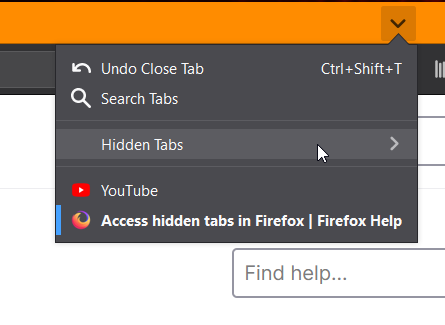
You could check if the tabs are still hidden:
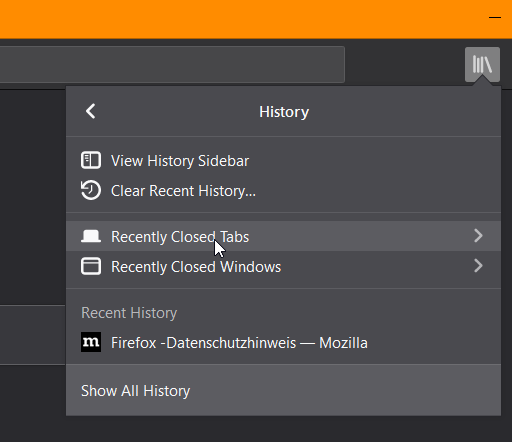
And you could look into the history for closed tabs.
I restored my Firefox session while I had the Panorama tab group view open. At one point the extension's icon displayed a 4, then it changed to 1.
The old tabs are in Hidden Tabs. If I click it, I can see the old tab group that it was in, but I can't see that group from the Panorama view. So recreate the groups in Panorama. Then go to Hidden Tabs, Right click each > Send to Group.
