
jekyll
 jekyll copied to clipboard
 programminghistorian
How should we highlight code blocks?
@fredgibbs I'm preparing to use Pandoc to do a massive bulk conversion of all existing lessons into Markdown. Before doing so, I've been doing some thinking about how code blocks should be handled in the new site.
In the lessons you've already converted, you used Jekyll's preferred highlighting feature. But the problem with this method is that when you view the markdown files in Github, the Github browser itself doesn't recognize those highlighting codes, and instead interprets things that should be commented lines in a code block as level-1 headers.
I'm wondering if it might be better (and would make us less dependent on Jekyll in the long run) to instead use raw HTML tags like pre for code blocks, and then use CSS styling to handle the language-specific highlighting. That way they would look readable either on the site or on Github.
Thoughts on this issue? Here are a couple of (oldish) sites that outline some of the different possibilities:
- https://gist.github.com/zakkain/3203448
- http://demisx.github.io/jekyll/2014/01/13/improve-code-highlighting-in-jekyll.html

i'm all for less dependency with jekyll, and i'm not super thrilled about the pigments syntax highlighting--it's fine but nothing special. i agree it would be preferable to have things render properly in github, so perhaps the easiest solution is regular markdown formatting with syntax.js to take care of the language highlighting. my sense is that combo will provide both github viewing and nicely colored HTML. (so, option #2 in link #1)

I think we might have to use raw HTML code blocks to get them to display properly in both Jekyll and on Github. Will Jekyll convert fenced code blocks written in regular markdown formatting?
Actually, this may be easier than I thought, if we just change our markdown parser from kramdown to redcarpet. See stackoverflow.
OK, after some experiments on the gh-pages branch, I think the best approach is to change our markdown parser to redcarpet, and then use Pandoc to produce fenced code blocks with back ticks followed by the highlighting language.
I suppose this is a related issue. I was wondering why syntax highlighting in markdown code blocks, which normally looks great in GitHub, is ignored here.
For instance, this code:
<text>
  <body>
    <div type="recto">
      <!-- aquí iría la cara frontal -->
    </div>
    <div type="verso">
      <!-- aquí iría la cara de atrás -->
    </div>
  </body>
</text>
which as you can see looks great here (rendered by GitHub), looks like so in PH:
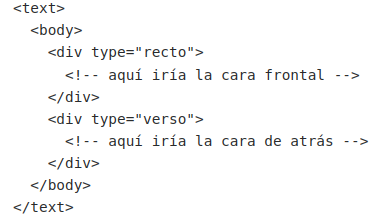
I don't know if this a bug or a feature (as some people prefer no syntax highlighting at all).


@acrymble seems like this issue can be closed and the broader question raised here can be added to a list of features under consideration for website redesign or enhancement at a later point. Unless I'm mistaken there's not a current problem with PH's code rendering that needs to be resolved here . . .

I've added this Issue to a Project board where I am keeping note of ideas for enhancements to improve users' experience of our website and its contents.
