
processing-video
 processing-video copied to clipboard
 processing
Unable to load webcam stream
Expected Behavior I print the capture devices list, see the entry I want to use, and open the one I want. Upon runnning some basic almost-example code, I see my video stream in the window.
Current Behavior For certain webcam configurations above a certain data rate, I only see a gray screen. It works for lower resolution, high framerate (480p 30fps) configurations, and higher resolution, lower framerate (720p 9fps) configurations. However fairly reasonable configurations, such as 720p 30fps, result in a gray screen. Any auxiliary code runs fine. This persists even with several different webcams. When it does work, the webcam light turns on, when it doesn't the light is off.
Steps to Reproduce Code:
import processing.video.*; Capture video;
void setup() { size(1280, 720); printArray(Capture.list()); video = new Capture(this, Capture.list()[0]);
video.start(); } void draw() { image(video, 0, 0); } void captureEvent(Capture video) { video.read(); }
Your Environment Processing 3.3.7 Windows 10
Possible Causes / Solutions
Attached are two screenshots showing the issue.


I'm also having a problem similar to this, but my webcam only supports 30fps. small resolution like 360p, 480p, is working fine but on changing the resolution to 720p the sketch appears blank. In 720p the Webcam status LED blinks twice at the beginning of the sketch.
After leaving the sketch open for few minutes, then closing it gives the error message in Console
(java.exe:3232): GStreamer-CRITICAL **: Trying to dispose element rgb, but it is in READY instead of the NULL state. You need to explicitly set elements to the NULL state before dropping the final reference, to allow them to clean up. This problem may also be caused by a refcounting bug in the application or some element.
(java.exe:3232): GStreamer-CRITICAL **: Trying to dispose element Video Capture, but it is in READY instead of the NULL state. You need to explicitly set elements to the NULL state before dropping the final reference, to allow them to clean up. This problem may also be caused by a refcounting bug in the application or some element.
Specs :
Processing 3.4 Windows 10
Code :
import processing.video.*; Capture cam;
void setup() { size(1280, 720); printArray(Capture.list()); cam = new Capture(this, Capture.list()[5]); cam.start(); }
void captureEvent(Capture cam) { cam.read(); }
void draw() { background(0); image(cam, 0, 0); }
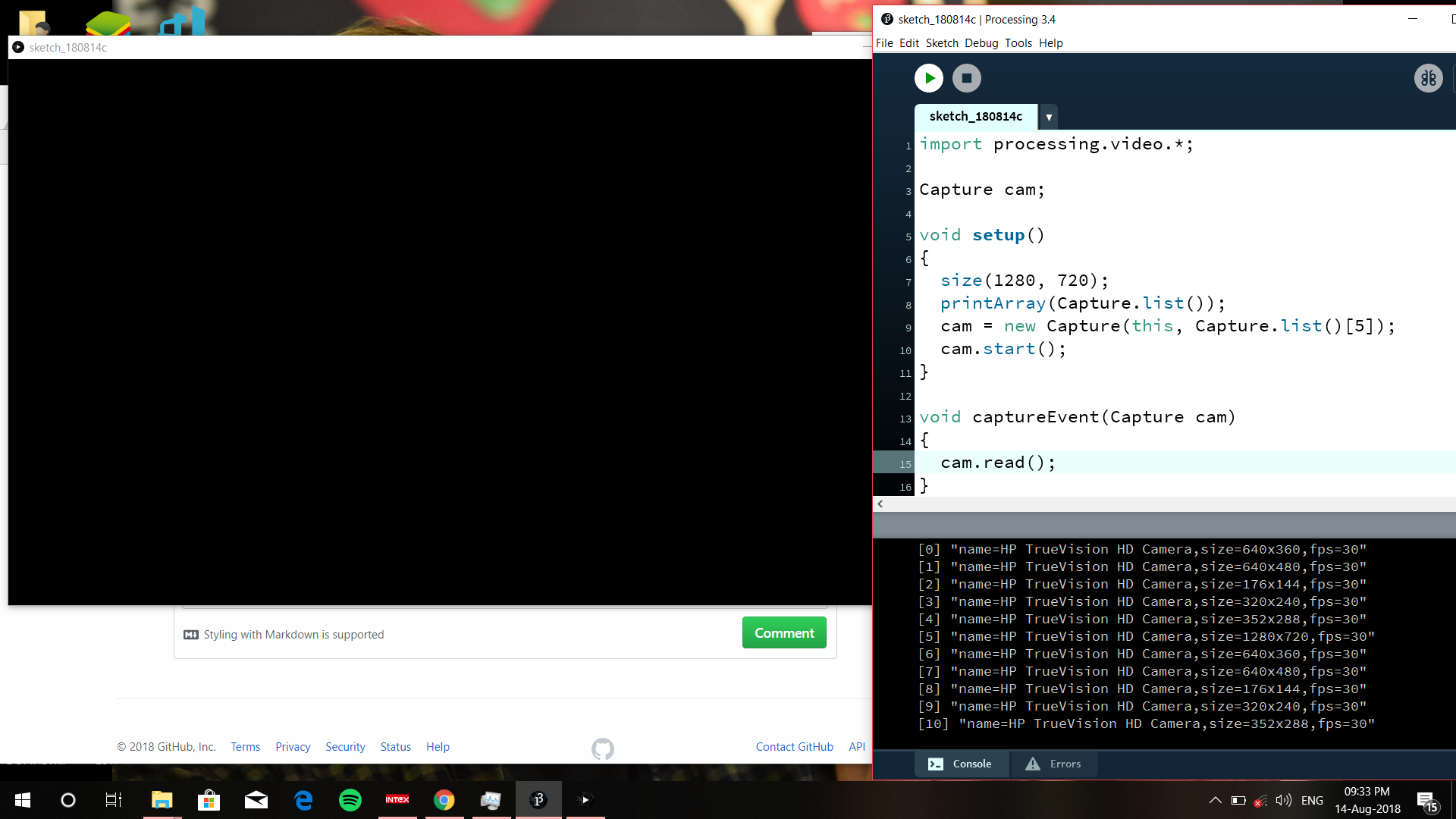

Just came here to report the same issue: Selecting a combination of high resolution + high fps doesn't return a video stream and doesn't activate the camera light. I tested this on two seperat PCs (both Windows 10) with example project code and couldn't get it to work either way. I also tried this with both the Laptop's internal cameras and an external webcam, but this didn't make a difference as well.
"Top end" working configurations:
- 600x480 at 30fps
- 800x448 at 30fps
- 960x720 at 15fps
- 1024x576 at 15fps
- 1280x720 at 10fps
- 1920x1080 at 5fps
- 2304x1536 at 2fps
Increasing resolution or fps on any of these (as long as available from the camera) results in the aforementioned issue.
After originally having used the version of the library that came from the Processing Contribution Manager, I also tried out the latest release of version 2.0 . I had to change the way the Capture object is instantiated from
cam = new Capture(this, stringFromCaptureList);
to
cam = new Capture(this, stringFromCaptureList, resolution_w, resolution_h, fps);
as Capture.list() doesn't return resolution/fps options anymore, but left everything else as is. I was able to get a camera image after requesting 1920x1080 30fps, assuming the issue was resolved, until I noticed that, in fact the image still was at a lower resolution (640x480 30fps is my guess). Requesting 1920x1080 5fps returned a 1080p image, but again with the caveat of a low framerate.
So this issue seems to be the same in version 2.0 .

I did some more seareching for a solution to this, but without luck. The only resource I found that was somewhat helpful was #32 , where using a different java library for webcam capture was proposed. I eventually was able to get a high resolution video stream from my webcam at (I assume) 30fps, but because the library returns a BufferedImage instead of a PImage, I always needed to take the extra mile of converting every frame from a BufferedImage to a PImage, which poses a bottleneck to performance, dropping the sketch to ~10fps at full-HD resolution, which is insufficient for my project.
I'm think of switching this project over to Unity, but maybe this can be helpfull for someone else. Though I'd still be interested in knowing whether this is a general problem with the processing library, or if it's somehow down to system-specifics like os-type?
@willtmakinen78 @viv1kk @JonasMumm I'd recommend to try the latest beta, as it uses the most recent version of GStreamer and so it should have better support for capture devices in general. Also, Capture.list() no longer lists each device all its native resolutions separately, but each device is listed just once. You can use any resolution you want, it will be upscaled/downscaled accordingly by software if the resolution is not native.

@codeanticode Is there still any way to discover/list those native configurations? It's helpful to know what they are so we can use their exact dimensions.

Hi,
I am having problems with video capture, too, using roughly the sample code, and a fresh code download. The cameras are parsed, but no image is captured.
I feel a little bad because I wanted to show my microscope friend just what could be done with OpenProcessing, but could not.
Thank you for looking into this, BrendaEM

confirming this problem - as stated 640480 30fps or 19201080 5fps seems maximum possible results.

Does anyone know what the last stable version was before the USB Camera code was broken?
The ability to read a camera and use the contents was one of OpenProcessing's unique and useful capabilities.
I used Processing in a science experiment, here; https://www.youtube.com/watch?v=ZH40mvSFI-g
I think I'm seeing a pattern here, processing ONLY likes to use YUY2 at higher resolutions. THATS why all the higher resolutions can only handle such low framerates, as YUY2 is uncompressed and takes up an entire usb 2.0 port's bandwidth. MJPEG on the other hand can go to really high frame rates, and that's the norm that's used in other applications, but seemingly not processing. Processing only accepts YUY2 beyond around 640 x 480, for dumb reasons I still can't figure out. This is a serious bug and needs to be fixed.

I believe I'm experiencing the same issue. I switched to a different webcam (offbrand fwiw) and started having problems. println(Capture.list()); lists the camera by name in the console, but cameras.length == 0. After upgrading to the Video library beta 4, it works at 640x480 at 30fps. In most other configurations, I get the same "camera not found" error as before.
I was able to get the sketch to run at 1280x960 by lowering the framerate, but the camera itself writes its format(?), resolution, and framerate to the first few seconds of video, and in Processing it invariably says "YUYV 640x480 30fps" (the image quality reflects this and the framerate is obviously limited by the sketch). However, when I launch the webcam from the windows 10 camera app, I see an HD image and the same text overlay says "MJPEG 1920x1080 30fps."
If I understand correctly that YUY2 and YUYV are the same thing or at least closely related, I think @8bit-coder is on the right track. However it may be worth noting that:
- I can increase the window resolution by reducing the framerate in processing, but the camera's actual resolution and framerate appear to be unchanged.
- Windows 10 Camera seems to have no problem opening the camera at HD resolutions in MJPEG, which makes me wonder if there's a way to specify your desired format and avoid YUY2/YUYV altogether.

Hi! This issue is close to a problem I'm having using the library with a USB 3D Webcamera module. The camera appears in a list, but reports an "internal data stream error" when selected, and does not turn on the camera. The camera resolution is 2560x960 streaming left and right eye (side-by-side) images (1280x960) at 60 fps.
// Java mode Processing SDK version 3.5.4 // Processing Video Library 2.0 // Library uses Gstreamer Version 1.16.2
The camera works fine with Zoom, VLC on Windows 10 and Android app USBWebCamPro (Google play store)
Could we get a release with the latest Gstreamer version (1.18.5) to rule out a possible problem in that area? Thanks,

Have you tried a custom gstreamer pipeline?
autovideosrc defaults to yuyv, which is slow/broken at higher resolutions. To get mjpeg, I used this pipeline:
cam = new Capture(this, 1920, 1080, "pipeline: ksvideosrc device-index=0 ! image/jpeg, width=1920, height=1080, framerate=30/1 ! jpegdec ! videoconvert");
I had to specify my resolution twice so that Processing and gstreamer were on the same page, but it might not be necessary in all cases.
edit: fixed syntax
Hi @lucasfredericks Thank you for the suggestion. I was not aware of custom gstreamer options. It worked! I used: cam = new Capture(this, width, height, "pipeline: ksvideosrc device-index=1 ! image/jpeg, width=2560, height=960, framerate=60/1 ! jpegdec ! videoconvert"); where width is 2560 and height 960 defining a window that fits in my 4K laptop display.
Note on syntax, I had to add a space before ! device-index=1! device-index=1 !
@lucasfredericks @ajavamind
THANK YOU for these examples. A high res webcam in Processing is a beautiful thing 😍 I almost don't believe my eyes. This should be documented somewhere.
cc/ @codeanticode @neilcsmith-net