
processing-sound
 processing-sound copied to clipboard
 processing
[WORKAROUND] AudioIn fails with "Audio Input not configured in start() method" on OSX Big Sur
I am trying to get the AudioIn example working, and after using Sound.list() to see the devices and trying the device IDs for the mic (shows 2 for some reason?) I get this error message.
java.lang.RuntimeException: Audio Input not configured in start() method. at com.jsyn.engine.SynthesisEngine.getInputBuffer(Unknown Source) at com.jsyn.unitgen.ChannelIn.generate(Unknown Source) at com.jsyn.unitgen.UnitGenerator.pullData(Unknown Source) at com.jsyn.ports.PortBlockPart.pullData(Unknown Source) at com.jsyn.ports.UnitInputPort.pullData(Unknown Source) at com.jsyn.unitgen.UnitGenerator.pullData(Unknown Source) at com.jsyn.ports.PortBlockPart.pullData(Unknown Source) at com.jsyn.ports.UnitInputPort.pullData(Unknown Source) at com.jsyn.unitgen.UnitGenerator.pullData(Unknown Source) at com.jsyn.ports.PortBlockPart.pullData(Unknown Source) at com.jsyn.ports.UnitInputPort.pullData(Unknown Source) at com.jsyn.unitgen.UnitGenerator.pullData(Unknown Source) at com.jsyn.ports.PortBlockPart.pullData(Unknown Source) at com.jsyn.ports.UnitInputPort.pullData(Unknown Source) at com.jsyn.unitgen.UnitGenerator.pullData(Unknown Source) at com.jsyn.engine.SynthesisEngine.synthesizeBuffer(Unknown Source) at com.jsyn.engine.SynthesisEngine.generateNextBuffer(Unknown Source) at com.jsyn.engine.SynthesisEngine$EngineThread.run(Unknown Source)
This is a fresh install of the latest Processing app on Mac Big Sur 11.0.1

Can you post your full sketch code as well as the output of Sound.list() please?

@kevinstadler the code was literally the audioin example from the sound library.
/**
 * Grab audio from the microphone input and draw a circle whose size
 * is determined by how loud the audio input is.
 */

import processing.sound.*;

AudioIn input;
Amplitude loudness;

void setup() {
  Sound.list();
  size(640, 360);
  background(255);

  // Create an Audio input and grab the 1st channel
  input = new AudioIn(this, 0);

  // Begin capturing the audio input
  input.start();
  // start() activates audio capture so that you can use it as
  // the input to live sound analysis, but it does NOT cause the
  // captured audio to be played back to you. if you also want the
  // microphone input to be played back to you, call
  //    input.play();
  // instead (be careful with your speaker volume, you might produce
  // painful audio feedback. best to first try it out wearing headphones!)

  // Create a new Amplitude analyzer
  loudness = new Amplitude(this);

  // Patch the input to the volume analyzer
  loudness.input(input);
}


void draw() {
  // Adjust the volume of the audio input based on mouse position
  float inputLevel = map(mouseY, 0, height, 1.0, 0.0);
  input.amp(inputLevel);

  // loudness.analyze() return a value between 0 and 1. To adjust
  // the scaling and mapping of an ellipse we scale from 0 to 0.5
  float volume = loudness.analyze();
  int size = int(map(volume, 0, 0.5, 1, 350));

  background(125, 255, 125);
  noStroke();
  fill(255, 0, 150);
  // We draw a circle whose size is coupled to the audio analysis
  ellipse(width/2, height/2, size, size);
}
See image for sound list. Can't copy n paste text from the app (copy button just copied blank spaces)
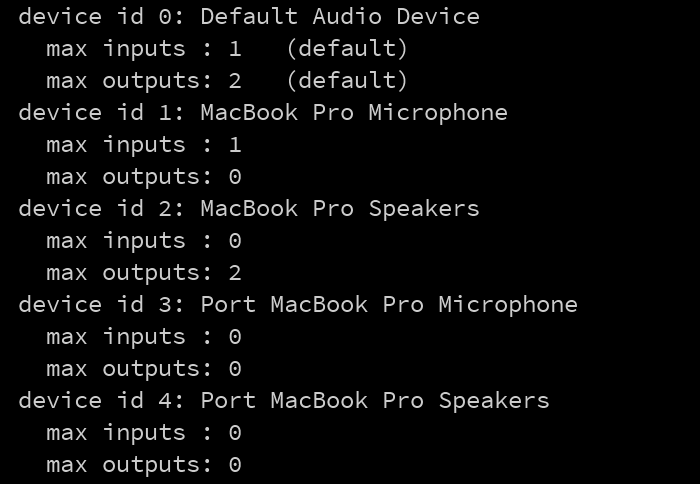
Not sure why there are two devices listed on your system, but you could try manually selecting the 'MacBook Pro Microphone' like this:
/**
 * Grab audio from the microphone input and draw a circle whose size
 * is determined by how loud the audio input is.
 */

import processing.sound.*;

AudioIn input;
Amplitude loudness;

void setup() {
  ////////////////////////////// select device (sound card) with id 1
  Sound.inputDevice(1);
  //////////////////////////////
  size(640, 360);
  background(255);

  // Create an Audio input and grab the 1st channel
  input = new AudioIn(this, 0);

  // Begin capturing the audio input
  input.start();
  // start() activates audio capture so that you can use it as
  // the input to live sound analysis, but it does NOT cause the
  // captured audio to be played back to you. if you also want the
  // microphone input to be played back to you, call
  //    input.play();
  // instead (be careful with your speaker volume, you might produce
  // painful audio feedback. best to first try it out wearing headphones!)

  // Create a new Amplitude analyzer
  loudness = new Amplitude(this);

  // Patch the input to the volume analyzer
  loudness.input(input);
}


void draw() {
  // Adjust the volume of the audio input based on mouse position
  float inputLevel = map(mouseY, 0, height, 1.0, 0.0);
  input.amp(inputLevel);

  // loudness.analyze() return a value between 0 and 1. To adjust
  // the scaling and mapping of an ellipse we scale from 0 to 0.5
  float volume = loudness.analyze();
  int size = int(map(volume, 0, 0.5, 1, 350));

  background(125, 255, 125);
  noStroke();
  fill(255, 0, 150);
  // We draw a circle whose size is coupled to the audio analysis
  ellipse(width/2, height/2, size, size);
}
Your code didn't work.
"Cannot make a static reference to the non-static method inputDevice(int) from the type Sound"
Have you tried any of the other Sound libraries for Processing (e.g. Minim)? If they don't work either then my only hunch is that it might have to do with OSX refusing/not asking for permission to access the microphone...
I have not yet tried any other sound libraries. I would have hoped that the official one worked out-of-the-box
Recent versions of OSX have been getting more cumbersome regarding audio/video capture, which is independent of what library is used. You could try granting microphone access to Processing according to this, then try again: https://support.apple.com/en-gb/guide/mac-help/mchla1b1e1fe/mac
Unfortunately, you cannot manually add apps to the list, and Processing is not in the list to start with.
Actually I forgot to ask if you're already running Processing4? If not, you could try following this comment to force the 'Microphone permission request' popup: https://github.com/processing/processing-sound/issues/51#issuecomment-622929461
I don't have an OSX 11 to do any testing myself, so I can't even tell if the problem is specifically about the Sound library or Processing in general. If it still doesn't work after the suggestion above, if you could install Minim from the Processing Library manager and let me know whether their AudioIn example works or not that would be great.
I'm using v3, as that is the version available to download from the website (stated in my opening post).
I really don't want to use a kludge to get this working. I'll just swerve Processing until this is fixed.
Latest pre-release on the Processing website is 4.0 alpha 3, download link for Mac: https://github.com/processing/processing4/releases/download/processing-1272-4.0a3/processing-4.0a3-macosx.zip
From the Changelog:
Fixes and Updates Video was broken on macOS because of Apple's security changes. Audio was also broken on macOS because of Apple security changes.
@kevinstadler downloaded, replaced the app, opened it up, used the example code, still nothing. No prompt about asking for microphone permissions. No app listed in the security options.
As before, I've not tried a different sound library, as I just wanted to use the official one.
Until it is actually fixed, I'm not going to bother looking into it. I don't want to use a different library, and I don't want to kludge a fix.
Keep in mind that fixing "it" first requires finding out what exactly the problem is, i.e. is it specific to the Sound library or does it actually apply to all audio/video capture by Processing on Big Sur. I have no Big Sur at hand to do any testing myself, so how quickly this will be fixed depends primarily on other people providing me with this information.
@kevinstadler so i took a bit of time to try Minim, using both Processing 4 and 3, and the getLineIn() which should listen to the mic, does not work either.
Also a problem for me. I'm willing to do some legwork if it helps. Trying to get my minim-based oscilloscope working under current mimim.

@dpwe one user appears to have found a workaround that allows you to add Processing to the OSX permissions menu permanently, described here: https://github.com/processing/processing4/issues/182#issuecomment-801659252
If you are trying to get minim to do the sound capturing you might have to swap the following in for the first command:
xattr -r -d com.apple.quarantine ~/Documents/Processing/libraries/minim/*
Please let me know if it works!
This worked. Running the xattr change on the sound/ and minim/ directories:
$ xattr -r -d com.apple.quarantine ~/Documents/Processing/libraries/sound/*
$ xattr -r -d com.apple.quarantine ~/Documents/Processing/libraries/minim/*
then launching Processing and running the minim Basics/RecordAudioInput example app triggered the "Allow Processing to access your microphone?" dialog box. After enabling that, running my minim.getLineIn-based sound analysis sketch correctly accessed the built-in microphone!
Many thanks.
DAn.
It looks like this was successfully solved with processing/processing4@7b75acf (see processing/processing4#182), closing