

 preactjs
CSS Module styles with `vh` fallback units are removed during build
What is the current behaviour?
When running preact build (but not preact watch), padding or margin selectors with vh fallback units are removed from CSS module styles. Oddly enough, they are preserved for height selectors (e.g. min-height).
Steps to Reproduce
- Create a new Preact CLI project and add the following CSS to the Home route:
/* style.css */
.home {
  width: 100%;
  border: 10px solid red;

  padding: 50px;

  padding-bottom: 20vh; /* <- will be removed */
  padding-bottom: 20dvh;

  margin-bottom: 20vh; /* <- will be removed */
  margin-bottom: 20dvh;

  min-height: 20vh; /* <- will be preserved */
  min-height: 20dvh;
}
-
Run
npm run devand see the CSS styles correctly rendered in Chrome. Thedvhunits are ignored (only for iOS) and thevhfallback units are rendered instead.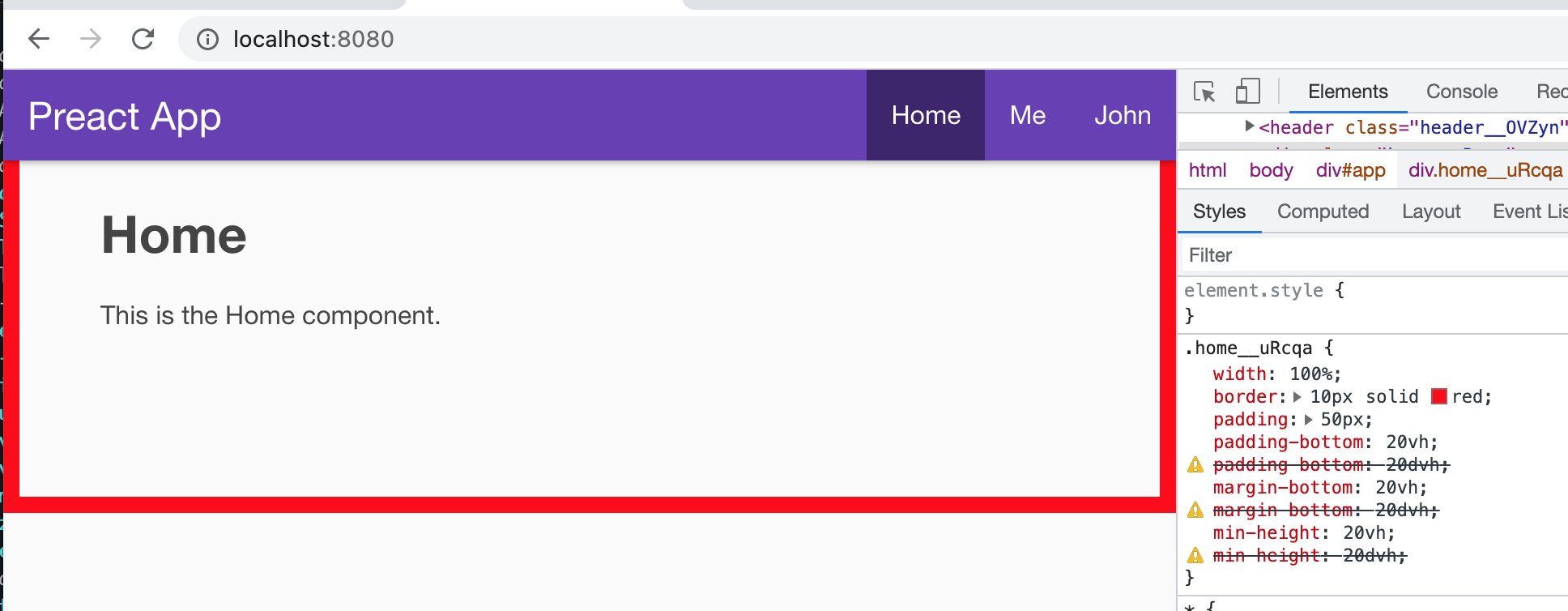
-
Run
npm run build && npm run serveand refresh the page in Chrome. Thedvhunits are ignored and thevhfallback units are missing for thepaddingandmarginstyles, but preserved formin-height.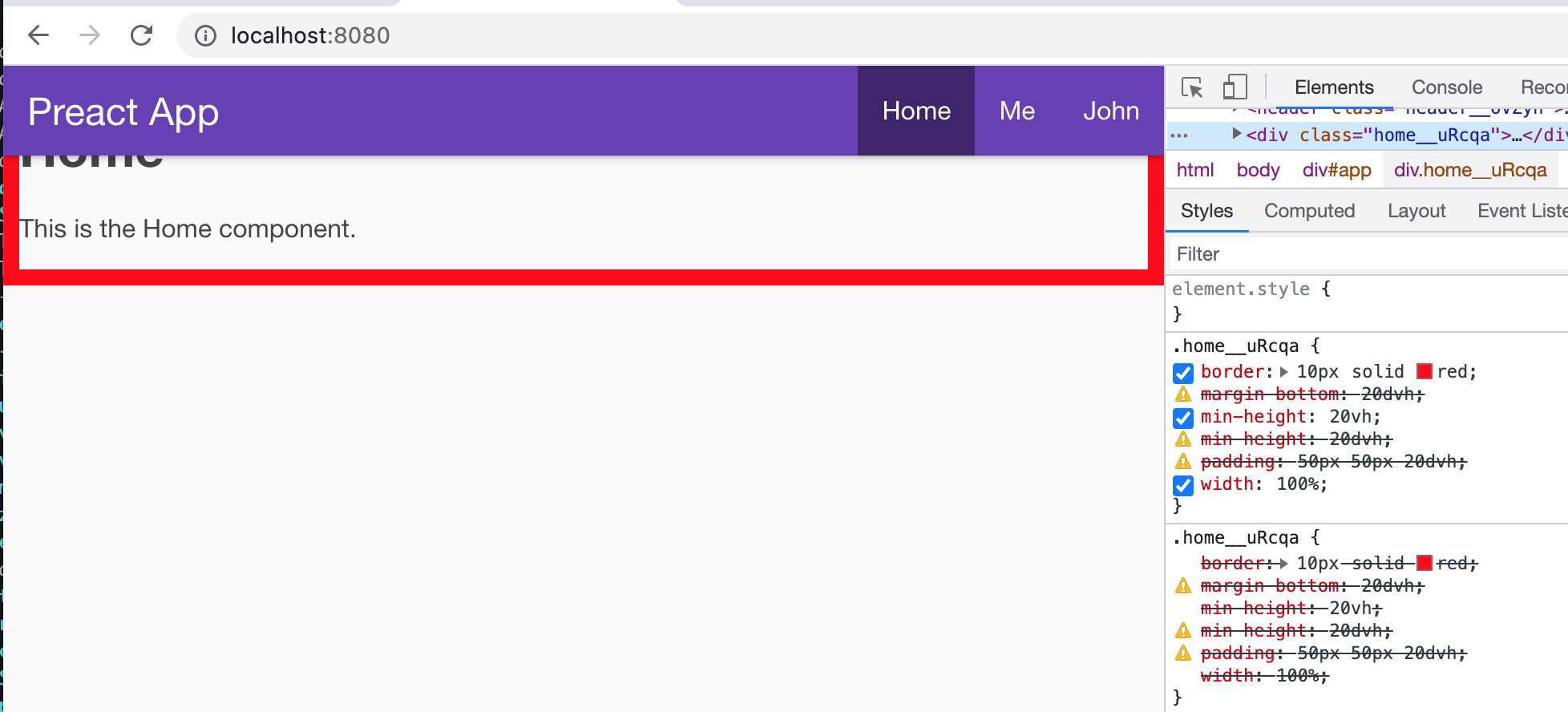
What is the expected behaviour?
vh units should not be removed from the CSS. It appears that some style de-duplication or minification is happening that doesn't understand that dvh and vh units can be used for padding and margins.
Thanks for your help with this!

I imagine it's due to the optimize-css-assets plugin.
Can you try adding the following into your preact.config.js?
// preact.config.js
export default (config, env, helpers) => {
    if (env.isProd) {
        config.optimization.minimizer.pop();
    }
}
That'll at least tell us if it's that plugin. You won't want to leave this on permanently, but I think you can pass a custom processor. The "out-of-the-box" plugin might be using an outdated version of cssnano or something.

Thanks @rschristian , turns out it's due to a CSSNano bug: https://github.com/cssnano/cssnano/issues/1163
Fixed by disabling the postcss-merge-longhand CSS optimization plugin:
// preact.config.js
export default (config, env, helpers) => {
  if (config.optimization.minimizer) {
    const cssOptimizer = config.optimization.minimizer.find(
      (plugin) => plugin.options.cssProcessor
    );
    cssOptimizer.options.cssProcessor.plugins =
      cssOptimizer.options.cssProcessor.plugins.filter(
        ({ postcssPlugin }) => postcssPlugin !== "postcss-merge-longhand"
      );
  }
};
This works great during the runtime, but fails during the SSR build. During SSR, there's no config.optimization.minimizer array (even though env.isProd === true). I did some digging but am not able to find the relevant plugin used by the SSR build. Right now I'm get a big layout shift as soon as the CSS modules load, since the SSR CSS is out of sync.
Any idea how to disable this plugin during SSR? Thanks again!
This works great during the runtime, but fails during the SSR build.
Whoops. Sorry about that. Should've added a && !env.isServer to that conditional.
did some digging but am not able to find the relevant plugin used by the SSR build.
We don't do any CSS optimization in the SSR build. If you open up the file (./build/ssr-build/ssr-bundle.<hash>.css, by default), you'll see it's rather "raw".
Right now I'm get a big layout shift as soon as the CSS modules load, since the SSR CSS is out of sync.
~~Not caused by this~~. You can comment out your config and see the SSR build's CSS has always been fine.
Ah shoot, on second look it seems Critters, which also uses cssnano, is having issues. The source CSS is fine. Will see if Critters is configurable shortly.
This should fix your issues:
$ npm i critters-webpack-plugin
// preact.config.js
import Critters from 'critters-webpack-plugin';

export default (config, env, helpers) => {
    if (env.isProd && !env.isServer) {
        const cssOptimizer = config.optimization.minimizer.find((plugin) => plugin.options.cssProcessor);

        cssOptimizer.options.cssProcessor.plugins = cssOptimizer.options.cssProcessor.plugins.filter(
            ({ postcssPlugin }) => postcssPlugin !== "postcss-merge-longhand"
        );

        const critters = helpers.getPluginsByName(config, 'Critters')[0];
        if (critters) {
            // These options match preact-cli's https://github.com/preactjs/preact-cli/blob/6aba5d8e4c165c81f258ca9f367fea6c9a08cf17/packages/cli/lib/lib/webpack/webpack-client-config.js#L255-L259
            config.plugins[critters.index] = new Critters({
                preload: 'media',
		pruneSource: false,
		logLevel: 'silent',
		additionalStylesheets: ['*.css'],
            });
        }
    }
}
Critters unfortunately offers no way to customize the CSS processor, but we can use a newer version (v3) that does not use cssnano.
The risky bit here is that Critters has a peer dep on html-webpack-plugin v4+ which preact-cli cannot satisfy at this time. A quick test seems to show this working fine, but there could be issues stemming from this. Mileage may vary.
The other alternative might be to disable Critter's compression and run your own compressor over the resulting HTML & CSS.